Orchardcore: Feature request: grouping field
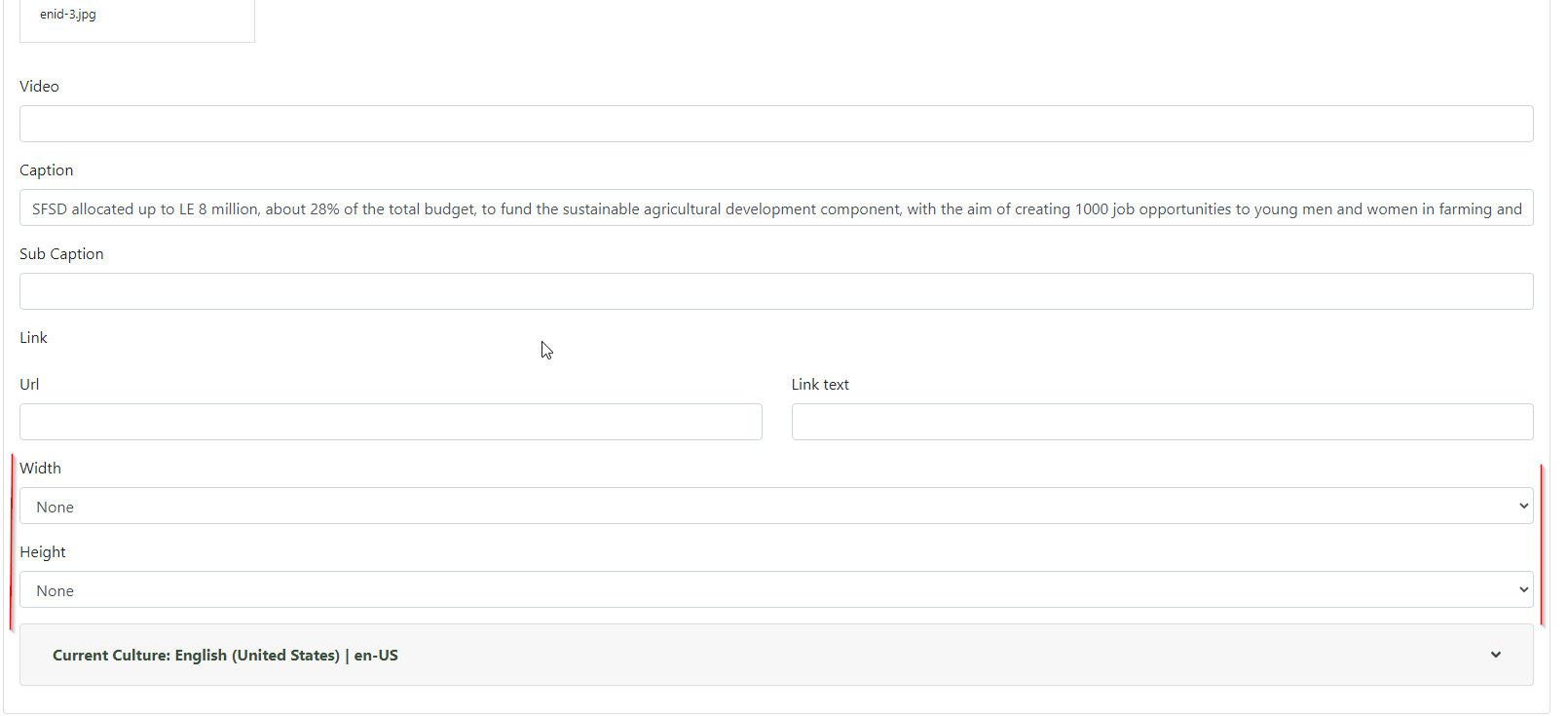
There are a lot of fields that doesn't need to occupy the whole width of the screen.
 dodyg
dodyg
All 13 comments
A solution could be to have a size property for all field settings, and generate a wrapper when a field editor is rendered.
Or, create a generic field wrapper shape, that could be redefined in the Admin Template feature, for specific fields using alternates. Field_Editor__Wrapper would then be around each field editor. So you could redefine it for specific fields. This could be empty by default.
 sebastienros
on 5 Dec 2019
sebastienros
on 5 Dec 2019
@dodyg Have you tried to place some of the field on Sidebar using placement.json?
 ns8482e
on 6 Dec 2019
ns8482e
on 6 Dec 2019
I don't think it's easy to create a placement file, even less for the admin, and the sidebar is a very limited solution. But I like the suggestion as it might be sufficient for some specific case.
Another extended approach on this idea, would be to create a custom template for this type (or all types) where you could define another custom zone, with the Admin Templates module, and then use the placement to target more specific zones than just the sidebar.
There is also Tabs that can be used in the placement. Maybe we should have a module to manage placement infos (admin or not) like we have for templates. And some easier UI than just a json document.
sebastienros
on 6 Dec 2019
Have you tried to place some of the field on Sidebar using placement.json?
Thanks for the tips. I've never used this before. I will do some reading.
dodyg
on 7 Dec 2019
@ns8482e post some screenshots of using the sidebar if you have some. I've not seen it before, although Seb thought I added it when I did tabs, but it was already there.
 deanmarcussen
on 7 Dec 2019
deanmarcussen
on 7 Dec 2019
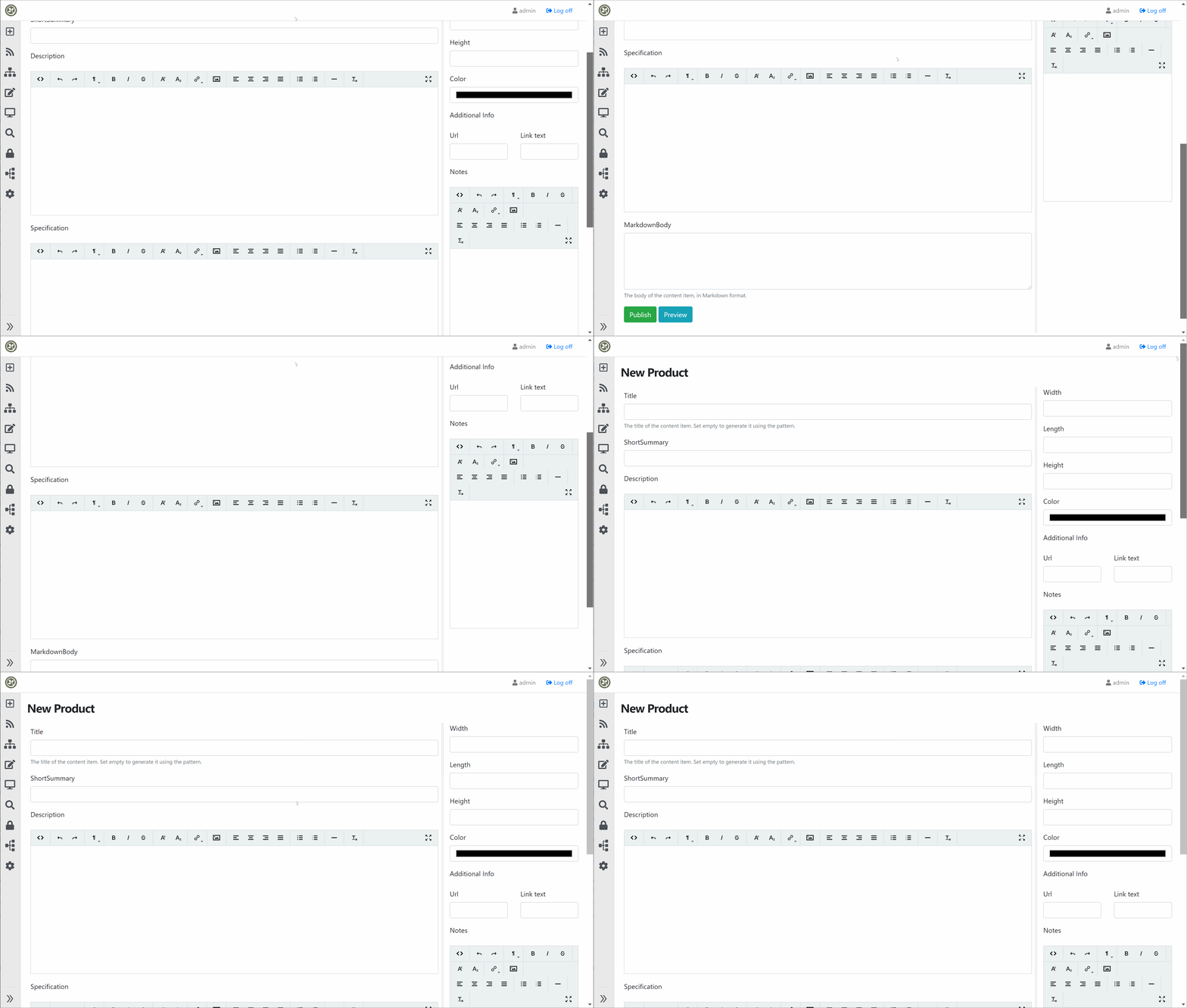
Here is how I placed some fields on sidebar.
{
    "TextField_Edit": [
        {
          "place": "Sidebar:0",
          "differentiator": "Dimension-Width",
          "contentType" : [ "Product" ]

        },
        {
          "place": "Sidebar:1",
          "differentiator": "Dimension-Length",
          "contentType" : [ "Product" ]
        },
        {
          "place": "Sidebar:2",
          "differentiator": "Dimension-Height",
          "contentType" : [ "Product" ]
        },
        {
            "place": "Sidebar:3",
            "differentiator": "ProductColor-Color",
            "contentType" : [ "Product" ]
        }
      ],

      "LinkField_Edit": [
        {
          "place": "Sidebar:4",
          "differentiator": "Product-AdditionalInfo",
          "contentType" : [ "Product" ]
        }
      ],
      "HtmlField_Edit":[{
        "place": "Sidebar:5",
        "differentiator": "Product-Notes",
        "contentType" : [ "Product" ]
      }]
  }
ns8482e
on 7 Dec 2019
Only drawback is, sidebar is not visible for widgets if edited within Flow/Bag or Widget list
ns8482e
on 7 Dec 2019
There is also Tabs that can be used in the placement.
Tabs only work on Parts not on Sidebar or any other local zone
ns8482e
on 7 Dec 2019
@ns8482e the work that you did is amazing, but IMHO we need to design a robust and flexible solution to let us redesign (rearrange) the admin UIs, I saw some CMSs allow such feature, let me search again and confirm which it already have such this feature
 hishamco
on 8 Dec 2019
hishamco
on 8 Dec 2019
Spend some time to find the solution today.
The road block is when cshtml is not a shape, as it can't be overridden with alternates.
To overcome, I wrapped all content of Edit.cshtml with <zone> as below, and added new Alternate property in ZoneTagHelper.cs so that I can define alternate for ZoneOnDemand shapes.
<zone name="SubLayout" alternate="SubLayout">
.....
.....
</zone>
 @await RenderSectionAsync("SubLayout", required: false)
and now I can specify SubLayout shape in AdminTemplate and can change Create/Edit view.
I think better solution would be to create new <sublayout> tag helper
ns8482e
on 19 Dec 2019
wrapping within <shape Type="SubLayout" > also works
ns8482e
on 19 Dec 2019
Can this be closed now that #6509 has been merged?
 agriffard
on 27 Jun 2020
agriffard
on 27 Jun 2020
I think this done by implementing cards, so I will close this for now. If you have any question please feel free to open a new issue
hishamco
on 27 Jun 2020
Related issues
 chillibug
·
4Comments
sebastienros
·
4Comments
chillibug
·
4Comments
sebastienros
·
4Comments
 superluminalK
·
4Comments
superluminalK
·
4Comments
 mobinzk
·
4Comments
mobinzk
·
4Comments
 webmedia1012
·
4Comments
webmedia1012
·
4Comments
Most helpful comment
Here is how I placed some fields on sidebar.