Orchardcore: Implementation notes for traditional CMS
In the vein of https://github.com/OrchardCMS/OrchardCore/issues/3553, I am starting another website using the traditional CMS model.
- I start with a blank theme.
- Sqlite
- Multi Language website (English and Arabic)
 dodyg
dodyg
All 108 comments
Multi Language website (English and Arabic)
If you need any kind of help in Arabic, ping me :)
 hishamco
on 29 Aug 2019
hishamco
on 29 Aug 2019
svg aren't cached https://github.com/OrchardCMS/OrchardCore/issues/3807
dodyg
on 30 Aug 2019

- What is Zone
- What is Layers
dodyg
on 31 Aug 2019

What rule?
dodyg
on 31 Aug 2019

- What is a widget
- Is there only one type of layers, .e.g Widget Layer?
dodyg
on 31 Aug 2019
This is a condition to display the layer, a javascript boolean expression interpreted by Jint.
ex: true if always displayed, isHomepage() for the home, url('~/blog*') for a url starting by blog.
We still need to create the corresponding documentation: #3111
When you use other recipes, some layers are created during the setup.
 agriffard
on 31 Aug 2019
agriffard
on 31 Aug 2019
A Widget is a content type that has a Widget stereotype.
Some widgets are created when you use other recipes, like Paragraph, ...
Widgets can also be added in a FlowPage and a WidgetListPart.
agriffard
on 31 Aug 2019
Then, you will ask: What is a zone?
You can define them in the admin Zones setting and they have to be the equivalent sections in your theme.
So, to summarize: the Layers page allows you to put widgets in zones for a specific Layer.
Ex: Add a paragraph Widget in the Footer zone on all the pages (= the Always layer).
agriffard
on 31 Aug 2019
So, to summarize: the Layers page allows you to put widgets in zones for a specific Layer.
So let me validate my understanding
Does zone comes first then layers?
eg
There's Template
<html>
<body>
   <zone header>
      <Layer One>
      <Layer Two>
   </zone header >

   <zone footer>
       <Layer One>
   </zone footer>
</body>
</html>
or Layer first then Zone
<html>
<body>
     <Layer One>
          <zone header>
          <zone footer>
      </Layer One>
     <Layer Two>
           <zone header>
     </Layer Two>
</body>
</html>
There are only zone sections in the theme.
Ex: {% render_section "Footer", required: false %}
You need to set them in the Zones settings
You declare Layers (which are displayed based on their Rule, the interpreted condition).
It allows you to drag and drop and edit widgets inside the zones for a specified layer.
Ex: You add a paragraph Widget in the Footer zone on all the pages (= the Always layer).
agriffard
on 2 Sep 2019
OK I think I get it now. Let me study the theme. Thank you for your explanation.
dodyg
on 2 Sep 2019
https://orchardcore.readthedocs.io/en/dev/docs/getting-started/theme/ needs more details. At the moment it is good enough to start an empty theme project but anything useful people will have to study existing themes.
dodyg
on 2 Sep 2019
There needs to be a gentler version introduction to theming other than this document. This is hard mode tutorial https://orchardcore.readthedocs.io/en/dev/OrchardCore.Modules/OrchardCore.Themes/.
dodyg
on 2 Sep 2019
I think a better theme tutorial would start from this layout.liquid and start expanding from here. This layout.liquid is generated by dotnet new octheme.
<!DOCTYPE html>
<html lang="{{ Culture.Name }}">
<head>
    <meta charset="utf-8">
    <title>{% page_title Site.SiteName, position: "before", separator: " - " %}</title>

    {% resources type: "Meta" %}

    <!-- INSERT REQUIRED RESOURCES HERE -->

    {% resources type: "HeadLink" %}
    {% resources type: "Stylesheet" %}
    {% resources type: "HeadScript" %}
</head>
<body dir="{{ Culture.Dir }}">

    {% render_body %}

    <footer>
    {% render_section "Footer", required: false %}
    </footer>

    {% script name:"jquery", use_cdn:"true", at:"Foot" %}

    {% resources type: "FootScript" %}
</body>
</html>
In the traditional CMS, existing theme isn't really a solution because you cannot alter the files of existing theme. You can't modify a theme and switch it from using bootstrap to using bulma for example.
You have to create a new theme.
dodyg
on 2 Sep 2019
@hishamco How i can make my CMS web project localized
I tried to add .po files to Localization folder but it didn't work
 AmrTealeb
on 6 Sep 2019
AmrTealeb
on 6 Sep 2019
SVG cache problem #3807 is fixed.
dodyg
on 8 Sep 2019

This instant preview feature while modifying template is super sweet.
dodyg
on 8 Sep 2019
{% resources type: "HeadLink" %}
It's not clear how this tag behaves. If the type is "HeadLink", where do you define the resources associated with it?
I mean the themes have these statements usually
    {% resources type: "HeadLink" %}
    {% resources type: "Stylesheet" %}
    {% resources type: "HeadScript" %}
And it's not clear how to interact with them.
dodyg
on 8 Sep 2019
{% meta name:"description", content:"This is a website" %}
Call this to be able to set a meta information from your liquid template
dodyg
on 8 Sep 2019
This is the relationship between the "zone" in the template and "render_section" in theme.

dodyg
on 8 Sep 2019
Orchard Core will pick up any changes on your theme (just refresh your browser). Just make sure you make your new custom theme as the default theme for your website.

dodyg
on 8 Sep 2019
Visual Guide to Zone, Widget and Layers
Name the zones where you can attach widgets

You can add Widgets to each specified Zone and you can change the order of appearance for the Widget

Each Widget in your zone is associated wit a Layer. A Layer is pretty much a condition where your Widget can appear

In this layer, the condition always evaluate true so it will show in every page. There are a bunch of possible rules you can use as mentioned here https://github.com/OrchardCMS/OrchardCore/issues/4121#issuecomment-526829675

What is a widget? A widget is Content Type that has a stereotype value 'Widget'

It's literally just a string that you type in this stereotype field "Widget" :laughing:

dodyg
on 8 Sep 2019
This autoroute description is tricky. You'd assume that just by adding the part you can define a custom path for your Content Type. Nope, you have to adjust more settings. If you don't, autoroute will generate the path for you.


dodyg
on 9 Sep 2019
This is new. I haven't checked it out yet but it can potentially solves the issue of sorting, filtering, etc.
https://orchardcore.readthedocs.io/en/dev/docs/reference/modules/SQL/
dodyg
on 14 Sep 2019
This thread is important regarding ASP.NET Core 3.0 upgrade (https://github.com/OrchardCMS/OrchardCore/issues/4261)
dodyg
on 14 Sep 2019
@hishamco How i can make my CMS web project localized
I tried to add .po files to Localization folder but it didn't work
Sorry I didn't notice your thread, to enable the localization you need to enable Localization Module after that the tenant will restart and you will be able to find a new sub menu _Settings -> Localization_ then add your favorites cultures
hishamco
on 14 Sep 2019
This is interesting Liquid Custom Tag (https://github.com/OrchardCMS/OrchardCore/issues/4384)
dodyg
on 24 Sep 2019
The default layout for a theme is called either "Layout.liquid" or "Layout.cshtml".
dodyg
on 7 Oct 2019
You can create an alternative layout e.g. "LayoutModern.liquid" and then call it from the view
{% layout "LayoutModern" %}
dodyg
on 7 Oct 2019
Using {{ Model.ContentItem.Content }} in your Content Item template will expose the Json structure of the content. It's great for accessing individual properties of the content.
dodyg
on 7 Oct 2019
Shape remains a mystery. I've watched the video twice. It looks like it's not relevant for just implementing a website (vs module developer)
dodyg
on 7 Oct 2019
Getting extra content in your liquid template:
- If you want to load a content by id or alias, etc from the template, read this https://orchardcore.readthedocs.io/en/dev/docs/reference/modules/Contents/
- To retrieve a list of contents by more complex criteria, read this https://orchardcore.readthedocs.io/en/dev/docs/reference/modules/Queries/
- Also Content Fields Indexing https://orchardcore.readthedocs.io/en/dev/docs/reference/modules/SQL/
dodyg
on 7 Oct 2019
@dodyg What made it click for me with shapes is then I compared them to React Components. Coming from doing javascript development for 2 years, when I understood that, everything clicked. The OC display manager is simply rendering a component (shape) and uses a bunch of conventions to find the right template to render. It also uses other metadata for placement of this shape. Hope this helps in some way.
 jptissot
on 8 Oct 2019
jptissot
on 8 Oct 2019
What I understand is that Model.Content is a shape. OK got it.
Then what? It's not clear whether you can create a shape within a layout using liquid. I tried all the documented shape filters (https://orchardcore.readthedocs.io/en/latest/OrchardCore.Modules/OrchardCore.Liquid/README/#shape-filters) but they either don't work or I misunderstood their purpose, e.g. 'shape_new'.
dodyg
on 8 Oct 2019
What you are looking for is something like this :
{{ "Footer__Before" | shape_new | shape_render }}
Which would work with a Footer-Before.liquid template.
Then the only matter missing here is passing an actual model to that sub-template.
 Skrypt
on 8 Oct 2019
Skrypt
on 8 Oct 2019
You can build a shape (component), pass properties, and assign a template.
jptissot
on 8 Oct 2019
You can build a shape (component),
I am lost this part.
dodyg
on 8 Oct 2019
Example:
- create a file
Views\MyTestShape.liquidin the active theme.
<span>{{ Model.MyString }} - {{ Model.MyInt }}</span>
- add the following to a template (layout.liquid maybe?)
{% assign customShape = "MyTestShape" | shape_new %}

{% shape_add_properties customShape my_string: "String Test 3", my_int: 1 %}
</br>{{ customShape | shape_render }}

{% shape_remove_property customShape "my_string" %}
</br>{{ customShape | shape_render }}

{% assign customShape = "MyTestShape" | shape_new | shape_properties: my_int: 3, my_string: "String Test 3" %}
</br>{{ customShape | shape_render }}

{% assign customShape = "MyTestShape" | shape_new: my_int: 4, my_string: "String Test 4" %}
</br>{{ customShape | shape_render }}
Ah so a Shape depends on a template file (either liquid or razor). Does it always have to rely on the template in the theme or can it be created in the db?
dodyg
on 8 Oct 2019
I am not sure of that one. I assume there must be some extension point to OC to be able to resolve liquid files from a database.
jptissot
on 8 Oct 2019
I found it. The template file can be created in the DB!


dodyg
on 8 Oct 2019
A shape doesn't necessarly depends on a template. Most of shapes are built by the DisplayManager for use with a template but some other shapes are also used for simply transforming a value from a context like a datetime displayed in the proper culture format. So a shape is basically a dynamic container used as a dynamic Viewmodel, but it's also used for all kind of things.
I think you can see Shapes visual representation in the Layout admin UI where you can add widgets in a layout template dynamically. That's the basic usage of shapes.
Skrypt
on 8 Oct 2019
As a website implementor, a shape is a template file you can include in other template and pass some parameters to it. It is simpler to start understanding from this angle.
dodyg
on 8 Oct 2019
I am going to write "50 shades of Shapes" guide, which will contains various aspect of shapes and it will start from the simplest usage of Shapes. I really had a hard time understanding Shapes until just minutes ago so I think this guide can save others time.
dodyg
on 8 Oct 2019
/OrchardCore.Templates/Template/Index is the place to manage all your templates. The corresponding documentation is here
dodyg
on 8 Oct 2019
This template naming convention hell is not for faint of hearths 😉
I'm still trying to figure out what works or not still. So don't be discouraged when trying different names 😄
Skrypt
on 8 Oct 2019
I love to talk about shapes. They are very easy to understand actually, let me try.
A Shape is an object that holds some data, like a view model, and also some metadata about how to render it. Any class that implements IShape is a shape.
Shapes are used to as a way to render some html, and to do so you need to call the IDisplayHelper.DisplayAsync(shape) that returns Task<IHmlContent>.
When calling this method you don't need to specify a template, it will trigger an event to allow any component in the system to chose what template is best suited to render this specific shape. This is why a shape can be rendered using a cshtml file, a liquid file, some template from the database, some code, ... it's completely extensible, but from your point of view you just ask it to be rendered. This is an advantage over Views in MVC where when return a ViewResult from an action the template is strongly associated with the action.
This indirection is very useful for theming, such that templates can come from different modules, or any module can redefine what template to use for a shape. So as a developer you can provide one default template with your shape that represents a Menu, but allow any other module or theme to redefine it.
Then to allow for better granularity in ways to select a template, the shape has a Metadata.Alternates property that contains which templates names are better suited for this shape, in order of priority. Like a shape representing an Article, which is a Content item, could accept template for an with a specific name, or a template for any article, or a template for any content item. This allows the themes to be able to customize the templates for very specific instances of shapes, or group of shapes.
When working in the decoupled CMS mode, you are removing theming altogether, and not using shapes at all, because you implement each view and route handler, and don't expect anything else to be able to override these. But most modules that expose front-end views need to use shapes in order to allow a theme to customizes parts of the system without having to re-implement all handlers and views.
 sebastienros
on 8 Oct 2019
sebastienros
on 8 Oct 2019
Thank you for the explanation. I think Shapes conceptually is very elegant however I think for OrchardCore CMS beginners like me it is much easier to grasp the concept from the practical POV.
Shapes allows me to modularize my template. Wow. That's super cool and very practical.

A collection of samples on the practical usages of Shapes in the CMS will be very helpful for everyone.
dodyg
on 9 Oct 2019
Rendering a sub Shapes using template

dodyg
on 9 Oct 2019
I have a question
{{ Model.Content.HomePage | shape_render }}
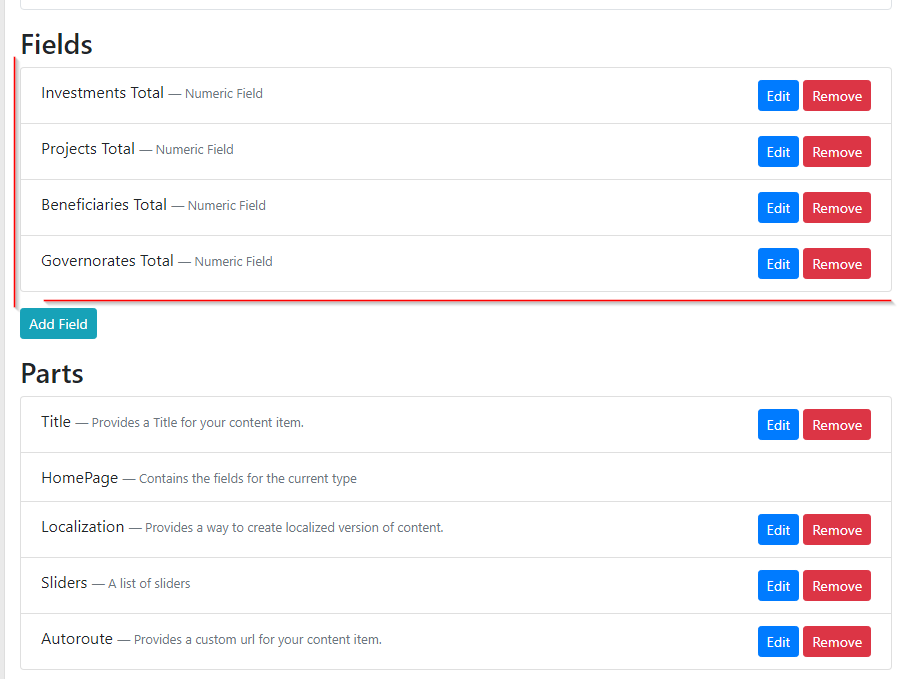
I have a content type called HomePage. How should I name the template that renders the fields part of the content type. I tried
HomePage__HomePageContent__HomePage__HomePageHomePage__HomePagePartContent__HomePage__HomePagePartHomePagePartHomePageHomePage__Summary__HomePage
dodyg
on 9 Oct 2019
Content__ContentTypeName__HomePage ?
or
ContentTypeName__HomePage ?
Skrypt
on 9 Oct 2019
The Content Type is 'HomePage' therefore ContentTypeName__HomePage is HomePage__HomePage which doesn't work.
dodyg
on 9 Oct 2019
Are you looking for the name of the template or the name of the alternate?
They are two different things
The alternate name is as @Skrypt suggested.
The template name for that alternate would be
Content-HomePage.liquid
It will contain the field and part shapes for that content item, and display them, which will then call into the other templates for the parts and fields to display them
 deanmarcussen
on 9 Oct 2019
deanmarcussen
on 9 Oct 2019
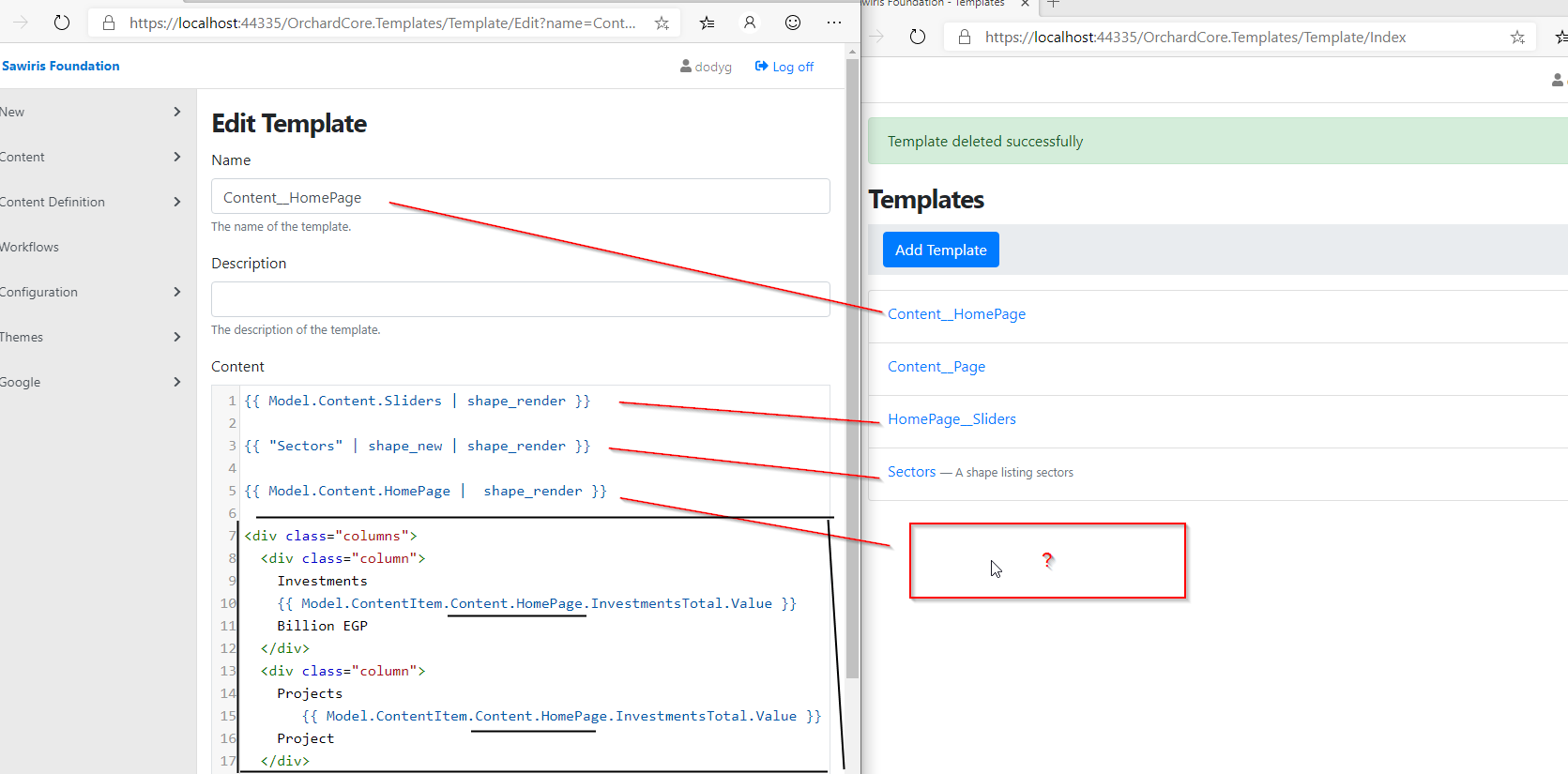
My goal is whether I can customize the rendering of the fields part Shapes on its own template
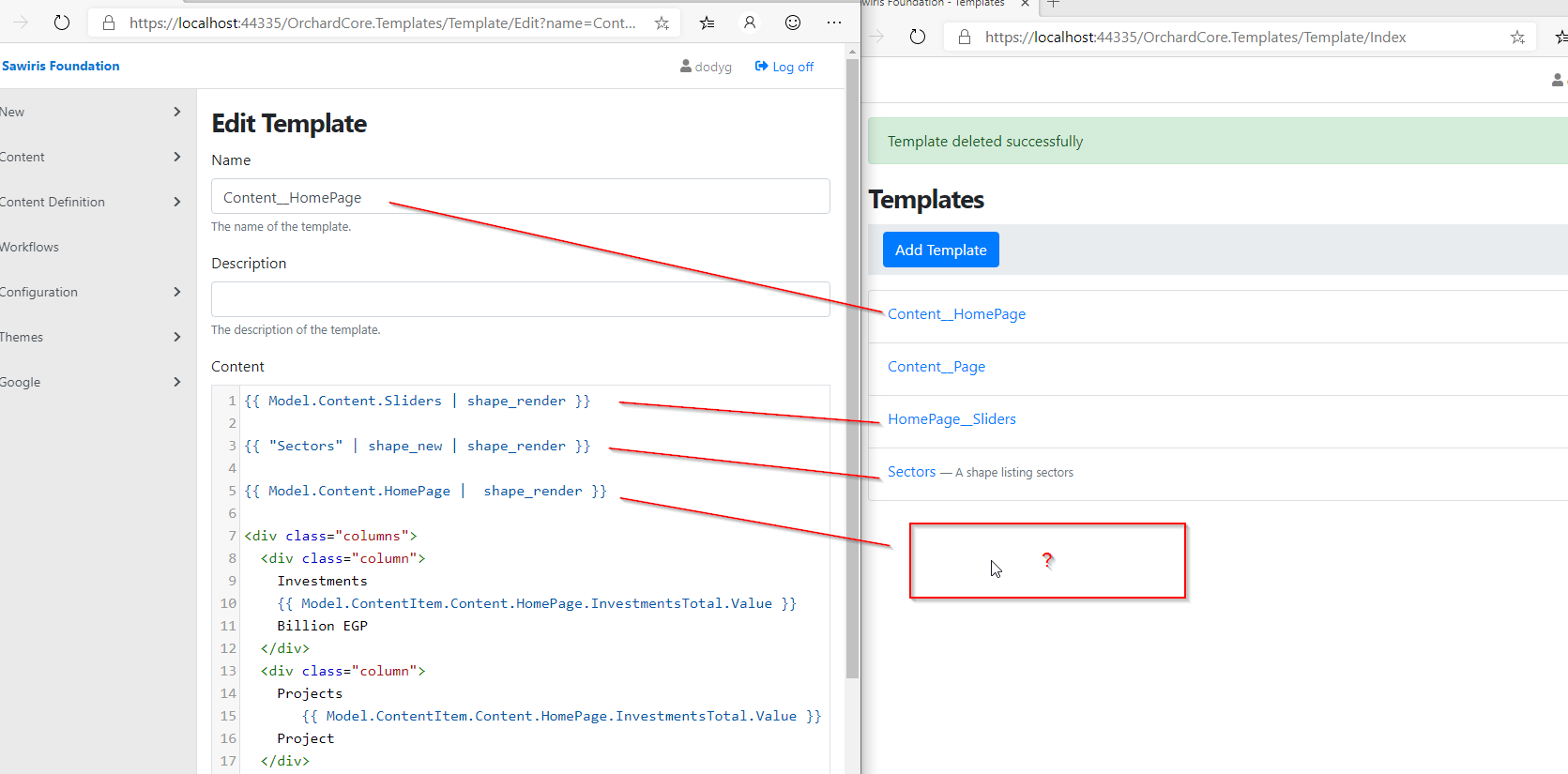
So I want the section highlighted in black to have its own template. Those data are from the Content Type fields values.
dodyg
on 9 Oct 2019
Hey @dodyg : Have you ever tried the magic trick with Preview and Template?
When you want to edit a template:
- Click on the Preview button that opens the front in Preview mode.
- Dock the 2 browser windows to see them both at the same time.
- Change the template 'Content'.
=> You will see the changes in live.
agriffard
on 9 Oct 2019
Yup it's awesome. The preview even continue to works live when I edit the Content Part templates in another tab.
dodyg
on 9 Oct 2019
Ah I understand, sorry didn't read the whole thread, and realise you were doing templates in the admin templates area, not in a theme.
The fields aren't contained in a shape as such, they are just 4 shapes added to the rest of the content shape.
So to move the rendering into a template of it's own you would need to create a new shape, and put the properties you want into it, if I am understanding what you are trying to do :)
deanmarcussen
on 9 Oct 2019
So to move the rendering into a template of it's own you would need to create a new shape, and put the properties you want into it, if I am understanding what you are trying to do :)
Yes.
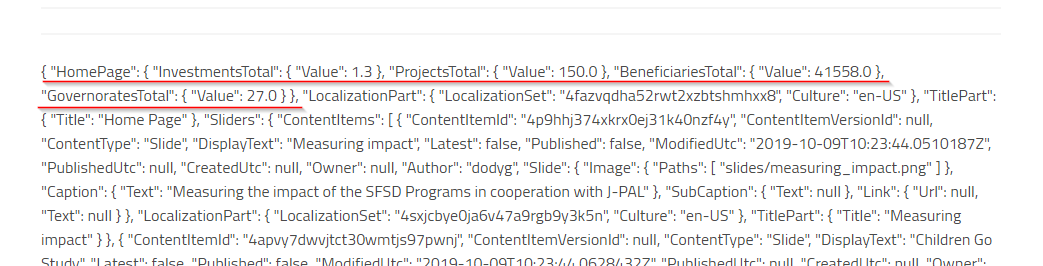
My question is whether shapes properties must be primitives, which means I have to add 4 properties or whether it can accept dynamic properties.
dodyg
on 9 Oct 2019
The answer is yes, the properties can be dynamic object!
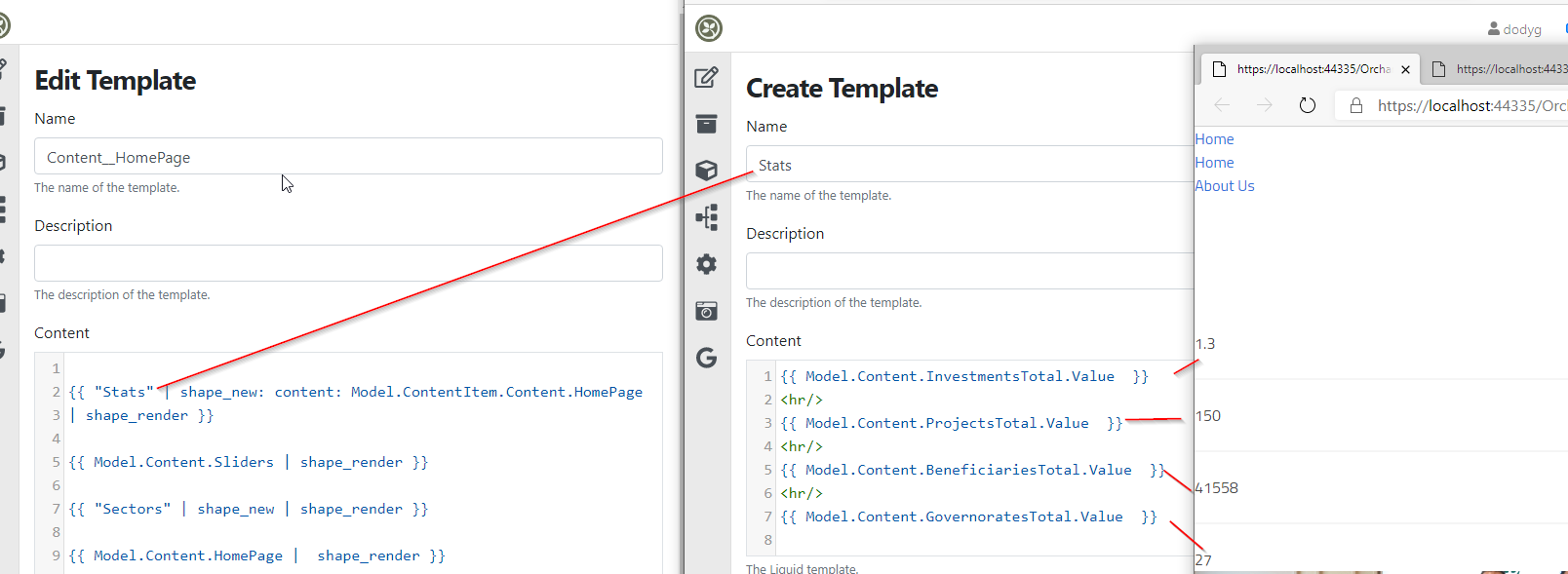
dodyg
on 9 Oct 2019
This is a good trick to get a better visual for the Shapes content
<pre>
{{ Model.ContentItem.Content | raw }}
</pre>
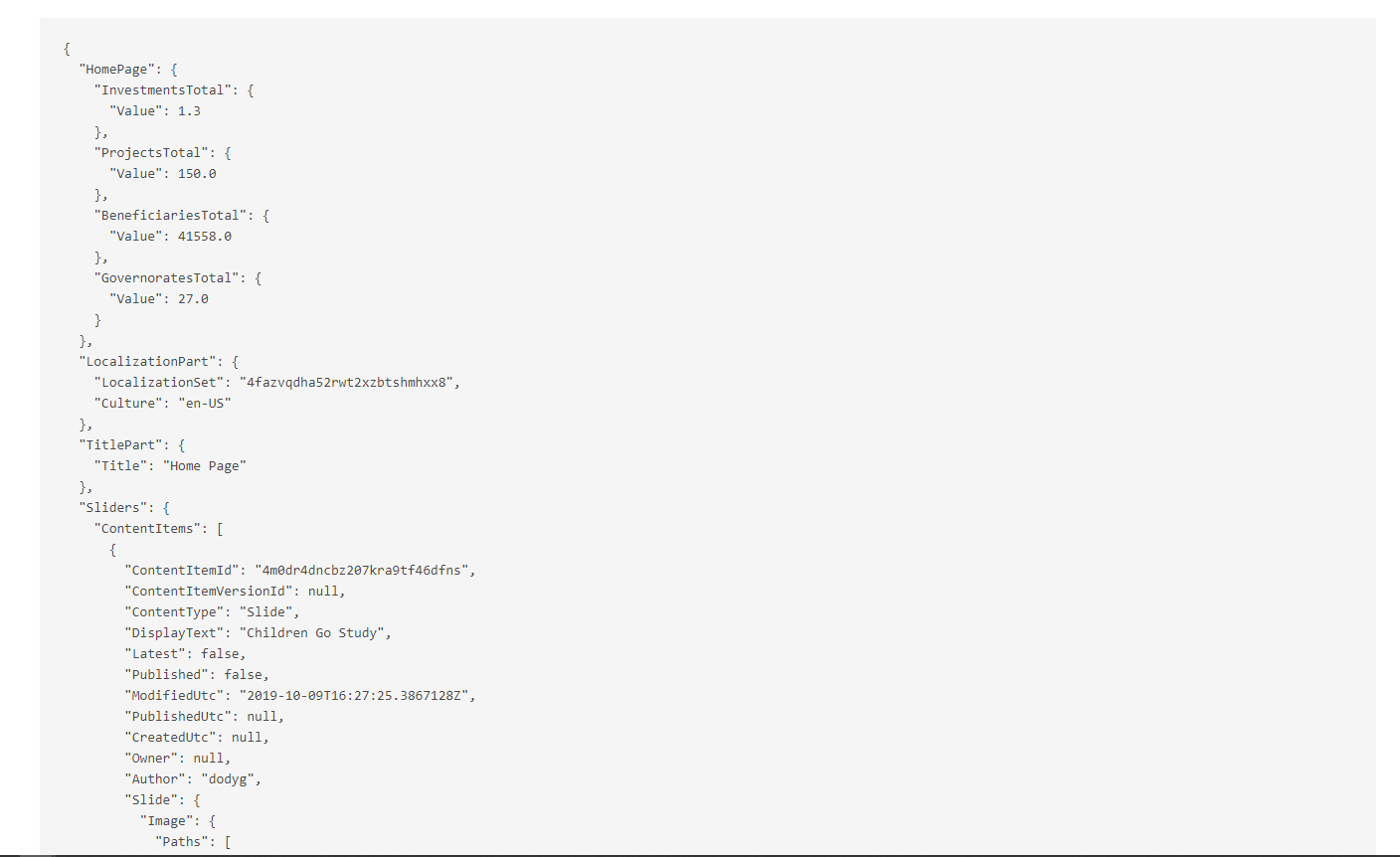
dodyg
on 9 Oct 2019
{{ Model.ContentItem.Content | raw }}
@sebastienros I think you mention long time a go in Fluid repo that we need to support json filter to dump the content for an object, is this already implemented or there's a different between them?
hishamco
on 10 Oct 2019
@hishamco This is different, as the item in question is already a json object.
However it was discussed at the metting having something that would prettify this (i.e. json) with expand collapse etc. I will be doing something for https://github.com/OrchardCMS/OrchardCore/pull/4495 which should easily translate into a helper / filter to do the same thing for an existing json object.
Also noting that it needs to work for both razor and fluid
deanmarcussen
on 10 Oct 2019
I already so your PR two days ago, but not dig into it
thanks
hishamco
on 10 Oct 2019
Answering the question about the fields shapes:
I have a content type called HomePage. How should I name the template that renders the fields part of the content type.
I opened the documentation and typed "field template"
You get to this page: https://orchardcore.readthedocs.io/en/dev/OrchardCore.Modules/OrchardCore.Templates/#content-field-templates
And you can see many examples, including this one for a specific field in a specific part of a specific type:
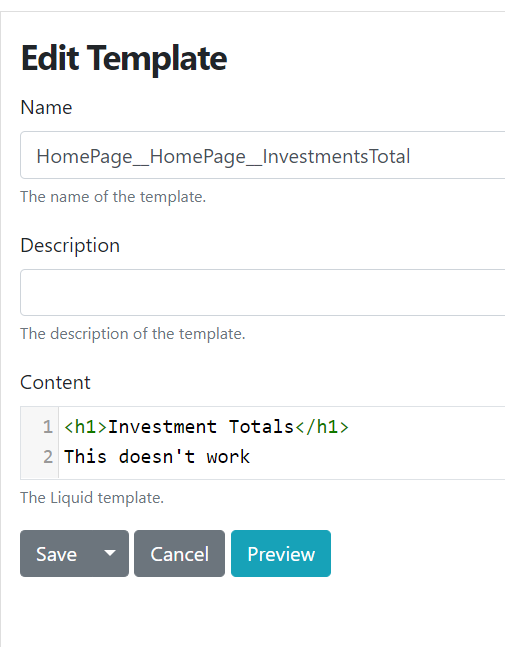
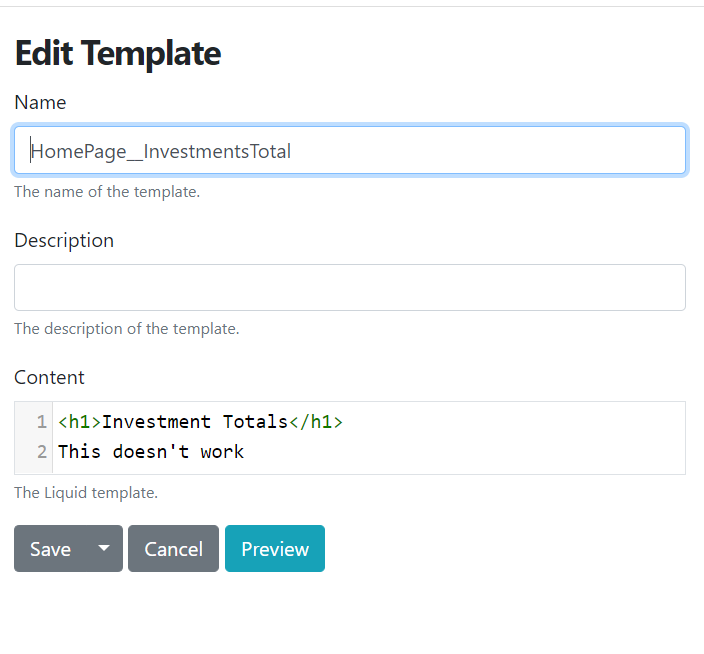
[ContentType]__[PartName]__[FieldName] which translates to HomePage__HomePage__InvestmentsTotal
But I think HomePage__InvestmentsTotal should work as the part and the type have the same name. To be confirmed.
sebastienros
on 10 Oct 2019
I can't manage to make them work unfortunately
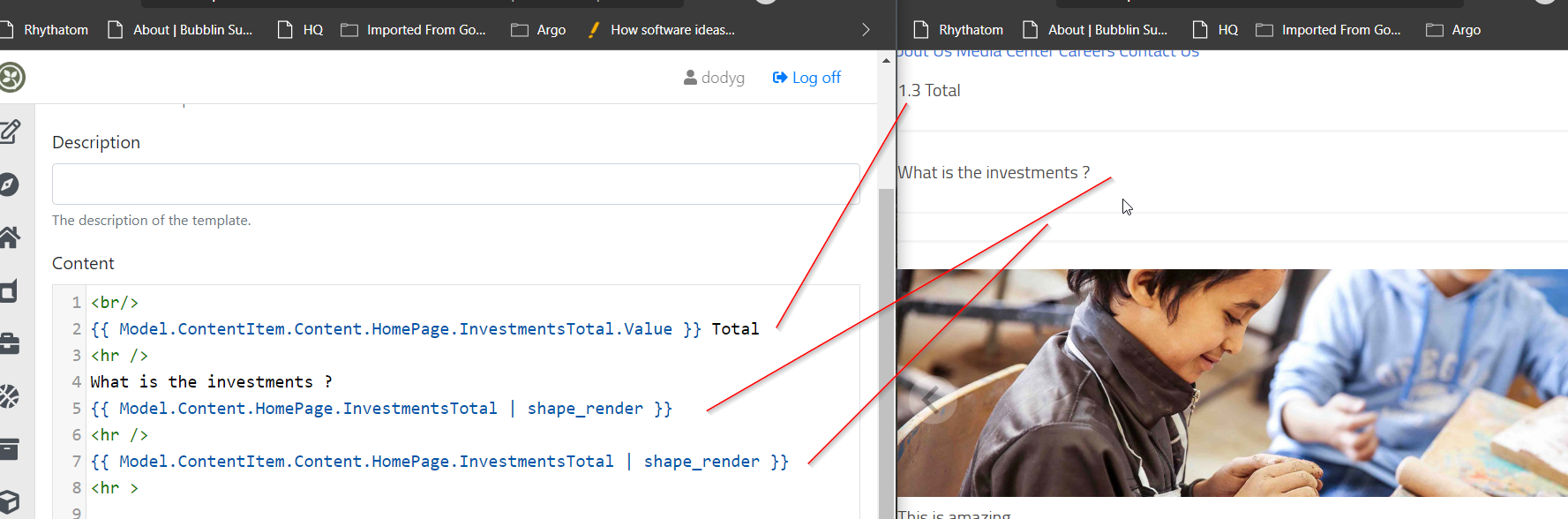
dodyg
on 11 Oct 2019
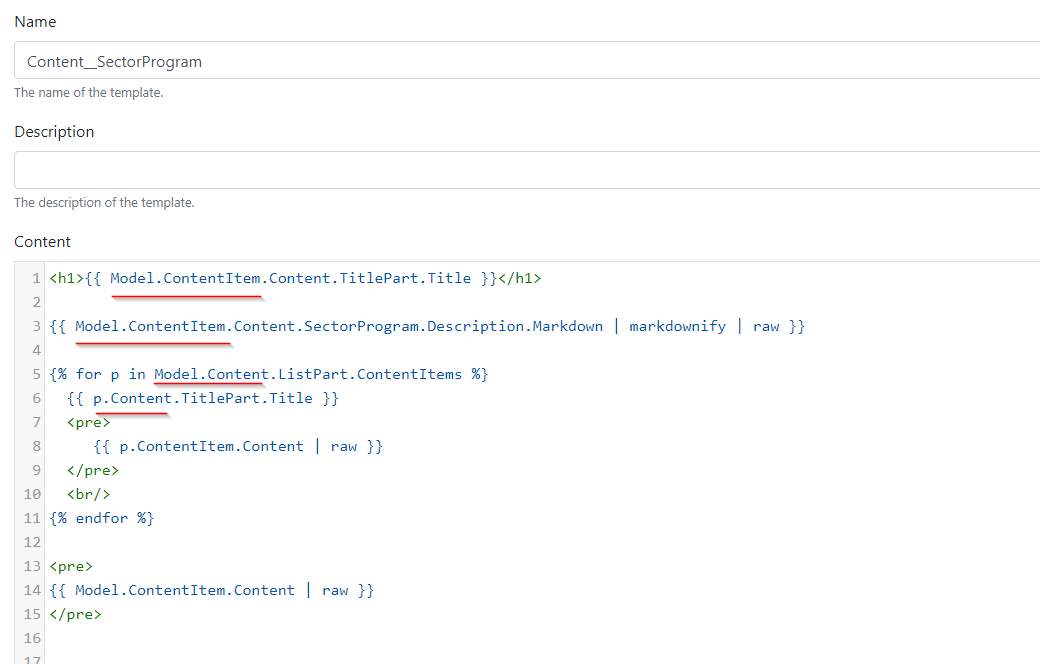
I don't understand why sometimes I have to use Model.ContentItem.Content and the other time Model.Content works just fine.
dodyg
on 13 Oct 2019
It's all about what type of Shape the Model is made of for each template. Sometimes Model if a Zones shape, like in your example.
Content__SectorProgram means you are redefining a Content shape alternate for the SectorProgram content type. In this case the shape contains properties that are zones, like Footer, Header, and Content. These zone shapes each contain a collection of other shapes that the content item is made of, like TitlePart shapes, Body shapes, or the fields ones.
But because we know that you are rendering a content item ultimately, we also add the ContentItem property to the main Model such that you can render it with its Content property (the json object) if you prefer it to part shapes.
When you used Model.Content.ListPart you are actually accessing the shape named ListPart that is in the zone named Content. This shape itself has a property named ContentItems, which is documented. But this content could probably have been available in the Model.ContentItem.Content.ListPart too, as json.
sebastienros
on 13 Oct 2019
I find it confusing too but I understand the difference now. Model.Content is a Dynamic Shape zone where the shapes get rendered (from the drivers) whereas Model.ContentItem.Content is the Content property of the Content item. The Content property is simply a JObject that is built from the Document record data in the Documents table.
I think we should rename either Model.Content zone to Model.Body or Rename ContentItem.Content to ContentItem.Json.
jptissot
on 13 Oct 2019
Use ContentItem.DisplayText instead of Content.TitlePart.Title
https://github.com/OrchardCMS/OrchardCore/issues/4526#issuecomment-541775020
dodyg
on 15 Oct 2019
@dodyg
I don't think that child shapes from Model.Content are accessible in liquid, so following would not render anything see #4334
{{ Model.Content.HomePage.InvestmentsTotal | shape_render }}
Also, following would not render anything - here Model.ContentItem.Content.HomePage.InvestmentsTotal is not a shape, it's json data
{{ Model.ContentItem.Content.HomePage.InvestmentsTotal | shape_render }}
 ns8482e
on 16 Oct 2019
ns8482e
on 16 Oct 2019
You can definitely access named shapes in zones from Liquid, here is an example taken from Content-BlogPost.liquid in TheBlogTheme:
{{ Model.Content.ContentsMetadata | shape_render }}
{{ Model.Content.MarkdownBodyPart | shape_render }}
@sebastienros Ah, the other day I was testing both cshtml/liquid, it wasn't working for me - may be the issue is with cshtml then.
ns8482e
on 16 Oct 2019
Then it's Model.Content.Named("ContentsMetadata").
Someone mentioned we should provide the accessor by name like we did for liquid. This is easily doable if you want to do a PR.
sebastienros
on 16 Oct 2019
Sure, I'll work on PR, Issue #3167
ns8482e
on 16 Oct 2019
There is still an issue with liquid though - named shapes can be accessed only if its part.
The field shapes are not accessible with just fieldnames. Here InvestmentsTotal is a field hence its not accessible. So following is not working
{{ Model.Content.HomePage.InvestmentsTotal | shape_render }}
OR
{{ Model.Content.InvestmentsTotal | shape_render }}
However there is a trick to access, @dodyg you can access fields with differentiator like below.
{{ Model.Content.HomePage-InvestmentsTotal | shape_render }}
@sebastienros I don't know if above is counted as valid liquid syntax or not, but it works.
ns8482e
on 16 Oct 2019
This is by designed and also documented AFAIK. Fields will return shapes at the same level as parts, in the zone directly. Using the differentiator as the name.
sebastienros
on 17 Oct 2019
Culture sensitive AutoroutePart pattern https://github.com/OrchardCMS/OrchardCore/issues/4589
dodyg
on 20 Oct 2019
Enabling language switcher for multi-lingual website (https://github.com/OrchardCMS/OrchardCore/issues/4594)
dodyg
on 22 Oct 2019
How to get a list of supported cultures from anywhere in Liquid
{{ Site.Properties["LocalizationSettings"].SupportedCultures }} (https://github.com/OrchardCMS/OrchardCore/issues/4594#issuecomment-545118766)
dodyg
on 23 Oct 2019
The differences between ListPart and NamedPart Bags (https://github.com/OrchardCMS/OrchardCore/issues/4678)
dodyg
on 31 Oct 2019
How to use Resources Liquid Tag (https://github.com/OrchardCMS/OrchardCore/issues/4681)
dodyg
on 31 Oct 2019
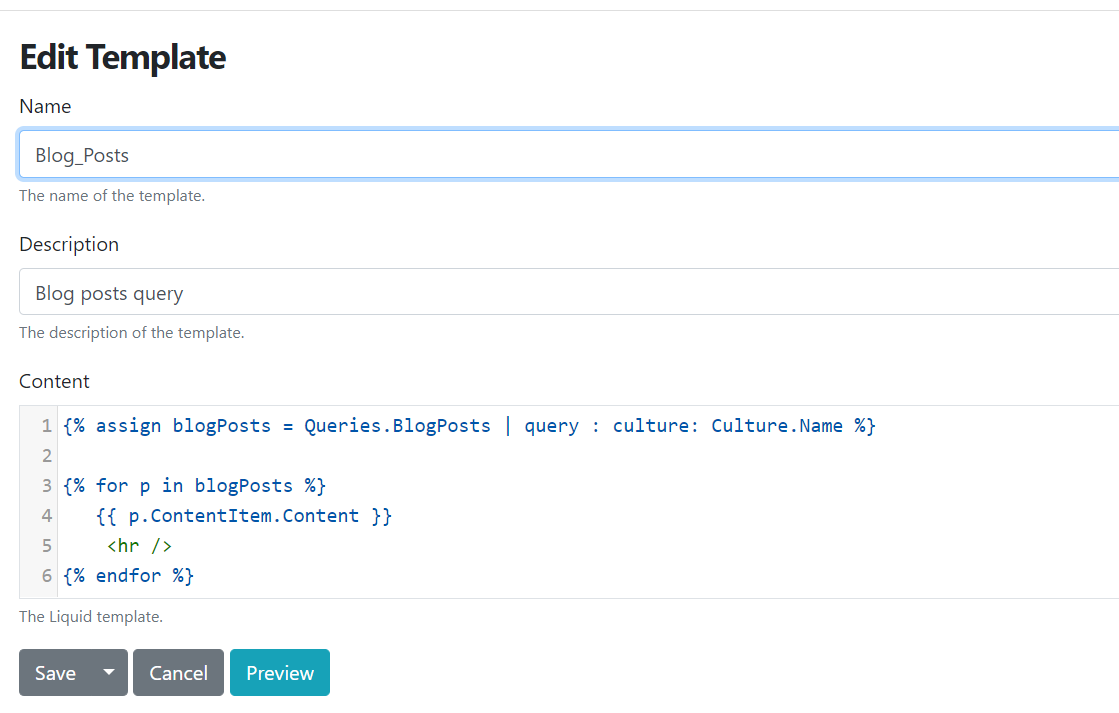
This is how you filter your content based on localization. This is just wonderful.
SELECT a.DocumentId FROM DateFieldIndex a
join LocalizedContentItemIndex b on a.DocumentId = b.DocumentId
WHERE a.ContentType = 'BlogPost' and a.ContentField = 'PublishingDate' and a.Published = 1 and b.Culture = 'en-US'
ORDER BY Date
but you would want to parameterized the culture so it will become
SELECT a.DocumentId FROM DateFieldIndex a
join LocalizedContentItemIndex b on a.DocumentId = b.DocumentId
WHERE a.ContentType = 'BlogPost' and a.ContentField = 'PublishingDate' and a.Published = 1 and b.Culture = @culture:'en-US'
ORDER BY Date
And in your shape, you just pass the Culture.Name to the query
dodyg
on 6 Nov 2019
This is important - how to do paging in liquid (https://github.com/OrchardCMS/OrchardCore/issues/4140)
dodyg
on 6 Nov 2019
When you return value from Queries without marking it as "return documents", it returns IEnumerable<JObject>.
Example
{% assign total = Queries.BlogPostsSize | query : culture: Culture.Name %}

{{ total }}
and the output is { "Total": 5 }
If you try to access this directly, it won't work. Remember it is an IEnumerable<JObject>.
{{ total.Total }}
So to access the value of Total, you have to to {{ total.first.Total }}
dodyg
on 6 Nov 2019
A case about ListPart (https://github.com/OrchardCMS/OrchardCore/issues/4749)
dodyg
on 7 Nov 2019
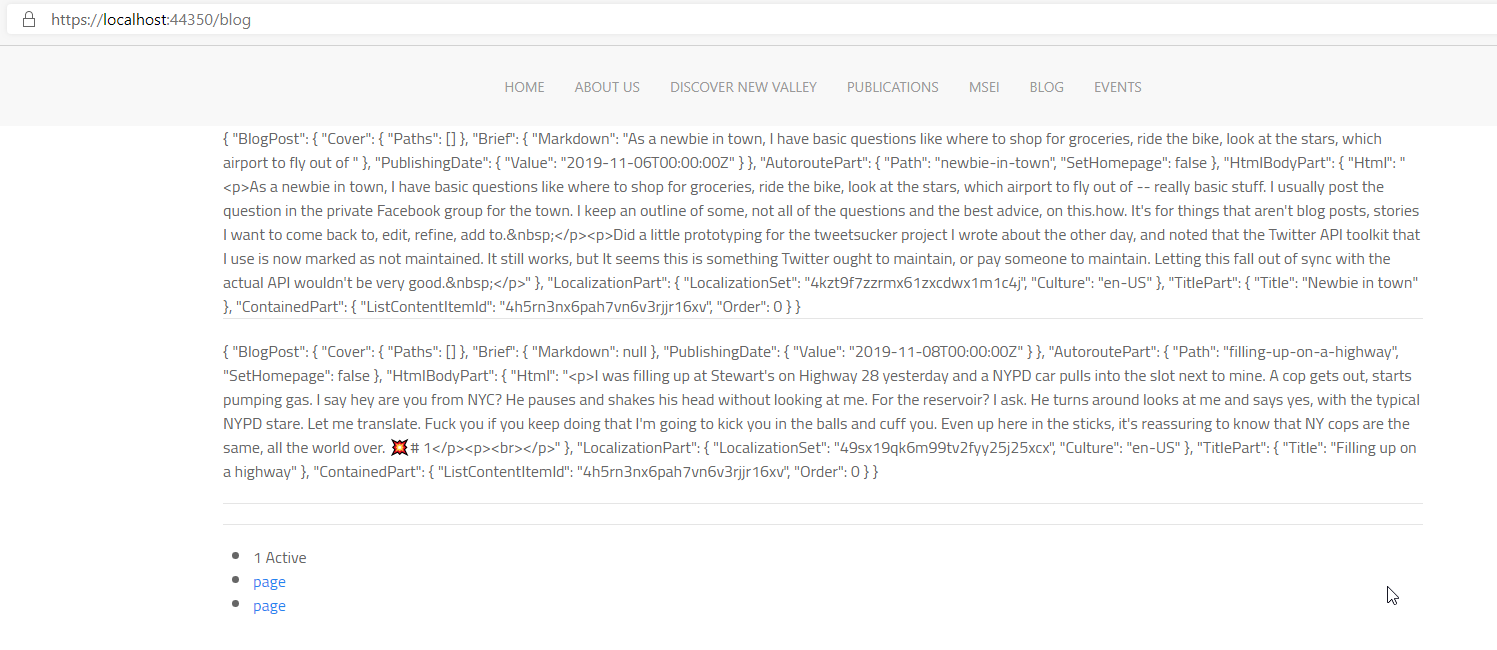
One way to provide paging navigation for your blog assuming that you are using two SQL queries, one for the content and the other is for the content total size.
{% comment %}Setup the parameters{% endcomment %}
{% assign current_page =  Request.Query.page.first | at_least: 1 %}
{% assign page_size = Request.Query.size.first | at_least: 2 %}
{% assign offset = current_page | minus: 1 | times: page_size %}

{% comment %}Do queries{% endcomment %}
{% assign blog_posts = Queries.BlogPosts | query : culture: Culture.Name, offset: offset, limit: page_size  %}
{% assign blog_posts_size = Queries.BlogPostsSize | query : culture: Culture.Name %}

{% comment %}Calculate the page size{% endcomment %}
{% assign total_posts = blog_posts_size.first.Total %}
{% assign total_pages = total_posts | divided_by: page_size %}
{% assign extra = total_posts | modulo: page_size %}
{% if extra > 0 %}
  {% assign total_pages = total_pages | plus: 1 %}
{% endif %}

{% for p in blog_posts %}
   {{ p.ContentItem.Content }}
    <hr />
{% endfor %}

<hr />
{% comment %}Show the paging navigation{% endcomment %}
{% if total_pages > 0 %}
    <ul>
    {% for page in (1..total_pages) %}
       {% if page == current_page %}
       <li>{{page}} Active </li>
       {% else %}
      <li><a href="?page={{page}}">page</a></li>
       {% endif %}
    {% endfor %}
    </ul>
{% endif %}
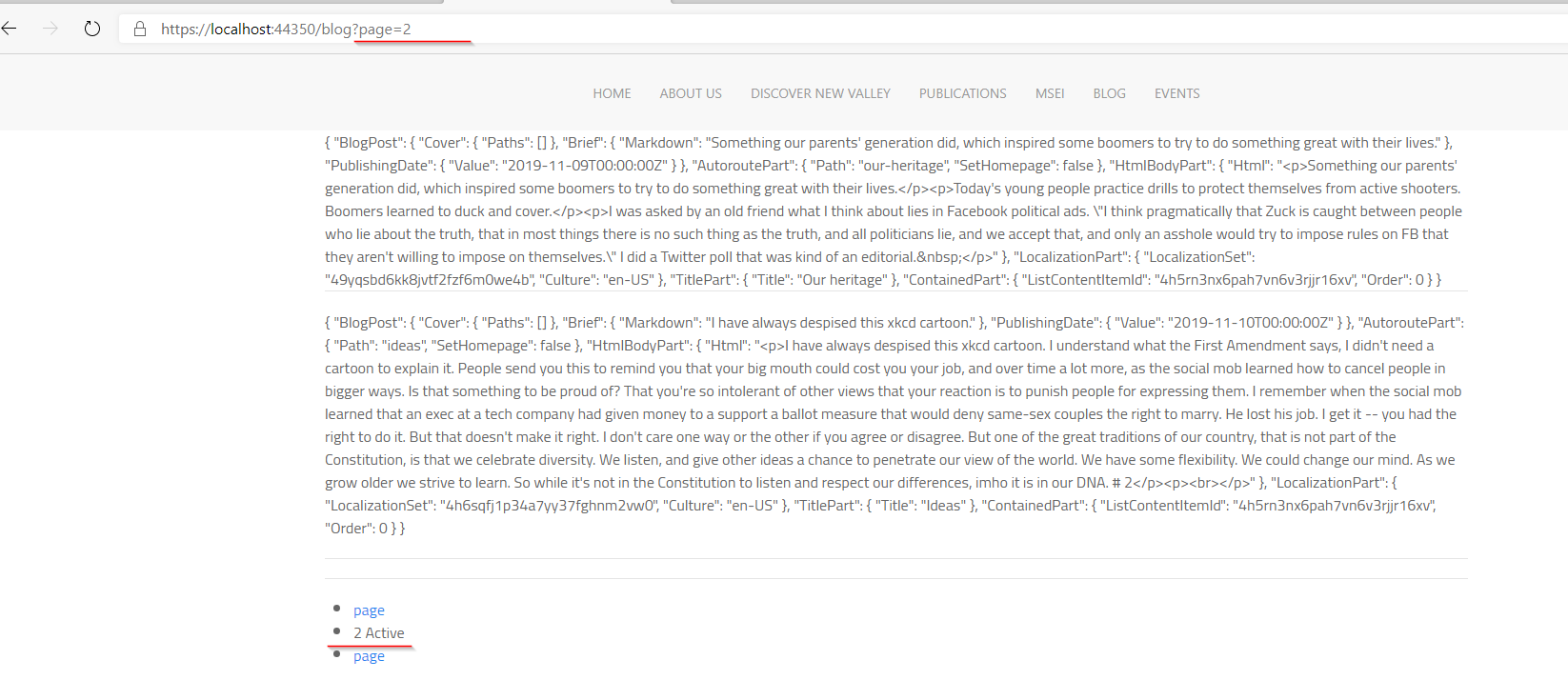
dodyg
on 10 Nov 2019
A discussion on how to organize content hierarchy (https://github.com/OrchardCMS/OrchardCore/issues/4494)
dodyg
on 14 Nov 2019
Search with parameters using Lucene (https://github.com/OrchardCMS/OrchardCore/issues/4825)
dodyg
on 17 Nov 2019
If you are using Trumbowyg for your editor, add this option tabToIndent : true so you can have nested list using shift/tab-shift.
https://github.com/Alex-D/Trumbowyg/pull/923/commits/f09fe82428e3871bff8ff0cda686e0f688ecde91
dodyg
on 24 Nov 2019
A taxonomy discussion (https://github.com/OrchardCMS/OrchardCore/issues/4856)
dodyg
on 24 Nov 2019
I just found out about placement.json (https://orchardcore.readthedocs.io/en/dev/docs/reference/core/Placement/) and Custom Settings (https://orchardcore.readthedocs.io/en/dev/docs/reference/modules/CustomSettings/)
dodyg
on 7 Dec 2019
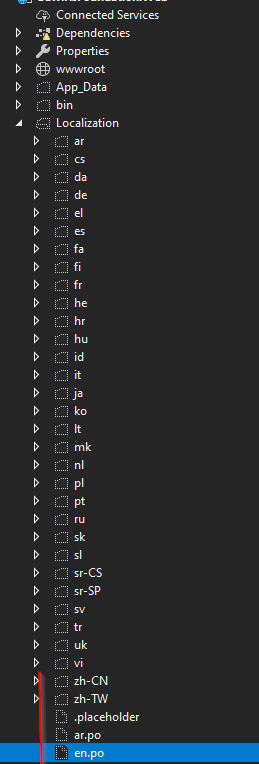
For Custom Settings, read this to learn on how to access it from your layout.
Don't call the Content Type Site Settings, it won't work (I tried). I use Site Options to create settings for things like page size for blogs, etc.
dodyg
on 7 Dec 2019
 dodyg
on 7 Dec 2019
dodyg
on 7 Dec 2019
You can perform bulk actions by selecting more than one items. If you just select one item, the "Action" dropdown won't be visible.

dodyg
on 8 Dec 2019
how can i use menu?
{% shape "menu", alias: "alias:main-menu", cache_id: "main-menu", cache_expires_after: "00:00:01", cache_tag: "alias:main-menu" %}
i have alias main-menu-en for English version.
 aghili371
on 9 Dec 2019
aghili371
on 9 Dec 2019
Just change the alias
{% shape "menu", alias: "alias:main-menu-en", cache_id: "main-menu-en", cache_expires_after: "00:00:01", cache_tag: "alias:main-menu-en" %}
@dodyg @aghili371 and the cache id and the cache tag
sebastienros
on 10 Dec 2019
How to replace an existing liquid filter (https://github.com/OrchardCMS/OrchardCore/issues/5017).
dodyg
on 14 Dec 2019
This is an efficient way to find a term within a taxonomy tree (https://github.com/OrchardCMS/OrchardCore/issues/5081)
dodyg
on 19 Dec 2019
@dodyg @aghili371 and the cache id and the cache tag
i wanna have dynamic menu:
{% shape "menu", alias: "alias:{{Culture.Name}}-main-menu", cache_id: "{{Culture.Name}}-main-menu", cache_expires_after: "00:00:01", cache_tag: "alias:{{Culture.Name}}-main-menu" %}
but it just working by hard coding:
{% shape "menu", alias: "alias:en-main-menu", cache_id: "en-main-menu", cache_expires_after: "00:00:01", cache_tag: "alias:en-main-menu" %}
i changed the menu alias to:
{{ContentItem.Content.LocalizationPart.Culture}}-{{ ContentItem | display_text | slugify }}
aghili371
on 22 Dec 2019
{% shape "menu", alias: "alias:{{Culture.Name}}-main-menu", cache_id: "{{Culture.Name}}-main-menu", cache_expires_after: "00:00:01", cache_tag: "alias:{{Culture.Name}}-main-menu" %}
try assigning these to variables so it looks like
{% shape "menu", alias: dynamic_alias, cache_id: dynamic_cache, cache_expires_after: "00:00:01", cache_tag: dynamic_cache_tag %}
{% shape "menu", alias: "alias:{{Culture.Name}}-main-menu", cache_id: "{{Culture.Name}}-main-menu", cache_expires_after: "00:00:01", cache_tag: "alias:{{Culture.Name}}-main-menu" %}
try assigning these to variables so it looks like
{% shape "menu", alias: dynamic_alias, cache_id: dynamic_cache, cache_expires_after: "00:00:01", cache_tag: dynamic_cache_tag %}
how can i assign that? i tested several ways but i got an error, please correct me:
{% assign dynamic_cache ="{{Culture.Name}}-main-menu" %}
aghili371
on 23 Dec 2019
{% assign dynamic_cache = Culture.Name | append: "-main-menu" %}
i just need to call a localized blogpost for any blog.
this is my query:
{
  "query": {
    "bool": {
      "must": [
        {
          "term": {
            "Content.ContentItem.ContentType": "BlogPost"
          },
          "term": {
            "Blog.LocalizationPart.Culture": "{{culture}}"
          }
        },
        {
          "bool": {
            "should": [
              {
                "term": {
                  "Content.ContentItem.ListContentItemId": "{{blogid}}"
                }
              }
            ]
          }
        }
      ]
    }
  }
}
and used loop to get blogpost List:
  {% assign _culture = Culture.Name   %}
  {% assign blogid = itemblog.ContentItemId %}

% assign recentBlogPosts = Queries.BlogPosts | query :   blogid: blogid, culture:_culture   %}
how can i pass two parameters in this query?
aghili371
on 24 Dec 2019
{% assign recentBlogPosts = Queries.BlogPosts | query: blogid: blogid, culture: _culture %}
You are missing a space between culture:_culture
Skrypt
on 24 Dec 2019
When you are implementing Bag, don't forget to read this section
<section class="flow">
    {% for item in Model.ContentItems %}
        {{ item | shape_build_display: "Detail" | shape_render }}
    {% endfor %}
</section>
This way different Content Types in your Bag can render itself accordingly instead you having to access each different properties of the Content Type and doing it manually.
dodyg
on 3 Mar 2020
This case https://github.com/OrchardCMS/OrchardCore/issues/6027 is about implementing a custom workflow activity. It is easier than I thought.
dodyg
on 28 Apr 2020
Related issues
hishamco
·
3Comments
 randaratceridian
·
3Comments
randaratceridian
·
3Comments
 webmedia1012
·
4Comments
webmedia1012
·
4Comments
 kevinchalet
·
4Comments
ns8482e
·
4Comments
kevinchalet
·
4Comments
ns8482e
·
4Comments
Most helpful comment
I love to talk about shapes. They are very easy to understand actually, let me try.
A Shape is an object that holds some data, like a view model, and also some metadata about how to render it. Any class that implements
IShapeis a shape.Shapes are used to as a way to render some html, and to do so you need to call the
IDisplayHelper.DisplayAsync(shape)that returnsTask<IHmlContent>.When calling this method you don't need to specify a template, it will trigger an event to allow any component in the system to chose what template is best suited to render this specific shape. This is why a shape can be rendered using a cshtml file, a liquid file, some template from the database, some code, ... it's completely extensible, but from your point of view you just ask it to be rendered. This is an advantage over Views in MVC where when return a
ViewResultfrom an action the template is strongly associated with the action.This indirection is very useful for theming, such that templates can come from different modules, or any module can redefine what template to use for a shape. So as a developer you can provide one default template with your shape that represents a Menu, but allow any other module or theme to redefine it.
Then to allow for better granularity in ways to select a template, the shape has a
Metadata.Alternatesproperty that contains which templates names are better suited for this shape, in order of priority. Like a shape representing an Article, which is a Content item, could accept template for an with a specific name, or a template for any article, or a template for any content item. This allows the themes to be able to customize the templates for very specific instances of shapes, or group of shapes.When working in the decoupled CMS mode, you are removing theming altogether, and not using shapes at all, because you implement each view and route handler, and don't expect anything else to be able to override these. But most modules that expose front-end views need to use shapes in order to allow a theme to customizes parts of the system without having to re-implement all handlers and views.