Or-tools: CPLEX Integration Failed: "[objs/linear_solver/cplex_interface.obj] Error 2"
Hey all - I'm unable to build or-tools using CPLEX solver from source. The command "tools\make make_third_party" succeeds and I am able to edit makefile.local to add my CPLEX installation path, e.g. "WINDOWS_CPLEX_DIR = C:\CPLEX_STUDIO1210".
Unfortunately, "tools\make python" fails with the following error message:
".\ortools\linear_solver\cplex_interface.cc(28): fatal error C1083: Cannot open include file: 'ilcplex/cplexx.h': No such file or directory
tools\make: * [objs/linear_solver/cplex_interface.obj] Error 2"
Can someone provide guidance on whether this is a mistake during my config, or is this a new issue?
Using master. Building from source without specifying CPLEX succeeds.
Thanks in advance.
 ryan-chien
All 21 comments
Check that the missing include is accessible from your cplex_dir.
Le sam. 21 déc. 2019 à 22:32, Ryan Chien notifications@github.com a
écrit :
Hey all - I'm unable to build or-tools using CPLEX solver from source. The
command "tools\make make_third_party" succeeds and I am able to edit
makefile.local to add my CPLEX installation path, e.g. "WINDOWS_CPLEX_DIR =
C:\CPLEX_STUDIO1210".Unfortunately, "toolsmake python" fails with the following error message:
".\ortools\linear_solvercplex_interface.cc(28): fatal error C1083: Cannot
open include file: 'ilcplex/cplexx.h': No such file or directory
tools\make: * [objs/linear_solver/cplex_interface.obj] Error 2"Can someone provide guidance on whether this is a mistake during my
config, or is this a new issue?Using master. Building from source without specifying CPLEX succeeds.
Thanks in advance.
—
You are receiving this because you are subscribed to this thread.
Reply to this email directly, view it on GitHub
https://github.com/google/or-tools/issues/1800?email_source=notifications&email_token=ACUPL3LEJYOEI25SKPAUQATQZ2DN5A5CNFSM4J6IZFL2YY3PNVWWK3TUL52HS4DFUVEXG43VMWVGG33NNVSW45C7NFSM4ICEXSHQ,
or unsubscribe
https://github.com/notifications/unsubscribe-auth/ACUPL3JYALL53JIAC5URTETQZ2DN5ANCNFSM4J6IZFLQ
.
 lperron
on 22 Dec 2019
lperron
on 22 Dec 2019
Hi Laurent. No, I do not see the missing include in my main cplex dir. This is what it looks like:

However, cplexx.h can be found at "C:\CPLEX_Studio1210cplex\include\ilcplexcplexx.h"

Do you think I should copy that file over to the main directory, or change the makefile to point towards the subdirectory?
I have very little knowledge of how to build from source - appreciate the help here.
FYI this is CPLEX 12.10 which was released 12/6/2019.
ryan-chien
on 22 Dec 2019
OK. Trying a new approach:
- Installed CPLEX 12.9 (instead of 12.10 previously).
- Modified ".../or-tools/ortools/linear_solver/cplex_interface.cc" to the following: _extern "C" {
// #include "ilcplex/cplexx.h"
include "C:/CPLEX_Studio129/cplex/include/ilcplex/cplexx.h"
// This is an undocumented function, setting the objective offset
// is not supported everywhere (for example it may not be exported if a
// model is written to a file), but it works in the cases we need here.
CPXLIBAPI int CPXPUBLIC CPXEsetobjoffset(CPXCENVptr, CPXLPptr, double);
}_
Build runs for a lot longer, but still fails with:
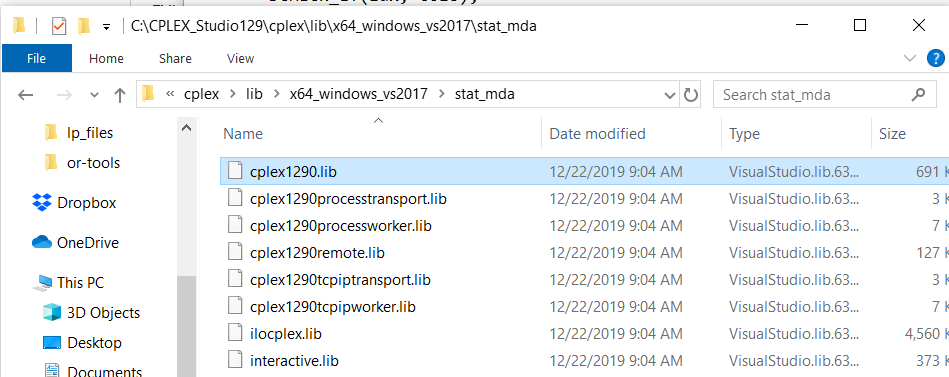
LINK : fatal error LNK1181: cannot open input file 'C:\CPLEX_Studio129\cplex1290.lib'
tools\make: * [lib/ortools.lib] Error 1181The file is not under the specified path, but is actually located at, "C:\CPLEX_Studio129cplex\lib\x64_windows_vx2017stat_mdacplex1290.lib"
So edit "...\or-tools\ortools\linear_solver\CMakeLists.txt" with the following:
_if (USE_CPLEX)
target_include_directories(${NAME} PUBLIC
${CPLEXDIR}/include
)
if(UNIX)
target_link_libraries(${NAME} PUBLIC ${CPLEXDIR}/lib/x64_windows_vs2015/stat_mda/cplex1270.a)
elseif(MSVC)
target_link_libraries(${NAME} PUBLIC ${CPLEXDIR}/lib/x64_windows_vs2015/stat_mda/cplex1290.lib)
endif()
endif(USE_CPLEX)_
Building now and will report results.
ryan-chien
on 22 Dec 2019
My 2 cents concerning this include issue
Context
- You have set
WINDOWS_CPLEX_DIR = C:\CPLEX_STUDIO1210-> LGTM - According to your installation screenshot
cplexx.his located to$(WINDOWS_CPLEX_DIR)\cplex\include\ilcplex\cplexx.h cplex_interface.ccis using#include ''ilcplex\cplexx.h"
Makefile based build
Finding the include
Internally when using Makefile based build (your first comment, since then you move to our CMake based build -_-;) we will use:
https://github.com/google/or-tools/blob/b4298f709f116de08f490ac2bfe5e295fcc91f40/makefiles/Makefile.win.mk#L123-L129
So you should use WINDOWS_CPLEX_DIR = C:\CPLEX_STUDIO1210\cplex instead.
Finding the lib
Currently, we expect to find it in C:\CPLEX_STUDIO1210\cplex\cplex1290.lib which seems doubly wrong:
- path seems broken
@rychien-official can you provide us the correct path(s) for 12.10 and 12.9 ?
note: point 4 you show vs2017 and point 5 you hack using vs2015... - As you see we have hard coded the name i.e. the version
1290-> need to make is user configurable (see below)...
Supporting several CPLEX versions
To fix 2, we can do like we did for GUROBI by adding a new variable $(CPLEX_VERSION)
see:
https://github.com/google/or-tools/blob/b4298f709f116de08f490ac2bfe5e295fcc91f40/makefiles/Makefile.third_party.win.mk#L180
and
https://github.com/google/or-tools/blob/b4298f709f116de08f490ac2bfe5e295fcc91f40/makefiles/Makefile.win.mk#L135
CMake based build
In your second comment point 5, you start to hack a CMakeLists.txt which is use by the CMake based build...
It feel strange to me that you manage to build using make python 🤔
 Mizux
on 22 Jan 2020
Mizux
on 22 Jan 2020
Hey Mizux, thanks for taking a look and helping.
OK let's start fresh. I'm working from a different computer, so the paths will be different. Will detail in the following commentary.
(Part 1 of 2)
1. Confirm Python and Cplex Installs
``` {bash}
PS C:\Users\rvc5634> python --version
Python 3.7.5
PS C:\Users\rvc5634> python -c "import platform; print(platform.architecture()[0])"
64bit
PS C:\Users\rvc5634> python -m pip --version
pip 19.3.1 from C:\users\rvc5634\documents\python\python37\libsite-packages\pip (python 3.7)
PS C:\Users\rvc5634>
PS C:\Users\rvc5634> cplex
Welcome to IBM(R) ILOG(R) CPLEX(R) Interactive Optimizer 12.10.0.0
with Simplex, Mixed Integer & Barrier Optimizers
5725-A06 5725-A29 5724-Y48 5724-Y49 5724-Y54 5724-Y55 5655-Y21
Copyright IBM Corp. 1988, 2019. All Rights Reserved.
Type 'help' for a list of available commands.
Type 'help' followed by a command name for more
information on commands.
CPLEX> ^Z
PS C:\Users\rvc5634>
## 2. Clone or-tools and make third_party
### Git clone
PS C:\gitrepo> git clone https://github.com/google/or-tools
Cloning into 'or-tools'...
remote: Enumerating objects: 215, done.
remote: Counting objects: 100% (215/215), done.
remote: Compressing objects: 100% (121/121), done.
remote: Total 180662 (delta 115), reused 156 (delta 93), pack-reused 180447
Receiving objects: 100% (180662/180662), 653.38 MiB | 8.64 MiB/s, done.
Resolving deltas: 100% (116429/116429), done.
Updating files: 100% (67714/67714), done.
PS C:\gitrepo> cd C:\or-tools
PS C:\gitrepo\or-tools> ls
Directory: C:\gitrepo\or-tools
Mode LastWriteTime Length Name
---- ------------- ------ ----
d----- 1/22/2020 8:38 AM .github
d----- 1/22/2020 8:38 AM .travis
d----- 1/22/2020 8:38 AM bazel
d----- 1/22/2020 8:38 AM binder
d----- 1/22/2020 8:38 AM cmake
d----- 1/22/2020 8:38 AM dependencies
d----- 1/22/2020 8:38 AM docs
d----- 1/22/2020 8:38 AM examples
d----- 1/22/2020 8:40 AM makefiles
d----- 1/22/2020 8:40 AM ortools
d----- 1/22/2020 8:40 AM patches
d----- 1/22/2020 8:40 AM tools
-a---- 1/22/2020 8:38 AM 2242 .appveyor.yml
-a---- 1/22/2020 8:38 AM 998 .gitignore
-a---- 1/22/2020 8:38 AM 14157 .pylintrc
-a---- 1/22/2020 8:38 AM 2161 .travis.yml
-a---- 1/22/2020 8:38 AM 5546 CMakeLists.txt
-a---- 1/22/2020 8:38 AM 1129 CONTRIBUTING.md
-a---- 1/22/2020 8:38 AM 110 Dependencies.txt
-a---- 1/22/2020 8:38 AM 11543 LICENSE-2.0.txt
-a---- 1/22/2020 8:38 AM 4399 Makefile
-a---- 1/22/2020 8:40 AM 3405 or-tools.code-workspace
-a---- 1/22/2020 8:40 AM 819 pom.xml
-a---- 1/22/2020 8:38 AM 6034 README.md
-a---- 1/22/2020 8:40 AM 1059 test.py.in
-a---- 1/22/2020 8:38 AM 54 Version.txt
-a---- 1/22/2020 8:38 AM 1656 WORKSPACE
### Error in make third_party via x64 Native Tools Command
* Visual Studio 2019 Developer Command Prompt v16.4.3
* Copyright (c) 2019 Microsoft Corporation
[vcvarsall.bat] Environment initialized for: 'x64'
C:\Program Files (x86)\Microsoft Visual Studio\2019\Community>cd c:\gitrepo\or-tools
c:\GitRepo\or-tools>tools\make third_party
Makefile:57: Makefile.local: No such file or directory
...
tools\win\wget.exe --quiet -P dependencies\archives --no-check-certificate https://superb-dca2.dl.sourceforge.net/project/swig/swigwin/swigwin-4.0.0/swigwin-4.0.0.zip
tools\win\unzip.exe -q -d dependencies\install dependencies\archives\swigwin-4.0.0.zip
[dependencies/archives/swigwin-4.0.0.zip]
End-of-central-directory signature not found. Either this file is not
a zipfile, or it constitutes one disk of a multi-part archive. In the
latter case the central directory and zipfile comment will be found on
the last disk(s) of this archive.
unzip: cannot find zipfile directory in dependencies/archives/swigwin-4.0.0.zip,
and cannot find dependencies/archives/swigwin-4.0.0.zip.zip, period.
make: * [dependencies/install/swigwin-4.0.0/swig.exe] Error 9
Here I encounter my first error. For a full log please see: https://github.com/rychien-official/ortools_issue_1800/blob/master/make_third_party.txt.

### Solving make third_party error
To solve this problem, I manually download swigwin-4.0.1.zip from https://sourceforge.net/projects/swig/files/swigwin/swigwin-4.0.1/swigwin-4.0.1.zip/download into or-tools/dependencies/archives.
PS C:\gitrepo\or-tools\dependencies\archives> dir
Directory: C:\gitrepo\or-tools\dependencies\archives
Mode LastWriteTime Length Name
---- ------------- ------ ----
-a---- 6/15/2019 4:31 AM 14351717 Cbc-2.10.3.zip
-a---- 1/22/2020 9:21 AM 660 download
-a---- 1/22/2020 8:43 AM 123837 gflags-2.2.2.zip
-a---- 1/22/2020 8:43 AM 276904 glog-0.4.0.zip
-a---- 1/22/2020 9:22 AM 11553525 swigwin-4.0.1.zip
-a---- 1/22/2020 8:44 AM 6987302 v3.10.0.zip
-a---- 1/15/2017 1:13 PM 747422 zlib1211.zip
Then I modify:
 or-tools/makefiles/Makefile.third_party.win.mk https://github.com/google/or-tools/blob/b4298f709f116de08f490ac2bfe5e295fcc91f40/makefiles/Makefile.third_party.win.mk#L47

I bump SWIG_TAG from 4.0.0 to 4.0.1.
tags of dependencies to checkout.
ZLIB_TAG = 1.2.11
ZLIB_ARCHIVE_TAG = 1211
GFLAGS_TAG = 2.2.2
GLOG_TAG = 0.4.0
PROTOBUF_TAG = 3.10.0
ABSL_TAG = bf29470
CBC_TAG = 2.10.3
CGL_TAG = 0.60.2
CLP_TAG = 1.17.3
OSI_TAG = 0.108.4
COINUTILS_TAG = 2.11.2
SWIG_TAG = 4.0.1
Then I re-navigate to or-tools and initiate tools\make third_party. It seems successful. The full log is at this link: https://github.com/rychien-official/ortools_issue_1800/blob/master/make_third_party_attemp2.txt. Last five lines are here:
dependenciessources\Cbc-2.10.3\Osisrc\Osi\config_osi_default.h
dependenciessources\Cbc-2.10.3\Osisrc\Osi\OsiConfig.h
3 file(s) copied.
copy dependenciessources\Cbc-2.10.3\Cbc\MSVisualStudio\v10\x64-v142-Release\cbc.exe dependencies\install\bin
1 file(s) copied.
c:\GitRepo\or-tools>
And makefile.local exists:
c:\GitRepo\or-tools>dir
Volume in drive C has no label.
Volume Serial Number is C8FB-81F9
Directory of c:\GitRepo\or-tools
01/22/2020 09:33 AM
01/22/2020 09:33 AM
01/22/2020 08:38 AM 2,242 .appveyor.yml
01/22/2020 08:38 AM
01/22/2020 08:38 AM 998 .gitignore
01/22/2020 08:38 AM 14,157 .pylintrc
01/22/2020 08:38 AM
01/22/2020 08:38 AM 2,161 .travis.yml
01/22/2020 08:38 AM
01/22/2020 08:38 AM
01/22/2020 08:38 AM
01/22/2020 08:38 AM 5,546 CMakeLists.txt
01/22/2020 08:38 AM 1,129 CONTRIBUTING.md
01/22/2020 08:43 AM
01/22/2020 08:38 AM 110 Dependencies.txt
01/22/2020 08:38 AM
01/22/2020 08:40 AM
01/22/2020 08:38 AM 11,543 LICENSE-2.0.txt
01/22/2020 08:38 AM 4,399 Makefile
01/22/2020 09:32 AM 911 Makefile.local
01/22/2020 08:40 AM
01/22/2020 08:40 AM 3,405 or-tools.code-workspace
01/22/2020 08:40 AM
01/22/2020 08:40 AM
01/22/2020 08:40 AM 819 pom.xml
01/22/2020 08:38 AM 6,034 README.md
01/22/2020 08:40 AM 1,059 test.py.in
01/22/2020 08:40 AM
01/22/2020 08:38 AM 54 Version.txt
01/22/2020 08:38 AM 1,656 WORKSPACE
16 File(s) 56,223 bytes
14 Dir(s) 332,334,714,880 bytes free
## 3. Update Makefile.win.mk with updated paths
### Find updated cplex12100.lib path
For this example I am using CPLEX 12.10, available via the IBM Academic Initiative (thanks IBM), link here: https://www-03.ibm.com/isc/esd/dswdown/searchPartNumber.wss?partNumber=CJ6BPML.

For Cplex 12.10 it looks like cplex12100.lib is located at:
C:\CorePrograms\CPLEX\cplex\lib\x64_windows_msvc14\stat_mda
PS C:\CorePrograms\CPLEXcplex\lib\x64_windows_msvc14stat_mda> ls
Directory: C:\CorePrograms\CPLEX\cplex\lib\x64_windows_msvc14\stat_mda
Mode LastWriteTime Length Name
---- ------------- ------ ----
-a---- 1/22/2020 8:12 AM 714580 cplex12100.lib
-a---- 1/22/2020 8:12 AM 2118 cplex12100processtransport.lib
-a---- 1/22/2020 8:12 AM 7034 cplex12100processworker.lib
-a---- 1/22/2020 8:12 AM 129734 cplex12100remote.lib
-a---- 1/22/2020 8:12 AM 2082 cplex12100tcpiptransport.lib
-a---- 1/22/2020 8:12 AM 6944 cplex12100tcpipworker.lib
-a---- 1/22/2020 8:12 AM 4764540 ilocplex.lib
-a---- 1/22/2020 8:12 AM 391476 interactive.lib
Cplex1200.lib is ***also*** located at: C:\CorePrograms\CPLEX\cplex\lib\x64_windows_msvc14\stat_mdd.
PS C:\CorePrograms\CPLEXcplex\lib\x64_windows_msvc14stat_mdd> ls
Directory: C:\CorePrograms\CPLEX\cplex\lib\x64_windows_msvc14\stat_mdd
Mode LastWriteTime Length Name
---- ------------- ------ ----
-a---- 1/22/2020 8:12 AM 714580 cplex12100.lib
-a---- 1/22/2020 8:12 AM 2118 cplex12100processtransport.lib
-a---- 1/22/2020 8:12 AM 7034 cplex12100processworker.lib
-a---- 1/22/2020 8:12 AM 129734 cplex12100remote.lib
-a---- 1/22/2020 8:12 AM 2082 cplex12100tcpiptransport.lib
-a---- 1/22/2020 8:12 AM 6944 cplex12100tcpipworker.lib
-a---- 1/22/2020 8:12 AM 4764560 ilocplex.lib
-a---- 1/22/2020 8:12 AM 391476 interactive.lib
For this example, I will try C:\CorePrograms\CPLEX\cplex\lib\x64_windows_msvc14\stat_mda\cplex12100.lib.

### Update STATIC_CPLEX_LINK
Update this line from: https://github.com/google/or-tools/blob/b4298f709f116de08f490ac2bfe5e295fcc91f40/makefiles/Makefile.win.mk#L127
to:
STATIC_CPLEX_LNK = "$(WINDOWS_CPLEX_DIR)\lib\x64_windows_msvc14stat_mdacplex12100.lib"
```
(End of Part 1. Please see more in Part 2.)
ryan-chien
on 22 Jan 2020
(Part 2 of 2)
4. Update Makefile.local with paths
Confirm Python path
PS C:\Users\rvc5634\Documents\Python\Python37> ls

    Directory: C:\Users\rvc5634\Documents\Python\Python37

Mode                LastWriteTime         Length Name
----                -------------         ------ ----
d-----       12/11/2019   1:53 PM                DLLs
d-----       12/11/2019   1:53 PM                Doc
d-----       12/11/2019   1:52 PM                include
d-----       12/11/2019   1:53 PM                Lib
d-----       12/11/2019   1:53 PM                libs
d-----       12/11/2019   2:12 PM                Scripts
d-----       12/11/2019   1:53 PM                tcl
d-----       12/11/2019   1:53 PM                Tools
-a----       10/15/2019   1:14 AM          30188 LICENSE.txt
-a----       10/15/2019   1:14 AM         711270 NEWS.txt
-a----       10/15/2019   1:12 AM          99856 python.exe
-a----       10/15/2019   1:12 AM          58896 python3.dll
-a----       10/15/2019   1:12 AM        3748880 python37.dll
-a----       10/15/2019   1:12 AM          98320 pythonw.exe
-a----       10/15/2019  12:04 AM          89752 vcruntime140.dll
Confirm CPLEX path
PS C:\CorePrograms\CPLEX\cplex> ls

    Directory: C:\CorePrograms\CPLEX\cplex

Mode                LastWriteTime         Length Name
----                -------------         ------ ----
d-----        1/22/2020   8:12 AM                bin
d-----        1/22/2020   8:12 AM                examples
d-----        1/22/2020   8:12 AM                include
d-----        1/22/2020   8:12 AM                lib
d-----        1/22/2020   8:12 AM                matlab
d-----        1/22/2020   8:12 AM                python
-a----        1/22/2020   8:12 AM          23453 c_cpp.html
-a----        1/22/2020   8:12 AM           7141 dotnet.html
-a----        1/22/2020   8:12 AM           4881 readmeWindows.html
Update Makefile.local
This is the resulting file:
JAVA_HOME = # JAVA_HOME is not set on your system. Set it to the path to jdk to build the java files.
WINDOWS_PATH_TO_PYTHON = C:\Users\rvc5634\Documents\Python\Python37
WINDOWS_CPLEX_DIR = C:\CorePrograms\CPLEX\cplex
#
# Define WINDOWS_SCIP_DIR to point to a installation directory of the scip binary packaged to use it
#   e.g.: WINDOWS_SCIP_DIR = "relative_path/to/scip-6.0.2"
# Define WINDOWS_GUROBI_DIR and GUROBI_LIB_VERSION to use Gurobi
#
# Define WINDOWS_ZLIB_DIR, WINDOWS_ZLIB_NAME, WINDOWS_GFLAGS_DIR,
# WINDOWS_GLOG_DIR, WINDOWS_PROTOBUF_DIR, WINDOWS_SWIG_BINARY,
# WINDOWS_CLP_DIR, WINDOWS_CBC_DIR if you wish to use a custom version
#   e.g.: WINDOWS_GFLAGS_DIR = "relative_path/to/gflags/dir"
#
# Define absolute paths without trailing "\". E.g. "c:\Installs\SCIP-6.0.0"
5. Make Python
First attempt error
Now I try to make python. Unfortunately this errors out with the following error:
Microsoft (R) Incremental Linker Version 14.24.28315.0
Copyright (C) Microsoft Corporation.  All rights reserved.

LINK : fatal error LNK1181: cannot open input file 'C:\Users\rvc5634\Documents\Python\Python37\\libs\\python.lib'
tools\make: *** [lib/_pywrapknapsack_solver.dll] Error 1181

c:\GitRepo\or-tools>
Full log here: https://github.com/rychien-official/ortools_issue_1800/blob/master/make_python_attempt1.txt
It looks like there is no python.lib in my python install, instead there are files python3.lib and python37.lib.
C:\Users\rvc5634\Documents\Python\Python37\libs>dir
 Volume in drive C has no label.
 Volume Serial Number is C8FB-81F9

 Directory of C:\Users\rvc5634\Documents\Python\Python37\libs

01/22/2020  11:14 AM    <DIR>          .
01/22/2020  11:14 AM    <DIR>          ..
10/15/2019  12:14 AM         1,232,690 libpython37.a
10/15/2019  12:12 AM           170,564 python3.lib
10/15/2019  12:11 AM           342,420 python37.lib
10/15/2019  12:12 AM             1,750 _tkinter.lib
               4 File(s)      1,747,424 bytes
               2 Dir(s)  331,069,136,896 bytes free

C:\Users\rvc5634\Documents\Python\Python37\libs>
Currently stuck here, can you please advise? Thanks.
ryan-chien
on 22 Jan 2020
few things.
- our default branch is stable, you should try to use the master branch instead (i.e. git checkout master)
note: you can check withgit branchon which branch you are master branch use swigwin-4.0.1 but I have plenty of timeout -> thinking of directly having the swigwin archive in ortools repo
mda is compiled with /MD and mdd is compiled with /MDd according to IBM
src: https://www.ibm.com/developerworks/community/forums/html/topic?id=7dd43f9a-3e87-43a3-8575-8def07b0894a
todo: need to check what ortools is using by default i guess we compile as debug but need to double check...seems CPLEX 12.9 was compiled against VS 2015 while CPLE 12.10 use msvc14 in the path...
Mizux
on 22 Jan 2020
I'm running stable. Ok will try master and report back. Probably won't get to this until tomorrow.
ryan-chien
on 22 Jan 2020
For python it's very strange, usually, I use:
https://github.com/google/or-tools/blob/884461024b35cc47d9f0f3544e7f67f470668414/tools/release/build_delivery_win.cmd#L106-L111
and we have:
https://github.com/google/or-tools/blob/884461024b35cc47d9f0f3544e7f67f470668414/makefiles/Makefile.win.mk#L103-L105
and we "automatically" retrieve the Python version (i.e. set WINDOWS_PATH_TO_PYTHON) thanks to (line 159):
https://github.com/google/or-tools/blob/b4298f709f116de08f490ac2bfe5e295fcc91f40/makefiles/Makefile.port.mk#L145-L161
@rychien-official Can you show me the log of make detect_python ?
EDIT: maybe found your issue, we load Makefile.local after parsing port.mk (which detect python)
https://github.com/google/or-tools/blob/884461024b35cc47d9f0f3544e7f67f470668414/Makefile#L52-L57
so at this time WINDOWS_PATH_TO_PYTHON is still empty while in my case since I pass it through the command line it's already set...
So i guess Make detect your default python then Makefile.local overwrite the WINDOWS_PATH_TO_PYTHON thus the weird path in order to found the Python library
Mizux
on 22 Jan 2020
Log of make detect_python is:
c:\GitRepo\or-tools>tools\make detect_python
Relevant info for the Python build:
WINDOWS_PATH_TO_PYTHON = "C:\Users\rvc5634\Documents\Python\Python37"
PYTHON_COMPILER = python.exe
PYTHON_EXECUTABLE = "C:\Users\rvc5634\Documents\Python\Python37\python.exe"
PYTHON_VERSION =
PYTHON3 = true
PYTHON_INC = /I"C:\Users\rvc5634\Documents\Python\Python37\\include"
PYTHON_LNK = "C:\Users\rvc5634\Documents\Python\Python37\\libs\\python.lib"
PYTHON_LDFLAGS =
SWIG_BINARY = "dependencies\\install\\swigwin-4.0.1\\swig.exe"
SWIG_INC = -I"dependencies/install/include" -I"dependencies/install/include" -DGFLAGS_DLL_DECL= -DGFLAGS_DLL_DECLARE_FLAG= -DGFLAGS_DLL_DEFINE_FLAG= -I"dependencies/install/include" -DGOOGLE_GLOG_DLL_DECL= -I"dependencies/install/include" -I"dependencies/install/include" -I"dependencies/install/include/coin" -DUSE_CLP -I"dependencies/install/include" -I"dependencies/install/include/coin" -DUSE_CBC -DUSE_GLOP -DUSE_BOP -DABSL_MUST_USE_RESULT    -I"C:\CorePrograms\CPLEX\cplex/include" -DUSE_CPLEX
SWIG_PYTHON3_FLAG = -py3 -DPY3
SWIG_PYTHON_LIB_SUFFIX = dll
SWIG_PY_DOXYGEN =
SET_PYTHONPATH = "set PYTHONPATH=c:\\GitRepo\\or-tools;c:\\GitRepo\\or-tools\\dependencies\\sources\\protobuf-3.10.0\\python &&"
MYPY_OUT = ""
This confuses me some, since it is detecting PYTHON_LNK with \python.lib. But that file does not exist, right? Instead there are python3.lib and python37.lib:
c:\Users\rvc5634\Documents\Python\Python37\libs>dir

 Directory of c:\Users\rvc5634\Documents\Python\Python37\libs

01/22/2020  11:14 AM    <DIR>          .
01/22/2020  11:14 AM    <DIR>          ..
10/15/2019  12:14 AM         1,232,690 libpython37.a
10/15/2019  12:12 AM           170,564 python3.lib
10/15/2019  12:11 AM           342,420 python37.lib
10/15/2019  12:12 AM             1,750 _tkinter.lib
               4 File(s)      1,747,424 bytes
               2 Dir(s)  328,298,676,224 bytes free
So the python version is not being detected correctly - so I manually set python version and path in the following lines
Set Python Version Manually
From
https://github.com/google/or-tools/blob/884461024b35cc47d9f0f3544e7f67f470668414/makefiles/Makefile.win.mk#L103-L105
To:
PYTHON_VERSION = 37
PYTHON_INC=/I"$(WINDOWS_PATH_TO_PYTHON)\\include"
PYTHON_LNK="$(WINDOWS_PATH_TO_PYTHON)\\libs\\python$(PYTHON_VERSION).lib"
Set Python Path Manually
From:
https://github.com/google/or-tools/blob/b4298f709f116de08f490ac2bfe5e295fcc91f40/makefiles/Makefile.port.mk#L145-L161
To:
# Detect Python
  ifeq ($(WINDOWS_PATH_TO_PYTHON),)
    DETECTED_PATH_TO_PYTHON = $(shell python -c "from sys import executable; from os.path import sep; print(sep.join(executable.split(sep)[:-1]).rstrip())")
    CANONIC_DETECTED_PATH_TO_PYTHON = $(subst $(SPACE),$(BACKSLASH_SPACE),$(subst \,/,$(subst \\,/,$(DETECTED_PATH_TO_PYTHON))))
    ifeq ($(wildcard $(CANONIC_DETECTED_PATH_TO_PYTHON)),)
      SELECTED_PATH_TO_PYTHON = WINDOWS_PATH_TO_PYTHON =\# python was not found. Set this variable to the path to python to build the python files. Don\'t include the name of the executable in the path! (ex: WINDOWS_PATH_TO_PYTHON = c:\\python37-64)
    else
      SELECTED_PATH_TO_PYTHON = WINDOWS_PATH_TO_PYTHON = $(DETECTED_PATH_TO_PYTHON)
      WINDOWS_PATH_TO_PYTHON = C:\Users\rvc5634\Documents\Python\Python37
    endif
  else
This seems to run successfully, here is a link to the make python output log: https://github.com/rychien-official/ortools_issue_1800/blob/master/make_third_party_attemp2.txt
This seems to test successfully as well, link to make test_python log: https://github.com/rychien-official/ortools_issue_1800/blob/master/make_test_python.txt
I'll try with one of my own integer linear programs later today, and report back.
ryan-chien
on 23 Jan 2020
@Mizux, can you please tell me how to set my ILP to use CPLEX? Is this automatic?
Without CPLEX, when I initiate an ILP I call pywraplp.Solver.CBC_MIXED_INTEGER_PROGRAMMING.
Do I initiate a pywraplp.Solver.CPLEX_MIXED_INTEGER_PROGRAMMING class?
ryan-chien
on 23 Jan 2020
yes, since you compile ortools with CPLEX support, ortools should be compiled with -DUSE_CPLEX so you should have this enums value available (that's why you need to recompile ortools to have access to CPLEX support since it a compile time enabled feature).
https://github.com/google/or-tools/blob/dbac8c324d1fa3d37ed992174aa4c0fcc48cd673/ortools/linear_solver/linear_solver.h#L198-L201 and
https://github.com/google/or-tools/blob/dbac8c324d1fa3d37ed992174aa4c0fcc48cd673/ortools/linear_solver/linear_solver.h#L220-L223
note: you can check using make run SOURCE=examples/cpp/integer_programming.cc you should see the CPLEX solver used
https://github.com/google/or-tools/blob/b4298f709f116de08f490ac2bfe5e295fcc91f40/examples/cpp/integer_programming.cc#L84-L87
note: seems we also have make run SOURCE=examples/tests/lp_test.cc
https://github.com/google/or-tools/blob/f3fd201e68cf75b7720ff5c3cadc599a1d02b54b/examples/tests/lp_test.cc#L174-L177
open question: do we have test to verify support on python/java/.net ?
Mizux
on 23 Jan 2020
maybe we have https://github.com/google/or-tools/blob/master/examples/tests/lp_test.py to test
you can try:
make run SOURCE=examples/tests/lp_test.py
Yes - pywrap.Solver.CPLEX_MIXED_INTEGER_PROGRAMMING works!
This is very helpful for solving programs in human-time.
Here is a demo of COIN-OR CBC versus CPLEX on a sudoku board using a non-standard ILP formulation. This formulation is inefficient (i.e. difficult) by design. For full code please see: https://github.com/rychien-official/ortools_issue_1800/blob/master/ilp_test.py.
COIN-OR CBC Solve Attempt
COIN-OR CBC cannot find a solution, and thinks the problem is infeasible.
>>> # Define sudoku board
>>> difficult_board = np.array([
...     [2, 0, 0, 3, 0, 0, 0, 0, 0],
...     [8, 0, 4, 0, 6, 2, 0, 0, 3],
...     [0, 1, 3, 8, 0, 0, 2, 0, 0],
...     [0, 0, 0, 0, 2, 0, 3, 9, 0],
...     [5, 0, 7, 0, 0, 0, 6, 2, 1],
...     [0, 3, 2, 0, 0, 6, 0, 0, 0],
...     [0, 2, 0, 0, 0, 9, 1, 4, 0],
...     [6, 0, 1, 2, 5, 0, 8, 0, 9],
...     [0, 0, 0, 0, 0, 1, 0, 0, 2]
... ])
>>> # Solve with COIN-CBC
...
>>> board_solution_COIN = solve_board_COIN(difficult_board, max_solve_time = 60000)
(1) Initializing optimization model...
(2) Creating objective variables...
(3) Setting constraints...
2
Solve failed, see status for details.
WARNING: Logging before InitGoogleLogging() is written to STDERR
E0123 10:12:09.085340  6108 linear_solver.cc:1577] No solution exists. MPSolverInterface::result_status_ = MPSOLVER_INFEASIBLE
E0123 10:12:09.086344  6108 linear_solver.cc:1577] No solution exists. MPSolverInterface::result_status_ = MPSOLVER_INFEASIBLE
E0123 10:12:09.086344  6108 linear_solver.cc:1577] No solution exists.
CPLEX Solve Attempt
>>> # Define sudoku board
>>> difficult_board = np.array([
...     [2, 0, 0, 3, 0, 0, 0, 0, 0],
...     [8, 0, 4, 0, 6, 2, 0, 0, 3],
...     [0, 1, 3, 8, 0, 0, 2, 0, 0],
...     [0, 0, 0, 0, 2, 0, 3, 9, 0],
...     [5, 0, 7, 0, 0, 0, 6, 2, 1],
...     [0, 3, 2, 0, 0, 6, 0, 0, 0],
...     [0, 2, 0, 0, 0, 9, 1, 4, 0],
...     [6, 0, 1, 2, 5, 0, 8, 0, 9],
...     [0, 0, 0, 0, 0, 1, 0, 0, 2]
... ])

>>> # Solve with CPLEX
CPLEX solves the problem within 9 seconds.
...
>>> board_solution_CPLEX = solve_board_CPLEX(difficult_board, max_solve_time = 60000)
(1) Initializing optimization model...
(2) Creating objective variables...
(3) Setting constraints...
0
Success!
Board of size 9 solved in 0 seconds, using 1171 simplex iterations.
>>> print(board_solution_CPLEX['solution']) # success - solution found
[[2 6 9 3 4 7 5 1 8]
 [8 5 4 1 6 2 9 7 3]
 [7 1 3 8 9 5 2 6 4]
 [1 4 5 6 2 8 3 9 7]
 [5 9 7 4 8 3 6 2 1]
 [9 3 2 7 1 6 4 8 5]
 [3 2 8 5 7 9 1 4 6]
 [6 7 1 2 5 4 8 3 9]
 [4 8 6 9 3 1 7 5 2]]
The ILP formulation details are available at: https://github.com/rychien-official/MOSS.
ryan-chien
on 23 Jan 2020
Thanks for the help @Mizux. Let me know if you want me to do further testing.
ryan-chien
on 23 Jan 2020
@rychien-official
Now if you sync with master (ed git pull -r) you should just need:
WINDOWS_CPLEX_DIR = C:\CorePrograms\CPLEX
and we define internally
https://github.com/google/or-tools/blob/3f5c8d1ad25a7e8909ebe2598256f71b666508b5/makefiles/Makefile.win.mk#L123-L129
note: we add the cplex subdir since we do the same on Linux...
Mizux
on 24 Jan 2020
I'll give this a test at home this weekend.
ryan-chien
on 24 Jan 2020
Yes - updates to master work perfectly. Thank you.
ryan-chien
on 25 Jan 2020
Thanks
lperron
on 5 Mar 2020
Related issues
 karomad
·
3Comments
karomad
·
3Comments
 frodrigo
·
5Comments
frodrigo
·
5Comments
 jack-zalora
·
5Comments
jack-zalora
·
5Comments
 gsittyz
·
3Comments
gsittyz
·
3Comments
 sanwer0
·
3Comments
sanwer0
·
3Comments
Most helpful comment
I'll give this a test at home this weekend.