Or-tools: Google.ortools 7.2.6977 C# Could not load file or assembly 'Google.OrTools' or one of its dependencies. Strong name signature could not be verified. The assembly may have been tampered with, or it was delay signed but not fully signed with the correct private key. (Exception from HRESULT: 0x80131045)
My system configuration:
Windows 7 Ultimate
Visual Studio 2017
Installation steps:
I followed the installation steps from Installing OR-Tools for .Net from Binary on Windows. I did all the steps, and was able to execute the make successfully - examples all passed. There was no mention of the Nuget install for ORTools in these instructions.
Within visual studio 2017 I brought down the Google.OrTools by Laurent Perron v7.2.6977 from Nuget.

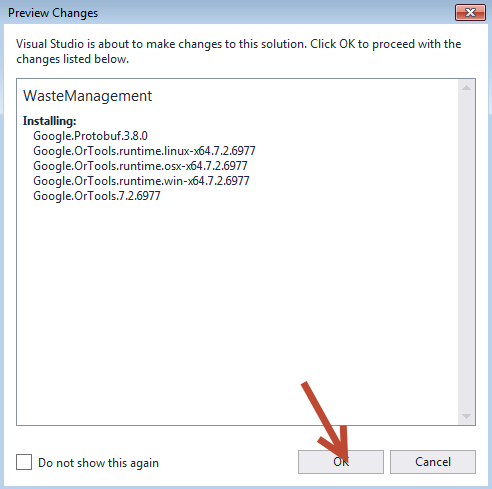
Google.Protobuf was added as a reference, but Google.OrTools was not

I manually added Google.OrTools as a reference to my project.

Built my web project and when I went to run I got the strong name error:
Could not load file or assembly 'Google.OrTools' or one of its dependencies. Strong name signature could not be verified. The assembly may have been tampered with, or it was delay signed but not fully signed with the correct private key. (Exception from HRESULT: 0x80131045)
Description: An unhandled exception occurred during the execution of the current web request. Please review the stack trace for more information about the error and where it originated in the code.
Exception Details: System.IO.FileLoadException: Could not load file or assembly 'Google.OrTools' or one of its dependencies. Strong name signature could not be verified. The assembly may have been tampered with, or it was delay signed but not fully signed with the correct private key. (Exception from HRESULT: 0x80131045)
Source Error:
An unhandled exception was generated during the execution of the current web request. Information regarding the origin and location of the exception can be identified using the exception stack trace below.
Assembly Load Trace: The following information can be helpful to determine why the assembly 'Google.OrTools' could not be loaded.
=== Pre-bind state information ===
LOG: DisplayName = Google.OrTools
(Partial)
WRN: Partial binding information was supplied for an assembly:
WRN: Assembly Name: Google.OrTools | Domain ID: 2
WRN: A partial bind occurs when only part of the assembly display name is provided.
WRN: This might result in the binder loading an incorrect assembly.
WRN: It is recommended to provide a fully specified textual identity for the assembly,
WRN: that consists of the simple name, version, culture, and public key token.
WRN: See whitepaper http://go.microsoft.com/fwlink/?LinkId=109270 for more information and common solutions to this issue.
LOG: Appbase = file:///C:/Users/Ed/Documents/Visual Studio 2017/Projects/WasteManagement/WasteManagement/
LOG: Initial PrivatePath = C:\Users\Ed\Documents\Visual Studio 2017\Projects\WasteManagement\WasteManagement\bin
Calling assembly : (Unknown).
LOG: This bind starts in default load context.
LOG: Using application configuration file: C:\Users\Ed\Documents\Visual Studio 2017\Projects\WasteManagement\WasteManagement\web.config
LOG: Using host configuration file: C:\Users\Ed\Documents\IISExpress\config\aspnet.config
LOG: Using machine configuration file from C:\Windows\Microsoft.NET\Framework64\v4.0.30319\config\machine.config.
LOG: Policy not being applied to reference at this time (private, custom, partial, or location-based assembly bind).
LOG: Attempting download of new URL file:///C:/Windows/Microsoft.NET/Framework64/v4.0.30319/Temporary ASP.NET Files/vs/75ffe19c/831bc11c/Google.OrTools.DLL.
LOG: Attempting download of new URL file:///C:/Windows/Microsoft.NET/Framework64/v4.0.30319/Temporary ASP.NET Files/vs/75ffe19c/831bc11c/Google.OrTools/Google.OrTools.DLL.
LOG: Attempting download of new URL file:///C:/Users/Ed/Documents/Visual Studio 2017/Projects/WasteManagement/WasteManagement/bin/Google.OrTools.DLL.
LOG: Using application configuration file: C:\Users\Ed\Documents\Visual Studio 2017\Projects\WasteManagement\WasteManagement\web.config
LOG: Using host configuration file: C:\Users\Ed\Documents\IISExpress\config\aspnet.config
LOG: Using machine configuration file from C:\Windows\Microsoft.NET\Framework64\v4.0.30319\config\machine.config.
LOG: Post-policy reference: Google.OrTools, Version=7.2.6977.0, Culture=neutral, PublicKeyToken=77370d3086a71853
ERR: Failed to complete setup of assembly (hr = 0x80131045). Probing terminated.
Stack Trace:
[FileLoadException: Could not load file or assembly 'Google.OrTools' or one of its dependencies. Strong name signature could not be verified. The assembly may have been tampered with, or it was delay signed but not fully signed with the correct private key. (Exception from HRESULT: 0x80131045)]
[FileLoadException: Could not load file or assembly 'Google.OrTools, Version=7.2.6977.0, Culture=neutral, PublicKeyToken=77370d3086a71853' or one of its dependencies. Strong name signature could not be verified. The assembly may have been tampered with, or it was delay signed but not fully signed with the correct private key. (Exception from HRESULT: 0x80131045)]
System.Reflection.RuntimeAssembly._nLoad(AssemblyName fileName, String codeBase, Evidence assemblySecurity, RuntimeAssembly locationHint, StackCrawlMark& stackMark, IntPtr pPrivHostBinder, Boolean throwOnFileNotFound, Boolean forIntrospection, Boolean suppressSecurityChecks) +0
System.Reflection.RuntimeAssembly.InternalLoadAssemblyName(AssemblyName assemblyRef, Evidence assemblySecurity, RuntimeAssembly reqAssembly, StackCrawlMark& stackMark, IntPtr pPrivHostBinder, Boolean throwOnFileNotFound, Boolean forIntrospection, Boolean suppressSecurityChecks) +225
System.Reflection.RuntimeAssembly.InternalLoad(String assemblyString, Evidence assemblySecurity, StackCrawlMark& stackMark, IntPtr pPrivHostBinder, Boolean forIntrospection) +110
System.Reflection.RuntimeAssembly.InternalLoad(String assemblyString, Evidence assemblySecurity, StackCrawlMark& stackMark, Boolean forIntrospection) +22
System.Reflection.Assembly.Load(String assemblyString) +34
System.Web.Configuration.CompilationSection.LoadAssemblyHelper(String assemblyName, Boolean starDirective) +88
[ConfigurationErrorsException: Could not load file or assembly 'Google.OrTools, Version=7.2.6977.0, Culture=neutral, PublicKeyToken=77370d3086a71853' or one of its dependencies. Strong name signature could not be verified. The assembly may have been tampered with, or it was delay signed but not fully signed with the correct private key. (Exception from HRESULT: 0x80131045)]
System.Web.Configuration.CompilationSection.LoadAssemblyHelper(String assemblyName, Boolean starDirective) +1259
System.Web.Configuration.CompilationSection.LoadAllAssembliesFromAppDomainBinDirectory() +474
System.Web.Configuration.CompilationSection.LoadAssembly(AssemblyInfo ai) +120
System.Web.Configuration.AssemblyInfo.get_AssemblyInternal() +76
System.Web.Compilation.BuildManager.GetReferencedAssemblies(CompilationSection compConfig) +247
System.Web.Compilation.BuildManager.GetPreStartInitMethodsFromReferencedAssemblies() +77
System.Web.Compilation.BuildManager.CallPreStartInitMethods(String preStartInitListPath, Boolean& isRefAssemblyLoaded) +204
System.Web.Compilation.BuildManager.ExecutePreAppStart() +226
System.Web.Hosting.HostingEnvironment.Initialize(ApplicationManager appManager, IApplicationHost appHost, IConfigMapPathFactory configMapPathFactory, HostingEnvironmentParameters hostingParameters, PolicyLevel policyLevel, Exception appDomainCreationException) +1415
[HttpException (0x80004005): Could not load file or assembly 'Google.OrTools, Version=7.2.6977.0, Culture=neutral, PublicKeyToken=77370d3086a71853' or one of its dependencies. Strong name signature could not be verified. The assembly may have been tampered with, or it was delay signed but not fully signed with the correct private key. (Exception from HRESULT: 0x80131045)]
System.Web.HttpRuntime.FirstRequestInit(HttpContext context) +555
System.Web.HttpRuntime.EnsureFirstRequestInit(HttpContext context) +154
System.Web.HttpRuntime.ProcessRequestNotificationPrivate(IIS7WorkerRequest wr, HttpContext context) +844
Version Information: Microsoft .NET Framework Version:4.0.30319; ASP.NET Version:4.7.3429.0
 manofglass1
All 71 comments
Same issue, any updates on resolution or workarounds?
Have no issues in building/running Console 64bit .Net Framework 4.7.2 project, but the same setup in web api 64bit class library output running .Net Framework 4.7.2 is producing the same error above.
 neeman1
on 24 Jul 2019
neeman1
on 24 Jul 2019
No ideas at all.
Laurent Perron | Operations Research | [email protected] | (33) 1 42 68 53
00
Le mer. 24 juil. 2019 à 09:34, neeman1 notifications@github.com a écrit :
Same issue, any updates on resolution or workarounds?
Have no issues in building/running Console 64bit .Net Framework 4.7.2
project, but the same setup in web api 64bit class library output running
.Net Framework 4.7.2 is producing the same error above.—
You are receiving this because you are subscribed to this thread.
Reply to this email directly, view it on GitHub
https://github.com/google/or-tools/issues/1421?email_source=notifications&email_token=ACUPL3PS4JTNABYAV7FRKJDQBCACJA5CNFSM4ICNJBKKYY3PNVWWK3TUL52HS4DFVREXG43VMVBW63LNMVXHJKTDN5WW2ZLOORPWSZGOD2W4ZUA#issuecomment-514706640,
or mute the thread
https://github.com/notifications/unsubscribe-auth/ACUPL3OOOPYHCOJUAJMBIY3QBCACJANCNFSM4ICNJBKA
.
 lperron
on 24 Jul 2019
lperron
on 24 Jul 2019
Do you still have the issue with 7.3 ?
lperron
on 7 Aug 2019
I do.Sent from my Verizon, Samsung Galaxy smartphone
-------- Original message --------From: Laurent Perron notifications@github.com Date: 8/6/19 21:02 (GMT-05:00) To: google/or-tools or-tools@noreply.github.com Cc: manofglass1 emahoney@idpsolutions.com, Author author@noreply.github.com Subject: Re: [google/or-tools] Google.ortools 7.2.6977 C# Could not load file
or assembly 'Google.OrTools' or one of its dependencies. Strong name signature
could not be verified. The assembly may have been tampered with, or it was
delay signed but not fully signed with the correct private key. (Exception
from HRESULT: 0x80131045) (#1421) Do you still have the issue with 7.3 ?
—You are receiving this because you authored the thread.Reply to this email directly, view it on GitHub, or mute the thread.
[
{
"@context": "http://schema.org",
"@type": "EmailMessage",
"potentialAction": {
"@type": "ViewAction",
"target": "https://github.com/google/or-tools/issues/1421?email_source=notifications\u0026email_token=AC2WUPJF22MQKI2EOAZACPTQDINLXA5CNFSM4ICNJBKKYY3PNVWWK3TUL52HS4DFVREXG43VMVBW63LNMVXHJKTDN5WW2ZLOORPWSZGOD3W4CBQ#issuecomment-518897926",
"url": "https://github.com/google/or-tools/issues/1421?email_source=notifications\u0026email_token=AC2WUPJF22MQKI2EOAZACPTQDINLXA5CNFSM4ICNJBKKYY3PNVWWK3TUL52HS4DFVREXG43VMVBW63LNMVXHJKTDN5WW2ZLOORPWSZGOD3W4CBQ#issuecomment-518897926",
"name": "View Issue"
},
"description": "View this Issue on GitHub",
"publisher": {
"@type": "Organization",
"name": "GitHub",
"url": "https://github.com"
}
}
]
manofglass1
on 7 Aug 2019
Laurent, sorry – didn’t realize you were talking about a different version of Or.tools. Version 7.3, as it turns out, requires a different version of nugget that visual studio 2015 is not compatible with. Is there another way to get this without going through nugget package manager?
From: Laurent Perron [mailto:[email protected]]
Sent: Tuesday, August 06, 2019 9:03 PM
To: google/or-tools
Cc: manofglass1; Author
Subject: Re: [google/or-tools] Google.ortools 7.2.6977 C# Could not load file or assembly 'Google.OrTools' or one of its dependencies. Strong name signature could not be verified. The assembly may have been tampered with, or it was delay signed but not fully signe
Do you still have the issue with 7.3 ?
—
You are receiving this because you authored the thread.
Reply to this email directly, view it on GitHub https://github.com/google/or-tools/issues/1421?email_source=notifications&email_token=AC2WUPJF22MQKI2EOAZACPTQDINLXA5CNFSM4ICNJBKKYY3PNVWWK3TUL52HS4DFVREXG43VMVBW63LNMVXHJKTDN5WW2ZLOORPWSZGOD3W4CBQ#issuecomment-518897926 , or mute the thread https://github.com/notifications/unsubscribe-auth/AC2WUPNDQDU7RMEHGSUUN73QDINLXANCNFSM4ICNJBKA . https://github.com/notifications/beacon/AC2WUPNUUJG56I65FSN6ZD3QDINLXA5CNFSM4ICNJBKKYY3PNVWWK3TUL52HS4DFVREXG43VMVBW63LNMVXHJKTDN5WW2ZLOORPWSZGOD3W4CBQ.gif
manofglass1
on 7 Aug 2019
We dropped support for 2015 something like 2 versions ago.
Laurent Perron | Operations Research | [email protected] | (33) 1 42 68 53
00
Le mer. 7 août 2019 à 10:17, manofglass1 notifications@github.com a
écrit :
Laurent, sorry – didn’t realize you were talking about a different version
of Or.tools. Version 7.3, as it turns out, requires a different version of
nugget that visual studio 2015 is not compatible with. Is there another way
to get this without going through nugget package manager?From: Laurent Perron [mailto:[email protected]]
Sent: Tuesday, August 06, 2019 9:03 PM
To: google/or-tools
Cc: manofglass1; Author
Subject: Re: [google/or-tools] Google.ortools 7.2.6977 C# Could not load
file or assembly 'Google.OrTools' or one of its dependencies. Strong name
signature could not be verified. The assembly may have been tampered with,
or it was delay signed but not fully signeDo you still have the issue with 7.3 ?
—
You are receiving this because you authored the thread.
Reply to this email directly, view it on GitHub <
https://github.com/google/or-tools/issues/1421?email_source=notifications&email_token=AC2WUPJF22MQKI2EOAZACPTQDINLXA5CNFSM4ICNJBKKYY3PNVWWK3TUL52HS4DFVREXG43VMVBW63LNMVXHJKTDN5WW2ZLOORPWSZGOD3W4CBQ#issuecomment-518897926>
, or mute the thread <
https://github.com/notifications/unsubscribe-auth/AC2WUPNDQDU7RMEHGSUUN73QDINLXANCNFSM4ICNJBKA>
. <
https://github.com/notifications/beacon/AC2WUPNUUJG56I65FSN6ZD3QDINLXA5CNFSM4ICNJBKKYY3PNVWWK3TUL52HS4DFVREXG43VMVBW63LNMVXHJKTDN5WW2ZLOORPWSZGOD3W4CBQ.gif>—
You are receiving this because you commented.
Reply to this email directly, view it on GitHub
https://github.com/google/or-tools/issues/1421?email_source=notifications&email_token=ACUPL3N5B32N256LKDYX25DQDL7SRA5CNFSM4ICNJBKKYY3PNVWWK3TUL52HS4DFVREXG43VMVBW63LNMVXHJKTDN5WW2ZLOORPWSZGOD3ZDMMQ#issuecomment-519190066,
or mute the thread
https://github.com/notifications/unsubscribe-auth/ACUPL3J3GSEAMFDNTHKHPZLQDL7SRANCNFSM4ICNJBKA
.
lperron
on 8 Aug 2019
Can you try adding visual studio 2017 redistributable libraries ?
Laurent Perron | Operations Research | [email protected] | (33) 1 42 68 53
00
Le mer. 7 août 2019 à 15:28, Laurent Perron lperron@google.com a écrit :
We dropped support for 2015 something like 2 versions ago.
Laurent Perron | Operations Research | [email protected] | (33) 1 42 68
53 00Le mer. 7 août 2019 à 10:17, manofglass1 notifications@github.com a
écrit :Laurent, sorry – didn’t realize you were talking about a different
version of Or.tools. Version 7.3, as it turns out, requires a different
version of nugget that visual studio 2015 is not compatible with. Is there
another way to get this without going through nugget package manager?From: Laurent Perron [mailto:[email protected]]
Sent: Tuesday, August 06, 2019 9:03 PM
To: google/or-tools
Cc: manofglass1; Author
Subject: Re: [google/or-tools] Google.ortools 7.2.6977 C# Could not load
file or assembly 'Google.OrTools' or one of its dependencies. Strong name
signature could not be verified. The assembly may have been tampered with,
or it was delay signed but not fully signeDo you still have the issue with 7.3 ?
—
You are receiving this because you authored the thread.
Reply to this email directly, view it on GitHub <
https://github.com/google/or-tools/issues/1421?email_source=notifications&email_token=AC2WUPJF22MQKI2EOAZACPTQDINLXA5CNFSM4ICNJBKKYY3PNVWWK3TUL52HS4DFVREXG43VMVBW63LNMVXHJKTDN5WW2ZLOORPWSZGOD3W4CBQ#issuecomment-518897926>
, or mute the thread <
https://github.com/notifications/unsubscribe-auth/AC2WUPNDQDU7RMEHGSUUN73QDINLXANCNFSM4ICNJBKA>
. <
https://github.com/notifications/beacon/AC2WUPNUUJG56I65FSN6ZD3QDINLXA5CNFSM4ICNJBKKYY3PNVWWK3TUL52HS4DFVREXG43VMVBW63LNMVXHJKTDN5WW2ZLOORPWSZGOD3W4CBQ.gif>—
You are receiving this because you commented.
Reply to this email directly, view it on GitHub
https://github.com/google/or-tools/issues/1421?email_source=notifications&email_token=ACUPL3N5B32N256LKDYX25DQDL7SRA5CNFSM4ICNJBKKYY3PNVWWK3TUL52HS4DFVREXG43VMVBW63LNMVXHJKTDN5WW2ZLOORPWSZGOD3ZDMMQ#issuecomment-519190066,
or mute the thread
https://github.com/notifications/unsubscribe-auth/ACUPL3J3GSEAMFDNTHKHPZLQDL7SRANCNFSM4ICNJBKA
.
lperron
on 8 Aug 2019
Can I add these 2017 redistributable libraries to VS 2015, or only to VS 2017?Sent from my Verizon, Samsung Galaxy smartphone
-------- Original message --------From: Laurent Perron notifications@github.com Date: 8/7/19 18:29 (GMT-05:00) To: google/or-tools or-tools@noreply.github.com Cc: manofglass1 emahoney@idpsolutions.com, Author author@noreply.github.com Subject: Re: [google/or-tools] Google.ortools 7.2.6977 C# Could not load file
or assembly 'Google.OrTools' or one of its dependencies. Strong name signature
could not be verified. The assembly may have been tampered with, or it was
delay signed but not fully signed with the correct private key. (Exception
from HRESULT: 0x80131045) (#1421) Can you try adding visual studio 2017 redistributable libraries ?
Laurent Perron | Operations Research | [email protected] | (33) 1 42 68 53
00
Le mer. 7 août 2019 à 15:28, Laurent Perron lperron@google.com a écrit :
We dropped support for 2015 something like 2 versions ago.
Laurent Perron | Operations Research | [email protected] | (33) 1 42 68
53 00
>
>
>
Le mer. 7 août 2019 à 10:17, manofglass1 notifications@github.com a
écrit :
>
Laurent, sorry – didn’t realize you were talking about a different
version of Or.tools. Version 7.3, as it turns out, requires a different
version of nugget that visual studio 2015 is not compatible with. Is there
another way to get this without going through nugget package manager?
>
>
>
From: Laurent Perron [mailto:[email protected]]
Sent: Tuesday, August 06, 2019 9:03 PM
To: google/or-tools
Cc: manofglass1; Author
Subject: Re: [google/or-tools] Google.ortools 7.2.6977 C# Could not load
file or assembly 'Google.OrTools' or one of its dependencies. Strong name
signature could not be verified. The assembly may have been tampered with,
or it was delay signed but not fully signe
>
>
>
Do you still have the issue with 7.3 ?
>
—
You are receiving this because you authored the thread.
Reply to this email directly, view it on GitHub <
https://github.com/google/or-tools/issues/1421?email_source=notifications&email_token=AC2WUPJF22MQKI2EOAZACPTQDINLXA5CNFSM4ICNJBKKYY3PNVWWK3TUL52HS4DFVREXG43VMVBW63LNMVXHJKTDN5WW2ZLOORPWSZGOD3W4CBQ#issuecomment-518897926>
, or mute the thread <
https://github.com/notifications/unsubscribe-auth/AC2WUPNDQDU7RMEHGSUUN73QDINLXANCNFSM4ICNJBKA>
. <
https://github.com/notifications/beacon/AC2WUPNUUJG56I65FSN6ZD3QDINLXA5CNFSM4ICNJBKKYY3PNVWWK3TUL52HS4DFVREXG43VMVBW63LNMVXHJKTDN5WW2ZLOORPWSZGOD3W4CBQ.gif>
>
>
—
You are receiving this because you commented.
Reply to this email directly, view it on GitHub
or mute the thread
https://github.com/notifications/unsubscribe-auth/ACUPL3J3GSEAMFDNTHKHPZLQDL7SRANCNFSM4ICNJBKA
.
>
>
—You are receiving this because you authored the thread.Reply to this email directly, view it on GitHub, or mute the thread.
[
{
"@context": "http://schema.org",
"@type": "EmailMessage",
"potentialAction": {
"@type": "ViewAction",
"target": "https://github.com/google/or-tools/issues/1421?email_source=notifications\u0026email_token=AC2WUPONDXSBDYVXYQCOELDQDNEFNA5CNFSM4ICNJBKKYY3PNVWWK3TUL52HS4DFVREXG43VMVBW63LNMVXHJKTDN5WW2ZLOORPWSZGOD3Z4IMQ#issuecomment-519291954",
"url": "https://github.com/google/or-tools/issues/1421?email_source=notifications\u0026email_token=AC2WUPONDXSBDYVXYQCOELDQDNEFNA5CNFSM4ICNJBKKYY3PNVWWK3TUL52HS4DFVREXG43VMVBW63LNMVXHJKTDN5WW2ZLOORPWSZGOD3Z4IMQ#issuecomment-519291954",
"name": "View Issue"
},
"description": "View this Issue on GitHub",
"publisher": {
"@type": "Organization",
"name": "GitHub",
"url": "https://github.com"
}
}
]
manofglass1
on 8 Aug 2019
It does not impact the visual studio. These are shared libraries for
programs compiled with vs2017.
Laurent Perron | Operations Research | [email protected] | (33) 1 42 68 53
00
Le mer. 7 août 2019 à 17:39, manofglass1 notifications@github.com a
écrit :
Can I add these 2017 redistributable libraries to VS 2015, or only to VS
2017?Sent from my Verizon, Samsung Galaxy smartphone
-------- Original message --------From: Laurent Perron <
[email protected]> Date: 8/7/19 18:29 (GMT-05:00) To:
google/or-tools or-tools@noreply.github.com Cc: manofglass1 <
[email protected]>, Author author@noreply.github.com Subject:
Re: [google/or-tools] Google.ortools 7.2.6977 C# Could not load file
or assembly 'Google.OrTools' or one of its dependencies. Strong name
signature
could not be verified. The assembly may have been tampered with, or it
was
delay signed but not fully signed with the correct private key.
(Exception
from HRESULT: 0x80131045) (#1421) Can you try adding visual studio 2017
redistributable libraries ?Laurent Perron | Operations Research | [email protected] | (33) 1 42 68
5300
Le mer. 7 août 2019 à 15:28, Laurent Perron lperron@google.com a écrit :
We dropped support for 2015 something like 2 versions ago.
Laurent Perron | Operations Research | [email protected] | (33) 1 42 68
53 00
>
>
>
Le mer. 7 août 2019 à 10:17, manofglass1 notifications@github.com a
écrit :
>
Laurent, sorry – didn’t realize you were talking about a different
version of Or.tools. Version 7.3, as it turns out, requires a different
version of nugget that visual studio 2015 is not compatible with. Is
thereanother way to get this without going through nugget package manager?
>
>
>
From: Laurent Perron [mailto:[email protected]]
Sent: Tuesday, August 06, 2019 9:03 PM
To: google/or-tools
Cc: manofglass1; Author
Subject: Re: [google/or-tools] Google.ortools 7.2.6977 C# Could not load
file or assembly 'Google.OrTools' or one of its dependencies. Strong
namesignature could not be verified. The assembly may have been tampered
with,or it was delay signed but not fully signe
>
>
>
Do you still have the issue with 7.3 ?
>
—
You are receiving this because you authored the thread.
Reply to this email directly, view it on GitHub <
, or mute the thread <
>
https://github.com/notifications/unsubscribe-auth/AC2WUPNDQDU7RMEHGSUUN73QDINLXANCNFSM4ICNJBKA. <
>
>
—
You are receiving this because you commented.
Reply to this email directly, view it on GitHub
or mute the thread
<
https://github.com/notifications/unsubscribe-auth/ACUPL3J3GSEAMFDNTHKHPZLQDL7SRANCNFSM4ICNJBKA.
>
>
—You are receiving this because you authored the thread.Reply to this
email directly, view it on GitHub, or mute the thread.[
{
"@context": "http://schema.org",
"@type": "EmailMessage",
"potentialAction": {
"@type": "ViewAction",
"target": "
https://github.com/google/or-tools/issues/1421?email_source=notifications\u0026email_token=AC2WUPONDXSBDYVXYQCOELDQDNEFNA5CNFSM4ICNJBKKYY3PNVWWK3TUL52HS4DFVREXG43VMVBW63LNMVXHJKTDN5WW2ZLOORPWSZGOD3Z4IMQ#issuecomment-519291954
","url": "
https://github.com/google/or-tools/issues/1421?email_source=notifications\u0026email_token=AC2WUPONDXSBDYVXYQCOELDQDNEFNA5CNFSM4ICNJBKKYY3PNVWWK3TUL52HS4DFVREXG43VMVBW63LNMVXHJKTDN5WW2ZLOORPWSZGOD3Z4IMQ#issuecomment-519291954
","name": "View Issue"
},
"description": "View this Issue on GitHub",
"publisher": {
"@type": "Organization",
"name": "GitHub",
"url": "https://github.com"
}
}
]
—
You are receiving this because you commented.
Reply to this email directly, view it on GitHub
https://github.com/google/or-tools/issues/1421?email_source=notifications&email_token=ACUPL3JHBGCDNDNGDT6EOEDQDNTLZA5CNFSM4ICNJBKKYY3PNVWWK3TUL52HS4DFVREXG43VMVBW63LNMVXHJKTDN5WW2ZLOORPWSZGOD32CWNY#issuecomment-519318327,
or mute the thread
https://github.com/notifications/unsubscribe-auth/ACUPL3ODCQXALYPTN22IMMTQDNTLZANCNFSM4ICNJBKA
.
lperron
on 8 Aug 2019
Hello,
First of all - thank you for the ortools - it is extremely good and has almost all the functionality I need.
Unfortunately, I also experience FileLoadException when using OrTools 7.3 in VisualStudio 2019 and Rider 2019. Some things that may affect this issue:
- Nuget folder structure: To me the folder structure of the generated Nuget looks not standard.
- Google.OrTools.7.3.7083 is the Nuget for providing the managed Google.OrTools.dll dependency. It contains the Google.OrTools.dll in a folder
ref/netstandard2.0, but it should be rather in a folder namedlib/netstandard2.0(See also) - Netstandard2.0 is compatible with netframework 4.6.1 (See also). Typically, when building a netstandard package a compatible netframework package is built in order to support net framework.
- Google.OrTools.7.3.7083 is the Nuget for providing the managed Google.OrTools.dll dependency. It contains the Google.OrTools.dll in a folder
For an example with a "similar" project that also uses a managed Nuget with a platform-dependent native NuGet see LibGit2Sharp:

Duplicated managed dll: Google.OrTools.7.3.7083 Nuget contains a managed .Net Google.OrTools.dll with a size of 598 KB. This dll contains only method empty stubs:

Whereas google.ortools.runtime.win-x64.7.3.7083 Nuget also contains a managed .Net Google.OrTools.dll under runtimes/win-x64/lib/netstandard2.0 but with a size 962 kb. This dll contains the correct managed code for the Google.OrTools dependency but should be provided by the Google.OrTools NuGet package (in my opinion).Nice to haves:
- It would be great to include the symbols (Google.OrTools.pdb) for the managed dll in the Nuget in order to improve the debugging experience.
- It would be nice to include the generated documentation file (Google.OrTools.xml) in the Nuget.
- It would be also nice to remove the content files in the Google.OrTools Nuget. Currently, all proto files are added to the content folder of the Nuget and are therefore included in the project that consumes the dependency and results in a lot of unnecessary files and folders in the project.

Best regards,
Peter
 ptr1120
on 11 Aug 2019
ptr1120
on 11 Aug 2019
You seem to know much more than me.
I would really appreciate if you can send me a pull request with the
relevant changes.
The build.process is quite simple, located in makefiles/Makefile.dotnet.mk
and the code in ortools/dotnet/*
This is beyond my skills and my time.
Thanks a lot.
Le dim. 11 août 2019 à 03:32, Peter Bruch notifications@github.com a
écrit :
Hello,
First of all - thank you for the ortools - it is extremely good and has
almost all the functionality I need.
Unfortunately, I also experience FileLoadException when using OrTools 7.3
in VisualStudio 2019 and Rider 2019. Some things that may affect this issue:
Nuget folder structure: To me the folder structure of the generated
Nuget looks not standard.Google.OrTools.7.3.7083 is the Nuget for providing the managed
Google.OrTools.dll dependency. It contains the Google.OrTools.dll in a
folder ref/netstandard2.0, but it should be rather in a folder named
lib/netstandard2.0 (See also
https://docs.microsoft.com/de-de/nuget/create-packages/supporting-multiple-target-frameworks#framework-version-folder-structure
)- Netstandard2.0 is compatible with netframework 4.6.1 (See also
https://docs.microsoft.com/de-de/dotnet/standard/net-standard).
Typically, when building a netstandard package a compatible netframework
package is built in order to support net framework.For an example with a "similar" project that also uses a managed Nuget
with a platform-dependent native NuGet see LibGit2Sharp:
[image: Capture]
https://user-images.githubusercontent.com/582627/62832523-18adb480-bc30-11e9-8747-2e7ea81f508b.PNG1.
Duplicated managed dll: Google.OrTools.7.3.7083 Nuget contains a
managed .Net Google.OrTools.dll with a size of 598 KB. This dll contains
only method empty stubs:
[image: Capture2]
https://user-images.githubusercontent.com/582627/62832557-d0db5d00-bc30-11e9-9fde-44052b8c3d91.PNG
Whereas google.ortools.runtime.win-x64.7.3.7083 Nuget also contains a
managed .Net Google.OrTools.dll under runtimes/win-x64/lib/netstandard2.0
but with a size 962 kb. This dll contains the correct managed code for the
Google.OrTools dependency but should be provided by the Google.OrTools
NuGet package (in my opinion).
2.Nice to haves:
- It would be great to include the symbols (Google.OrTools.pdb) for
the managed dll in the Nuget in order to improve the debugging experience.- It would be nice to include the generated documentation file
(Google.OrTools.xml) in the Nuget.- It would be also nice to remove the content files in the
Google.OrTools Nuget. Currently, all proto files are added to the content
folder of the Nuget and are therefore included in the project that consumes
the dependency and results in a lot of unnecessary files and folders in the
project.
[image: Capture3]
https://user-images.githubusercontent.com/582627/62832683-9c68a080-bc32-11e9-9019-1637597b76e9.PNGBest regards,
Peter—
You are receiving this because you commented.
Reply to this email directly, view it on GitHub
https://github.com/google/or-tools/issues/1421?email_source=notifications&email_token=ACUPL3LBGARTDDDZGPXKYU3QD7TD3A5CNFSM4ICNJBKKYY3PNVWWK3TUL52HS4DFVREXG43VMVBW63LNMVXHJKTDN5WW2ZLOORPWSZGOD4A6GAA#issuecomment-520217344,
or mute the thread
https://github.com/notifications/unsubscribe-auth/ACUPL3JK7LFFMLIUTNV37ALQD7TD3ANCNFSM4ICNJBKA
.
lperron
on 11 Aug 2019
Of course, I will have a look at it, hoping to understand the cmake things, where I am not knowing much of...
ptr1120
on 11 Aug 2019
Right now it is makefiles based.
Le dim. 11 août 2019 à 03:46, Peter Bruch notifications@github.com a
écrit :
Of course, I will have a look at it, hoping to understand the cmake
things, where I am not knowing much of...—
You are receiving this because you commented.
Reply to this email directly, view it on GitHub
https://github.com/google/or-tools/issues/1421?email_source=notifications&email_token=ACUPL3PDPJE6TXNCC64OZIDQD7UX5A5CNFSM4ICNJBKKYY3PNVWWK3TUL52HS4DFVREXG43VMVBW63LNMVXHJKTDN5WW2ZLOORPWSZGOD4A6MRA#issuecomment-520218180,
or mute the thread
https://github.com/notifications/unsubscribe-auth/ACUPL3L5UCQRWV7GZ7FUGL3QD7UX5ANCNFSM4ICNJBKA
.
lperron
on 11 Aug 2019
@Mizux : do you know, why the Nuget for the C# Wrapper for OrTools (Google.OrTools.nuget) is platform dependent? Does Swig generate platform-dependent code for the wrapper?
ptr1120
on 11 Aug 2019
No. We generate de runtime on each platform, then we merge them manually.
Le dim. 11 août 2019 à 09:40, Peter Bruch notifications@github.com a
écrit :
@Mizux https://github.com/Mizux : do you know, why the Nuget for the C#
Wrapper for OrTools (Google.OrTools.nuget) is platform dependent? Does Swig
generate platform-dependent code for the wrapper?—
You are receiving this because you commented.
Reply to this email directly, view it on GitHub
https://github.com/google/or-tools/issues/1421?email_source=notifications&email_token=ACUPL3IQAM3KXSB25ZH7NWDQEA6JDA5CNFSM4ICNJBKKYY3PNVWWK3TUL52HS4DFVREXG43VMVBW63LNMVXHJKTDN5WW2ZLOORPWSZGOD4BEJYQ#issuecomment-520242402,
or mute the thread
https://github.com/notifications/unsubscribe-auth/ACUPL3MVATQYU7DBJSBPFCDQEA6JDANCNFSM4ICNJBKA
.
lperron
on 11 Aug 2019
@lperron : Sorry I need to ask again more clearly. Do you know whether the Swig generated C# code (cs files) is paltform dependent? I would like to make one package for the managed C# code and again 3 for the native, platform dependent Swig c wrapper and ortools binary.
ptr1120
on 13 Aug 2019
When I merge, I only use the Mac version .
So I guess it is platform independent.
Le mar. 13 août 2019 à 10:08, Peter Bruch notifications@github.com a
écrit :
@lperron https://github.com/lperron : Sorry I need to ask again more
clearly. Do you know whether the Swig generated C# code (cs files) is
paltform dependent? I would like to make one package for the managed C#
code and again 3 for the native, platform dependent Swig c wrapper and
ortools binary.—
You are receiving this because you were mentioned.
Reply to this email directly, view it on GitHub
https://github.com/google/or-tools/issues/1421?email_source=notifications&email_token=ACUPL3NXRB7BIVOZKJDIP7DQELTBLA5CNFSM4ICNJBKKYY3PNVWWK3TUL52HS4DFVREXG43VMVBW63LNMVXHJKTDN5WW2ZLOORPWSZGOD4GKKQI#issuecomment-520922433,
or mute the thread
https://github.com/notifications/unsubscribe-auth/ACUPL3MQKP3UKDOQTVS77C3QELTBLANCNFSM4ICNJBKA
.
lperron
on 13 Aug 2019
There is a pull request to fix this problem but as @lperron said, it won't published until September at best. So, is there a workaround for this problem like using different VS version or .Net framework?
 ylmzkaan
on 2 Sep 2019
ylmzkaan
on 2 Sep 2019
I merged your PR.
Thanks
lperron
on 7 Sep 2019
Hi, this issue still happens on version 7.4.7247.0 when consuming the or tools nuget package from a web application targeting .NET Framework 4.6.2 in Visual Studio 2019.
I used sn.exe to check if the assembly had any strong name verification issues and i got this:
sn -v .\Google.OrTools.dll

Microsoft (R) .NET Framework Strong Name Utility  Version 4.0.30319.0
Copyright (c) Microsoft Corporation.  All rights reserved.

Failed to verify assembly -- Strong name validation failed.
Any ideas?
Edit: opened https://github.com/google/or-tools/issues/1655 for this issue
 pablojmp
on 18 Oct 2019
pablojmp
on 18 Oct 2019
I am too struggling to figure out, whats going wrong.
Could not load file or assembly 'Google.OrTools' or one of its dependencies. Strong name signature could not be verified. The assembly may have been tampered with, or it was delay signed but not fully signed with the correct private key. (Exception from HRESULT: 0x80131045)
Developed .NET Standard 2.0 wrapper library for processing data using Google.ORTool 7.4.7247.0 linear solver
Calling it from 4.7.1 WebAPI X64.
First it complained the WebAPI project also need Google.OrTool. Installed the Google.ORTool 7.4.7247.0 and all it dependencies.
I also Tried to copy the dlls and use it as fixed dll reference in standard library. Its giving the same error.
 ranjithota
on 18 Oct 2019
ranjithota
on 18 Oct 2019
Looks like something went wrong during singning of the build binaries, maybe the signing key was wrong/missing?
ptr1120
on 18 Oct 2019
How do I fix it now? I have no idea...
Thinking of removing the whole signing thing and get dlls and use them.
ranjithota
on 18 Oct 2019
If you build the ortools manually you will get a working nuget that you can reference.
ptr1120
on 18 Oct 2019
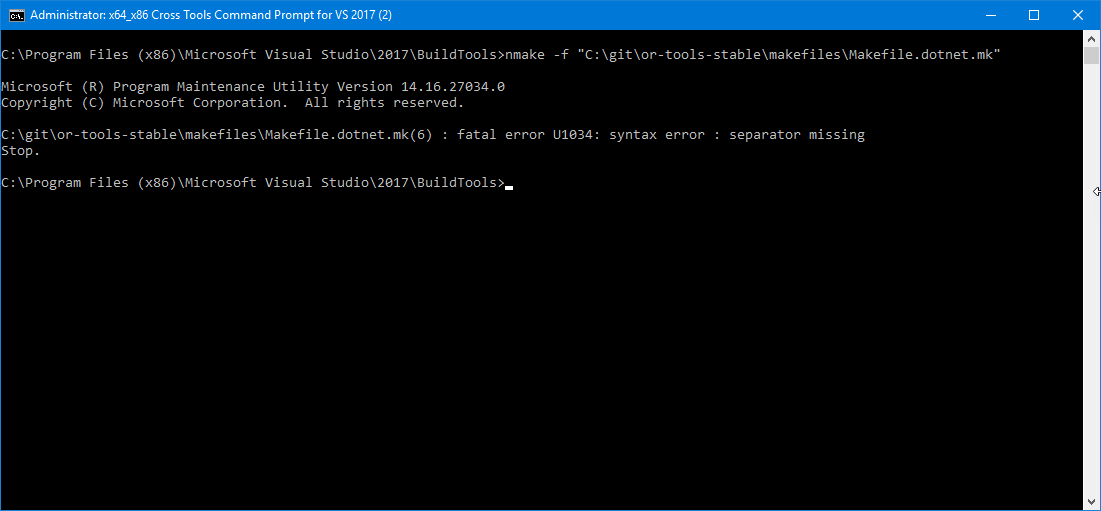
Don't know whats going wrong.
Any direction from here.
ranjithota
on 18 Oct 2019
@ranjithota did you followed this installation guide?
btw, i ran sn -v on previous versions (6.9 onwards) and they all gave a strong name validation failed output
pablojmp
on 18 Oct 2019
Ok, now I tested the new nuget of ortools (7.4) by myself and found NO issues. I tested with visual studio 2019, rider 2019.2.3 and I ran multiple unittests on an external build server.
In order to exclude problems with your project configuration please:
- Create a new solution with a console project (net core or net framework)
- create and select x64 bit as solution configuration
- install ortools 7.4
- replace the content of Program.cs with the fllowing:
public class VarArraySolutionPrinter : CpSolverSolutionCallback
    {
        private readonly IntVar[] _variables;

        public VarArraySolutionPrinter(IntVar[] variables)
        {
            _variables = variables;
        }

        public override void OnSolutionCallback()
        {
            {
                foreach (var v in _variables)
                {
                    Console.Write($"{v.ShortString()}={Value(v)} ");
                }

                Console.WriteLine();
            }
        }
    }

    internal class Program
    {
        private static void Main(string[] args)
        {
            Console.WriteLine("Hello World!");
            // y == x < 5 ? 0 : 10 - x
            // Model.
            var model = new CpModel();

            // Variables.
            var x = model.NewIntVar(0, 10, "x");
            var y = model.NewIntVar(0, 10, "y");

            var b = model.NewBoolVar("b");

            // Implement b == (x >= 5).
            model.Add(x >= 5).OnlyEnforceIf(b);
            model.Add(x < 5).OnlyEnforceIf(b.Not());

            // b implies (y == 10 - x).
            model.Add(y == 10 - x).OnlyEnforceIf(b);
            // not(b) implies y == 0.
            model.Add(y == 0).OnlyEnforceIf(b.Not());

            // Search for x values in increasing order. (in order to improve performance)
            model.AddDecisionStrategy(
                new[] { x },
                DecisionStrategyProto.Types.VariableSelectionStrategy.ChooseFirst,
                DecisionStrategyProto.Types.DomainReductionStrategy.SelectMinValue);

            // Create a solver and solve with a fixed search.
            // Force solver to follow the decision strategy exactly.
            var solver = new CpSolver { StringParameters = "search_branching:FIXED_SEARCH" };

            var cb = new VarArraySolutionPrinter(new[] { x, y, b });
            solver.SearchAllSolutions(model, cb);
            Console.ReadLine();
        }
    }
- run
ptr1120
on 18 Oct 2019
I did it yesterday itself, there is no issue with the console app. I see the issue only when I tried in WebAPI.
Just try with referring the Google.ORTool from a new Web API and use only below line
// Create a solver and solve with a fixed search.
// Force solver to follow the decision strategy exactly.
var solver = new CpSolver { StringParameters = "search_branching:FIXED_SEARCH" };
ranjithota
on 18 Oct 2019
Same here, console app tests run fine; only when consumed from a web project fails
pablojmp
on 18 Oct 2019
What happens if you create a new solution (x64) and a new webproject with ortools and the code above?
ptr1120
on 18 Oct 2019

Same error. Steps followed.
Created New WebAPI project in Visual Studio 2017. added NuGet ref and then the line of code. Boom.
ranjithota
on 18 Oct 2019
test.zip
Here's a test project, same issue at least on my machine (win 10 x64, vs 2019)
pablojmp
on 18 Oct 2019
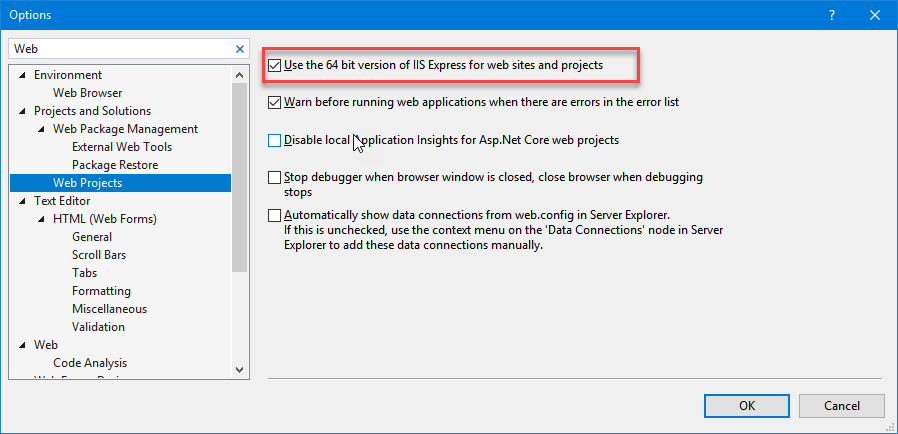
Just to put it on records. IISExpress is also running in X64.
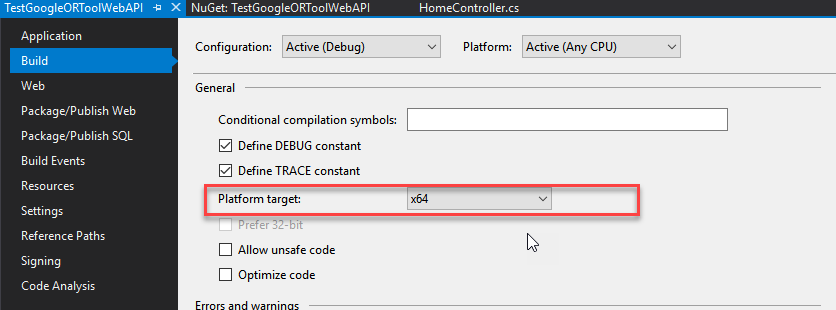
Platform Target is also X64
ranjithota
on 18 Oct 2019
yeap, same here
pablojmp
on 19 Oct 2019
also, this is the output of sn.exe with Protobuf
sn -v .\Google.Protobuf.dll

Microsoft (R) .NET Framework Strong Name Utility  Version 4.0.30319.0
Copyright (c) Microsoft Corporation.  All rights reserved.

Assembly '.\Google.Protobuf.dll' is valid
Summary:
- the issue only occurs when using netframework + web project. I also tested a net core (3.0) web project with IIS => NO issue. Maybe the strong name verification is more strict in a asp netframework project.
- Problem: as you already found out:
Google.OrTools.dllhas not been correctly signed. I am not very experienced with strong name signing (never needed this). I tested various dlls and the result ofsn -v <dllname>should be either "not signed" for a dll without stongnamesigning, or "valid" for a valid signed dll. But for ortools the result is "failed". @lperron can you check whetherGoogle.OrTools.dllis correctly signed during build (sn -k keys.snk). Maybe you can add a verification check in the automatic build that tests the correct signing viasn -v Google.OrTools.dll.
ptr1120
on 19 Oct 2019
I welcome any fix.
lperron
on 22 Oct 2019
@lperron: this must be done by you. The ortools dll is signed during build with a private key that is owned by you. Therefore only you can verify that the signing key is correct and the signing result is valid. Link: How to securely sign .NET assemblies, or Sign an assembly with a strong name.
Btw. There are various problems with signed assembies, thats why microsoft doesn't really recommend it (link), but maybe this is something that is a requiremet for a google assemly. If not I can offer to remove the signing from the build process.
ptr1120
on 22 Oct 2019
@lperron: this must be done by you. The ortools dll is signed during build with a private key that is owned by you. Therefore only you can verify that the signing key is correct and the signing result is valid. Link: How to securely sign .NET assemblies, or Sign an assembly with a strong name.
Btw. There are various problems with signed assembies, thats why microsoft doesn't really recommend it (link), but maybe this is something that is a requiremet for a google assemly. If not I can offer to remove the signing from the build process.
I am currently working on removing the strong name key. @lperron Let me know, if thats an acceptable solution. I'll do a pull req.
ranjithota
on 22 Oct 2019
I generate the key manually.
So you can try the same process as me, and build from source. The
only constraint is to define DOTNET_SNK to point to the key file.
Laurent Perron | Operations Research | [email protected] | (33) 1 42 68 53
00
Le mar. 22 oct. 2019 à 08:47, ranjithota notifications@github.com a
écrit :
@lperron https://github.com/lperron: this must be done by you. The
ortools dll is signed during build with a private key that is owned by you.
Therefore only you can verify that the signing key is correct and the
signing result is valid. Link: How to securely sign .NET assemblies
https://www.google.com/amp/s/lowleveldesign.org/2017/03/07/how-to-securely-sign-dotnet-assemblies/amp/,
or Sign an assembly with a strong name
https://docs.microsoft.com/de-de/dotnet/standard/assembly/sign-strong-name
.
Btw. There are various problems with signed assembies, thats why microsoft
doesn't really recommend it (link
https://github.com/dotnet/corefx/blob/master/Documentation/project-docs/strong-name-signing.md),
but maybe this is something that is a requiremet for a google assemly. If
not I can offer to remove the signing from the build process.I am currently working on removing the strong name key. @lperron
https://github.com/lperron Let me know, if thats an acceptable
solution. I'll do a pull req.—
You are receiving this because you were mentioned.
Reply to this email directly, view it on GitHub
https://github.com/google/or-tools/issues/1421?email_source=notifications&email_token=ACUPL3I5QX6ZSTAJOSA6PCTQP2OZHA5CNFSM4ICNJBKKYY3PNVWWK3TUL52HS4DFVREXG43VMVBW63LNMVXHJKTDN5WW2ZLOORPWSZGOEB4WUFI#issuecomment-544827925,
or unsubscribe
https://github.com/notifications/unsubscribe-auth/ACUPL3OIKYSRS6X54BTLMTLQP2OZHANCNFSM4ICNJBKA
.
lperron
on 22 Oct 2019
I would like to keep strong signing. I just need the process.
Laurent Perron | Operations Research | [email protected] | (33) 1 42 68 53
00
Le mar. 22 oct. 2019 à 08:40, Peter Bruch notifications@github.com a
écrit :
@lperron https://github.com/lperron: this must be done by you. The
ortools dll is signed during build with a private key that is owned by you.
Therefore only you can verify that the signing key is correct and the
signing result is valid. Link: How to securely sign .NET assemblies
https://www.google.com/amp/s/lowleveldesign.org/2017/03/07/how-to-securely-sign-dotnet-assemblies/amp/,
or Sign an assembly with a strong name
https://docs.microsoft.com/de-de/dotnet/standard/assembly/sign-strong-name
.
Btw. There are various problems with signed assembies, thats why microsoft
doesn't really recommend it (link
https://github.com/dotnet/corefx/blob/master/Documentation/project-docs/strong-name-signing.md),
but maybe this is something that is a requiremet for a google assemly. If
not I can offer to remove the signing from the build process.—
You are receiving this because you were mentioned.
Reply to this email directly, view it on GitHub
https://github.com/google/or-tools/issues/1421?email_source=notifications&email_token=ACUPL3JRFOCBFS7EEMQGZWTQP2N57A5CNFSM4ICNJBKKYY3PNVWWK3TUL52HS4DFVREXG43VMVBW63LNMVXHJKTDN5WW2ZLOORPWSZGOEB4WF7Y#issuecomment-544826111,
or unsubscribe
https://github.com/notifications/unsubscribe-auth/ACUPL3NQYSLDFLWA3OGVB7TQP2N57ANCNFSM4ICNJBKA
.
lperron
on 22 Oct 2019
I found a workaround for this issue; it seems that adding <hostingEnvironment shadowCopyBinAssemblies="false" /> to the .net framework asp app configuration solves the problem.
Shadow copy is a feature of IIS used to minimize downtime when modifying assemblies from the webapp while the server is running; to do this it copies assemblies to an IIS temp folder but it seems that native dlls are not copied (hello google-ortools-native.dll :-/ )
Still, it won't hurt to have the Google.OrTools.dll assembly signed.
Thanks for this wonderful project btw, it really works very well!
pablojmp
on 22 Oct 2019
@ranjithota how to bypass strong name verification for an assembly
In this case the message is unrelated because the error was a missing native dependency. Looks like strong name validation is bypassed by default
pablojmp
on 22 Oct 2019
I found a workaround for this issue; it seems that adding
<hostingEnvironment shadowCopyBinAssemblies="false" />to the .net framework asp app configuration solves the problem.Shadow copy is a feature of IIS used to minimize downtime when modifying assemblies from the webapp while the server is running; to do this it copies assemblies to an IIS temp folder but it seems that native dlls are not copied (hello google-ortools-native.dll :-/ )
Still, it won't hurt to have the Google.OrTools.dll assembly signed.
Thanks for this wonderful project btw, it really works very well!
it doesnt work when trying to publish, it gives following error.
Severity Code Description Project File Line Suppression State Suppression State
Error Unable to copy file "obj\Debug\RouteApp.dll" to "bin\RouteApp.dll". The process cannot access the file 'bin\RouteApp.dll' because it is being used by another process. RouteApp
Severity Code Description Project File Line Suppression State Suppression State
Error Could not copy "obj\Debug\RouteApp.dll" to "bin\RouteApp.dll". Exceeded retry count of 10. Failed. The file is locked by: "Microsoft.VisualStudio.Web.Host.exe (15128)" RouteApp
 zohaibdhukka
on 22 Oct 2019
zohaibdhukka
on 22 Oct 2019
@zohaibdhukka: why do you mean your error has something to do with the problem here? Did you stop IIS before publishing? Because the publishing seems to have a problem to access your RouteApp.dll that may be in access of your IDE or IIS.
ptr1120
on 23 Oct 2019

please help me to slove this issue my deadline are very close
zohaibdhukka
on 24 Oct 2019
rebuild from sources, try to sign locally
I have no clue
Laurent Perron | Operations Research | [email protected] | (33) 1 42 68 53
00
Le jeu. 24 oct. 2019 à 14:04, Zohaib Dhuka notifications@github.com a
écrit :
>
https://user-images.githubusercontent.com/34459143/67401485-d8927880-f574-11e9-9eee-8eeda17e732e.PNG
please help me to slove this issue my deadline are very close—
You are receiving this because you were mentioned.
Reply to this email directly, view it on GitHub
https://github.com/google/or-tools/issues/1421?email_source=notifications&email_token=ACUPL3LK5AF3JAQEOTCMLOLQQGFLHA5CNFSM4ICNJBKKYY3PNVWWK3TUL52HS4DFVREXG43VMVBW63LNMVXHJKTDN5WW2ZLOORPWSZGOECEY5MY#issuecomment-545885875,
or unsubscribe
https://github.com/notifications/unsubscribe-auth/ACUPL3I2IP5Y7HSLYPMTRP3QQGFLHANCNFSM4ICNJBKA
.
lperron
on 24 Oct 2019
i have tried everything and one more thing when i install version 6.5 it works without any errors but when ever i try to add latest version it give me this error and currently i am working on vs2019 .net framework 4.7.2 and even i reset my pc to complete factory mode and tried but no luck
zohaibdhukka
on 24 Oct 2019
and how do i sign locally
zohaibdhukka
on 24 Oct 2019
@zohaibdhukka Hi, try this test project
You'll need to run nuget restore first, then for some reason it fails if you don't do
Update-Package Microsoft.CodeDom.Providers.DotNetCompilerPlatform -r
on the package manager console.
Hope it works
pablojmp
on 24 Oct 2019
Use NuGet Package Restore to download them; there's your problem.
See my previous comment
You'll need to run nuget restore first, then for some reason it fails if you don't do
Update-Package Microsoft.CodeDom.Providers.DotNetCompilerPlatform -r
on the package manager console.
pablojmp
on 24 Oct 2019
and test project also give me the same "Could not load file" error
zohaibdhukka
on 24 Oct 2019
@ranjithota how to bypass strong name verification for an assembly
In this case the message is unrelated because the error was a missing native dependency. Looks like strong name validation is bypassed by default

Removed strong name and public key token and built my own nuget packages, getting above error. Package explorer view of the generated package.

ranjithota
on 24 Oct 2019
My current investigation on Archlinux
Get the published package
I downloaded the Google.OrTools official package at:
https://www.nuget.org/api/v2/package/Google.OrTools/7.4.7247
and extract it (ed a .nupkg is "just" an archive, so i used file-roller)
Check key
Using mono (extra/mono 6.0.0.334-1) to get /usr/bin/sn
pacman -Qo sn
/usr/bin/sn is owned by mono 6.0.0.334-1
I've got:
sn -v lib/netstandard2.0/Google.OrTools.dll
Mono StrongName - version 6.0.0.0
StrongName utility for signing assemblies
Copyright 2002, 2003 Motus Technologies. Copyright 2004-2008 Novell. BSD licensed.

Assembly lib/netstandard2.0/Google.OrTools.dll is delay-signed but not strongnamed

sn -v lib/netstandard2.0/Google.OrTools.dll
Mono StrongName - version 6.0.0.0
StrongName utility for signing assemblies
Copyright 2002, 2003 Motus Technologies. Copyright 2004-2008 Novell. BSD licensed.

Assembly lib/netstandard2.0/Google.OrTools.dll is delay-signed but not strongnamed
to sign we use:
https://github.com/google/or-tools/blob/46173008fdb15dae1dca0e8fa42a21ed6190b6e4/ortools/dotnet/Google.OrTools/Google.OrTools.csproj.in#L15-L18
like specified in the doc...
ref: https://docs.microsoft.com/en-us/dotnet/core/tools/project-json-to-csproj#keyfile
Maybe related: to https://github.com/Microsoft/msbuild/issues/2503
Trying to disable delay sign on pet project
Protocol
mkdir tmp && cd tmp
dotnet new console
dotnet build
Verify the dll is not signed
sn -v bin/Debug/netcoreapp2.2/tmp.dll
Mono StrongName - version 6.0.0.0
StrongName utility for signing assemblies
Copyright 2002, 2003 Motus Technologies. Copyright 2004-2008 Novell. BSD licensed.

bin/Debug/netcoreapp2.2/tmp.dll is not a strongly named assembly.
Then I add to tmp.csproj
<AssemblyOriginatorKeyFile>sgKey.snk</AssemblyOriginatorKeyFile>
<SignAssembly>True</SignAssembly>
<PublicSign>True</PublicSign>
ref: https://docs.microsoft.com/en-us/dotnet/core/tools/project-json-to-csproj#keyfile
then again
dotnet build
Microsoft (R) Build Engine version 15.9.20.63311 for .NET Core
Copyright (C) Microsoft Corporation. All rights reserved.

  Restore completed in 47.69 ms for /home/mizux/work/debug/tmp/tmp.csproj.
CSC : error CS7027: Error signing output with public key from file 'tmp/sgKey.snk'
 -- Could not find file 'tmp/sgKey.snk'. [tmp/tmp.csproj]
CSC : error CS8102: Public signing was specified and requires a public key, but no public key was specified. [tmp/tmp.csproj]

Build FAILED.

CSC : error CS7027: Error signing output with public key from file 'tmp/sgKey.snk'
 -- Could not find file 'tmp/sgKey.snk'. [tmp/tmp.csproj]
CSC : error CS8102: Public signing was specified and requires a public key, but no public key was specified. [tmp/tmp.csproj]
    0 Warning(s)
    2 Error(s)

Time Elapsed 00:00:01.85
then I create a key using
sn -k sgKey.snk
dotnet build
...
 Restore completed in 47.09 ms for tmp/tmp.csproj.
  tmp -> bin/Debug/netcoreapp2.2/tmp.dll

Build succeeded.
    0 Warning(s)
    0 Error(s)

Time Elapsed 00:00:01.58
and when verifying:
sn -v bin/Debug/netcoreapp2.2/tmp.dll
Mono StrongName - version 6.0.0.0
StrongName utility for signing assemblies
Copyright 2002, 2003 Motus Technologies. Copyright 2004-2008 Novell. BSD licensed.

Assembly bin/Debug/netcoreapp2.2/tmp.dll is delay-signed but not strongnamed
I've tried to add
<DelaySign>False</DelaySign>
... without any success...
EDIT:
Potential fix !, still on my pet project, if I use
<!-- Signing -->
<AssemblyOriginatorKeyFile>sgKey.snk</AssemblyOriginatorKeyFile>
<SignAssembly>True</SignAssembly>
<PublicSign>False</PublicSign>
<DelaySign>False</DelaySign>
note: <DelaySign>False</DelaySign> seems optional
I've got:
sn -v bin/Debug/netcoreapp2.2/tmp.dll
Mono StrongName - version 6.0.0.0
StrongName utility for signing assemblies
Copyright 2002, 2003 Motus Technologies. Copyright 2004-2008 Novell. BSD licensed.

Assembly bin/Debug/netcoreapp2.2/tmp.dll is strongnamed.
-> it seems that <PublicSign>True</PublicSign> force the delay sign...
I'll continue my investigation
note: if PublicSign and DelaySign are both True you'll have
dotnet build
Microsoft (R) Build Engine version 15.9.20.63311 for .NET Core
Copyright (C) Microsoft Corporation. All rights reserved.

  Restore completed in 46.94 ms for /home/mizux/work/debug/plop/plop.csproj.
CSC : error CS7102: Compilation options 'PublicSign' and 'DelaySign' can't both be specified at the same time. [/home/mizux/work/debug/plop/plop.csproj]

Build FAILED.
 Mizux
on 18 Nov 2019
Mizux
on 18 Nov 2019
Few references on Public/Delay sign:
Seems that not "really" signing an assembly with the private key is the norm in the OSS...
Since almost no consumers actually need to check if the assembly is fully signed, these publicly built assemblies are useable in almost every scenario where the fully signed one would be used.
Mizux
on 18 Nov 2019
just found https://github.com/google/or-tools/commit/f66e52cc71ef4a0dcd9538eeb9a1c840d25da8c3#diff-60ecbbead3dbf52f65983bc6a00dc84c didn't contains a patch for the meta package Google.OrTools
Mizux
on 18 Nov 2019
just found f66e52c#diff-60ecbbead3dbf52f65983bc6a00dc84c didn't contains a patch for the meta package Google.OrTools
I did the same thing and compiled my code locally to generate the nuget packages and used them instead from nuget server.
Works like a charm.
ranjithota
on 19 Nov 2019
Great. Thanks for doing that.
Laurent Perron | Operations Research | [email protected] | (33) 1 42 68 53
00
Le mar. 19 nov. 2019 à 11:11, ranjithota notifications@github.com a
écrit :
just found f66e52c#diff-60ecbbead3dbf52f65983bc6a00dc84c
https://github.com/google/or-tools/commit/f66e52cc71ef4a0dcd9538eeb9a1c840d25da8c3#diff-60ecbbead3dbf52f65983bc6a00dc84c
didn't contains a patch for the meta package Google.OrToolsI did the same thing and compiled my code locally to generate the nuget
packages and used them instead from nuget server.Works like a charm.
—
You are receiving this because you were mentioned.
Reply to this email directly, view it on GitHub
https://github.com/google/or-tools/issues/1421?email_source=notifications&email_token=ACUPL3JE25DBVPUMI2Y7BU3QUQ25JA5CNFSM4ICNJBKKYY3PNVWWK3TUL52HS4DFVREXG43VMVBW63LNMVXHJKTDN5WW2ZLOORPWSZGOEEPL6JQ#issuecomment-555663142,
or unsubscribe
https://github.com/notifications/unsubscribe-auth/ACUPL3NRFSLBC2WYDPNGMNDQUQ25JANCNFSM4ICNJBKA
.
lperron
on 19 Nov 2019
When is the fix going to show up in the nuget repository?
As far as I interpret the tree correctly, the stable branch still don't contain the commit thus the current nuget packages remains unusable. while dating back to summer 2019.
 m0ddixx
on 16 Jan 2020
m0ddixx
on 16 Jan 2020
once release v7.5 is out ETA around mid/end of January
stable (default) branch is our release release branch and should fast forward from one release tag to an other, currently the last release is v7.4.
The patch has been done on our "devel branch" named master after this last release...
Mizux
on 16 Jan 2020
Hello,
Was this resolved for 7.4 or to be resolved for 7.5? (For .AspNet WebAPI projects)
Or, do we need to dive into the NuGet process and hopefully solve it somehow ...
 GuyBenhaim
on 26 Jan 2020
GuyBenhaim
on 26 Jan 2020
7.5, hopefully next week.
Laurent Perron | Operations Research | [email protected] | (33) 1 42 68 53
00
Le dim. 26 janv. 2020 à 07:17, Guy notifications@github.com a écrit :
Hello,
Was this resolved for 7.4 or to be resolved for 7.5? (For .AspNet WebAPI
projects)
Or, do we need to dive into the NuGet process and hopefully solve it
somehow ...—
You are receiving this because you were mentioned.
Reply to this email directly, view it on GitHub
https://github.com/google/or-tools/issues/1421?email_source=notifications&email_token=ACUPL3MFTXMPVOMXON6JEALQ7WSSLA5CNFSM4ICNJBKKYY3PNVWWK3TUL52HS4DFVREXG43VMVBW63LNMVXHJKTDN5WW2ZLOORPWSZGOEJ5WHXI#issuecomment-578511837,
or unsubscribe
https://github.com/notifications/unsubscribe-auth/ACUPL3OXASIBVJQH3CNLXO3Q7WSSLANCNFSM4ICNJBKA
.
lperron
on 26 Jan 2020
Great.
For me, even a pre-released version should be useful, if accessible via NuGet protocol.
GuyBenhaim
on 26 Jan 2020
You can build from source using the master branch.
Le dim. 26 janv. 2020 à 07:54, Guy notifications@github.com a écrit :
Great.
For me, even a pre-released version should be useful.—
You are receiving this because you were mentioned.
Reply to this email directly, view it on GitHub
https://github.com/google/or-tools/issues/1421?email_source=notifications&email_token=ACUPL3N26PR7HSNNN4UK4OLQ7WW2LA5CNFSM4ICNJBKKYY3PNVWWK3TUL52HS4DFVREXG43VMVBW63LNMVXHJKTDN5WW2ZLOORPWSZGOEJ5XBLY#issuecomment-578515119,
or unsubscribe
https://github.com/notifications/unsubscribe-auth/ACUPL3IDZALHR3NULWVL4PLQ7WW2LANCNFSM4ICNJBKA
.
lperron
on 26 Jan 2020
Hi Laurent Perron/Mizux,
Thank you for the update v7.5
I am able to run a console app using your libraries, and it works perfectly.
I am still having issues with running a web app using your library, I keep getting the following exception "Could not load file or assembly 'Google.OrTools, Version=7.5.7466.0, Culture=neutral, PublicKeyToken=53dbb1ea090cbef7'." Please you help me understand the necessary steps to resolve this.
I've tried to follow some of the above advice but I just can't get it to work.
Your help is greatly appreciated!
Many Thanks
Tino
 tzishi1991
on 7 Feb 2020
tzishi1991
on 7 Feb 2020
@tzishi1991 maybe be related to #1862
Mizux
on 7 Feb 2020
@tzishi1991 You might wan't to check if you have the Visual C++ Redistributable 2019 installed on your machine. download found here
m0ddixx
on 7 Feb 2020
@tzishi1991 maybe be related to #1862
Thanks for the quick reply, I will check that issue#
tzishi1991
on 7 Feb 2020
@tzishi1991 You might wan't to check if you have the Visual C++ Redistributable 2019 installed on your machine. download found here
Hi @m0ddixx , i tried that, but still getting the same error message. Thanks though. I am thinking there might be a dependency conflict with the other libraries in my web app
tzishi1991
on 7 Feb 2020
@tzishi1991 You might wan't to check if you have the Visual C++ Redistributable 2019 installed on your machine. download found here
Hi @m0ddixx , i tried that, but still getting the same error message. Thanks though. I am thinking there might be a dependency conflict with the other libraries in my web app
If you look into #1862 there are differences within the same exception. @Mizux stated that a certain HRESULT code might be related to a COM permission setting within IIS and this is not solved so far.
m0ddixx
on 7 Feb 2020
Hello,
Many comments .... was there a solution for solving the issue?
I saw this comment by ranjithota, on Nov 19, 2019
_just found f66e52c#diff-60ecbbead3dbf52f65983bc6a00dc84c didn't contains a patch for the meta package Google.OrTools
I did the same thing and compiled my code locally to generate the nuget packages and used them instead from nuget server. Works like a charm._
What is this "same thing" ? Was that with a WebAPI project?
GuyBenhaim
on 9 Feb 2020
Related issues
 gsittyz
·
3Comments
gsittyz
·
3Comments
 jack-zalora
·
5Comments
jack-zalora
·
5Comments
 hklarner
·
3Comments
hklarner
·
3Comments
 nosrettep
·
5Comments
nosrettep
·
5Comments
 Phibedy
·
3Comments
Phibedy
·
3Comments
Most helpful comment
Summary:
Google.OrTools.dllhas not been correctly signed. I am not very experienced with strong name signing (never needed this). I tested various dlls and the result ofsn -v <dllname>should be either "not signed" for a dll without stongnamesigning, or "valid" for a valid signed dll. But for ortools the result is "failed". @lperron can you check whetherGoogle.OrTools.dllis correctly signed during build (sn -k keys.snk). Maybe you can add a verification check in the automatic build that tests the correct signing viasn -v Google.OrTools.dll.