Openui5: How to validate not nullable sap.ui.model.type.DateTime?
OpenUI5 version: 1.54.8
URL (minimal example if possible): http://plnkr.co/edit/D8EXpuOUmhu5JuI2k508?p=preview
- Steps to reproduce the problem:
- Input something in DateTimePicker, leave focus
Clear value in DateTimePicker, leave focus
What is the expected result?
When there is not datetime in DateTimePicker, value state is Error and value state text is meaningful.

Meanwhile, keep date check in DateTimePicker:

What happens instead?
- set
nullable: falsedid not work both in DateTimePicker & Input, this should work according to https://sapui5.hana.ondemand.com/#/api/sap.ui.model.odata.type ?

- set
minLength: 1works in Input, but not in DateTimePicker(no Error State):
Input:

- set
minimum: 1works, but with strange value state text:

I did not found minimum in doc, but found it in https://sapui5.hana.ondemand.com/resources/sap/ui/model/type/Date-dbg.js
It seems only constraints validation for minimum and maximum

I also tried this in change event:
onValidateDate: function(oEvent) {
  var oSource = oEvent.getSource();
  var sValue = oSource.getValue();

  // not sure this is the right way
  if (sap.ui.core.format.DateFormat.getDateTimeInstance().parse(sValue)) {
    oSource.setValueState("None");
    return;
  }
  oSource.setValueState("Error");
}
But
if sValue is "", parse() returns null, value state is set to Error in onValidateDate, but it will immediately changed back(None state) by DateTime validation. Or I can remove DateTime type in xml ? But I'd like to use build in type validation.
 TinaC
TinaC
All 8 comments
Hello @TinaC ,
The DateTimePicker control covers specific use cases and has custom logic behind. The maxLengthd doesn't have semantic usage because the validation of the control is made by date format not by the number of the characters in it. In DateTimePicker there are properties as minDate and maxDate which are inherited from the sap.m.DatePicker.
The validation of the DateTimePicker is handled by the change event and you can get if the value is valid by the boolean parameter "valid". If you want to validate the DateTimePicker please use this change event.
Regards, Diana
 Shtilianova
on 19 Jul 2018
Shtilianova
on 19 Jul 2018
Thanks @Shtilianova,
Now I understand minLength & maxLength did not work for date. And minimum is use for setMinDate.
change event works for me:
http://plnkr.co/edit/9gxntn9AbstsbwXvQIJd?p=preview
handleDateChange: function(oEvent) {
  var oDP = oEvent.oSource;
  var sValue = oEvent.getParameter("value");
  var bValid = oEvent.getParameter("valid");

  if (bValid && sValue) {
    oDP.setValueState(sap.ui.core.ValueState.None);
  } else {
    oDP.setValueState(sap.ui.core.ValueState.Error);
  }
}
Still have one question, why nullable: false did not work as I expected?
TinaC
on 20 Jul 2018
And in Date Picker sample, change event seems not recommend to work with data binding? I use oData data binding in my DateTimePicker, which in my sample, using view model data binding to simulate.

But sap.ui.getCore().attachParseError did not work in my sample: http://plnkr.co/edit/IBbgCGfcpW69sz4HHCtU?p=preview
attachParseError & attachValidationSuccess never fired.
TinaC
on 20 Jul 2018
Hi, pls remove "author action" label.
I found out why change event could not work with data binding, but I need DateTime to do format for me, and I can not remove data binding. So this issue is not solved.
Here is my new sample: http://plnkr.co/edit/9gxntn9AbstsbwXvQIJd?p=preview
  <DateTimePicker
    id="date3"
    required="true"
    change="handleDateChange"
    value="{
      path: '/time',
      type: 'sap.ui.model.type.DateTime',
      formatOptions: {
        style: 'medium',
        strictParsing: false
      }
    }"/>
steps to reproduce the problem:
- refresh the page:

- clear the date, leave focus, for the first time, it works:
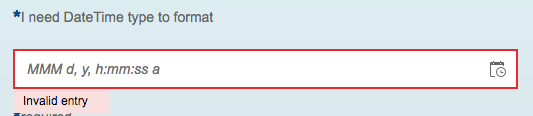
- input a invalid date. seems triggered DateTime type validation:
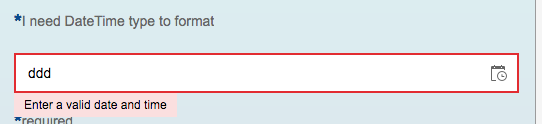
- and then clear the date again, mandatory check no longer work:

It seems after DateTime type validation trigger, my own mandatory check is override.
TinaC
on 24 Jul 2018
Hello @TinaC ,
Thank you for sharing this finding. I've created an internal incident 1870401849. The status of the issue will be updated here in GitHub.
Regards, Diana
Shtilianova
on 7 Sep 2018
Hi @TinaC,
the problem here is that our framework validation is done asynchronously, and the ValueState set by your onChange handler is overruled. This is just the way our framework does validation, and no bug in my opinion.
IMO the only correct way from framework perspective to achieve what you want is to use the "minimum" constraint, but I agree with you that the shown error message isn't meaningful. I will talk with the responsible colleagues about the error text.
Edit: Minimum constraint also makes no sense here.
The alternative solution would be disabling the framework validation and do the validation on your own, create own messages (sap.ui.core.message.Message), and add them to the MessageManager (sap.ui.core.message.MessageManager).
 clemai
on 26 Oct 2018
clemai
on 26 Oct 2018
Hello @TinaC,
Regarding the nullable I guess you have mixed up two things:
nullable is not supported in the sap.ui.model.type.DateTime
https://sapui5.hana.ondemand.com/#/api/sap.ui.model.type.DateTime
but a concept of the OData types
https://sapui5.hana.ondemand.com/#/api/sap.ui.model.odata.type
 devtomtom
on 6 Nov 2018
devtomtom
on 6 Nov 2018
Thanks, @clemai @tommyvinhlam
Yes. I mixed up the doc !
sap.ui.model.type.DateTime extends sap.ui.model.type.Date
constraints of type.DateTime are the same as type.Date: only have minimum and maximum
Without nullable, it seems the only solution is do validation & DateTime format on my own...
TinaC
on 7 Nov 2018
Related issues
 AndreaBorgia-Abo
·
4Comments
AndreaBorgia-Abo
·
4Comments
 boghyon
·
4Comments
boghyon
·
4Comments
 TANYBOSE
·
3Comments
TANYBOSE
·
3Comments
 yaruson
·
3Comments
boghyon
·
3Comments
yaruson
·
3Comments
boghyon
·
3Comments