Openui5: How to preserve `/n` in sap.m.Text
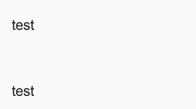
For <span>test \n\n\n test</span>, it showed in page:

But for <Text text="test \n\n\n test"/>, it showed as:
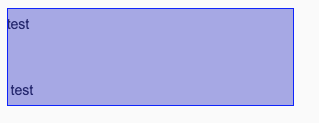
And \n is not preserved in HTML:

As the doc said, I added renderWhitespace="true", maxLines="0":
renderWhitespace="false", maxLines="1":
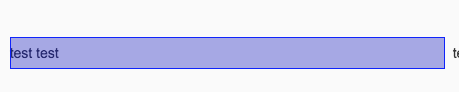
What if I want to show "test \n\n\n test" ?
Failed to find design purpose for renderWhitespace in https://github.com/SAP/openui5/blob/master/src/sap.m/src/sap/m/Text.js#L184
 TinaC
TinaC
All 16 comments
Please check the overview here https://sapui5.hana.ondemand.com/#/api/sap.m.Text/overview
The special break line sequences will be always displayed, unless you turn off wrapping, which will not generate the spaces.
 stephania87
on 2 Apr 2018
stephania87
on 2 Apr 2018
@stephania87 Demo here: http://plnkr.co/edit/5v9ZM8BbY2eIxbAUGTs2?p=preview
I've set wrapping =false, but it still is test 123, not test \n\n 123
TinaC
on 3 Apr 2018
@TinaC That was what I mean, the wrapping property controls only if the already read new line character will be displayed as such, or it will be ignored.
In general, the \n sequence cannot be escaped in order to be shown as such text. You can try with a sap.m.Label
stephania87
on 3 Apr 2018
Which one do you recommend if I want to add data in Form? Label or FormattedText ? If I continue to use sap.m.Text, will it violate our product guideline?
In edit/display form, sap.m.Input in edit form displays different data in sap.m.Text in display form, this confuses user.
Actually, I'm curious why only sap.m.Text works like this, it would be nice if you provide more details about this behavior. Thanks very much.
TinaC
on 3 Apr 2018
@TinaC
Details for the Form control - https://experience.sap.com/fiori-design-web/form/
Please note the part here controls should be either displaying only data, or allowing its editing. This includes setting the control's editable property correspondingly.
Layout controls, controls rendering external HTML should not be used in the Form control.
The Label control should be used for labels, the Text control for visualizing data.
The Text control will display special characters as the system would interpret them e.g. new line. The wrapping will determine if the special characters will be considered by the renderer, or the space will be collapsed. The renderWhiteSpace determines when text will wrap, on new line and/or when the available space ends e.g.
Wrapping is false, but new line is respected.
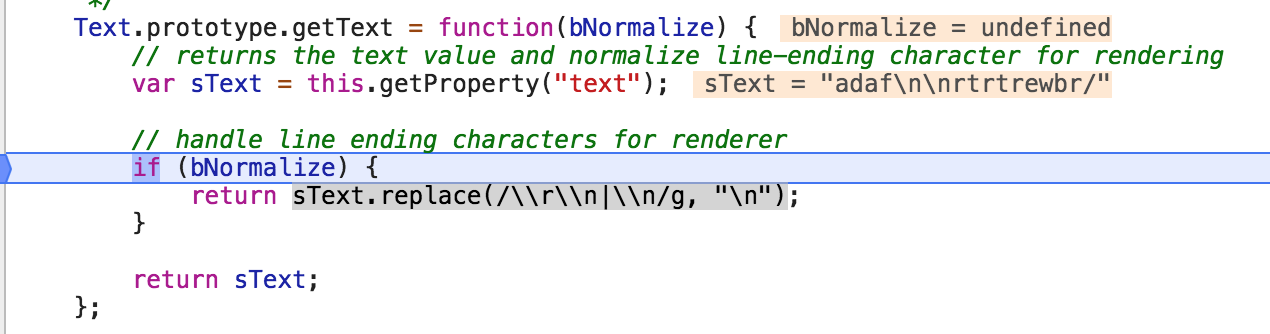
The Text control renders a SPAN element. It is trhe TextRenderer that call the Text getText where the text is normalized on purpose and special characters are escaped.
If you want other behavior from the control, it will be considered a feature request. For the purpose, please provide a case where the user will add formatted string as value, and the text has to appear with the special formatting characters, and the reason for that.
Thanks
stephania87
on 4 Apr 2018
Not sure that I've got your point.
As in this sample: https://sapui5.hana.ondemand.com/#/sample/sap.ui.layout.sample.SimpleForm354/preview
In sap.m.Input:

sap.m.Text:

Don't you find that strange?
TinaC
on 6 Apr 2018
Should I change sap.m.Text to sap.m.Input(editable="false") ?
TinaC
on 6 Apr 2018

What's the purpose of doing this?
TinaC
on 6 Apr 2018
@TinaC
- If the input is a text formatted with \n\n isn't it expected to have it "translated" as new lines when the text is displayed? If not, please elaborate on the use case.
- You can have an Input that is disabled, but the form will have to remain in edit mode (editable=true), where the disabled input will imply that further input is not expected
stephania87
on 7 Apr 2018
Yes, it's not expected. I expected it to be "test \n\n\n test" in sap.m.Text just like in sap.m.Input. Or users can be very confusing. This is also an issue pointing out by our product Penetration Test report. If UI5 team think this is acceptable and can not be fixed, I will argue that with our QA colleges.
So in this sample : https://sapui5.hana.ondemand.com/#/sample/sap.ui.layout.sample.SimpleForm354/preview
We should change sap.m.Text to sap.m.Input?
I can work around this issue in many ways, but I want to know what's the official recommend?
- Replace
sap.m.Textwithsap.m.Label - Replace
sap.m.Textwithsap.m.FormattedText - Replace
sap.m.Textwithsap.m.Input editable="false" - Avoid users input
\in form input validation.
PS: please remove works label
TinaC
on 8 Apr 2018
Objectively, the control is designed to replace the system symbol for new line with the current environment's new line. This is why the control works as it is designed to work. This can be seen also in the source code we discussed - Text.js -> getText and the available documentation.
If it does not work the way you need it in a custom context, it does not mean the control does not work. What you can do, elaborate on the use case. The request will be checked by developers and considered as enhancement or rejected with explanation.
What you provide as information is that the user wants to add formatted string, but not in WYSIWYG way, and then the string should not be interpreted - it should be displayed the way it appears in a code editor, but in a display mode in a form. Can you please validate this requirement and why it is so, and if the user is supposed to use a single or multi line edit field?
About forms, please visit the official Fiori guidelines for each control you are interested in - https://experience.sap.com/fiori-design-web/form/
- in display mode, you can use Labels and Text controls
- in edit mode, you can use Input and similar controls; regardless the controls' enabled/readonly/etc settings, you are still having an editable form with restrictions on some fields.
Note that adding external html (formattedText, HTML controls) and/or layout controls (HorizontalLayout, VBox), you can break the form. Please see the official documentation of the Form control - https://sapui5.hana.ondemand.com/#/api/sap.ui.layout.form.Form/overview
Also to clarify:
- \n is system specification, which in HTML is
FormattedText gets html. - sap.m.Text (not sap.m.label) is replacement of Input fields in many cases, and it is for visualizing data. New lines will appear always by concept, not in their code representation - https://sapui5.hana.ondemand.com/#/api/sap.m.Text/overview
stephania87
on 8 Apr 2018
Thanks @stephania87 for the patient explanation. I understand it's a feature, not a bug now.
Actually, as I've mentioned, this is not a requirement come from real users, it's an issue raised by our Penetration Test report. It is marked as "Missing Input Validation and web parameter tampering"

I‘ll work around it using sap.m.Text warpping="false" to avoid newline character.
All the work around is not perfect, I will disallow \ in input validation.
TinaC
on 9 Apr 2018
What do you mean by "break the form" ? You mean mess up the layout of the form ?
TinaC
on 9 Apr 2018
This examples illustrates the issue with external HTML in the structure of the Form - https://jsbin.com/dinofuwuvu/edit?html,output
The HTML on its own may be OK, but in the structure in the form it can alter the structure (see the HTML rendered for the form and for the external HTML content):
- JAWS needs certain attributes and structure to work correctly
- The external HTML and its structure validation is not in control of the renderer
Adding input validation and/or having a multiline input field seems to a valid approach. I cannot say if it is secure to keep the \n symbols though.
I am forwarding the part with the sap.m.Text to the dev team for a review. Colleagues, please use #1870145637 (approved label is because the case is logged)
stephania87
on 10 Apr 2018
Issue is fixed in SAPUI5 version 1.56
 LidiaBobeva
on 15 May 2018
LidiaBobeva
on 15 May 2018
if enter new line at starting by pressing enter in TextArea then it removes the new line when we refresh the json model binded with TextArea . Please look into this issue
 jagtrasingh
on 26 Feb 2020
jagtrasingh
on 26 Feb 2020
Related issues
 mauriciolauffer
·
3Comments
mauriciolauffer
·
3Comments
 TANYBOSE
·
3Comments
TANYBOSE
·
3Comments
 viqtor1
·
3Comments
viqtor1
·
3Comments
 rpbouman
·
3Comments
rpbouman
·
3Comments
 boghyon
·
3Comments
boghyon
·
3Comments