Openui5: PDF Viewer cannot open URI link with space in URI (" ")
OpenUI5 version: 1.52
Browser/version (+device/version): all browser
URL (minimal example if possible): sapui5 sample
Steps to reproduce the problem:
- Use PDF Viewer to open a URL containing space --> didn't work as expected
- I have encoded the URL to using encodeURI() to avoid the above issue.
- But still didn't work.
What is the expected result?
The PDF Viewer should render the PDF.
What happens instead?
Error: the URI gets encoded 2 times: one by me, one by the library; which make the URI incorrect & cannot get the PDF file.

Any other information? (attach a screenshot if possible)
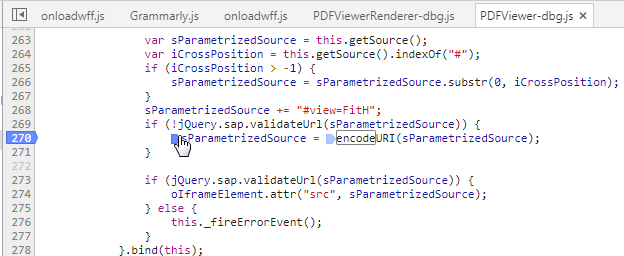
As you can see in the screenshot above. it's the library code.
After the URL validation, if the URL is valid, there's still another encodeURI, which create the error in this issue.
What I don't understand is that: if we already check for the URL validity, why need we encode the URL again?
For now, in my code, I'm intended to remove the encodeURI after we had the validation. (I'm using custom control based on the PDF Viewer). Is there a better solution for this?
Another option is that make sure the URL has no space, but it's not a really good option because the naming is done by our end user, who has no idea about this technical challenges.
Looking for your discussion.
Thank you,
Victor!
 strawherotk
All 6 comments
Hello @strawherotk ,
Thank you for sharing this finding. I've created an internal incident 1870096788. The status of the issue will be updated here in GitHub.
Regards,
Gery
 gerym
on 27 Mar 2018
gerym
on 27 Mar 2018
Dear @strawherotk ,
I am sap suite controls team responsible for sap.m.PDFViewer control.
I had went through your issue description.
Actually you can avoid the encodeURI check in control by white-listing your URL.
Only if the Source URI is not white listed control do's the econdeURI.
For white-listing your URL.
Please see document.
URL_WhiteList.docx .
Regards,
Dhanwin.
SAP Suite Controls.
 dhanwin89
on 17 May 2018
dhanwin89
on 17 May 2018
Hello @dhanwin89,
I've gone through the Whitelist.docx and made some experiment with my project.
As my current understanding. the Whitelist will make the jQuery.sap.validate() return 'true' to some specified URL pattern.
However, how can I define the pattern to ignore space inside the URL?
My PDF file URL is dynamic so I cannot define the exact URL into the Whitelist.
example URL:
https://myDomain.com/documents/show space PDF.pdf
Is there any way to ignore the space inside the URL using the while list?
After checking with the API:
When a whitelist has been configured using addUrlWhitelist, any URL that passes the syntactic checks above additionally will be tested against the content of the whitelist.
I guess there's no solution for my above question. As the Whitelist is used for adding more validation, not remove the validation (what I want).
Hence, I think I have to use my current customization. :(
Thanks.
strawherotk
on 21 May 2018
btw, here's my customization in the library:
sParametrizedSource += "#view=FitH";
if (jQuery.sap.validateUrl(sParametrizedSource)) {
oIframeElement.attr("src", sParametrizedSource);
}
I remove the encodeURL() since I've already encoded it in my formatting function:
urlFormatter: function(sURL) {
return encodeURI(sURL);
}
strawherotk
on 21 May 2018
Hi again,
I've just checked the PDFViewer with sapui5 version 1.54.4.
The issue seem to be fixed:
sParametrizedSource += "#view=FitH";
if (!jQuery.sap.validateUrl(sParametrizedSource)) {
    sParametrizedSource = encodeURI(sParametrizedSource);
}

if (jQuery.sap.validateUrl(sParametrizedSource)) {
    oIframeElement.attr("src", sParametrizedSource);
} else {
    this._fireErrorEvent();
}
2 new line of code has been added: if the url is not validate, encode the url, before checking whether to fire the error or not.
Hence, I think you can close this issue, and noted this it has been fixed in version 1.54.4 (or earlier version) i'm not sure.
Thanks.
strawherotk
on 21 May 2018
Hi @strawherotk ,
Yes from version 1.52 onwards the above 2 new line were added to avoid encodeURL check if the domain is white listed.
So this fix is available from version 1.52 onwards :-).
Since your query is resolved I will close the issue.
Thanks & Regards,
Dhanwin.
Suite Controls.
dhanwin89
on 21 May 2018
Related issues
 TANYBOSE
·
3Comments
TANYBOSE
·
3Comments
 boghyon
·
4Comments
strawherotk
·
3Comments
boghyon
·
4Comments
strawherotk
·
3Comments
 whydrae
·
4Comments
whydrae
·
4Comments
 viqtor1
·
3Comments
viqtor1
·
3Comments