Openui5: Float type validateValue not check not a number.
OpenUI5 version: 1.50
URL (minimal example if possible): http://plnkr.co/edit/ahS6NlUHHL0kdvdddvgd?p=preview
Steps to reproduce the problem:
- Input --0.1
What is the expected result?
Remove focus, error message will show in input, validateValue should throw an error
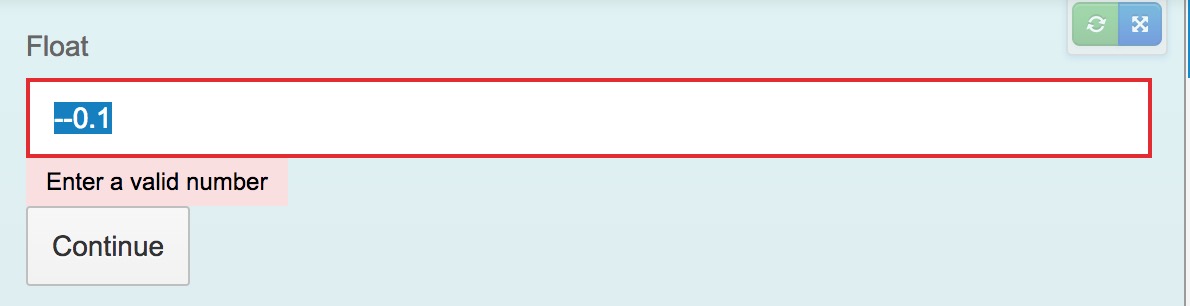
What happens instead?
validateValue did not throw an error. Instead, inonContinue,oBinding.getType().validateValue(oInput.getValue())returnedundefined, it should not pass validate.
But if I input200,oBinding.getType().validateValue(oInput.getValue())will throw an error
In Float.prototype.validateValue, there seems not check for isNumber: https://github.com/SAP/openui5/blob/3a212d2b66e7935986b5507c5f520c99ec645497/src/sap.ui.core/src/sap/ui/model/type/Float.js#L87
 TinaC
TinaC
All 8 comments
Workaround in onContinue function
var oBinding = oInput.getBinding("value");
if((oBinding.getType().sName === "Float") && isNaN(oInput.getValue())) {
    oInput.setValueState("Error");
    oInput.setValueStateText(Utils.i18n("INVALID_VALUE"));
    bValidationError = true;
}
The root of this is in sap.ui.model.type.Float#validateValue
If constraints are given the validateValue checks if the given value is valid but it assumes you give a valid number. If not the code works as expected. You can check this pretty simple in the Chrome console:
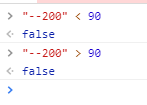
This is the code in the validateValue:
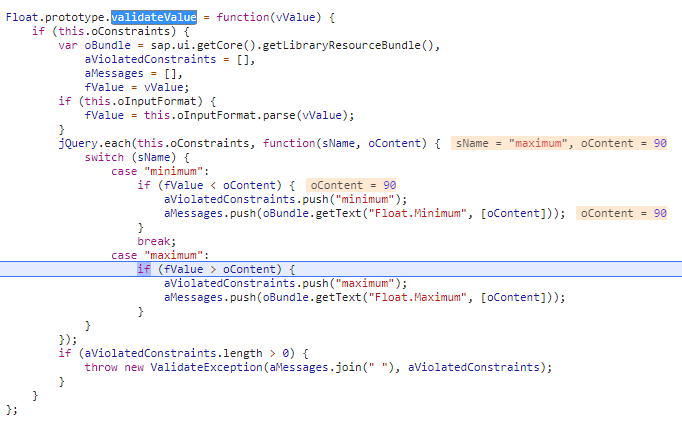
So if you want to prevent values like --200 I would recommend that you write a custom Float type which extends the sap.ui.model.type.Float and override the validateValue instead of your solution in onContinue.
I agree with you that those invalid inputs should raise an error in validateValue
According to the documentation:
https://sapui5.hana.ondemand.com/#/api/sap.ui.model.SimpleType/methods/validateValue
Validate whether a given value in model representation is valid and meets the defined constraints (if any).
When I read the documentation I would assume that --200 is NOT a valid float value.
 Myge91
on 5 Dec 2017
Myge91
on 5 Dec 2017
Hello @TinaC,
Thank you for sharing this finding. I've created an internal incident 1780468444. The status of the issue will be updated here in GitHub.
Regards,
Wenqian
 awui
on 6 Dec 2017
awui
on 6 Dec 2017
Hello TinaC,
works as expected. validateValue is meant to validate the constraints on float values, it doesn't need to be able to handle strings. When entering a string which does not represent a valid float number parseValue will throw an error.
So whenever a value is entered, first parseValue is called to convert the string value into a number. Only if parsing was successful, validateValue will be called with the result.
Regards,
Malte
 goligo
on 6 Dec 2017
goligo
on 6 Dec 2017
@goligo , Sorry I don't understand. So in order to solve my problem, your suggestion is capture parseValue error?
try {
        oBinding.getType().parseValue(oInput.getValue());
}
Hi TinaC,
in the first place I don't get why you need to call parseValue or validateValue yourself - this happens automatically when a property value with a binding is changed. If you really want to call them yourself, the purpose of parseValue is to parse the entered value and to return a valid number (in case it could be parsed) and the purpose of validateValue is to check whether a valid number is within the boundary conditions defined by the constraints of the type.
Regards,
Malte
goligo
on 7 Dec 2017
Hi Malte,
I just make some changes to official custom input type: https://sapui5.hana.ondemand.com/#/sample/sap.m.sample.InputChecked/preview
validateValueis used to make my custom validate rule for this type.I did not use
parseValue, just add it in case there is an error forparseValue not found.So here comes to my question: ui5 just check the float value is within boundary conditions, but missing the check for the value is a float/number
Regards,
Tina
TinaC
on 11 Dec 2017
Hi Team,
Since I not satisfied with the answer, I think you should not close my issue in a hurry.
@awui @goligo
Regards,
Tina
TinaC
on 12 Dec 2017
Related issues
 boghyon
·
3Comments
boghyon
·
3Comments
 fabiopagoti
·
4Comments
fabiopagoti
·
4Comments
 git-ashish
·
4Comments
git-ashish
·
4Comments
 LalitMendha
·
3Comments
LalitMendha
·
3Comments
 MagicCube
·
4Comments
MagicCube
·
4Comments