Opentrons: CSV files on computer not found by robot
I wrote a GUI app to do plate mapping, and it exports the map to a CSV file. I'd like to use that CSV file to map source tubes to wells for distributing master mixes.
Loading the CSV file using an absolute path to a file on my computer passes local simulation, but throws a FileNotFoundError when simulating on the robot.
The robot seems to only check its local disk for files. Attempting to import pandas with 'import pandas' and 'from pandas import *' throws a ModuleNotFoundError. I'm not sure if this behavior is intended or not, but either way the local simulation should probably throw the same error as the simulation through the app while connected to the robot. Or the robot should be able to access local files from the connected computer. I'm using APIv2 and it appears from documentation that I may need to bundle this file with my protocol file, though without some explicit examples I'm having difficulty doing so.
Attempt to open a file from the computer's local drive with a simple open() or a pandas.read_csv() call to a string or PathLike object when simulating through the Opentrons App (attached to robot).
If loading the csv files onto the robot does not significantly increase the time it takes to set up a protocol then bundling seems fine. I did just spend two whole days making this app that my lab cannot use for its sole purpose, so some sort of workaround for the meantime would be greatly appreciated.
 ColtonGarelli
All 13 comments
@ColtonGarelli ~to use Pandas on your OT-2, you will need to install Pandas on the OT-2's on-board computer. To do so, you will need to SSH into your robot and install the required package. I don't know off the top of my head what the proper steps are for installing Pandas, so I recommend reaching out to our support team via in-app chat or at https://support.opentrons.com. I do know we have several customers who have installed Pandas on their robots.~ Update: please see my comment below
Compared to installing Pandas, getting a CSV onto your computer is relatively straightforward; please see this support article. Because it's a whole separate computer, giving the OT-2 direct access to your computer's file-system is not something we can do.
Having to SCP stuff to your robot _is_ a pain, so we're actively working on bundling data files with your Python protocols (see #3465), and there will be announcement(s) when that is ready to go.
I'm going to close this issue because the data bundling work already has a ticket, but feel free to continue using this thread to ask any questions you may have!
 mcous
on 18 Dec 2019
mcous
on 18 Dec 2019
After consulting with some of my colleagues, it looks like installing Pandas on the OT-2 is prohibitively difficult because it requires native extensions (unlike other, pure-Python packages that are easy to install on the OT-2).
Accordingly, I have opened Opentrons/buildroot#61 to update the OT-2's operating system to ship with Pandas pre-installed and will keep this thread updated with the results. Thanks for the request!
mcous
on 18 Dec 2019
Great! Thanks. So once I connect to the robot using the ssh command I can navigate through the robot's directory structure with bash commands and then add files using scp?
ColtonGarelli
on 18 Dec 2019
Yup! I definitely recommend following the directory path recommendations in the support article to avoid accidentally putting any important files in a place a system update might overwrite, but otherwise for now this is the best way to get supplementary files onto your robot
On the Pandas front, we're making some progress with https://github.com/Opentrons/buildroot/pull/62, and if everything goes well then the 3.16 robot software update will likely include Pandas when that goes out sometime in the new year
mcous
on 18 Dec 2019
Awesome! Thanks for the quick and detailed response.
ColtonGarelli
on 18 Dec 2019
So I just tried connecting by ssh as stated in the article and I got this error...."The authenticity of host '169.254.235.94 (169.254.235.94)' can't be established. ECDSA key fingerprint is SHA256:" and a long string of letters and numbers. When I enter yes to continue connecting i'm prompted for a password. I tried generating one and copying it to my machine (ssh-keygen), but I also know nothing about sever stuff so I'm just trying google solutions. Any idea what's going on? I tried issuing an ssh-keyscan to root@wiredIP and it returned stuff but now I'm more confused. see attached screenshot for the ssh-keyscan output
ColtonGarelli
on 19 Dec 2019
Oops, I'm sorry, I struck through the more important of the two links. Please go through this article to set up the proper security credentials to SSH into your robot:
https://support.opentrons.com/en/articles/3203681-setting-up-ssh-access-to-your-ot-2
Once you have SSH access set up, here's the support article for connecting with SSH generally:
https://support.opentrons.com/en/articles/3287453-connecting-to-your-ot-2-with-ssh
Once you are able to confirm your SSH access, go ahead and disconnect SSH and in your own computer's terminal + filesystem, navigate to your CSV file and use scp (Secure CoPy) to copy the file. scp will (more or less) SSH into your robot, copy the file in, and then disconnect the SSH tunnel in one shot. The support article for SCP usage with the robot looks out of date and I've pinged our support team to update it. Here is the command you'll want (I think)
scp -i ot2_ssh_key -o UserKnownHostsFile=/dev/null -o StrictHostKeyChecking=no ./your_file.csv [email protected]:/data/your_folder
Note that ot2_ssh_key is an SSH identity you will create in the first setup step
mcous
on 19 Dec 2019
Great. I've set up the ssh connection and gotten in. Thanks!
Is this the main way to access the robot's file system for the foreseeable future? Or will something be added to the api? Just wondering how much time to invest in ironing this out to automatically integrate my platemap app with my protocol scripts.
ColtonGarelli
on 19 Dec 2019
That's a really good question. Yes, this will be how one accesses the robot's file system for the foreseeable future. We're still roadmapping the next year out, but there are a couple potential features in this area that I think could, in most cases, make it so you never _need_ to access the robot's file system:
- Protocol bundles: basically, you can ZIP up a Python protocol with whatever files you want and upload the ZIP to the app + robot directly
- Protocol parameterization: define a protocol that knows it will accept variable data, and feed that data in at run time
- Live protocol execution: a stable HTTP API to run protocols directly from your own computer
These projects are all still in the exploratory phase, so I can't commit to what will or won't get prioritized (and the live execution stuff is _especially_ early).
All this to say: I think your best path right now is to iron out this SCP flow (with which we're very able to help you do via GH or support chat), because even as we build newer stuff, this flow is going to remain stable. Any thoughts you have about a more ideal setup and what you'd like to accomplish are super helpful for us, though, in terms of prioritizing projects and making sure we architect our platform to enable more flexible usage
mcous
on 19 Dec 2019
Cool. I did some research and it seems relatively simple....as long as I don't get any weird errors. Also a little concerned about file management on the robot. I should probably delete them off of the robot. I think bundling sounds like the best option out of the three. A) allows for the exact protocol and layout to be stored as a paper trail and B) allows for easy repetition of protocols and C) is very simple.
While I have your attention, plate mapping is something that might be nice to integrate into the protocol designer or app. I haven't thought about it enough to really suggest a method or how feasible/simple it would be to implement but it's a necessary feature to mostly/completely automate a lot of protocols.
For example, when we run a qPCR we may run multiple multiple targets on the same plate, and thus we will need to load separate master mixes into specific wells, and are not always the same directionally (ie geneA is horizontal across two rows up to row 10, and geneB is vertical down the last two columns). We also do not always use all wells. It's super easy to fill a whole plate by rows or columns, but a combination is a little more difficult and skipping rows/columns is even more annoying. I'm the only person in the lab who knows OT API or Python for that matter, so a non-programmatic or minimally programmatic way to do this sort of mapping would be awesome.
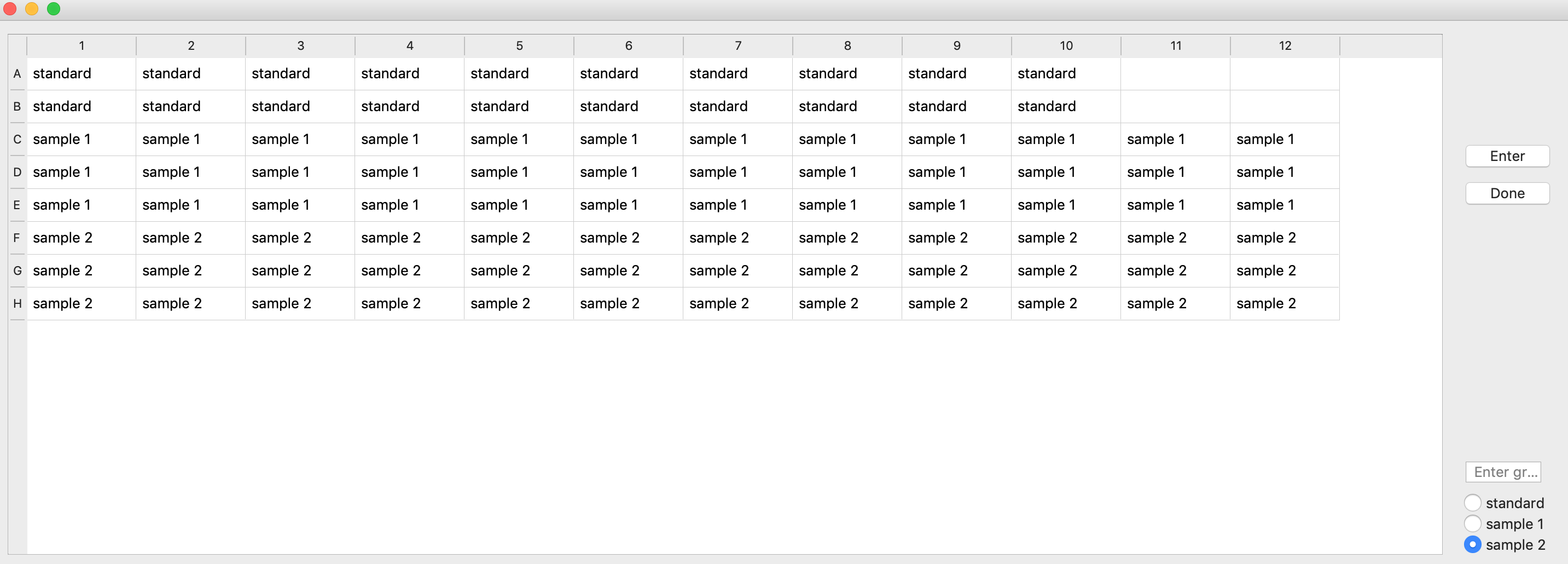
So the groups defined in the gui would have to be transmitted and matched to source wells (ie a tubes in tuberack), I've attached a screenshot of my app as an example. It exports to a csv, then the csv is loaded, parsed, and mapped to source wells in a tube rack in the protocol script (which is why I opened this issue). My system is not automatic yet (I still don't have a way to map each plate well to a source tube), but it's much easier to hardcode that part than try to define wells each time the plate map changes.
Food for thought i suppose.
ColtonGarelli
on 19 Dec 2019
Thanks so much for all the details! I've forwarded this entire thread to out product + design team to make sure this is captured. We're really focused on making (q)PCR workflows more straightforward, so this is really nice to have
mcous
on 19 Dec 2019
Awesome. I just realized the screenshot is from an example ELISA plate, but the same would apply. Thanks!!
ColtonGarelli
on 19 Dec 2019
Yes, this will be how one accesses the robot's file system for the foreseeable future.
Just wanted to chime in to say that I think that providing the SFTP access which is typical on most SSH setups would IMO be a major bonus for some users, with few downsides. From quick research it seems like the openssh-sftp-server package can be used with dropbear.
I recognise this won't be a priority, and it won't directly affect me as I have (in significant part for this reason) defected to raspbian.
 theosanderson
on 14 Jan 2020
theosanderson
on 14 Jan 2020
Related issues
 nickcrider
·
3Comments
nickcrider
·
3Comments
 MarcelRobitaille
·
7Comments
MarcelRobitaille
·
7Comments
 aciceri
·
6Comments
aciceri
·
6Comments
 ethanfjones
·
3Comments
ethanfjones
·
3Comments
 iansolano
·
4Comments
iansolano
·
4Comments