Opentoonz: How Copy Layer frames alone, I need Change the color?
Issue Summary
I need outline of many frames, I copy and change the fill of them. But the original frames changed too.
Screenshot or Video Reference

Steps to Reproduce
I make matte for the mouth and ### teeth. I need outline of mouth, So I copy the mouth layer, and changed it's color that inside fill. now I got a outline.
BUT BUT BUT
I found the original mouth changed its too. I can't only change one of it after copy a levels.
What can I do? how to duplicate many frames as new one?
Expected Results
get new frames only with outline. I need original with fill color, and new copy changed fill (alpha 0, only line)
Actual Results
all the original one and duplicate were changed
System Information
- OpenToonz Version: new
- Operating System: win10
- CPU:
- Memory:
- Graphics Card:
- Graphics Tablet:
 4nopea
All 4 comments
As you’ve discovered, copy creates a linked copy. You actually want to use the clone command instead of copy. Select all of the cells in the level you want to duplicate (click on the left edge of the level in the Xsheet or the top edge in the Timeline), then in the top menu, go to Cells -> Clone.
 artisteacher
on 28 Oct 2018
artisteacher
on 28 Oct 2018

It works. Appreciate your help.
4nopea
on 28 Oct 2018
@Leegov,
Recommend closing this issue.
Don't forget, explorations and troubleshootings can be pursued via the OpenToonz Forum without opening bug reports on github. Link:
https://groups.google.com/forum/#!forum/opentoonz_en/categories
 RodneyBaker
on 28 Oct 2018
RodneyBaker
on 28 Oct 2018
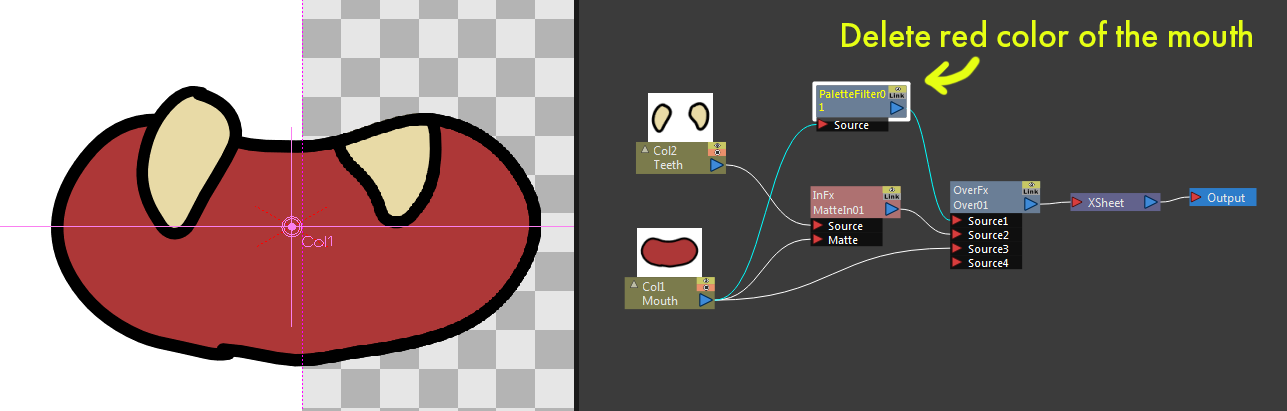
FYI You can use the Palette Filter Fx to obtain both the filled and the outline images from the single column.
 shun-iwasawa
on 29 Oct 2018
shun-iwasawa
on 29 Oct 2018
Related issues
 gab3d
·
4Comments
gab3d
·
4Comments
 digitallysane
·
5Comments
digitallysane
·
5Comments
 ghost
·
5Comments
RodneyBaker
·
4Comments
ghost
·
5Comments
RodneyBaker
·
4Comments
 blurymind
·
4Comments
blurymind
·
4Comments
Most helpful comment
FYI You can use the Palette Filter Fx to obtain both the filled and the outline images from the single column.