Openshot-qt: Toolbar icons gone in latest daily build...
Describe the bug:
after update.., all icons are gone in toolbar and in timeline...
have to downgrade to :
OpenShot-v2.4.4-dev2-1563230139-ed4b32d4-7939e156-x86_64
 nanohtpc
All 16 comments
@nanohtpc Which OS are you reporting this issue on? Everything looks fine with the Linux OpenShot-v2.4.4-dev2-1564165718-769efd87-574877b9-x86_64.AppImage:
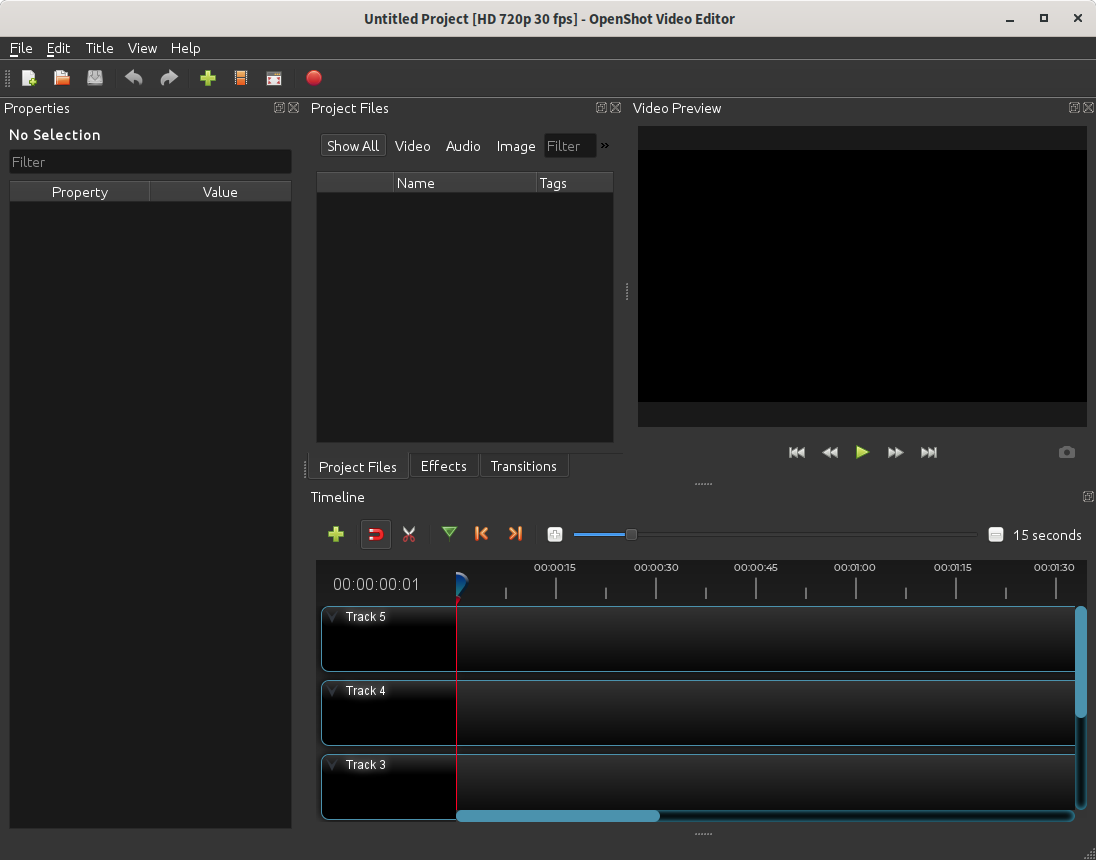
 ferdnyc
on 27 Jul 2019
ferdnyc
on 27 Jul 2019
(Actually, I'll be even more specific: What's the filename of the download where you _had_ the issue?)
ferdnyc
on 27 Jul 2019
Win10 x64
the last two builds after you change the installer...
nanohtpc
on 27 Jul 2019
Thanks @nanohtpc , can confirm after installing OpenShot-v2.4.4-dev2-1564165829-769efd87-574877b9-x86_64.exe (64-bit) in a Windows 7 VM:

ferdnyc
on 27 Jul 2019
@jonoomph
The issue appears to be a missing QtSvg.dll (or I guess lib/QtSvg.dll), which is not being packaged, despite still being needed to render the SVG-format interface icons.
Also, I'm seeing two copies of the QtCore.dll file now, one in the root install directory, a second in lib/.
ferdnyc
on 27 Jul 2019
Still working on the latest windows builds... it might be a few more days before this is resolve. Thx.
 jonoomph
on 27 Jul 2019
jonoomph
on 27 Jul 2019
Current status: "New builder, who dis?"
ferdnyc
on 27 Jul 2019
..."New builder, who dis?"
@ferdnyc can you explain what exactly this phrase means? (just a linguistic question)
 SuslikV
on 27 Jul 2019
SuslikV
on 27 Jul 2019
@SuslikV
Oh, that's just me riffing on "New phone, who dis?"
ferdnyc
on 27 Jul 2019
I eventually discovered that all of the Qt DLLs, including Qt5Svg.dll, _are_ actually present in the installation. It's just that they've all ended up inside the lib\PyQt5\ subdirectory!
(Manually copying all lib\PyQt5\Qt*.dll files to the root of the installation is my current untested, purely-theoretical approach to fixing the affected builds. It'd be great if someone wanted to test out that theory and report back with their results.)
ferdnyc
on 28 Jul 2019
i can confirm that works... for now...
nanohtpc
on 28 Jul 2019
I personally, for my own builds of OpenShot, ended up in moving (with overwrite) all .dll files (but the imageformats and platforms folders - these are hardcoded) to the root of the original launch.exe file.
SuslikV
on 28 Jul 2019
i can confirm that works... for now...
Excellent, thanks for testing @nanohtpc
@SuslikV Yeah, that's pretty much the "Windows way". The irritating thing is that cx_Freeze is meant to be sorting this stuff out, and it's just not doing as good a job as it should be with the dependencies, especially once they get up to a couple of levels of indirection. (e.g.: The Qt DLLs aren't direct OpenShot dependencies. The various PyQt modules are, and the Qt DLLs are dependencies of those modules. A couple of them, but not all, are also dependencies of libopenshot, so it's possible that's complicating things for cx_Freeze.)
Whether we're just not using cx_Freeze correctly, or we're putting other things in places it doesn't expect, or if these are just bugs in cx_Freeze itself... that's still not quite clear.
ferdnyc
on 28 Jul 2019
I think part of the problem is the existence of a lib/ directory, which is very un-Windows. Maybe I should try making that change to install libopenshot.dll into the bin/ directory (aka the "RUNTIME INSTALL" path), which is where it really belongs on Windows. cx_Freeze might deal with that better.
ferdnyc
on 28 Jul 2019
Working on a fix now: https://github.com/OpenShot/openshot-qt/issues/2894
jonoomph
on 28 Jul 2019
This is fixed now.. it should be in the next daily build (maybe in 30 minutes to an hour). Please reopen if you still have this issue. Thx!
jonoomph
on 29 Jul 2019
Related issues
 Yesideez
·
3Comments
Yesideez
·
3Comments
 ppkakkar
·
3Comments
ppkakkar
·
3Comments
 lukashajek78
·
3Comments
lukashajek78
·
3Comments
 Geoff0627
·
3Comments
Geoff0627
·
3Comments
 LadyReader
·
3Comments
LadyReader
·
3Comments