Openshot-qt: OpenShot on Windows requires undocumented network access
Describe the bug
Following installation, the Windows installer complains about requiring network access from launch.exe. Efforts to find documentation supporting this requirement have (so far) proven fruitless.
System Details:
- Windows 7
- OpenShot Version v2.4.3 for Windows
To Reproduce
Steps to reproduce the behavior:
- Install OpenShot on Windows 7 from https://www.openshot.org/
- Once setup is complete, choose "Launch"
- Observe the Windows Security Alert from "C:\program files\openshot video editor\launch.exe"
- Notice the "Publisher" for the Windows Security Alert is "Unknown" (read: Unsigned)
- See screenshot, below.
Expected behavior
Network access requirements should be documented, or contain some sort of warning. Windows binaries should be signed by a verifiable publisher.
Current web searches only show typical responses for "trojan'd" software (generally from other scanner output listing OpenShot in the Windows Firewall whitelist, ironically enough).
Screenshots

Logs
N/A
Additional context
Hopefully, there's at least a general "README" to be had for non-UNIX users. No apparent requirement in launch.py for network, though that's only a top-level script for python modules, obviously.
It would likely be a good exercise to launch the Linux version and observe the network requirements (which I have yet to do). Unfortunately, the low-level troubleshooting on Windows 7 (and others) often leaves much to be desired.
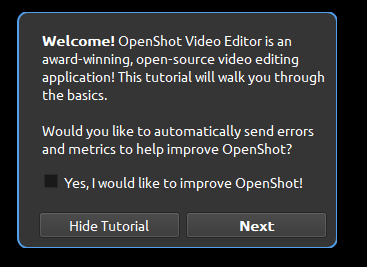
Assuming this might have something related to "Automatically send errors and metrics to OpenShot" (which defaults as "Yes, I would like to improve OpenShot!")... though obviously this action is taken prior to actual approval from the user.
 russellvt
All 17 comments
It is for the error metrics collection (google analytic). Open-shot does not need any other network use (except, maybe check for updates; OpenShot notifies users of available updates when a new stable version is out, so perhaps that).
Yes, we could have done things a little better. But we are short on active volunteers. But hopefully this will get addressed in the future releases. Thank you for notifying us.
 peanutbutterandcrackers
on 30 Oct 2018
peanutbutterandcrackers
on 30 Oct 2018
It is for the error metrics collection (google analytic). Open-shot does not need any other network use (except, maybe check for updates; OpenShot notifies users of available updates when a new stable version is out, so perhaps that).
FTR: Not just _error_ metrics, also usage tracking. Anonymized, but each application launch is tracked unless the user opts out.
 ferdnyc
on 2 Nov 2018
ferdnyc
on 2 Nov 2018
@peanutbutterandcrackers @ferdnyc - I feel maybe we should add this to documentation but where is the question? The GitHub readme.md?
 DylanC
on 3 Nov 2018
DylanC
on 3 Nov 2018
Doesn't Windows have an installer? IMHO, a disclosure about data collection should be prominently featured (not buried-in-a-long-rambling-wall-of-legalese type "featured") during the steps taken to install OpenShot, so that the user has been informed _before_ it's even fully available to run for the first time.
Bonus points if data collection could be opted out of right there, but just giving precise instructions on _how_ to opt out after starting OpenShot for the first time would suffice.
I'd also personally like to see the option to disable data collection moved from the "Debug" tab of the Preferences to a more appropriate one, since it's _not_ a debugging option. "General" would be fine.
And in addition, yeah, both the Github project README and the openshot.org Download page should (again IMHO) make much more prominent disclosures regarding data collection.
It's really impossible to make _too many_ mentions of this kind of thing. People just automatically ignore future repetitions after they've seen it, anyway.
ferdnyc
on 3 Nov 2018
(Pre-launch opt-out would involve the installer either writing a %USERPROFILE%/.openshot_qt/openshot.settings that's customized from the standard _default.settings by having send_metrics already set to false, or writing a separate %USERPROFILE%/.openshot_qt/no-send-metrics or whatever that OpenShot looks for when creating a new preferences file with _default.settings.)
ferdnyc
on 3 Nov 2018
@DylanC - for now we could probably start with the FAQ section int he README, perhaps?
peanutbutterandcrackers
on 27 Nov 2018
(Pre-launch opt-out would involve the installer either writing a
%USERPROFILE%/.openshot_qt/openshot.settingsthat's customized from the standard_default.settingsby havingsend_metricsalready set tofalse, or writing a separate%USERPROFILE%/.openshot_qt/no-send-metricsor whatever that OpenShot looks for when creating a new preferences file with_default.settings.)
Actually, come to think of it this is wrong, since opting out on install should disable collection for _all_ users of OpenShot on that system. not just the one running the installer. So, the right thing to do would be to modify the _default.settings that gets installed into C:\Program Files\OpenShot Video Editor\settings, changing send_metrics from true to false.
ferdnyc
on 27 Nov 2018
Or, you know, send_metrics could just _always_ default to false, and tracking could be opt-in. Which would probably cut the number of installations that have it enabled by 90%, but I say good for them. I certainly have no vested interest in metrics being collected on OpenShot users.
ETA: And with that, I shall Unsubscribe myself from this discussion, because this is a topic which never fails to get me irritated, and I will eventually write something that someone takes offense to.
ferdnyc
on 27 Nov 2018
Opt-in for tracking would be preferred, but I'd be OK with having an install switch that allows turning it off automatically (e.g. for deployment to a classroom). If this is possible, documentation is sorely missing.
 teknowledgist
on 25 Sep 2019
teknowledgist
on 25 Sep 2019
In case it's useful for someone else, here is some PowerShell code to disable the metrics by default (and disable the tutorial by default):
$text = Get-Content -Path 'C:\Program Files\OpenShot Video Editor\settings\_default.settings' -ReadCount -raw
$newtext = $text -replace ',\r\n',',' -split '\r\n' | ForEach-Object {
               if (($_ -match 'send_metrics') -or ($_ -match 'tutorial_enabled')) {
                  $_ -replace '("value":\s*)true','$1false'
               } else {$_}
            }
It will not turn off metrics for users who have already started OpenShot, but all new users will have data collection disabled.
teknowledgist
on 1 Oct 2019
I just arrived here after wondering a lot why the Windows installer included a checkbox for "add exception to Windows firewall".
However, upon first open, I see dialog that OpenShot defaults to not sending metrics, with the option to turn that on. I approve of this :) (this change wasn't mentioned in the discussion above, so I am mentioning it here for the worried future user)
 thomasaarholt
on 6 Jun 2020
thomasaarholt
on 6 Jun 2020
I arrived here after being asked to add an exception to the Windows Firewall.
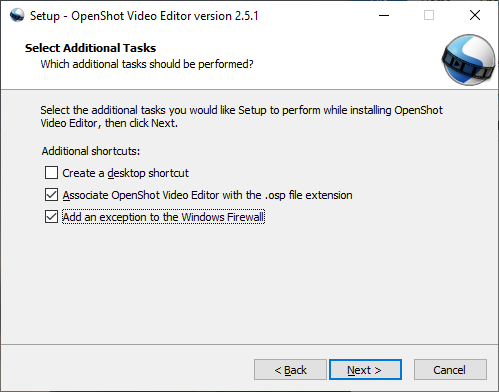
The rule it adds is an inbound rule, open on all source & destination ports, all protocols, all users. Not sure why it's here, nor as wide open as it can get.
 davimack
on 21 Aug 2020
davimack
on 21 Aug 2020
I also came here wondering why OpenShot had a cryptic "Windows Firewall exception" on the installer.
It looks like the "Would you like to improve OS?" dialog should be shown during the Install, and the firewall opened only if user says Yes.
Or If the user later chooses "Yes!" then ask for admin PW and unblock it.
Currently this is in the wrong order - It asks users whether to unblock FW without any explanation (checked by default - hopefully all users uncheck it?), THEN later asks if you'd like to contribute via network access.
It made me wonder if OS would not function without network access, since it's in the installer.
 demisjohn
on 27 Aug 2020
demisjohn
on 27 Aug 2020
If any of you have questions, please ask. If you don't, please consider my question: Why didn't you do what I just did? It took me about 5 minutes. Well, 5 minutes plus about 5 years of experience messing around in github. Hence, my invitation to answer questions. I like empowering people.
 dscotese
on 22 Sep 2020
dscotese
on 22 Sep 2020
Thanks @dscotese for applying a change. Not sure how long that took you to do, but if I had tried to do the same, I guarantee it would have taken me ~2 days to figure it out and applying it in a way without damaging something else. Your expertise is very much appreciated.
demisjohn
on 27 Sep 2020
I'm getting old, so I like to pass my expertise on. Here's the basic outline:
- Use Github's search function to find "Firewall" in "this repository only" since that string must be provided somewhere (this method has failed me before, I guess because github didn't search the ".json" files in the other repo, but maybe it was some other problem).
- Examine the code to see if the string "Add an exception to the Windows Firewall" is easily altered (Yay! It was).
- Click the little pencil (and let GIthub make me a fork of the project so I can edit "my own version").
- Use the drop-down at the top to select a branch other than "master," (in my "dscotese:OpenShot" fork) or create a new branch.
- Save the file, and then (?) follow the instructions to create a pull request.
- Receive tips and help from other devs and apply them or ask for more help.
- Further edits to the files in the same branch are _automatically_ included in the pull request.
- WIN!
dscotese
on 28 Sep 2020
On @demisjohn 's point:
I also came here wondering why OpenShot had a cryptic "Windows Firewall exception" on the installer.
It looks like the "Would you like to improve OS?" dialog should be shown during the Install, and the firewall opened only if user says Yes.
Or If the user later chooses "Yes!" then ask for admin PW and unblock it.Currently this is in the wrong order - It asks users whether to unblock FW without any explanation (checked by default - hopefully all users uncheck it?), THEN later asks if you'd like to contribute via network access.
It used to be that OpenShot's anonymized telemetry was opt-out, and during the first startup would be active _until_ you opted out, meaning that some data would be sent back on initial launch. I agree that was the wrong order (and argued mightily against it), and the code's since been changed so that nothing is sent until after the first tutorial popup with the checkbox has been shown.
But one of the consequences of the previous wrong ordering was, on Windows the first thing users would see when they launched OpenShot after installing it was a Windows Firewall "network activity detected" dialog — not exactly friendly, and even less explanation as to why that'd be needed. So the firewall rule addition was included in the installer to prevent that.
Creating the firewall rule in the Windows installer makes sense, as it's already being run with Administrator permissions. Creating the rule after launch would require a second UAC prompt (which some people would argue is correct and necessary, but others would view as an unnecessary annoyance), and more importantly would require Windows-specific code in our cross-platform Python application, which is something we try to avoid whenever possible.
It made me wonder if OS would not function without network access, since it's in the installer.
It would, and no functionality would be affected except _perhaps_ the version update checks. We wouldn't get anonymized stats and crash reports, but that's perfectly fine.
ferdnyc
on 1 Oct 2020
Related issues
 gbbbbb
·
3Comments
gbbbbb
·
3Comments
 ghost
·
3Comments
ghost
·
3Comments
 GrandpaBill3006
·
3Comments
GrandpaBill3006
·
3Comments
 audioclown
·
3Comments
audioclown
·
3Comments
 malinga91
·
3Comments
malinga91
·
3Comments
Most helpful comment
Doesn't Windows have an installer? IMHO, a disclosure about data collection should be prominently featured (not buried-in-a-long-rambling-wall-of-legalese type "featured") during the steps taken to install OpenShot, so that the user has been informed _before_ it's even fully available to run for the first time.
Bonus points if data collection could be opted out of right there, but just giving precise instructions on _how_ to opt out after starting OpenShot for the first time would suffice.
I'd also personally like to see the option to disable data collection moved from the "Debug" tab of the Preferences to a more appropriate one, since it's _not_ a debugging option. "General" would be fine.
And in addition, yeah, both the Github project README and the openshot.org Download page should (again IMHO) make much more prominent disclosures regarding data collection.
It's really impossible to make _too many_ mentions of this kind of thing. People just automatically ignore future repetitions after they've seen it, anyway.