Openshot-qt: Windows: Preferences for Advanced Title Editor (Path) expects forward slashes instead of backslashes
Describe the bug
Under Windows, when you configure the Advanced Title Editor (Path) setting in Preferences using the Windows path to the Inkscape executable, you will receive an error that says "Please install c:\program files\inkscape\inkscape.exe to use this function."
System Details (please complete the following information):
- Operating System / Distro: Windows 10
- OpenShot Version 2.4.2
To Reproduce
Steps to reproduce the behavior:
- Install Inkscape for Windows. It normally installs in C:\Program Files\Inkscape as inkscape.exe
In OpenShot, go to Preferences and enter the Windows path for Inkscape, in this example it would be C:\Program Files\Inkscape\inkscape.exe
Go to Title -> Title and click on a template that allows you to edit a title (for example, the Bar 1 template)
Click the "Use Advanced Editor" button.
You will get an error that says "Please install c:\program files\inkscape\inkscape.exe to use this function."
If you manually change the path to use forward slashes instead, when you click the "Use Advanced Editor" button, Inkscape will launch. In this example, that means changing the path to C:/Program Files/Inkscape/inkscape.exe
NOTE: If you set the path using the forward slashes and successfully launch the Inkscape with the "Use Advanced Editor" button once, the Inkscape integration will continue to work even if you set the preference back to using backslashes in the path. This is important to know during testing.
Expected behavior
Windows operating systems use backslashes in a file path, rather than forward slashes (which Linux uses). However, OpenShot expects forward slashes for the Advanced Title Editor (Path) setting regardless of operating system. Consequently, when a Windows user wants to specify the path to Inkscape, they fail because Windows displays paths using backslashes.
 dlcarraw
All 9 comments
@dlcarraw - Yes, we should fix this regarding your expected behavior.
 DylanC
on 26 Jul 2018
DylanC
on 26 Jul 2018
Hmm. See, now I'm confused.
On Windows 7, this is how my preferences are set:
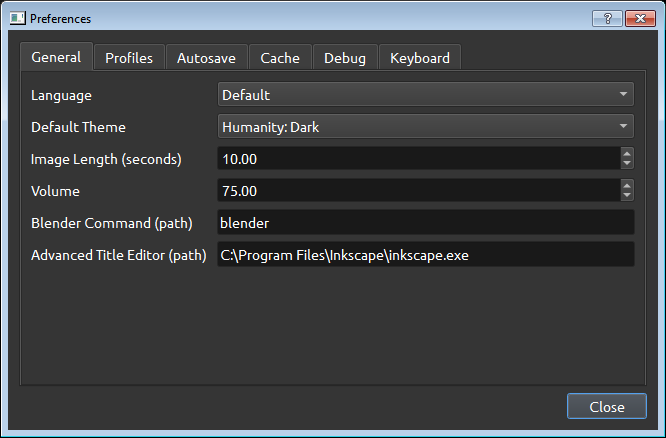
OpenShot has no trouble launching Inkscape. I tried changing to all-lowercase, too, just in case it was being case-sensitive, but still no problems. Inkscape came right up.
While it's True Qt uses forward slashes by default (even on Windows), it's supposed to auto-convert native paths. Are you sure there wasn't some other issue with the path name, like a component that was spelled wrong?
 ferdnyc
on 29 Jul 2018
ferdnyc
on 29 Jul 2018
NOTE: If you set the path using the forward slashes and successfully launch the Inkscape with the "Use Advanced Editor" button once, the Inkscape integration will continue to work even if you set the preference back to using backslashes in the path. This is important to know during testing.
I never had the path set with forward slashes, so I'm not sure that's the issue. It really is _supposed_ to work with backslashes.
ferdnyc
on 29 Jul 2018
Tried it again:
- _Completely_ deleted
%USERPROFILE%\.openshot_qtdirectory and all contents - Launched OpenShot 2.4.2 release
- Went into Preferences, typed
C:\Program Files\Inkscape\inkscape.exein title editor field - Opened Title > Title
- Selected a title and hit Use Advanced Editor
Inkscape took forever to launch (also doing a Windows Update), but it did eventually come up.
I can't get it to not accept the path with backslashes. @dlcarraw , please try again with steps above, confirm that you're still having a problem with the path when using backslashes. Perhaps there's something different under Windows 10 compared to Windows 7.
ferdnyc
on 29 Jul 2018
Ping @dlcarraw about this issue, see my previous comment.
If there's no response, @DylanC , @peanutbutterandcrackers , I think this can probably be closed. As I said, I couldn't reproduce (tho I'm running Win7, not Win10), even after I tried pretty hard.
ferdnyc
on 22 Sep 2018
I'm visiting family in a rural area with very little internet. Will respond when I get back to the 21st century.
On Sep 22, 2018 3:12 PM, Frank Dana notifications@github.com wrote:
Ping @dlcarrawhttps://github.com/dlcarraw about this issue, see my previous comment.
If there's no response, @DylanChttps://github.com/DylanC , @peanutbutterandcrackershttps://github.com/peanutbutterandcrackers , I think this can probably be closed. As I said, I couldn't reproduce (tho I'm running Win7, not Win10), even after I tried pretty hard.
—
You are receiving this because you were mentioned.
Reply to this email directly, view it on GitHubhttps://github.com/OpenShot/openshot-qt/issues/1896#issuecomment-423766605, or mute the threadhttps://github.com/notifications/unsubscribe-auth/ASezPftaBuf3kl4ynTNmbvzvpdUbitBfks5udot_gaJpZM4VZsnX.
dlcarraw
on 22 Sep 2018
(Note: One enhancement to address this, regardless, would be to add a "Choose..." button and launch a filepicker for the user to locate the inkscape.exe executable with, rather than having them type in the path. Then there wouldn't be any possibility of problems due to typos, misparsed path strings, Qt quirks in path formatting, or what have you.)
ferdnyc
on 22 Sep 2018
@ferdnyc - I've started something like this actually. First for Blender but afterwards I could do Inkscape too. :+1:
DylanC
on 19 Oct 2018
I put in a change to have browse buttons in future. This will work better in newer releases:
https://github.com/OpenShot/openshot-qt/pull/2255
DylanC
on 24 Oct 2018
Related issues
 sspmrsomebody1
·
3Comments
sspmrsomebody1
·
3Comments
 Emma3993
·
3Comments
Emma3993
·
3Comments
 Sefran007
·
3Comments
Sefran007
·
3Comments
 LadyReader
·
3Comments
LadyReader
·
3Comments
 ppkakkar
·
3Comments
ppkakkar
·
3Comments