Openshot-qt: Media relinking in file properties
I'm working on a feature to be able to re-link media files if they have moved (I already fixed the bug to relink them during opening if the project has moved, but would like more flexibility now).
I had the problem that I moved a project to another computer, and OpenShot got stuck in a loop asking where the media files are. I've fixed this problem by auto-linking all files in the same folder, so that it's enough to point to the first file (assuming they are all in the same directory. This works (see my fork), and I'll submit a pull request shortly.
However, while doing this I thought it would be great to simply change the path in the file properties, and relink media to a new file, e.g. it could also be a recoded version in another video codec (different extension). I seem to have a problem with the MP4 files from my phone, they cause stuttering video output with skipping frames every now and then, both in preview, and in export (unrelated issue). The problem goes away if I recode the videos to MJPEG. So now I'd like to recode videos in existing projects, and relink the media files to the new file.
I have added this feature in file_properties.py, and it seems to work for the media files in the project view. However, all clips that are already in the timeline are not updated for all I can tell. They still show up with the old name (if I drag a renamed file in, it has the new name). Also, when saving and reloading the project, the log shows that it is still loading the old files.
Here is my question:
Can someone explain to me how clips in the timeline are linked to files in the project view? If I delete a file, it is removed from the timeline as well, so clearly there is a listener mechanism to let clips know if something happened to a file. But it does not seem to work for changing file locations.
Your help would be much appreciated.
PS: my current attemtps are on my fork. Media relinking attempts are in the branch media_relink: https://github.com/fschill/openshot-qt/tree/media_relink
 fschill
All 29 comments
Anyone have any hints? I'm stuck on this, need some insight or at least some pointers how OpenShot data structures are managed.
fschill
on 10 Jul 2018
Wow. You're working on it right now!? Awesome!
Sorry for the tardy reply.
This seems to be related to #1061. However, I would also like to suggest you take a look at #1325.
Pinging @ferdnyc @N3WWN @DylanC @jonoomph here!
 peanutbutterandcrackers
on 12 Jul 2018
peanutbutterandcrackers
on 12 Jul 2018
thanks - yes, I decided that I want to use OpenShot regularly now instead of iMovie (my desktops are all linux, and working on laptops is not as nice). I had a few issues and started looking into the code to fix them. So, time permitting, you might hear more of me in the future... :)
Reading #1325 was useful, it matches what I thought while debugging this. Up to now, my ideas were:
- "quick and dirty" approach: when re-linking or renaming a file, seach through all clips for usage of that file and apply the changes. What confuses me is that there already appear to be listeners in clips that react to changes in the file, and that update should be triggered already. E.g., if I delete a file, the clips also get deleted. But I could not find the place where properties would be updated, and it seems a lot of it is "abstracted away" (which is good, as long as it works, but makes it difficult to understand as an outsider).
- as #1325 says, the other approach would be to do it by reference. I don't know if it would be a significant overhaul, and I don't have enough insight into the data structures yet. Presumably, to handle saving and loading, it would still require unique IDs to handle references, so the actual implementation might not be too different from the other approach. Maybe the referenced IDs could be converted to actual references during loading, and in reverse during saving. We might still need a listener mechanism anyway though, to handle re-caching or other updates when a file changes?
The main problem I have is trying to understand the exact content of the various data structures (files, clips, etc.), and how they relate to each other, how they are created, updated, saved, loaded, and removed. So any hints on that matter would help me understand the code.
fschill
on 12 Jul 2018
@fschill - Awesome! I'm so glad that you have decided to stick with OpenShot and do your part in making it better. While I'd love to help you out regarding all of that, I'm afraid I can not due to my lack of knowledge. However, one of the contributors whom I have pinged might be able to give you some insight into things. In the meantime, I have added your branch as a remote branch and will be fetching and checking out progress in it, and will also try to test and give feedbacks and engage in discussions (as far as my limited knowledge allows me to do so). All the very best! I'm so stoked about this. :+1:
peanutbutterandcrackers
on 12 Jul 2018
I am _incredibly_ happy to hear that you're looking at addressing this, @fschill , as it's been one of OpenShot's most glaring design flaws IMHO. (If you wanted to solve the path issue and finally get rid of all the relative file paths in the project data, while you were about it, then you'd be my new best friend. The fact that you can't even move a project file to another place on disk without invalidating every media reference it contains is... ... ... "unfortunate".)
I'll try to take a look at the questions in more detail and offer what I can from my own perusal of the same code, though it probably will take me a few days. However, one basic pointer I can offer:
Can someone explain to me how clips in the timeline are linked to files in the project view? If I delete a file, it is removed from the timeline as well, so clearly there is a listener mechanism to let clips know if something happened to a file. But it does not seem to work for changing file locations.
They're... _effectively_ NOT, to be honest. There should be much tighter coupling between them. (I initially felt that the Clip records shouldn't even HAVE a file path associated with them, and they should look that up from the File objects instead. But, given that libopenshot needs to access the on-disk data, and AIUI the JSON from the Clips gets passed in whenever it needs to perform file access, that sort of compartmentalization may not be practical.) But for right now, any relationships between object in OpenShot are actively enforced from the originating end: When a File object is deleted, the code then goes out and removes all Clips from the timeline related to that File object.
By the same token, when a File is updated to reference a different on-disk path, the next step would be to go out and update all Clips for that same path. If that's even _possible_, meaning if there are even methods to "refresh" a Clip's data post-instantiation. There may not be, and worst-case it may necessitate _creating _ all new replacements for each of the dependent Clips, copying the parameters from the old one and then deleting it and replacing it with the new one. That would be a brute-force way of ensuring that all of the necessary data is updated, though I'd hope it might be possible to find a less scorched-earth approach. (However, the OpenShot code is no stranger to scorched-earth approaches already.)
Again, many thanks for even taking the time to look at this. I'll try to poke my head into your branch when I have a chance.
 ferdnyc
on 14 Jul 2018
ferdnyc
on 14 Jul 2018
Hi,
thanks for your reply - much appreciated, and it also appears to match what I gathered from looking at the code. Btw., opening a project that has been moved works already after my fixes. I added a bit of code that would check for each file if it's present in whatever folder the user already picked for the previous file, and as long as they are all in the same place, re-linking during open works quickly, and without the confusion of being asked about the same file over and over again (which made me think it's locked in an endless loop). I haven't had time to issue a pull request yet, but was going to. Spurred on by this initial success, I thought I should extend this to individual relinking (also wanting to switch files over to another codec, due to some problems with MP4). However, after reading your comments, I get the distinct feeling that I might have bitten off more than I can chew... ;)
I think the approach to search through all clips, and update them if a file object changes, would be fine. As far as I can see, there are already listeners anyway, so a file knows exactly which clips it needs to update. It is consistent with the "delete" feature, and really not that much of an issue. Having actual direct references would be neater, but presumably would also create its own problems with saving, and as you say, the interaction with libopenshot. Maybe a reverse reference could be added, so that a clip also knows which file it came from.
My issues at the moment are that I could not find where those path properties are in the clip object, and where they should be updated. Also, the "update" callback to all listeners (=clips) appears to work when deleting a file, but not when changing the properties, although it should happen when file.save is called. We might have to step through with a debugger to see what's going on.
The other issue that I haven't reached yet, but might be lurking there, is what sort of other updates will be necessary (notifying libopenshot, maybe refreshing the caches, thumbnails, etc.?) It might happen automatically, but this is something where someone with more intimate knowledge of openshot internals should have a look at it.
Once it works, there are further issues, and features: What happens if the user relinks to a file that's actually a different video? Should openshot perform some simple sanity checks (length, etc.), or just warn users that that's not a good idea?
Also, what would maybe be a nice feature is to have multiple sets of media (e.g. each in their own folder). That would allow to do the editing on a lower-res version with a frame-by-frame codec like MJPEG, and then to the final render on the full-res source material. Or, just brainstorming here, filmmakers could use pre-viz renders for the initial cut, and replace them with the final scenes or full CGI renders later.
But first the basic replacement of a path needs to work, those other things can wait, and should be easier to do once the fundamentals work.
fschill
on 14 Jul 2018
@fschill
Just a partial response for now, as I'm away from my computer and trying to address everything via my phone's keyboard would make me suicidal...
Btw., opening a project that has been moved works already after my fixes. I added a bit of code that would check for each file if it's present in whatever folder the user already picked for the previous file, and as long as they are all in the same place, re-linking during open works quickly, and without the confusion of being asked about the same file over and over again (which made me think it's locked in an endless loop).
Which is a HUGE win, that would be amazing! But it works in the sense that if you move the project, the files disconnect, and now you can reconnect them ideally by just locating one file and having it Intuit the rest, right? (If, as you say, they're all in the same place.)
Like I said, that's an immeasurable improvement, but storing file paths in the project file as ABSOLUTE paths would mean that the project file could be moved, _without_ the files disconnecting at all. As long as the media files aren't moved, they'll stay connected. And if they are, it's the same whether the paths are relative or absolute.
Relative paths really only make sense if OpenShot uses a project-folder system for saving projects, and even then they only make sense if the media files are inside that directory. In that specific case, the entire directory can be moved without disconnecting the files if they're stored with relative paths. But because we DON'T use a project folder, there are basically zero situations where relative paths are preferable, and lots of situations where they cause problems. Even if, thanks to your fixes, those problems are thankfully minimized.
Also, what would maybe be a nice feature is to have multiple sets of media (e.g. each in their own folder). That would allow to do the editing on a lower-res version with a frame-by-frame codec like MJPEG, and then to the final render on the full-res source material.
That's _sort of_ already done, effectively, with the cache. Individual frames are rendered and cached at reduced quality and resolution, with the full-res render only happening during export.
Given that OpenShot has to render to the cache anyway, I'm not _sure_ how much benefit would necessarily be realized from transcoding to a different video format (even if it is a less resource-hungry one) just for feeding the cache renderer. Your other case though, using work "prints" / pre-viz to edit before the final versions are ready, that has clear and obvious benefits, potentially.
But I'd suggest setting that aside _for now_, because any feature of that type would depend on (different-)file replacement ability within the OpenShot data structures and interface. So if that can be made to work, then the ability to perform those swaps manually opens up, and we could use that to test the efficiency and performance of different scenarios. That's the point when it makes sense to revisit the larger question.
If that testing produces any scenarios that would clearly benefit all OpenShot users, then we could work on a feature to perform the optimizations (generating the transcoded work files, using them in the project, and swapping in the original sources for export) automatically behind the scenes. Ditto with the pre-viz scenario, except the user would be supplying both the work and final media directly, instead of us transcoding one from the other. It still requires unlike-file-replacement as a first step.
(That's something that would also benefit our SVG title system, since right now you can edit a generated title file in the Project Files library, but any existing Clips made from it don't update automatically. There's a bug# for that, which I could look up if I was at my computer.)
ferdnyc
on 15 Jul 2018
But it works in the sense that if you move the project, the files disconnect, and now you can reconnect them ideally by just locating one file and having it Intuit the rest, right?
yes, that is correct. It requires user input, but at least it's pretty smooth. I think it's ok though, as at least for me, moving projects is relatively rare as moving Gb of videos also requires effort and time.
Relative paths really only make sense if OpenShot uses a project-folder system for saving projects, and even then they only make sense if the media files are inside that directory.
I read your other post on that matter. I think there are pros and cons for both scenarios. Bundling media files into the project folder makes it easier to archive and move, but if multiple projects use the same media files, there's duplication (not great with the size of HD video files).
I think I actually prefer the OpenShot way of keeping media wherever you want, and storing absolute paths. I import all my photos and videos of my camera into a central folder structure (also accessed by my photo software), and I'd like to keep them there and not copy/move them to other project folders. It's been many years that I've used other pro video editing software (e.g. Final Cut), but I think it was also done this way. Counter-Example is e.g. iMovie which imports media into its own folder structure, which I actually find annoying.
That's sort of already done, effectively, with the cache. Individual frames are rendered and cached at reduced quality and resolution, with the full-res render only happening during export.
True, but in my experience, the cache is too small to store the entire timeline, and on some of my computers the cache rendering is too slow to keep up with playback. Maybe this can be made faster, but with 4K content becoming more common, it might still remain an issue.
The problem I'm having right now though is that the mp4 files from my Galaxy S7 have weird skipping problems (video skipping back and forth for a single frame or so), in both preview and final output, which makes it unusable. This is why I wanted to relink to recoded MJPEG files in an existing project. I figured, apart from this particular issue, that it would also be a nice feature in general (and won't really hurt anyone if they don't want to use it).
Regarding future features, I agree to put them on hold for now. In any case, first the relinking would have to work smoothly. It might just be worth to keep it in mind if there are desired future features, to guide the design, in order to not construct future road blocks.
That's something that would also benefit our SVG title system, since right now you can edit a generated title file in the Project Files library, but any existing Clips made from it don't update automatically.
Ah, true, I think I noticed that too. Solving the clip updating problem should solve this issue too.
From what I understand now, the two ways of addressing this are:
- clips do not have the file properties themselves, but always look up files via reference to the appropriate file object in the project view. This way it will always be consistent, but would still require an update mechanism via listeners to make sure that clips are updated (caches, thumbnails, etc.) when a file object changes
- files actively push changes via update mechanism if they change, and clips keep a local copy of file paths and other settings (e.g. the user-definable name of a file, which updates in the project view but not in the timeline).
The first option is probably a bit better, but might be more work now to implement at this point. The second option would be ok, I think, as long as it works reliably, but it would put the responsibility on developers of future properties to make sure the update is done for those as well. Maybe it can be done generically for all properties, but if clips have a full copy of a file object, they might as well just look up the original object instead (option 1). For option 1, the critical question is, how many places are there where clips need file info, and how to find them all...
fschill
on 15 Jul 2018
(Again, partial response...)
I think I actually prefer the OpenShot way of keeping media wherever you want, and storing absolute paths.
Now you've confused me, because that's NOT the OpenShot method, currently. It's the one I'm proposing. Currently OpenShot stores RELATIVE paths for all files, no matter where they are (even if it's ../../../Users/otheruser/Videos/movie.mp4), which is why project files can't be moved without breaking everything.
- clips do not have the file properties themselves, but always look up files via reference to the appropriate file object in the project view. This way it will always be consistent, but would still require an update mechanism via listeners to make sure that clips are updated (caches, thumbnails, etc.) when a file object changes
As I said, there's a chance that won't work with libopenshot. And going down that road could also screw you on the other feature. If automatic transcoding/replacement ever does become a thing, Clips may NEED (or at least want) to point to different file paths than the Files they were created from.
Oh, and since you asked in your earlier comment but I didn't get a chance to answer, the file path in a Clip is in the reader property, which IIRC is stored in the project file as a JSON object that holds all of the actual libopenshot parameters for file access (codec, length, location on disk, etc). That's from memory so it's worth double-checking. I'm sure about the reader part, though.
ferdnyc
on 15 Jul 2018
I think I actually prefer the OpenShot way of keeping media wherever you want, and storing absolute paths.
Now you've confused me, because that's NOT the OpenShot method, currently. It's the one I'm proposing. Currently OpenShot stores RELATIVE paths for all files, no matter where they are (even if it's
../../../Users/otheruser/Videos/movie.mp4), which is why project files can't be moved without breaking everything.
I realized I should've been more specific: When I'm talking about storing relative paths, I'm talking about in the _project file_, meaning the .osp JSON stream that's written when you save the project to disk. If you've been working in the code for the in-memory objects, you've probably seen absolute paths, because they _are_ absolute paths, there. Then when the data is stored to disk, all of the absolute paths are converted to relative paths, and that's how they're stored in the .osp file. It's basically the worst of all possible scenarios, because the way it's implemented makes sense only for a completely different source-file-management system than what we actually have in place.
ferdnyc
on 15 Jul 2018
Now you've confused me, because that's NOT the OpenShot method, currently. It's the one I'm proposing. Currently OpenShot stores RELATIVE paths for all files, no matter where they are (even if it's ../../../Users/otheruser/Videos/movie.mp4), which is why project files can't be moved without breaking everything.
Oh, ok. Tbh I'm not sure about this and probably misunderstood. In my case I copied the project file to a new computer, _and_ copied the media files into a different path on that new computer, so it was clear that OpenShot would not find them, but was not clear if the paths were relative or absolute. In this case, I agree that they should be absolute, at the very least if they're not a subdirectory of the project file path.
As I said, there's a chance that won't work with libopenshot. And going down that road could also screw you on the other feature. If automatic transcoding/replacement ever does become a thing, Clips may NEED (or at least want) to point to different file paths than the Files they were created from.
Don't know if that's the case. The way I picture it, the file object (in the project view) is the final reference where a file is, and clips always point to that. If I'm relinking a file with new media, I'd expect all clips to update, not just some. If there was a feature to have different media sets to choose from, I'd also expect that to be done through the project manager: maybe having multiple "profiles" or something that would switch all files to a new folder, or being able to define a "base path" for media files, and each file has just a name, or relative path to that base path. That last approach might be an answer to your previous question "relative to what?"
Thanks for the pointer towards the reader property. Will look into that.
TBC, I don't know yet what the best approach would be. Also, I'll be very busy with my actual job for the next week, so I won't have time to work on this for now. No need to rush, take your time to respond :) As I do want to use OpenShot for making youtube videos from now on, I do have an incentive to establish my workflow, and at least try to fix the things that need fixing for that workflow. Being able to update titles would also be important, so if that can be fixed in the same go, that would be nice. I have a list of other "nice to have" features that others have mentioned (overdubbing, more instant subtitling, etc.) but I don't want to stick my head out too far for now...
fschill
on 15 Jul 2018
I realized I should've been more specific: When I'm talking about storing relative paths, I'm talking about in the project file, meaning the .osp JSON stream that's written when you save the project to disk.
Thanks for clarifying, that makes sense.
fschill
on 15 Jul 2018
that makes sense.
Well, no... it doesn't, at _ALL_. :laughing: But, it's the way things are.
ferdnyc
on 15 Jul 2018
yeah, point taken :) your explanation makes sense, not the actual implementation....
fschill
on 15 Jul 2018
Don't know if that's the case. The way I picture it, the file object (in the project view) is the final reference where a file is, and clips always point to that. If I'm relinking a file with new media, I'd expect all clips to update, not just some.
Agreed. But say we're transcoding to temporary work files. One relatively pain-free way to do that is to transcode the File to a temporary work directory, then point the Clips to _that_ file instead of the source File. That way the File retains the location of the source media, and the Clips work from the file they need to work from. If the File changes, the new source gets re-transcoded and the Clips updated (if need be, assuming it isn't transcoded into the same location).
When it comes time for Export... well, for other reasons I've already thought this may become necessary at some point, but for Export in this scenario it probably makes the most sense to take an in-memory copy of all the Clip data, and then update the reader paths to point to the original source file instead of their work file, in that export-copy data.
ferdnyc
on 15 Jul 2018
What do you think of this: Add a "project properties" dialog, where it's possible to define base paths for video, audio and image/title paths. They could be filled with reasonable defaults, so that nothing changes for current users. If the base path is empty, absolute paths are used, otherwise file paths are stored relative to that base path. And maybe the basepath could be absolute, or relative to the project file path.
fschill
on 15 Jul 2018
Agreed. But say we're transcoding to temporary work files....
oh, I see what you mean now. I guess in your scenario, it's an internal process that the user is not necessarily aware of, while I was thinking of something the user explicitly specifies. I usually prefer to have explicit say which files should be where, as I'm constantly struggling with full disks...
If it's an openshot internal caching (I think final cut had a "scratch space" for such things), then it might indeed make more sense to just use the cache feature as it's already implemented.
fschill
on 15 Jul 2018
What do you think of this: Add a "project properties" dialog, where it's possible to define base paths for video, audio and image/title paths. They could be filled with reasonable defaults, so that nothing changes for current users. If the base path is empty, absolute paths are used, otherwise file paths are stored relative to that base path. And maybe the basepath could be absolute, or relative to the project file path.
Personally, unless we're going to also _move_ the files into the base path, then I think that's just making things more complicated for the user. I wrote a really long response to this and then deleted it all, because it was just more arguing for absolute paths, and I realized that's not the issue here.
The issue here is that the "base path" you're proposing is basically a project folder. I discussed that extensively in this comment in 1325. I think if we _wanted_ to go that route, it'd be great, but if we do then it should be more structured. Have the user give each project a name, CREATE the folder for them with that project name, store a file named project.osp automatically in there, and encourage the user to both (a) keep their media in that folder (though they have the option to keep it elsewhere), and (b) consider that entire _folder_ to represent "the project", not just the .osp file. If they want to move it or archive it, they should take the entire thing, and moving project.osp out of the folder is unsupported. (I'd say we should even name it .project.osp to hide it, but they need some way to launch OpenShot from the file association.)
Plenty of software works like that, Ableton Live comes to mind as just one more example. But I don't see the point of setting a basepath if _we're_ only managing files, not directories. If we're *only* dealing with project .osp files, the paths should all be absolute. Because like I said somewhere in 1325, you can't _really_ have a path relative to a file — in reality, it's relative to the location of that file (the directory it's in).
...Also, because I happened to have blender open recently, I thought to check just now how they deal with all this. Why am I not surprised that given all of these possible options, they went with "all of the above"?
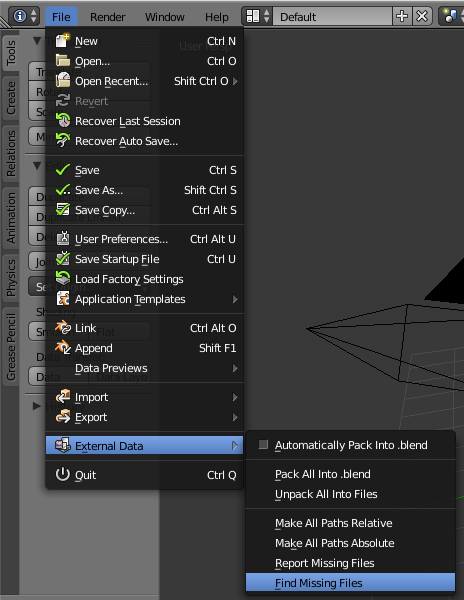
(For the record, while _I'M_ of a similar mind as you, in that I'm a big fan of user control ("just give me a knob!", an old boss used to shout whenever defaults were discussed), I've learned software should not be designed to make *me* happy. The sort of excessive flexibility in that blender screenshot is overwhelming to the average user, and turns them off to your software unless you've really engineered it so that they never HAVE to touch any of that unless they want to. Which basically 0 such applications successfully manage to do, in my experience.)
ferdnyc
on 15 Jul 2018
Looking at my project files, I saw that OpenShot already simply creates some folders without asking ("assets", "thumbnails"), and also just realised that they contain files from multiple projects. So really, with the current implementation, having just a project file somewhere, and not in its own folder, is basically a bug.
Maybe I badly communicated what I meant with base path - I'm proposing multiple paths, e.g. one for videos, one for audio, one for images/titles. If not specified, they would just have sensible defaults, but it would be possible to change them for each project individually (and maybe have the defaults for new projects in the general preferences). Regarding relative/absolute paths: many IDEs do this by always assuming absolute paths, but it's possible to use something like $(PROJECT_HOME) if you want relative.
fschill
on 15 Jul 2018
For the record, while I'M of a similar mind as you, in that I'm a big fan of user control ("just give me a knob!", an old boss used to shout whenever defaults were discussed), I've learned software should not be designed to make me happy. The sort of excessive flexibility in that blender screenshot is overwhelming to the average user, and turns them off to your software unless you've really engineered it so that they never HAVE to touch any of that unless they want to.
There's some truth to that, but I think the solution is to have meaningful defaults. Say, when you click "new project", a dialog opens up with everything already filled in the way OpenShot _recommends_ it (maybe even hidden under "advanced options"), and 95% of users can just click "ok" and be happy. But if my workflow is different, I can simply unfold the options and point the default path for media files to my central storage location where I keep my videos (and I can always do that, at any point in time, by going to "project properties" and changing it).
Regarding "making people happy" - I agree that just having a ton of options with no guidance is confusing and frustrating. But forcing a particular model without any way to change it is equally frustrating, or worse, because there is no way to fix it. And sometimes the "dumbed-down" version doesn't really make anyone happy. This is the main thing that annoys me with iMovie, which is an amazing video editor for fast, quick projects, super smooth to use, but I have zero control over how I manage, archive and handle my project files. It's all nice and shiny for a quick demo situation, but as video projects tend to have 10s or 100s of Gigabytes, it quickly breaks down with anything but casual use, and there's nothing user-friendly about lost files, broken projects and missing paths if there's no way to fix it. A friend of mine actually had the problem that iMovie couldn't handle the files from camcorders directly, and insisted on transcoding them to Apple's lossless format (no other option), which meant that the files went to 5-10 times the original size, and the harddrive filled up instantly. Yes, all very clean and simple, but not workable in reality (same goes for the "oh, just put it all in the cloud" model that's heavily pushed these days).
Anyway, the nice thing with open source is that it's at least possible to make myself happy, and leave it to others to decide if my way of doing things works for them too ;) . Don't worry though, I do very much like slick, easy to use software, and smooth efficient workflows, and that's what I'm trying to work towards.
fschill
on 15 Jul 2018
Just to summarise:
- storing everything as relative paths (relative to project file) does not really make sense, except if those files are within the project folder
- given that openshot already automatically creates subdirectories, a project folder should maybe be the recommended option (maybe auto-filled in the save dialog as a suggestion, or a checked-by-default option "create project folder").
- as potential options for linking to files (particularly video files, as they are very large, and some people might want to keep them in separate locations, NAS, etc.):
- just store absolute paths, for each file individually. If files are not found while opening, ask user to give new location (as it is now).
- have a "base path" in the project properties (user-adjustable, but with useful default), and store file paths relative to that base path. The default could e.g. be project_home/media to have it all in one folder and portable, or it could be empty which would mean "absolute paths". The default values that are used for new projects could be defined in the general preferences.
- alternatively, allow some symbolic variables in file paths for advanced users "like $(PROJECT_HOME)", "$(VIDEO_FOLDER)", etc. which can be set somewhere in the project options or global preferences. This way, each file has their own independent path, but it's still possible to change locations for all files at once. The advantage is that casual users would not even need to know about it, and would not notice it's there. A question is how to make it easy to use - maybe a drop-down list of possible options.
- use cases for re-linking of all files, instead of one-by-one:
- editing a project on multiple computers, e.g. desktop and laptop, with video files being stored on a central network drive that might be mounted on a different path
- having multiple versions at different resolution for fast editing (also e.g. on laptops where disk space is more limited)
- copying media files into the project folder, e.g. for archiving (maybe this could be an option in "Save as...", or "export project", something like "include all media files").
I'll think about it a bit more, as I said I don't have much time to work on it the coming week(s). Suggestions/comments are of course welcome.
fschill
on 15 Jul 2018
Quick update:
- I managed to implement the "brute force update" strategy: After the file_properties window is closed and returns to main_window:actionFile_Properties_trigger, it searches all clips that match the file id, and writes the new path. It seems to work in my brief tests so far, but more testing is required to find out if it causes any bugs.
- once I figured out how to do that, I also added the same to actionEditTitle_trigger, so that the edited title is also updated in all the clips. Also seems to work, but the new title is only updated when playing, or moving the timeline position. I guess it is necessary to force a re-render, but don't know yet how to do that.
As discussed above, it's maybe not the most elegant approach, but for now seems to do what I need it to do. I tried to understand the data structures, listeners, JSON, interaction with libOpenShot, etc., but really struggled. It looked to me like there is a lot of code (in the listener mechanism) that doesn't seem to do anything, and still don't really understand where everything is stored and how it relates... but hey, the "quick-n-dirty" works, and isn't that dirty (basically i copied the mechanism from "remove file from project").
These changes are in my fork, on branch "media_relink".
fschill
on 16 Jul 2018
Just barging in here to point this issue out. It'd be nice if we could have portable projects...
Also, allowing for a new file name as pointed in #1061
Sorry if these are off topic. I haven't really read the entire conversation yet. Nor have gotten to test the changes out...
peanutbutterandcrackers
on 16 Jul 2018
I'll be away for the next few days, but just wanted to ask how I should proceed. I could create two pull requests (one for the auto-link at open feature, and one for the per-file relinking), or could all roll it into one. At the moment I also have added a "recode to MJPEG" button in the file properties, which is a bit hacky, so I'll remove that for the PR.
@peanutbutterandcrackers I had a quick look at these issues. I do have a mac, and probably can get my hands on windows for creating a test project, so I might have a look. It sounds a bit like the person got confused by the dialog, which actually only asks for a folder - I wonder if one clicked "ok" instead of "cancel" if it would work?
Regarding specifying a new file name: one way to do this, now that we have individually relinkable files, is to just leave files that cannot be linked during open in the project, instead of deleting them. Then the user can go in and relink them manually. I'd prefer this option, as I don't want my project to be stripped of all clips if a directory is offline, and rather have the clips shown as "?" or something. We would have to check what happens if there are unlinked files, it might cause crashes which would be undesirable. In that case we'd need extra checks, and ideally a "?" thumbnail, if that's not done already.
fschill
on 16 Jul 2018
This was addressed in both @fschill 's own PR and @jonoomph 's commit bdd2135; between the two I think we're actually in OK shape on this issue, finally.
(I'd feel better if the file sizes were being compared, before automatically relinking files based on nothing more than their presence in the same directory as another relinked file. Because I know way too many people with 700 different Untitled (1).mp4 files scattered around their hard drive(s).)
...But, that enhancement is totally doable (the file size on disk is stored in the Reader dictionary for each Clip and File), and beyond the scope of this issue anyway.
ferdnyc
on 20 Jul 2019
@ferdnyc Yes, I agree. I think the most important thing was to be able to open projects that have been moved. And if something goes wrong, at least it's possible to manually fix the linking file by file. Checking file sizes is probably a good idea before re-linking anything automatically - or alternatively, the length of the clip. Length would have the advantage that it would still accept files that have been recoded (e.g. you could then have a more compressed version of the project on your laptop to edit on the road). But as you say, that should be a new "enhancement" issue.
fschill
on 20 Jul 2019
I wrote:
Agreed. But say we're transcoding to temporary work files. One relatively pain-free way to do that is to transcode the File to a temporary work directory, then point the Clips to _that_ file instead of the source File. That way the File retains the location of the source media, and the Clips work from the file they need to work from. If the File changes, the new source gets re-transcoded and the Clips updated (if need be, assuming it isn't transcoded into the same location).
When it comes time for Export... well, for other reasons I've already thought this may become necessary at some point, but for Export in this scenario it probably makes the most sense to take an in-memory copy of all the Clip data, and then update the reader paths to point to the original source file instead of their work file, in that export-copy data.
As a side note and for future reference, this ⬆️ has already come to pass — it's how the export-to-a-different-frame-rate issue was solved, by duplicating the Timeline data and remapping all of the keyframes. So, there again, we're in good shape for possible future implementation of other features discussed.
ferdnyc
on 21 Jul 2019
@fschill
Checking file sizes is probably a good idea before re-linking anything automatically - or alternatively, the length of the clip. Length would have the advantage that it would still accept files that have been recoded (e.g. you could then have a more compressed version of the project on your laptop to edit on the road).
I've thought about that some more, and I think for automatic relinking, it really needs to be the SAME file, which checking (exact) file size gets you. As things currently stand, I don't believe (unless I'm mistaken, which is possible) that OpenShot will update the stored metadata for the project's Files/Clips in a relinking scenario, and if the file has been transcoded or modified in any way that data will all be _wrong_.
So, assuming my memory/assumptions about how all that code works is correct, I think trying to swap out media files for non-exact replacements using the automatic file-relinking process is probably a recipe for disaster. That would have to be handled through some other process that's aware of the non-identical nature of the replacement files.
ferdnyc
on 21 Jul 2019
I decided it was easy enough to test the theory in my previous comment, so I contrived one.
- I created a project containing two MP4 files (which I stored in `/var/tmp/somerandomname/), dropped each of them on the Timeline twice, saved it, and quit.
- Then I coped the _project file_ to
/var/tmp/someothername/, created a _subdirectory_ of that directory (so I'd be sure to trigger the automatic relinking), and copied two files into that/var/tmp/someothername/fakereplacements/subdirectory. Those files were:
- An MP4 of a different section of the same video that the first two clips came from; same encoding parameters and etc., but slightly different length, and none of the same content. I gave this the same filename as the first MP4 file in step 1 above.
- A random AVI from my collection, completely different length, resolution, _aspect ratio_... it basically had nothing in common with the two original clips. I named that file the same as the second MP4 from step 1.
- Then I launched OpenShot (latest devel code), loaded the copy of the project file that I'd made in step 2 above, and when prompted to locate the first missing file I pointed it at the subdirectory containing my fake replacements.
- When OpenShot finished loading the project, I saved it back to disk and quit.
Then I diffed the two project files. As I feared, the ONLY changes from the original project file to the resaved copy were the file paths of all the media files, despite the fact that one of the media files had been swapped out for a different one with an entirely different file format!
Sooooo, yeah. That's Bad™. We should really work on that file-size-matching code soonish.
ferdnyc
on 21 Jul 2019
Related issues
 mnally8
·
3Comments
mnally8
·
3Comments
 Geoff0627
·
3Comments
Geoff0627
·
3Comments
 gbbbbb
·
3Comments
gbbbbb
·
3Comments
 ghost
·
3Comments
ghost
·
3Comments
 GrandpaBill3006
·
3Comments
GrandpaBill3006
·
3Comments