Openshot-qt: Time on timeline incorrect
Describe the bug
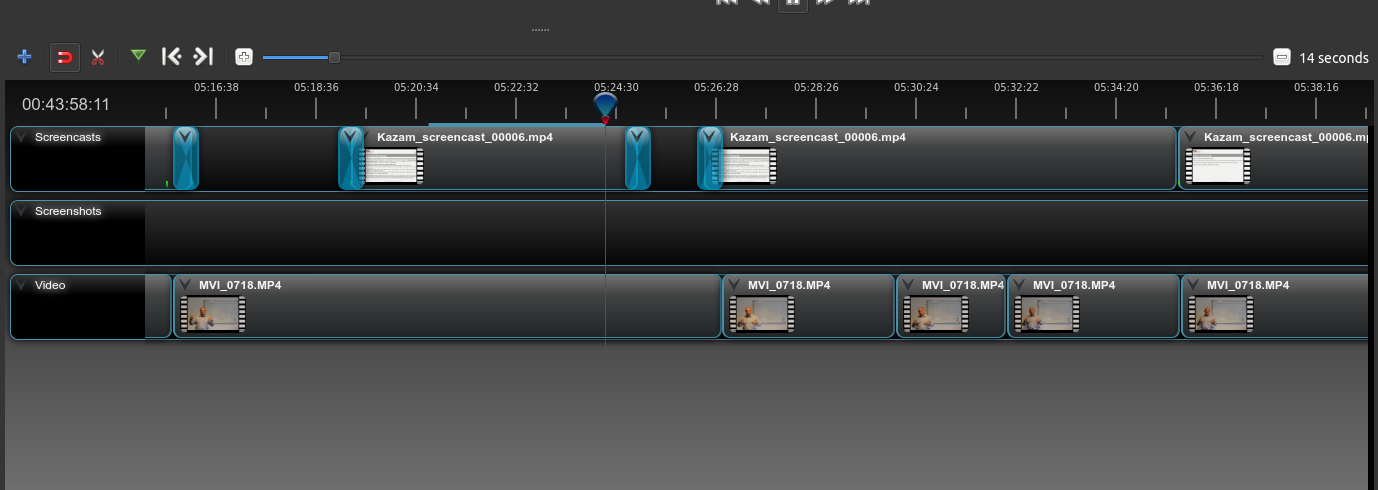
Reviewing a video showed me, that the time on the timeline does not fit with any other indication. See attached screenshot and compare timeline with the progress counter to the left. The entire video is about 50mins long, bit timeline already shows 5hrs and 24mins.
System Details (please complete the following information):
- Operating System / Distro: Ubuntu 16.04
- OpenShot Version: 2.4.2
To Reproduce
Steps to reproduce the behavior:
- Open a video in preview mode
- Compare timeline time with actual progress
Expected behavior
Timeline should be within the length of the video and the progress counter
Screenshots
Attached
Logs
None
Additional context
None
 ruffieuxh
All 12 comments
@ruffieuxh - Good sir. On an unrelated note, could you please let us know how you have OpenShot installed on your Ubuntu 16.04 machine? Are you using the stable PPA? The daily PPA? Or the AppImage? Compiling from source?
 peanutbutterandcrackers
on 2 Jul 2018
peanutbutterandcrackers
on 2 Jul 2018
Also, we shall look into this matter soon.
@DylanC - Can you recreate this issue, Cap'ain?
peanutbutterandcrackers
on 2 Jul 2018
Using 2.4.2 AppImage
ruffieuxh
on 2 Jul 2018
@ruffieuxh - You do not get any errors? Wow!
@DylanC - Cap'ain! In light of myself being unable to use the AppImage because of the following error:
Loaded modules from current directory: /tmp/.mount_TzQfxi/usr/bin
Traceback (most recent call last):
  File "/usr/local/lib/python3.4/dist-packages/cx_Freeze-4.3.4-py3.4-linux-x86_64.egg/cx_Freeze/initscripts/Console.py", line 27, in <module>
  File "openshot_qt/launch.py", line 53, in <module>
    from classes.app import OpenShotApp
  File "/usr/lib/python3.4/importlib/_bootstrap.py", line 2237, in _find_and_load
  File "/usr/lib/python3.4/importlib/_bootstrap.py", line 2226, in _find_and_load_unlocked
  File "/usr/lib/python3.4/importlib/_bootstrap.py", line 1200, in _load_unlocked
  File "/usr/lib/python3.4/importlib/_bootstrap.py", line 1129, in _exec
  File "/usr/lib/python3.4/importlib/_bootstrap.py", line 1471, in exec_module
  File "/usr/lib/python3.4/importlib/_bootstrap.py", line 321, in _call_with_frames_removed
  File "/tmp/.mount_TzQfxi/usr/bin/classes/app.py", line 34, in <module>
    from PyQt5.QtWidgets import QApplication, QStyleFactory, QMessageBox
  File "/usr/lib/python3.4/importlib/_bootstrap.py", line 2237, in _find_and_load
  File "/usr/lib/python3.4/importlib/_bootstrap.py", line 2226, in _find_and_load_unlocked
  File "/usr/lib/python3.4/importlib/_bootstrap.py", line 1191, in _load_unlocked
  File "/usr/lib/python3.4/importlib/_bootstrap.py", line 1161, in _load_backward_compatible
  File "ExtensionLoader_PyQt5_QtWidgets.py", line 22, in <module>
  File "ExtensionLoader_PyQt5_QtWidgets.py", line 14, in __bootstrap__
ImportError: /usr/lib/x86_64-linux-gnu/mesa/libGL.so.1: undefined symbol: drmGetDevices2
and also this error opened by another user just today, perhaps some investigations are in order. What is it that @ruffieuxh's system has that our's lack? o.O
Perhaps @N3WWN could help out, too?
@ferdnyc? Maybe?
peanutbutterandcrackers
on 2 Jul 2018
@peanutbutterandcrackers - I can test this on my system later today and give some feedback.
 DylanC
on 2 Jul 2018
DylanC
on 2 Jul 2018
None so far. Please find attached the logfile from the start of the app including loading of video
openshot-qt.log
libopenshot.log
ruffieuxh
on 2 Jul 2018
The 2.42. AppImage runs fine for me as well, on Fedora.
Looking at my system libraries vs. the bundled ones, my /usr/lib64/libdrm.so.2 does contain the symbol drmGetDevices2, whereas the AppImage bundled one does not:
$ readelf -s /tmp/.mount_kByOxc/usr/bin/libdrm.so.2|grep -i drmGetDevices
   141: 00000000000070c0   782 FUNC    GLOBAL DEFAULT   11 drmGetDevices

$ readelf -s /usr/lib64/libdrm.so.2|grep drmGetDevices
   144: 0000000000009260    19 FUNC    GLOBAL DEFAULT   11 drmGetDevices
   201: 0000000000008eb0   937 FUNC    GLOBAL DEFAULT   11 drmGetDevices2
So, I suspect this may again be a library versioning issue, with libdrm.so.2 in the AppImage being out of date, but newer system libraries being pulled in that require that symbol. libGLX.so.1 is not bundled with the AppImage (nor are libGLdispatch.so.0 or libGLX.so.0, also dependencies of PyQt5.QtWidgets.so), so perhaps libdrm.so.2 shouldn't be either.
 ferdnyc
on 3 Jul 2018
ferdnyc
on 3 Jul 2018
@ruffieuxh @peanutbutterandcrackers @ferdnyc - I wasn't able to reproduce this bug using the above instructions.
DylanC
on 28 Jul 2018
Yeah, this is something I've never seen before, but based on the logs... it's not a normal condition. There's an error logged at line 178 of the log file, when OpenShot attempts to load the JSON object defining the project. (Not clear whether it's a backup file or one that @ruffieuxh loaded from disk — for all of the logspam OpenShot outputs, right now the logging on exactly _from where_ and _how_ inputs are loaded is sloppy... that's on my list to clean up.) Anyway, that's largely immaterial, the real point is that the JSON object loaded causes the following log message:
timeline:INFO Error applying JSON to timeline object in libopenshot: JSON is invalid (missing keys or invalid data types).
That message is followed by the JSON object itself, which is 1.44 MEGABYTES in size, and (when formatted with json_pp) comes out to 154,212 lines of encoded data, occupying 5.7MB of disk. The entire logfile, in fact, is 1455672 bytes long, and that single message on line 178 is 1440396 of those bytes (98.95% of the total logfile).
This is clearly something that OpenShot is not up to handling.
One of the things I notice is that the JSON contains both undo and redo histories. Now, I can't say for _certain_ that has anything to do with the problem here, but the undo history occupies lines 72392-85917 of the formatted file, and the redo history lines 85918-152837. So, the history entries _alone_ are 52% of the file (by formatted length). I'm kind of surprised to see those; most applications don't store undo/redo history across saves, because it is so expensive to keep (and often difficult to reapply outside of the session that generated it). But, now that I look at my own project files, they also contain the "history" parameter. That's probably something we should rethink.
Anyway, @ruffieuxh — here's a copy of that logged JSON load failure, converted back into an .osp file but with the history entries removed (reducing the file size from 5.7MB to 2.4MB, and it would be a lot smaller without the json_pp formatting for readability). OpenShot 2.4.2 at least _recognizes_ it as a valid project file on my system, though the missing media files mean I can't fully load it, and even if I could it would be pointless as it would load "empty".
But, give it a try, and see if loading from this file makes any difference. Please also do report back with your results, because if removing the history section from saved project files can clear up errors like this then that's something we'll want to explore going forward.
If this doesn't help, then it's possible the complexity of your project is just too much for OpenShot, I'm afraid. It may be necessary to assemble it in sections, creating smaller sub-projects, exporting them to disk, and then combining those rendered sections into your final project.
ETA: I should mention that the JSON data recovered uses absolute path names for the files, so it shouldn't matter where you extract the bug1768-recovered_nohistory.osp file. (Sorry, I'm wordy with my filenames as well.) The path for all of the media files it's expecting to load is /home/ruffieux/Videos/.
ferdnyc
on 28 Jul 2018
@ferdnyc Is this a confirmed bug?
 speedytechdev
on 12 Dec 2018
speedytechdev
on 12 Dec 2018
The history thing? Yeah, it's #1923 (and many others, including this one), and my PR to fix it is #2400, filed November 25. If anyone can convince @jonoomph to take a look at that and possibly merge it, that'd be awesome.
ferdnyc
on 13 Dec 2018
@ferdnyc - I'll do my best. 👍
DylanC
on 13 Dec 2018
Related issues
 CarlBicknell
·
3Comments
CarlBicknell
·
3Comments
 Geoff0627
·
3Comments
Geoff0627
·
3Comments
 LadyReader
·
3Comments
LadyReader
·
3Comments
 gbbbbb
·
3Comments
gbbbbb
·
3Comments
 malinga91
·
3Comments
malinga91
·
3Comments