Openshot-qt: Ongoing Error For My Windows 10 - Cx_freeze
Windows 10 Home 64 bit
Intel Core 2 Quad Q6600
8GB DDR2 RAM
250GB HDD
Windows 10 Home 64 bit
- OpenShot Version:2.4.1
*
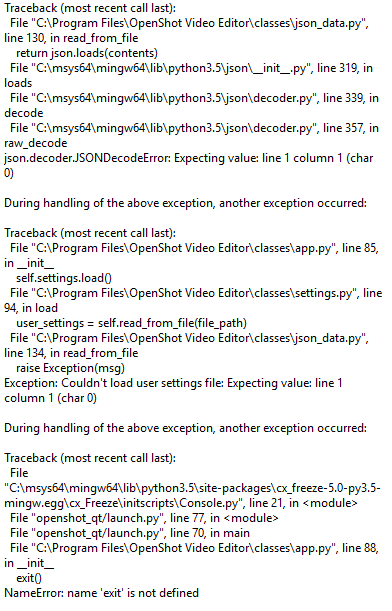
This has been ongoing for about a year now, tried troubleshooting myself. It ALWAYS crashes with this error above, everytime I attempt to launch it from my main system. Ive reinstalled it, updated it, uninstalled it, moved it, you name it. I installed it on a second Windows 10 system, and it ran fine. I copied those working files to a flash drive. tried to run it on my main system...NOPE! Right off the bat it crashed when launched, with the same error. I instantly plugged it into the secondary system, and it worked like nothing happened at all. I do wish for a reply to my email if this requires any additional information to assist, and for troubleshooting help from the great and wise creator of Openshot (lol).
 IAmSofaKingStewPid
All 17 comments
@IAmSofaKingStewPid - I would recommend to delete your settings folder.
 DylanC
on 15 Nov 2017
DylanC
on 15 Nov 2017
thank you, i will report back to you once i get the results of this
experiment.
UPDATE: Im sorry but that did NOT solve the problem. Same error, same result.
On Nov 15, 2017 6:24 AM, "DylanC" notifications@github.com wrote:
@IAmSofaKingStewPid https://github.com/iamsofakingstewpid - I would
recommend to delete your settings folder.—
You are receiving this because you were mentioned.
Reply to this email directly, view it on GitHub
https://github.com/OpenShot/openshot-qt/issues/1035#issuecomment-344564222,
or mute the thread
https://github.com/notifications/unsubscribe-auth/AgHOlY4pjVyiYpVW54tbjnT_7qA2iZHXks5s2snggaJpZM4QeKw3
.
IAmSofaKingStewPid
on 15 Nov 2017
Honestly I think my system is rejecting me. xD
IAmSofaKingStewPid
on 16 Nov 2017
@IAmSofaKingStewPid - Hmm.. Possibly. :) Not sure what else you could try.
DylanC
on 24 Nov 2017
well im guessing i have the most unique error ever....not sure if i should
be proud of it or not...
On Nov 24, 2017 8:14 AM, "DylanC" notifications@github.com wrote:
@IAmSofaKingStewPid https://github.com/iamsofakingstewpid - Hmm..
Possibly. :) Not sure what else you could try.—
You are receiving this because you were mentioned.
Reply to this email directly, view it on GitHub
https://github.com/OpenShot/openshot-qt/issues/1035#issuecomment-346826095,
or mute the thread
https://github.com/notifications/unsubscribe-auth/AgHOlSvvEwmUeLFz65vTnIGoNPXk1z8uks5s5sEOgaJpZM4QeKw3
.
IAmSofaKingStewPid
on 25 Nov 2017
@IAmSofaKingStewPid - Maybe try to delete backup.osp. I think it keeps trying to open your backup.
DylanC
on 25 Nov 2017
attempted, and yet failed again...sorry...
On Nov 25, 2017 7:01 AM, "DylanC" notifications@github.com wrote:
@IAmSofaKingStewPid https://github.com/iamsofakingstewpid - Maybe try
to delete backup.osp. I think it keeps trying to open your backup.—
You are receiving this because you were mentioned.
Reply to this email directly, view it on GitHub
https://github.com/OpenShot/openshot-qt/issues/1035#issuecomment-346936378,
or mute the thread
https://github.com/notifications/unsubscribe-auth/AgHOlUAudu6igH55clOCxACy0oNTUQbPks5s6AGlgaJpZM4QeKw3
.
IAmSofaKingStewPid
on 26 Nov 2017
Hey there!
It has been reported that this issue affects only certain users in the computer, and thus, it is a user-related issue. Some report that the admin could run OpenShot while the standard user could not, and vice-versa.
A user recently reported that he resolved this issue by copying openshot.settings file from the standard user (or whichever user can use OpenShot in your windows machine) to the admin user (or whichever user can NOT use OpenShot). He also recommends having a backup made of the openshot.settings file.
Please note that the solution is edited in at the very end of the comment.
Hope this helps. :)
All the very best!
 peanutbutterandcrackers
on 13 Feb 2018
peanutbutterandcrackers
on 13 Feb 2018
Hello, guys!
I solved the problem by deleting the following directory:
C:\Users\yourUSER\ .openshot_qt
Then just open the program and enjoy! :)
 laellsr
on 20 Feb 2018
laellsr
on 20 Feb 2018
@laellsr - Thank you for sharing. I hope this helps others with the same issue too. :)
peanutbutterandcrackers
on 20 Feb 2018
Thank you peanutbutterandcrackers, the running as administrator works!!
Thank You!!!
 EBW1
on 22 Feb 2018
EBW1
on 22 Feb 2018
@EBW1 - I'm glad this was of some help to you. :) I hope you create awesome videos using OpenShot! All the very best!
@DylanC - I think we're up to something here... Multiple people reporting similar problems and a simple solution seems to fix it for quite a few of them. Hmm. cue in detective music here
peanutbutterandcrackers
on 25 Feb 2018
@peanutbutterandcrackers
OpenShot worked fine, so any night after months that same problem happened to me :'(
- Looking for solutions I found that another user solved the problem by installing Windows again.
I realized that uninstalling OpenShot did not solve the problem, it was necessary to clean the system.
Then I thought that all the program logs were not being deleted. Some configuration file (and customization) was causing problems.
Check mate. Date files remain on every user of the system even after uninstalling the program.
I simply deleted my user's OpenShot date folder :)
_Thanks to all of you who make OpenShot a better open source editor every day! =D_
laellsr
on 27 Feb 2018
@laellsr - Awesome! I'm glad that it has worked for you. You're welcome. We're just doing our part. Also, that was some great deduction there, Mr. Holmes! :+1:
However, I have a question. When you say "OpenShot date folder", what exactly do you mean? o.O Is it the .openshot_qt folder (as many have reported the issue being resolved once this folder was deleted) or is it sth else? I'd like to know, for future references. Thanks!
Hope you make awesome videos with OpenShot!
peanutbutterandcrackers
on 28 Feb 2018
Please do look forward to v2.4.2. This issue has been put on the list of the 'critical bugs to be fixed' for the release. OpenShot should finally work quite well on Windows Machines with v2.4.2. Please, do however continue to support OpenShot. Perhaps test the latest daily build if you have the time and report the issues as you encounter them. Thanks!
peanutbutterandcrackers
on 12 Mar 2018
@peanutbutterandcrackers
Yes! Sorry for taking so long to respond. I did not see the message in my email.
I believe that this folder is from the OpenShot data cache, it specifies for each user of the system. This folder is neither excluded nor refreshed when you reinstall the program.
Some intervention on the files in this folder causes an error. This is a tip for programmers.
I have not yet studied Python, just C, so I do not know what I can help ...
laellsr
on 13 Mar 2018
@laellsr - Yes. This issue has been brought to Mr. Thomas's attention. Hopefully, this will be resolved completely by v2.4.2. Please do keep on supporting OpenShot!
peanutbutterandcrackers
on 14 Mar 2018
Related issues
 malinga91
·
3Comments
malinga91
·
3Comments
 Emma3993
·
3Comments
Emma3993
·
3Comments
 Geoff0627
·
3Comments
Geoff0627
·
3Comments
 LadyReader
·
3Comments
LadyReader
·
3Comments
 Sefran007
·
3Comments
Sefran007
·
3Comments
Most helpful comment
@peanutbutterandcrackers
OpenShot worked fine, so any night after months that same problem happened to me :'(
I realized that uninstalling OpenShot did not solve the problem, it was necessary to clean the system.
Then I thought that all the program logs were not being deleted. Some configuration file (and customization) was causing problems.
Check mate. Date files remain on every user of the system even after uninstalling the program.
I simply deleted my user's OpenShot date folder :)
_Thanks to all of you who make OpenShot a better open source editor every day! =D_