Opensheetmusicdisplay: Display Multi-Measure rests
Added to Vexflow in November 2018 (PR 671).
https://usermanuals.musicxml.com/MusicXML/Content/EL-MusicXML-multiple-rest.htm
Currently, we render these measure for measure, because they are also still given like that in XML.
The starting multi-measure rest bar just has an added attribute:
    <measure number="6" width="0.00">
      <attributes>
        <measure-style>
          <multiple-rest>4</multiple-rest>
          </measure-style>
        </attributes>
      <note>
        <rest/>
        <duration>4</duration>
        <voice>1</voice>
      </note>
    </measure>
- [ ] TODO: Add Vexflow.MultiMeasureRest to type definitions
Sample:
Multi-Measure-Rest_sample.musicxml.zip
Musescore Rendering:
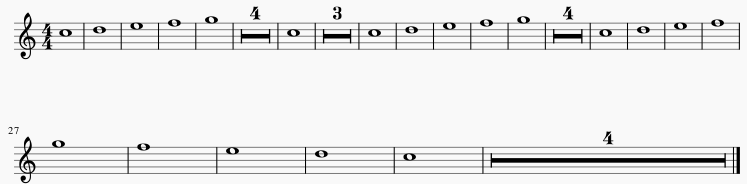
OSMD 0.7 Rendering:

This will have a few small challenges like needing to skip creating GraphicalMeasures and incrementing measure number count for measureNumberLabel, but the Vexflow part should be easy.
 sschmidTU
All 6 comments
Done.
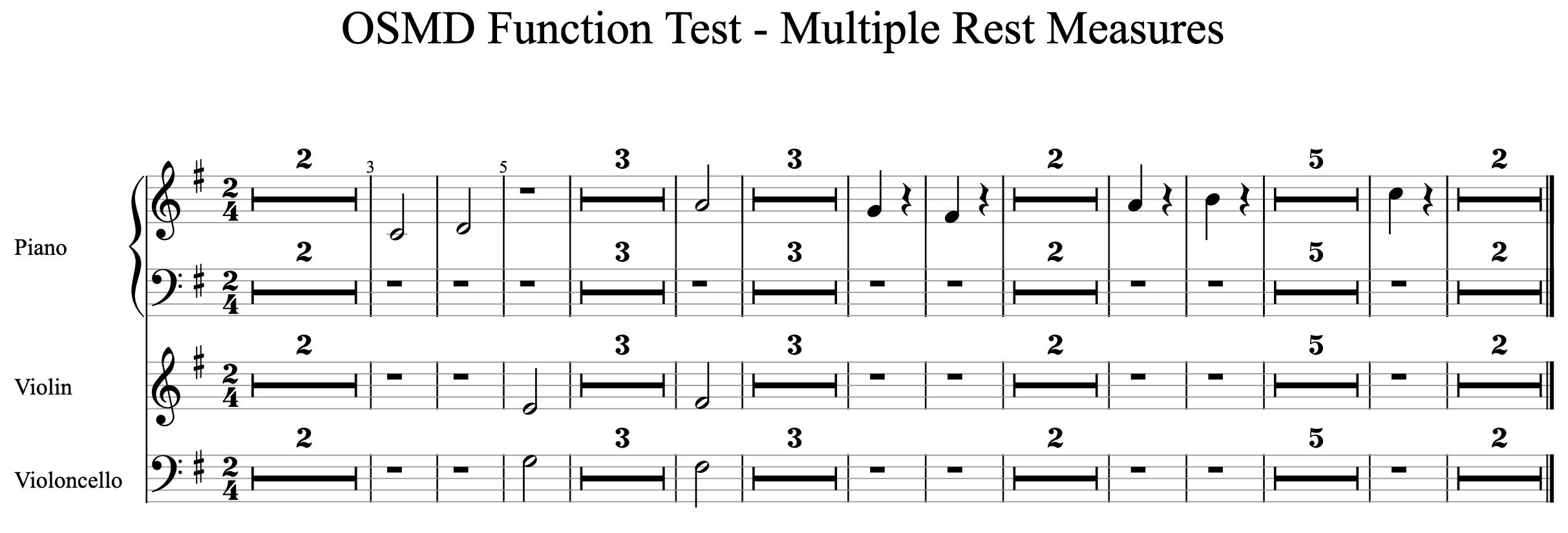
Added new OSMD Function Test - Multiple Rest Measures to the demo.
sschmidTU
on 30 Jun 2020
I suppose the measure number labels need a change now,
they should be drawn after a multi rest measure if the interval between labels (e.g. every 3 measures) fell into the multi rest measure.
sschmidTU
on 30 Jun 2020
@sschmidTU Yes makes sense to adapt the numbering, but is it really such a coincidence, that no numbering falls on a rendered measure?
Actually measure 9 is rendered in your image for example, but no number is shown - seems some other problem here...
 matt-uib
on 1 Jul 2020
matt-uib
on 1 Jul 2020
Fixed the measure number label generation.
The problem was that it checked for the measure in exactly that interval (e.g. in 2 measures), which can now be inside a multirest.
Now, it checks whether the measure number is greater or equals the previous label plus the interval.

sschmidTU
on 1 Jul 2020
This is awesome! Very nice!!
 MilesMorel
on 2 Aug 2020
MilesMorel
on 2 Aug 2020
By the way, you can disable multiple rest measures by setting:
osmd.EngravingRules.RenderMultipleRestMeasures = false;
This will render all rest measures individually.
sschmidTU
on 3 Aug 2020
Related issues
 npmccallum
·
5Comments
sschmidTU
·
3Comments
MilesMorel
·
3Comments
npmccallum
·
5Comments
sschmidTU
·
3Comments
MilesMorel
·
3Comments
 djae88
·
4Comments
djae88
·
4Comments
 conde2
·
4Comments
conde2
·
4Comments
Most helpful comment
Fixed the measure number label generation.

The problem was that it checked for the measure in exactly that interval (e.g. in 2 measures), which can now be inside a multirest.
Now, it checks whether the measure number is greater or equals the previous label plus the interval.