Openseadragon: Button size on mobile devices in full screen mode
I am trying to make my website more mobile friendly. Just changed the 'Flat Toolbar Icons' linked here
https://openseadragon.github.io/#examples-and-features
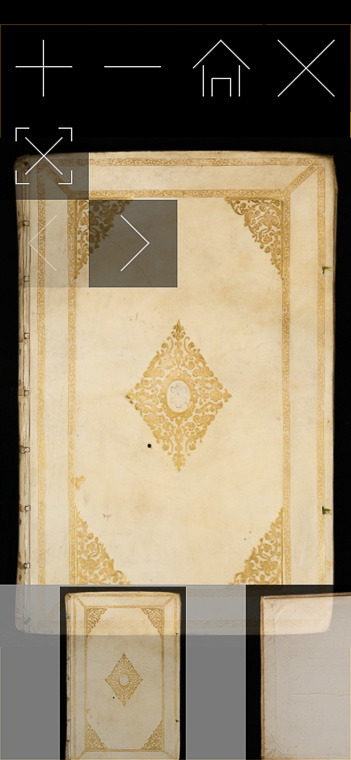
from 50px to 90px to make it usable on mobile phones. But the size of the button icons in full screen mode is much too larger now compared to normal mode. I have not seen any possibility to change this. Does someone has an idea why the icons become so large in full screen mode on mobile devices? Same behavior in Firefox and Chrome, I only can test Android. There is no size change of the icons on the desktop.
Screenshot normal:

Full screen:
 adversor
All 4 comments
Wild! Does it do this if you use the original buttons?
I'm noticing the reference strip also gets a lot bigger... is that part of the same bug, or is there another explanation for it?
Are you able to look at the browser inspector? Is there anything funny happening in the CSS?
Do you have a repro of this you can share?
 iangilman
on 1 Jun 2021
iangilman
on 1 Jun 2021
Thank you for coming back on this. You may have a look here: rare-atlases.com
Let me know if you see the same with your mobile device.
I tried it with a newer phone, Android 10 + Chrome + Firefox, also an older one with Android 5 + Chrome + FF. All the same.
I build OSD from the actual source with grunt, but same behavior with version 2.4.1 and the original buttons. The reference strip and also the navigator become much larger in full screen mode, so it should be the same bug.
The website uses Joomla, I tried to open OSD in a lightbox within Joomla, but don't got it to run. So I just open it in full size in the same window and the 'close-button' only triggers history.back
I can't code JS, just trial and error. That's the code I use if you click on the first image on an atlas page, a bit different for the single maps below:
prefixUrl += "openseadragon/images/";

let backButton = new OpenSeadragon.Button({
    tooltip: 'Close',
    srcRest: prefixUrl + 'close_rest.png',
    srcGroup: prefixUrl + 'close_grouphover.png',
    srcHover: prefixUrl + 'close_hover.png',
    srcDown: prefixUrl + 'close_pressed.png',
    fadeDelay: 0,
    fadeLength: 2000,
    onClick: goBack
});

function goBack() {
  window.history.back();
}


var viewer = OpenSeadragon({
    id:"openseadragon_id",
    prefixUrl: prefixUrl,
    wrapHorizontal: false,
    wrapVertical: false,
    constrainDuringPan: true,
    visibilityRatio: 1.0,
    autoHideControls: true,
    showNavigator: false,
    navigatorSizeRatio: 0.1,
    navigatorPosition: 'TOP_RIGHT',
    defaultZoomLevel:   0,
    minZoomImageRatio: 0.85,
    maxZoomPixelRatio: 1,
    tileSources: multiMapTile,
    sequenceMode: true,
        showReferenceStrip: true,
    referenceStripScroll: 'horizontal',
    referenceStripSizeRatio: 0.25,
    showFullPageControl: true
    });


viewer.addControl(backButton.element,{anchor: OpenSeadragon.ControlAnchor.TOP_RIGHT});

jQuery(function(){
    var screenWidth = window.innerWidth;
    var screenHeight = window.innerHeight;
    jQuery(".openseadragon").width(screenWidth);
    jQuery(".openseadragon").height(screenHeight);
    })
Same effect if I delete the last function with screenWidth/screenHeight, the openseadragon-container is just fixed in size by css. I am not sure if this is a bug in OSD, maybe some conflicts with Joomla on my website.
Cheers, Rainer
adversor
on 1 Jun 2021
Looks like you don't have the mobile meta tag in your HTML... I suspect that may be causing issues. Here's one I've used, though you might Google to see what the latest suggestion is:
<meta name="viewport" content="user-scalable=no, initial-scale=1.0, minimum-scale=1.0, maximum-scale=1.0" />
I suspect adding that will make your page more consistent.
As for the jQuery function at the bottom, I would think you should be able to skip that and instead do it via CSS, something like:
.openseadragon {
  width: 100vw;
  height: 100vh;
}
Yes, this was the problem. Thank you so much!
adversor
on 3 Jun 2021
Related issues
 maxrottersman
·
4Comments
maxrottersman
·
4Comments
 JonasGra
·
6Comments
JonasGra
·
6Comments
 bdrichards
·
4Comments
bdrichards
·
4Comments
 sommour
·
5Comments
sommour
·
5Comments
 mnyrop
·
3Comments
mnyrop
·
3Comments
Most helpful comment
Yes, this was the problem. Thank you so much!