Openrefine: First time Export to Google Drive/Sheets is called, it does nothing
Describe the bug
When you call, the FIRST TIME, the function « Export to gDrive », it does nothing. You have to call it a second time.
To Reproduce
- Go to 'Export project'
- Click on 'Export to Google Drive' and 'Export'
- See nothing happening
Expected behavior
It should present the dialog box that ask for the gDrive file name.
OpenRefine (please complete the following information):
- Version 3.3
 antoine2711
All 10 comments
Just to be more precise, the first time the command is called, the mechanism for the authentification of gData seams to open a window that gets closed after. But it should also ask for the name of the file to create in gDrive, which it only does if you call the command a second time.
antoine2711
on 22 Mar 2020
@antoine2711 I tried but could not reproduce the issue in Google Chrome. After authorizing dialog it presents the dialog box that asks for the Google Drive file name.
but gets an error when I tried in Firefox (unfortunately could not take the Screenshot but it was some 400 bad request error).
After closing that bad request dialog I was still able to upload the file after exporting again.
Now I have removed the OpenRefine app from Google Drive but now OpenRefine is not asking for authorization
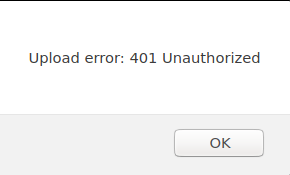
The above dialog appears but is not asking to authorize again.
OpenRefine Version 3.3
 AghaSaad04
on 22 Mar 2020
AghaSaad04
on 22 Mar 2020
I tested it using Google Chrome.
OpenRefine version: 3.3
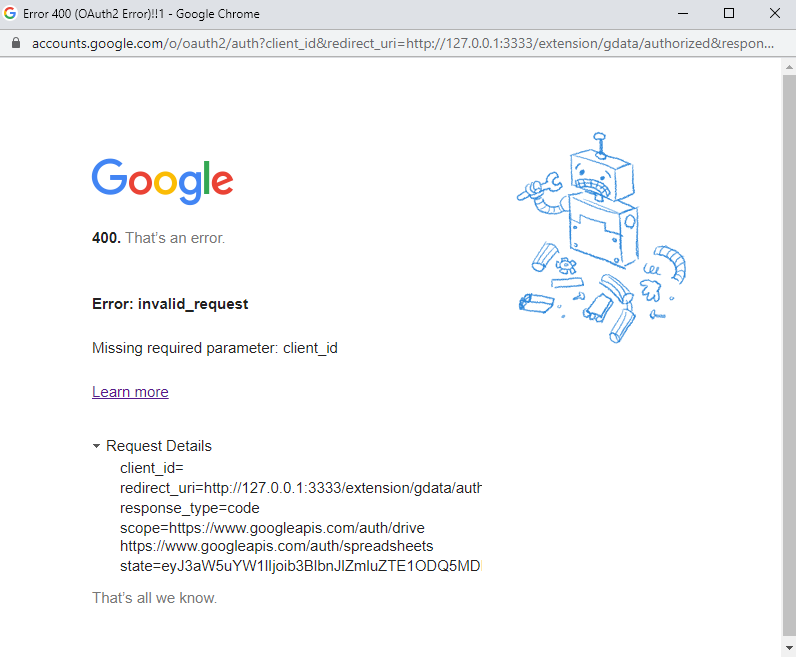
As soon as I selected the "Google Drive" option, this window showed up:
 khyati-agarwalss
on 22 Mar 2020
khyati-agarwalss
on 22 Mar 2020
I tested it using Google Chrome.
OpenRefine version: 3.3
As soon as I selected the "Google Drive" option, this window showed up:
Hi @khyati-agarwalss, I suspect you are having this problem because you didn't create your private GOOGLE KEY & SECRET.
Go here to check this out! https://github.com/OpenRefine/OpenRefine/OpenRefine/wiki/Google-Extension
Regards, Antoine
antoine2711
on 22 Mar 2020
@antoine2711, you don't need to quote the entire message when you are replying to it immediately after - it just needlessly duplicates content. Thanks!
 wetneb
on 22 Mar 2020
wetneb
on 22 Mar 2020
Hi @AghaSaad04
@antoine2711 I tried but could not reproduce the issue in Google Chrome. After authorizing dialog it presents the dialog box that asks for the Google Drive file name.
I suggest that you do this sequence:
- do an export of the project in gDrive;
- quit OR;
- launch again;
- try to Export to gDrive;
Then, you will see a window opening and closing, one just the size of the gData authentification. But wait, and nothing else will happen.
but gets an error when I tried in Firefox (unfortunately could not take the Screenshot but it was some 400 bad request error).
After closing that bad request dialog I was still able to upload the file after exporting again.
I didn't even try Firefox. All my problems are with Chrome.
Now I have removed the OpenRefine app from Google Drive but now OpenRefine is not asking for authorization
The above dialog appears but is not asking to authorize again.
I haven't tried removing gData auth. But the authentification process could be involved in the problem.
Regards, Antoine
antoine2711
on 22 Mar 2020
I experienced this today with Firefox 77.0.1 and on OpenRefine 3.3. I had never connected with Google before, for either import or export.
It asked me to authorize, which I did, then it gave me an error and did nothing. The export worked the second time (without reauthorization).
 allanaaa
on 16 Jun 2020
allanaaa
on 16 Jun 2020
Just a followup in case this helps:
Using 3.4, Create Project > Google Data did not show me as authorized. When I tried to authorize I got
HTTP ERROR 500
Problem accessing /extension/gdata/authorized. Reason:
Butterfly Error
Butterfly caught the following error while processing the request:
org.mozilla.javascript.WrappedException: Wrapped com.google.api.client.auth.oauth2.TokenResponseException: 400 Bad Request
{
"error" : "invalid_grant",
"error_description" : "Bad Request"
} (openrefine-3.4-beta/webapp/extensions/gdata/module/MOD-INF/controller.js#108)
....
etc.
I tried a few times; no change.
When I opened an existing project and went to "export as Google Sheets" it worked fine.
Then, when I navigated back to Create Project > Google Data, it showed me as authorized.
So, I suspect there are multiple issues with authorization.
allanaaa
on 23 Jun 2020
This is true for Google Sheets export as well. Something is messed up with the OAuth2 flow for handling the final callback.
 tfmorris
on 29 Jun 2020
tfmorris
on 29 Jun 2020
Just in case it's helpful: I experienced this also in Ubuntu and Firefox - this time I tried to authorize on the "Create project > Google data" screen and it gave me the same error: HTP Error 500, Butterfly Error, 400 Bad Request, etc. But it authorized properly according to the email I received. I refreshed the OpenRefine tab and it loaded my documents.
allanaaa
on 15 Jul 2020
Related issues
 asyrul21
·
3Comments
asyrul21
·
3Comments
 katrinleinweber
·
3Comments
katrinleinweber
·
3Comments
 kushthedude
·
3Comments
kushthedude
·
3Comments
 anchardo
·
3Comments
antoine2711
·
3Comments
anchardo
·
3Comments
antoine2711
·
3Comments
Most helpful comment
I experienced this today with Firefox 77.0.1 and on OpenRefine 3.3. I had never connected with Google before, for either import or export.
It asked me to authorize, which I did, then it gave me an error and did nothing. The export worked the second time (without reauthorization).