Openrefine: Sign in error using Google sign in
Describe the bug
To Reproduce
Steps to reproduce the behavior:
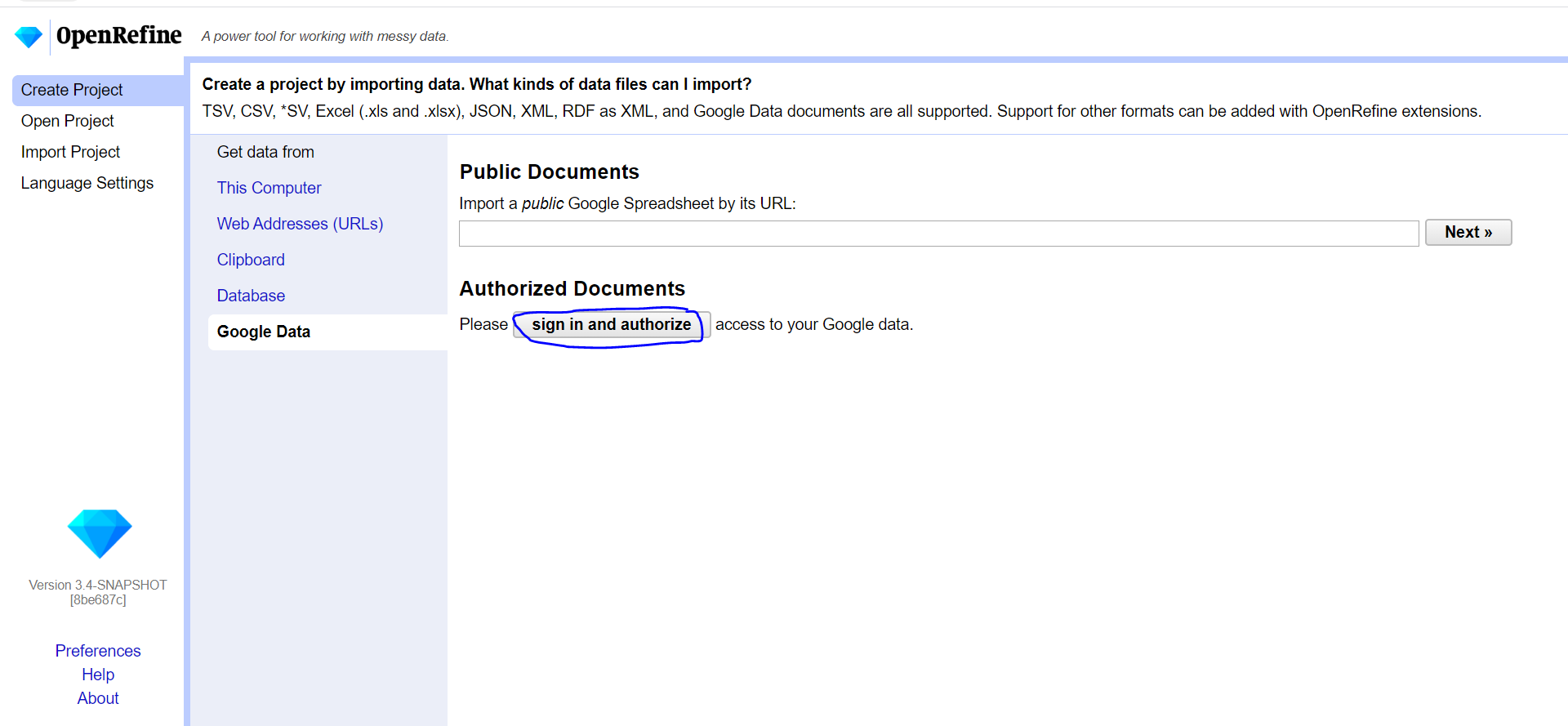
- Go to 'Create project'
- Click on 'Google data'
- Click on 'Sign in and authorize Google Account'
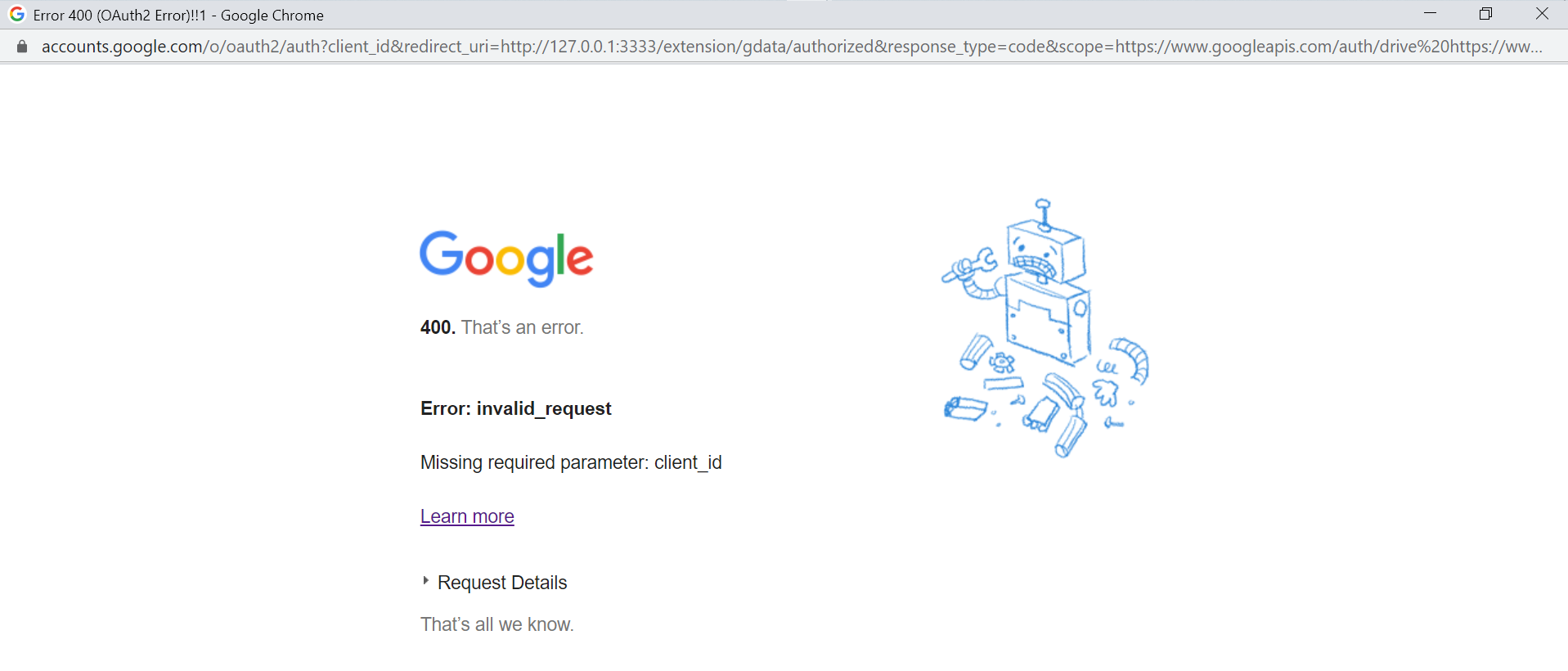
- See error
Current Results
400 error page as per screenshot
Expected behavior
I should be able to authorize my Google account
Screenshots
Desktop (please complete the following information):
Window 10
JDK-13
Latest Chrome version
OpenRefine (please complete the following information):
Version 3.3 (I expect it's 3.3, not sure where to check in)
 TejaswiKarasani
All 17 comments
You need to setup your keys before doing this. Did you set up the keys?
 kushthedude
on 8 Mar 2020
kushthedude
on 8 Mar 2020
You need to setup your keys before doing this. Did you set up the keys?
No I didn't , how to do that?
TejaswiKarasani
on 8 Mar 2020
We need to document the process of obtaining OAuth credentials from Google. When using the credentials for development purposes, it's not too hard.
You will need to go to the Google API Console: https://console.developers.google.com/
This will let you register for OAuth credentials. First, click "Create Project" and pick a project name such as "My OpenRefine Dev Project". Then, pick "Enable APIs and Services". Enable the following services:
- Google Sheets API
- Google Drive API
The go to the "OAuth consent screen" pane. As user type, pick "External". Don't worry about the validation stage, it will not be needed if you are only using the service for development.
Fill the form for the OAuth credentials. For the OAuth scopes, pick ../auth/drive/ which will give you write access to your Google Drive. For the domain (and other URLs), you can pick anything (since localhost will be allowed anyway). Hit "Save" to save the consent screen.
Then go to the "Credentials" pane, create new OAuth credentials, adding as allowed origin http://localhost:3333. Copy your client id and client secret and save them in a file outside your git clone of OpenRefine.
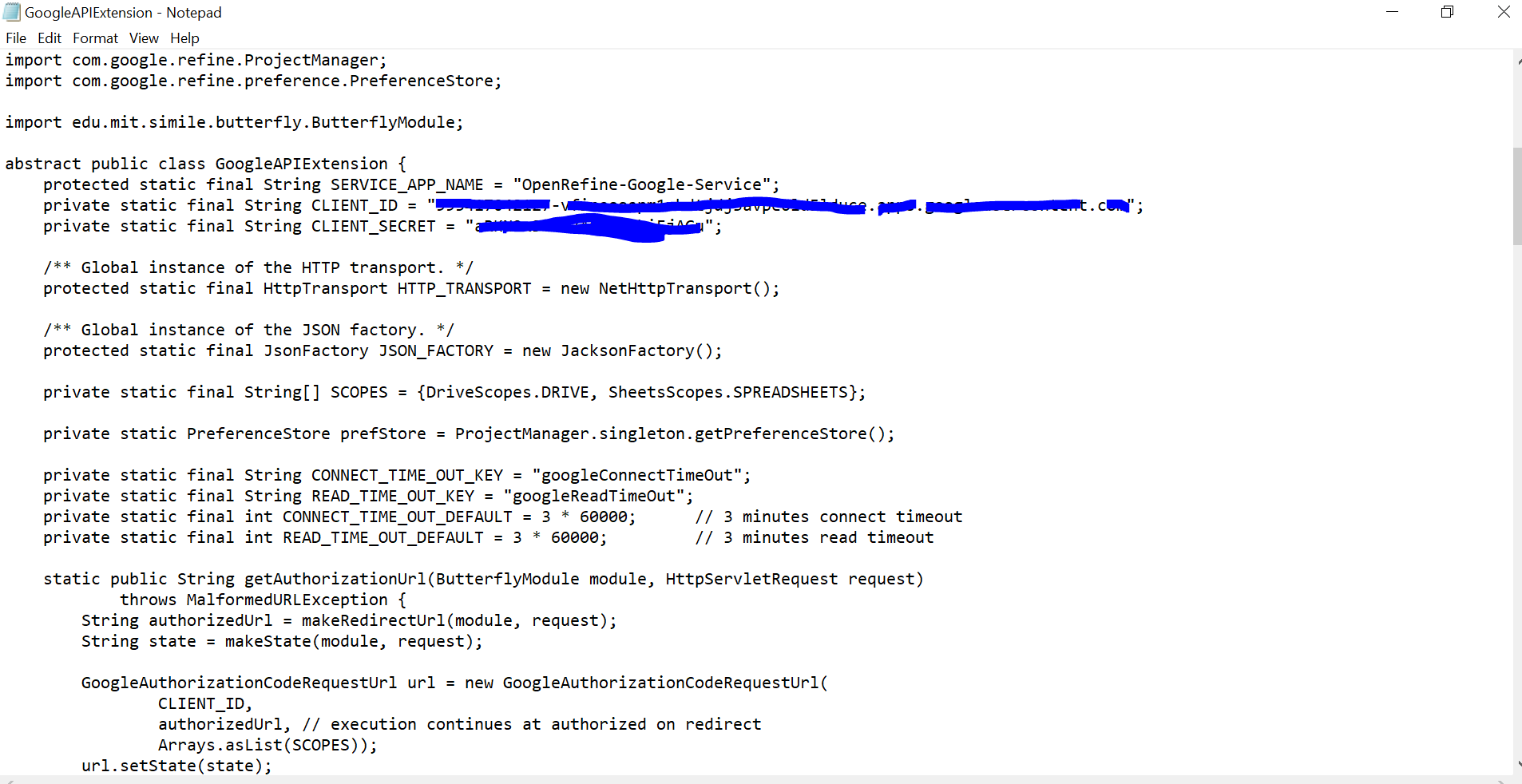
You can then add your client id and secret in the GoogleAPIExtension class.
Note: we could potentially create disposable OAuth credentials for dev and put these in the source code by default. They would not get validated but would be still useful for development. They would also get revoked at some point, since they would appear in clear in the source code.
 wetneb
on 8 Mar 2020
wetneb
on 8 Mar 2020
Hi @wetneb, where should we add this documentation?
 AghaSaad04
on 8 Mar 2020
AghaSaad04
on 8 Mar 2020
@AghaSaad04 perhaps on a new page dedicated to the Google extension, on the wiki?
wetneb
on 8 Mar 2020
I have added the Google Extension page to the wiki. Kindly review it :)
AghaSaad04
on 8 Mar 2020
@AghaSaad04 I think we should also make our Google Data importer panel a bit more helpful for our users. Explaining those 2 basic steps. Make a new issue so someone can work on that! :-)
Example:
1. KEYS: Setup your KEYS before proceeding to AUTHORIZE - See our [Google Extension](https://github.com/OpenRefine/OpenRefine/wiki/Google-Extension) help page
2. AUTHORIZE: Authorized Documents - Please sign in and authorize access to your Google data.
 thadguidry
on 8 Mar 2020
thadguidry
on 8 Mar 2020
Just to be clear - this is only needed when working with development versions of OpenRefine, as keys are provided for the releases. We could add an additional message pointing to the wiki when OpenRefine is run without OAuth credentials, but only in that case.
wetneb
on 8 Mar 2020
Perfect @wetneb, @thadguidry. I will update the Google Extension page and will also add that in the Google Data importer panel.
AghaSaad04
on 8 Mar 2020
@wetneb
I did everything as per procedure but it's the same again :/
TejaswiKarasani
on 8 Mar 2020
@TejaswiKarasani have you recompiled OpenRefine after changing GoogleAPIExtension.java? You can do this on the command line with refine.bat build. But I would recommend using an IDE such as Eclipse (rather than a simple text editor) which will automatically compile things when you save your changes.
wetneb
on 8 Mar 2020
@TejaswiKarasani have you recompiled OpenRefine after changing
GoogleAPIExtension.java? You can do this on the command line withrefine.bat build. But I would recommend using an IDE such as Eclipse (rather than a simple text editor) which will automatically compile things when you save your changes.
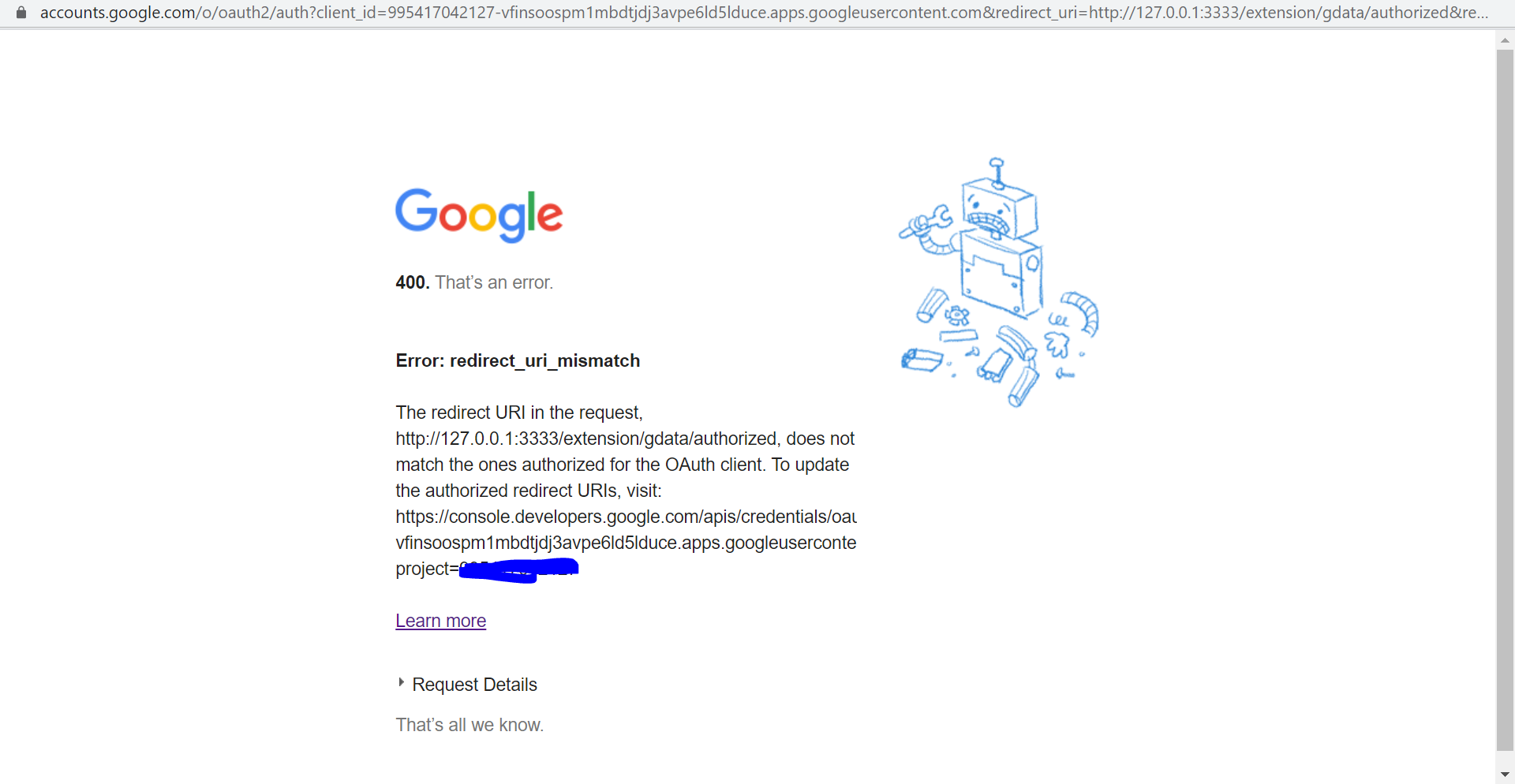
yes I did recompile
TejaswiKarasani
on 8 Mar 2020
Ah it's my fault then, you probably need to add the callback URL http://localhost:3333/extensions/gdata/authorized to the Credentials pane (I have just updated the wiki).
wetneb
on 8 Mar 2020
@wetneb it worked finally. Should search around some tasks and start contributing ^_^
TejaswiKarasani
on 8 Mar 2020
This can be closed then:)
On Sun, 8 Mar, 2020, 23:50 TejaswiKarasani, notifications@github.com
wrote:
@wetneb https://github.com/wetneb it worked finally. Should search
around some tasks and start contributing ^_^—
You are receiving this because you commented.
Reply to this email directly, view it on GitHub
https://github.com/OpenRefine/OpenRefine/issues/2368?email_source=notifications&email_token=AKQMTLT2WHJSENHTX4NNSTLRGPOW5A5CNFSM4LDYIY42YY3PNVWWK3TUL52HS4DFVREXG43VMVBW63LNMVXHJKTDN5WW2ZLOORPWSZGOEOE5FVY#issuecomment-596234967,
or unsubscribe
https://github.com/notifications/unsubscribe-auth/AKQMTLVQBF5VKFSUFALWIRLRGPOW5ANCNFSM4LDYIY4Q
.
kushthedude
on 8 Mar 2020
yes @kushthedude but just waiting for @wetneb approval because some of the wiki updated along .
TejaswiKarasani
on 8 Mar 2020
Sure!
wetneb
on 8 Mar 2020
Related issues
 antoine2711
·
3Comments
antoine2711
·
3Comments
 asyrul21
·
3Comments
wetneb
·
3Comments
asyrul21
·
3Comments
wetneb
·
3Comments
 ettorerizza
·
4Comments
ettorerizza
·
4Comments
 stellasia
·
4Comments
stellasia
·
4Comments
Most helpful comment
Just to be clear - this is only needed when working with development versions of OpenRefine, as keys are provided for the releases. We could add an additional message pointing to the wiki when OpenRefine is run without OAuth credentials, but only in that case.