Openrefine: Cluster returning "groups" of 1 row/choice
All of the cluster methods return clusters with one row/choice, which takes up processing time and makes using anything beyond ngram-fingerprint nearly impossible for larger sets.

Desktop (please complete the following information):
- Windows 10
- Browser Version: Chrome and Firefox
OpenRefine (please complete the following information):
- Version 3.2
 emiraglia
All 21 comments
First, any use of Clustering feature uses quite a bit of memory.
Try to increase the amount of memory that you allocate to OpenRefine. Follow our guide here:
https://github.com/OpenRefine/OpenRefine/wiki/FAQ:-Allocate-More-Memory
Have you tried different Clustering methods and functions such as kNN and Levenshtein?
Please review our wiki page that explains more in depth how to use our Clustering feature.
https://github.com/OpenRefine/OpenRefine/wiki/Clustering-In-Depth
My suggestion is perhaps to use Levenshtein and then start with an edit distance of 6 (the average length of most English words) and then try increasing or decreasing that edit distance value.
 thadguidry
on 10 Sep 2019
thadguidry
on 10 Sep 2019
You might also be expecting Clustering to find duplicates for you, which it sort of can do, but depending on your use case, you might find our Duplicates facet in the Column menu in what you are looking for.
If you want to treat your entire row (all columns) to look for Duplicates, then you can Concatenate all the columns into a new column and then run the Duplicates facet on that new concatenated column.
thadguidry
on 10 Sep 2019
I've tried other methods and ones that worked in earlier versions are no longer working, even on smaller datasets because I'm getting the results shown above. I have never had earlier versions return thousands of clusters with 1 row/choice in them. If I have a set of 4300 rows, I shouldn't get getting 4100 clusters, right?
I'm not using Clustering to find duplicates. I'm using it to hopefully identify items that should be duplicates, but aren't because of spelling errors or diacritics or other things that the clustering methods can address.
emiraglia
on 10 Sep 2019
Just for reference, when I use the exact same clustering method on the same dataset with version 3.1 I get this:
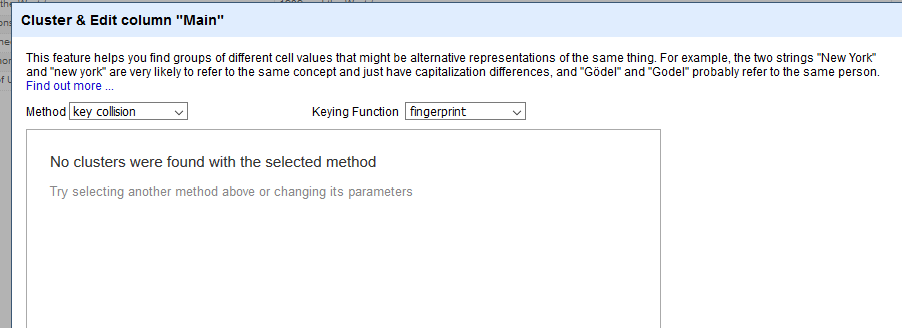
Which is much more in line with what I'd expect, and uses far less memory.
emiraglia
on 10 Sep 2019
I see no problem in 3.2 where you state that "All of the cluster methods return clusters with one row/choice"
There are clusters found with multiple rows using OpenRefine 3.2
3.1 version had several regressions and in hindsight we should not have released it.
So let's focus on 3.2 and expectations there. Thanks.
So... here's what I get with fingerprint and Levenshtein with just 5 row test set that you can see on the grid additional to the Clustering dialog...
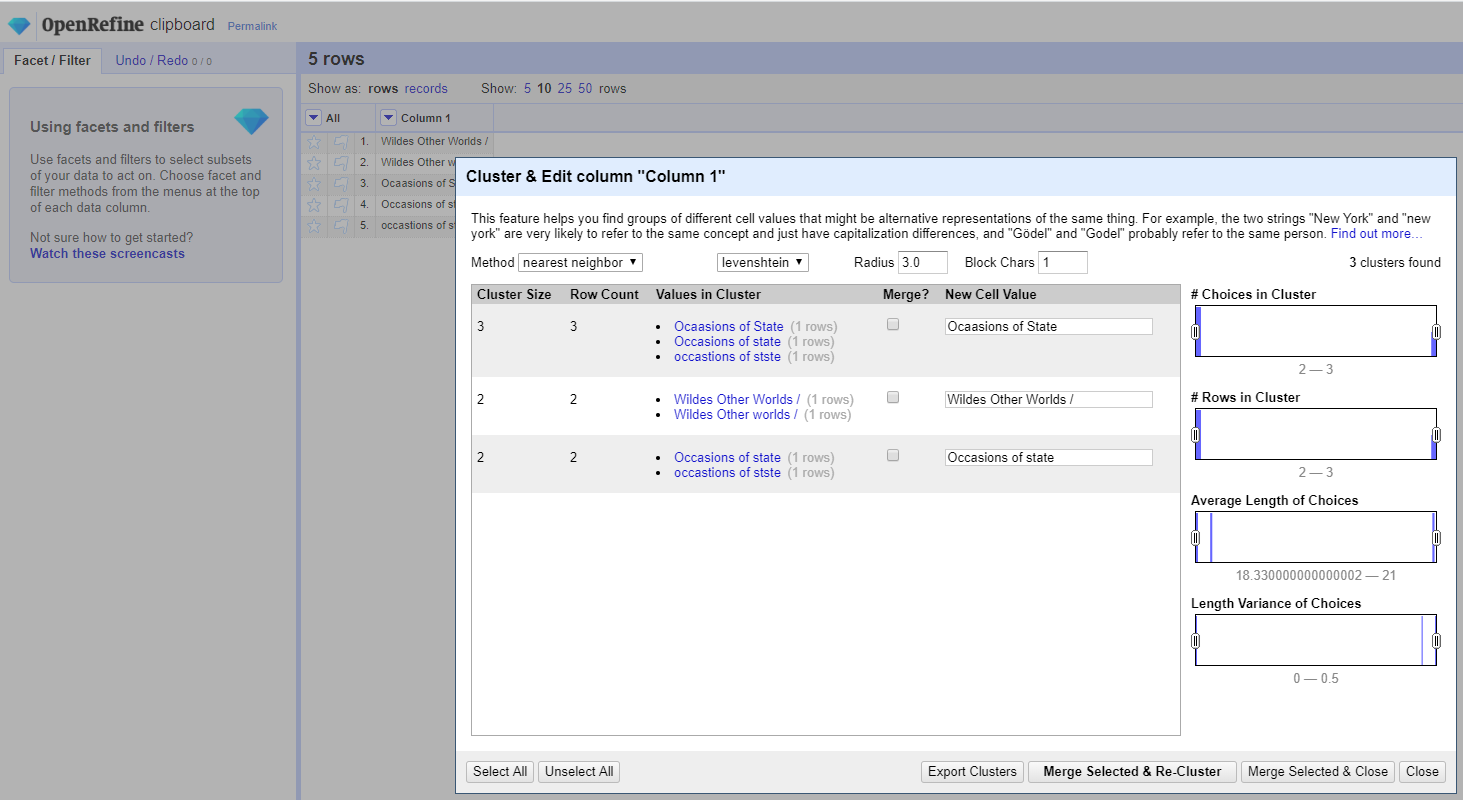
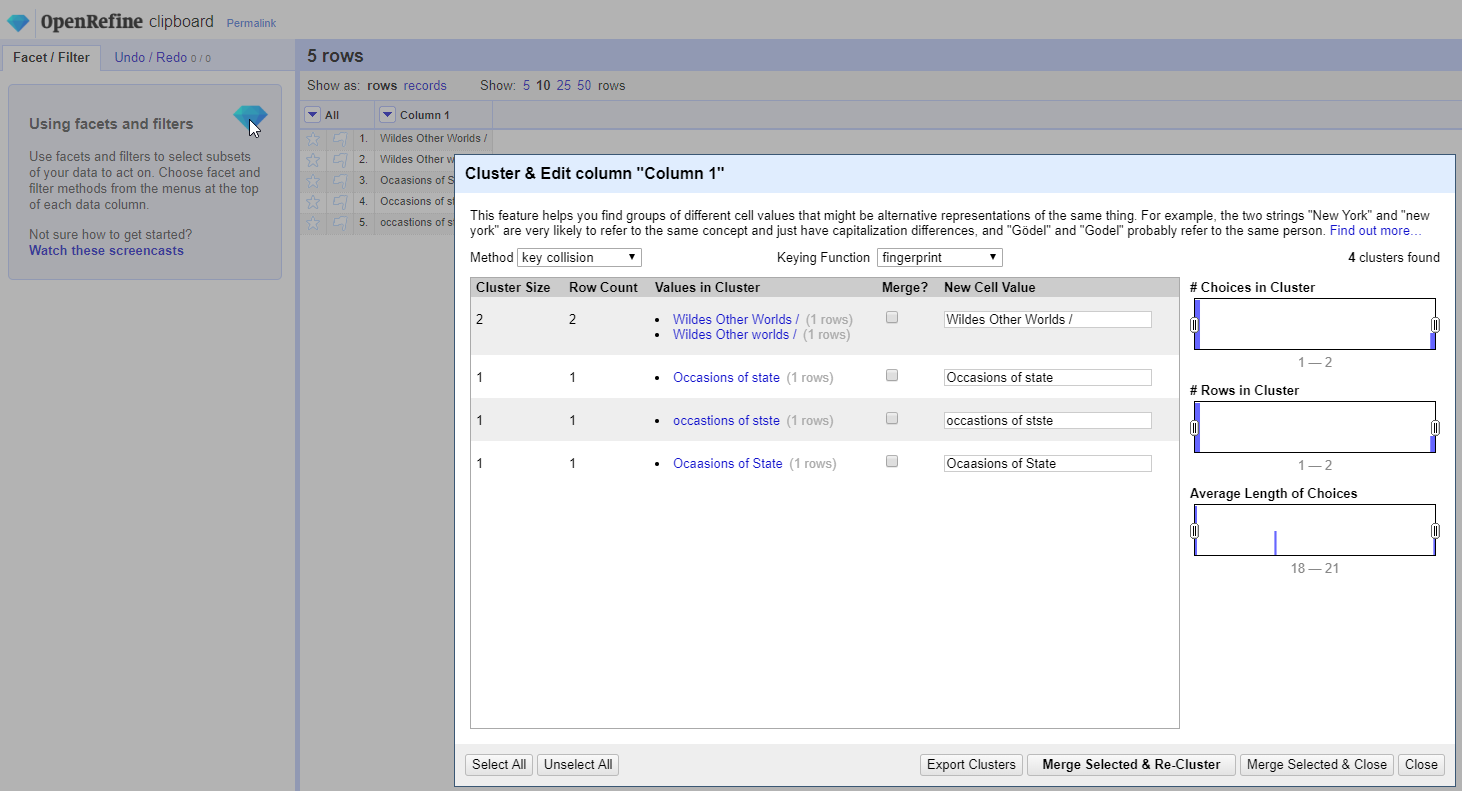
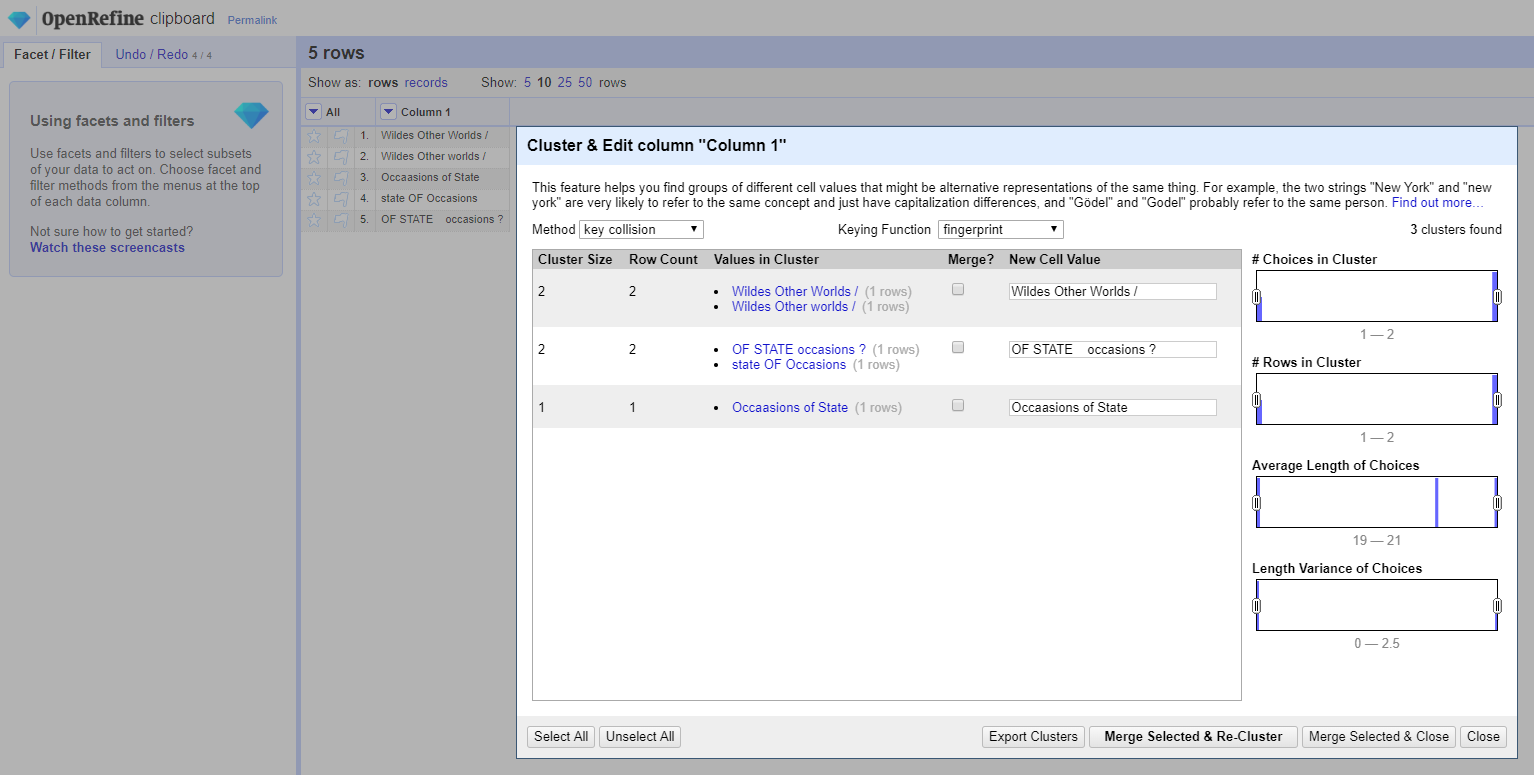
And here's a slightly altered test set grid to make sure Fingerprint is actually doing what it is designed to do per our spec on the Wiki and our code and test cases...
thadguidry
on 10 Sep 2019
I see the same problem as @emiraglia - the clustering algorithm should never return a cluster of 1 (no matter what clustering method is used), and this is a behaviour introduced in 3.2 - I think this is a bug that needs fixing
 ostephens
on 10 Sep 2019
ostephens
on 10 Sep 2019
Testing with a local project
In 3.1 http://127.0.0.1:3333/command/core/compute-clusters?project=2512015923657 returns
[]
In 3.2 http://127.0.0.1:3333/command/core/compute-clusters?project=2512015923657 returns
[[{
    "v": "Research studies in music education",
    "c": 1
}], [{
    "v": "Social marketing quarterly",
    "c": 1
}], [{
    "v": "Journal of adult and continuing education",
    "c": 1
}], [{
    "v": "Big data & society",
    "c": 1
}], [{
    "v": "Giornale di tecniche nefrologiche e dialitiche",
    "c": 1
}], [{
    "v": "Australasian psychiatry",
    "c": 1
}]
etc
ostephens
on 10 Sep 2019
@ostephens Doh ! Thanks, you guys are absolutely right... a Cluster means >1 :-) For some reason my brain was missing the entire reason for being with Clustering this morning!
Let's see if we can quickly push out a patch and 3.2.1 release for this.
How did our test cases miss this? Let's fix that also. (returned cluster must have >1 row or test fails)
thadguidry
on 10 Sep 2019
Thank you both. Also, not to be annoying since it's not my product and I might just be using terms incorrectly, but when you say:
"returned cluster must have >1 row or test fails"
I just want to be sure that means that the cluster will have multiple choices, not just affected rows. For example, true duplicates will occur in multiple rows, but will have only one "choice" and so shouldn't be considered a cluster, right?
emiraglia
on 10 Sep 2019
Agreed - the cluster must contain multiple choices to be validly offered to the user as a cluster
ostephens
on 10 Sep 2019
@emiraglia it would be even better if.... you supplied us with a small test set of tabular data and the results on the Clustering dialog that you are expecting... that way we can also write a small test for your expectation as well.
use this format in the comment reply to provide the sample data, and Github will expose it as a real table of TSV values that we can copy/paste:
First Header | Second Header
------------ | -------------
Content from cell 1 | Content from cell 2
Content in the first column | Content in the second column
First Header | Second Header
------------ | -------------
Content from cell 1 | Content from cell 2
Content in the first column | Content in the second column
thadguidry
on 10 Sep 2019
For the data below I would expect that if I cluster on the "title" column, at least one of the clustering methods (realistically fingerprint with how simple this data is) to return a cluster for "Lange flash cards" with both versions to merge/select, but not "Case files" since the two rows are identical.
Title | Author
------------ | -------------
Case files | Some author
Case files | Some author
Lange flash cards | Another author
Lange flash cards | Another author
Laneg flash cards | Another author
emiraglia
on 10 Sep 2019
The way this is currently fixed in master breaks a use case we have for clustering. We have a column with abbreviated political parties. Using the "Cluster and edit...", we can easily replace all occurrences of each abbreviation with an identifier.
Isn't the original problem reported here (and in #2162) that clusters with a single row are included? Here is a screenshot of what we are doing:
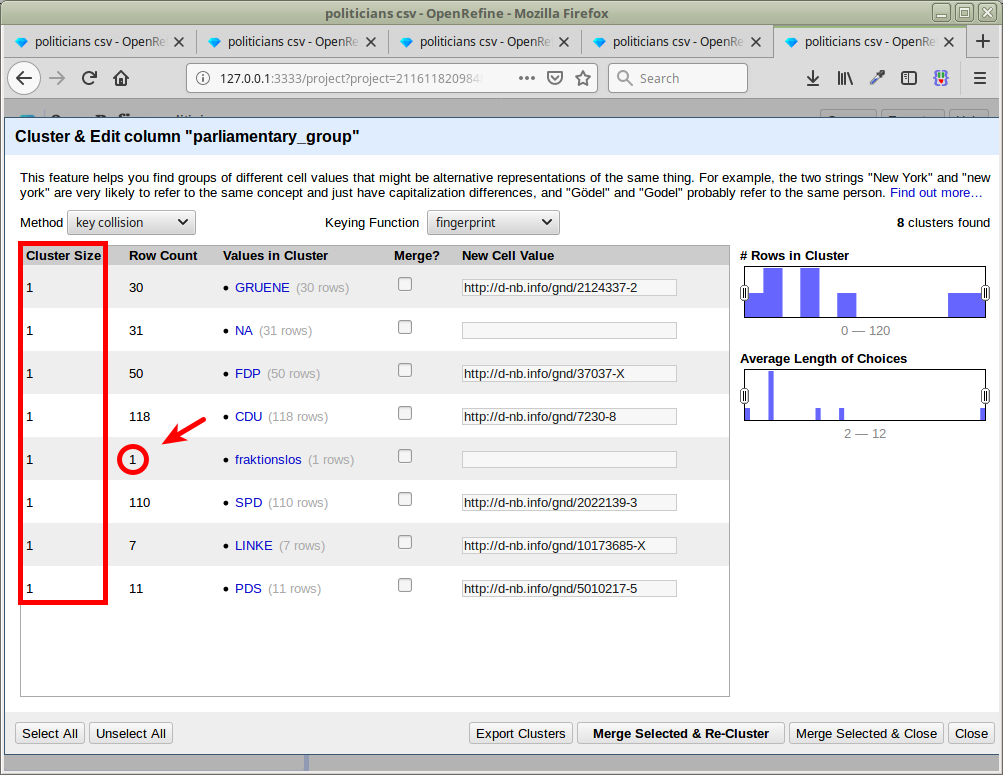
I've pushed a proposed solution that only removes clusters with a single row here: https://github.com/OpenRefine/OpenRefine/pull/2171
Or is there some other feature in OpenRefine to batch edit multiple occurrences of identical values?
 fsteeg
on 26 Sep 2019
fsteeg
on 26 Sep 2019
@fsteeg Why not just use a Text Facet ? And then see the count of rows next to each item in that Text Facet...and then click on the small blue edit link that appears next to each value and type your new value that you want to make the change for all those rows that have that same value ?
thadguidry
on 26 Sep 2019
Why not just use a Text Facet ? And then see the count of rows next to each item in that Text Facet...and then click on the small blue edit link that appears next to each value
Nice, thanks!
fsteeg
on 26 Sep 2019
Or is there some other feature in OpenRefine to batch edit multiple occurrences of identical values?
Yes! If you create a Text facet on a column, you will be able to edit the values in this facet - that will replace the values in the corresponding cells.
There seems to be consensus above (from @ostephens and @emiraglia at least, and I would concur) that we should only display a cluster if it contains multiple values.
The behaviour you are proposing could be useful for small datasets, but I am worried for large datasets this is going to clutter up the clustering window with a lot of distinct values that the user cannot merge: this is potentially quite frustrating.
That being said, perhaps other users enjoy being able to do that from the clustering window. I think it would be good to just stick to the behaviour of 3.1 regarding this (I haven't checked). (This issue was introduced by me when I changed the JSON serialization from org.json to Jackson).
 wetneb
on 26 Sep 2019
wetneb
on 26 Sep 2019
(oops, thanks Thad, that was quick! :))
wetneb
on 26 Sep 2019
I think it would be good to just stick to the behaviour of 3.1 regarding this (I haven't checked).
Yes, 3.1 behaves like the current master for my example above (no clusters).
fsteeg
on 26 Sep 2019
@fsteeg you are welcome. You might want to watch our 3 videos again. :) Those are the basics which somehow you missed? :) :) I myself am forgetting all the new features we have been putting into OpenRefine where @ostephens keeps reminding me!
thadguidry
on 26 Sep 2019
Those are the basics which somehow you missed? :) :)
Yeah I have a somewhat weird relation to OpenRefine, since we provide a reconciliation service, but don't use OpenRefine ourselves. The sample from above was actually from a support request we got (the mapped IDs are used as additional properties for reconciliation). Constantly learning about all the great features in OpenRefine :-)
fsteeg
on 26 Sep 2019
I agree the videos are fantastic, really worth watching and re-watching and re-re-watching (that's what got me in the project).
wetneb
on 26 Sep 2019
Related issues
 antoine2711
·
3Comments
thadguidry
·
4Comments
antoine2711
·
3Comments
thadguidry
·
4Comments
 ettorerizza
·
3Comments
ettorerizza
·
3Comments
 tfmorris
·
3Comments
tfmorris
·
3Comments
 lapoisse
·
3Comments
lapoisse
·
3Comments