Is your feature request related to a problem or area of OpenRefine? Please describe.
Add a "Boolean" facet that facets on boolean values - true/false. This is to avoid the use of a Text facet when the intention is really to have a boolean outcome
Describe the solution you'd like
- [ ] Add support for a new facet type of "Boolean"
- [ ] Add option to "Create custom boolean facet" in menu
- [ ] Convert pre-defined facets to use new Boolean facet type where appropriate
Describe alternatives you've considered
See discussion in #1957 and #1662
Additional context
See discussion in #1957 and #1662 and other linked PRs and issues
 ostephens
All 4 comments
I like it. Additional elements of the solution that I would like to see:
- [ ] Make it short and sleek so that it doesn't eat up a lot of real estate like the current list facet.
- [ ] Even if it's an Android-style slider switch, include the words true/false in a clear ambiguous fashion.
- [ ] Make the first line of the expression visible by default
This allows differentiation between an isBlank() facet and Duplicates facet. Currently, the GREL/expression becomes visible after clicking the "change" link, but that's not obvious. It's easy to lose track of which boolean facet is which. Being able to give a human readable name to the facet would be nice. The novice might not understand facetCount(...) > 1 means duplicate. - [ ] Bucketize the non-Booleans like the checkboxes on the Numeric facet to highlight data problems.
Seems like we need a toBoolean() function to be complete as well. Internally we're differentiating between strings and bools.
 nanobrad
on 12 Apr 2019
nanobrad
on 12 Apr 2019
@nanobrad thanks for these -the way I'm currently thinking about this I'll produce a boolean facet which works in the same way as the current list facet. Once I have that working we can look at improving the display.
The facet naming (so you know what the facet represents) is something I think is worth us looking at overall since when you create any custom list facets it definitely gets confusing for them to all have the same name (of the column they are created from)
In terms of a 'toBoolean()' the challenge is how to convert a non-boolean to a boolean. I don't really like the idea of converting strings and numbers to Booleans because there is no real clear way of saying "this string should be true but this other string should be false". Same with numbers and dates. I think it is clearer to leave this to the user to devise their own tests/conversions which they can do with GREL functions like contains or == etc. However - feel free to create a feature request for toBoolean if you would like that function with a description of how it would work and we can discuss it further on that Github issue
ostephens
on 13 Apr 2019
Not progressed this yet, but have done some planning. See #2018 for more info on basic approach. Once I've made progress with #2018, to implement the new Boolean facet should be a matter of doing a new class which extends the ListFacet class (as per approach described in #2018)
ostephens
on 23 Apr 2019
I have been thinking that it could be nice to have the possibility to customize how the boolean values are rendered. Here is why:
When I create a "facet by null", I get this:
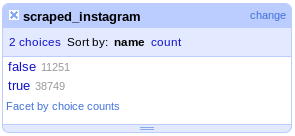
I would find it much more natural to have that:
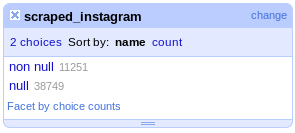
Because I always find it a bit of a hassle to have to think "okay this is a facet by null, so the true option corresponds to the null cells", especially given that only the column name is displayed in the facet by default (not the actual expression, isNull(value)), so it is easy to forget which facet does what.
To get this behaviour, one can of course change the expression to if(isNull(value), 'null', 'non null') but I am not sure it would be a good idea to use that sort of expression in the menus - we would need to localize it. One possibility would be to have a dedicated facet type for that, that the UI would render with localized options.
 wetneb
on 10 Jun 2019
wetneb
on 10 Jun 2019
Related issues
 lapoisse
·
3Comments
lapoisse
·
3Comments
 antoine2711
·
3Comments
antoine2711
·
3Comments
 katrinleinweber
·
3Comments
katrinleinweber
·
3Comments
 ettorerizza
·
3Comments
wetneb
·
3Comments
ettorerizza
·
3Comments
wetneb
·
3Comments
Most helpful comment
I have been thinking that it could be nice to have the possibility to customize how the boolean values are rendered. Here is why:
When I create a "facet by null", I get this:


I would find it much more natural to have that:
Because I always find it a bit of a hassle to have to think "okay this is a facet by null, so the true option corresponds to the null cells", especially given that only the column name is displayed in the facet by default (not the actual expression,
isNull(value)), so it is easy to forget which facet does what.To get this behaviour, one can of course change the expression to
if(isNull(value), 'null', 'non null')but I am not sure it would be a good idea to use that sort of expression in the menus - we would need to localize it. One possibility would be to have a dedicated facet type for that, that the UI would render with localized options.