Openrefine: Include zip filename when importing from zips
When doing bulk imports of zipped log files, only the filename itself is retained with the data. It would be nice to also include the name of the zip file.
 nanobrad
All 16 comments
We do store the zip file name.
My zip file was "texas_grasses.zip".
OpenRefine truncates the .zip part, then inserts into the File column.

 thadguidry
on 19 Feb 2019
thadguidry
on 19 Feb 2019
@thadguidry that's the file name inside the zip, what they mean is the name of the zip file itself.
 wetneb
on 19 Feb 2019
wetneb
on 19 Feb 2019
Updated comment above.
thadguidry
on 19 Feb 2019
Ah ok! @nanobrad, does this solve your problem? Or did we misunderstand it?
wetneb
on 19 Feb 2019
My error... we don't....anymore ? hmmm....I think this broke somewhere over the years.
Yeah, @nanobrad is right, we don't store the original Filename. We used to I'm pretty sure, but perhaps not. What we store is the folder structure inside the .zip file.
thadguidry
on 19 Feb 2019
@thadguidry, I think you got it. The structure inside the zip is stored, but I have a bunch of identical structures where the zip filename itself is what differentiates them.
In my case, these are log files taken from several devices. Each device produces files that have the same name (e.g., eventlog.txt and python.log). The zip filename incorporates the serial number of the device.
nanobrad
on 26 Feb 2019
@nanobrad Got it. Yeah, will need to add the Zip filename as a column value and get this working again, if it ever did, cannot recall 100%, I'm getting old :) Thanks for clarifying!
thadguidry
on 26 Feb 2019
@thadguidry can you share your test dataset? I tried to create mine, but turns out there are other errors, it will be convenient if I can test using the same dataset.
 james-cui
on 11 Apr 2020
james-cui
on 11 Apr 2020
@james-cui Here you go:
texas_grasses.zip
thadguidry
on 11 Apr 2020
@james-cui you might want to download OpenRefine 2.7 release...and compare how it works...not sure about this issue.
thadguidry
on 11 Apr 2020
@thadguidry & @wetneb: I think the request of this user is clear: he want to have the name of the .ZIP file.
- We can create a new column with that file name as value, or
- we could add this to the project's « Import option metadata (JSON) », but he would then need a variable to access it, let's say
project.importOption, or - we could go fancy in the metadata way, with
project.import.file.name,project.import.type(that would be «ZIP»).
What good with 2. and 3., is that they do not require a checkbox at import since they cost almost nothing to retain.
What do you think of that?
Regards,
Antoine
 antoine2711
on 11 Apr 2020
antoine2711
on 11 Apr 2020
For me the only way to solve this is to add an option to the importer, to create an additional column for the zip filename. This should ideally be done in a generic way since this should be applicable to most (if not all) file-based importers.
wetneb
on 11 Apr 2020
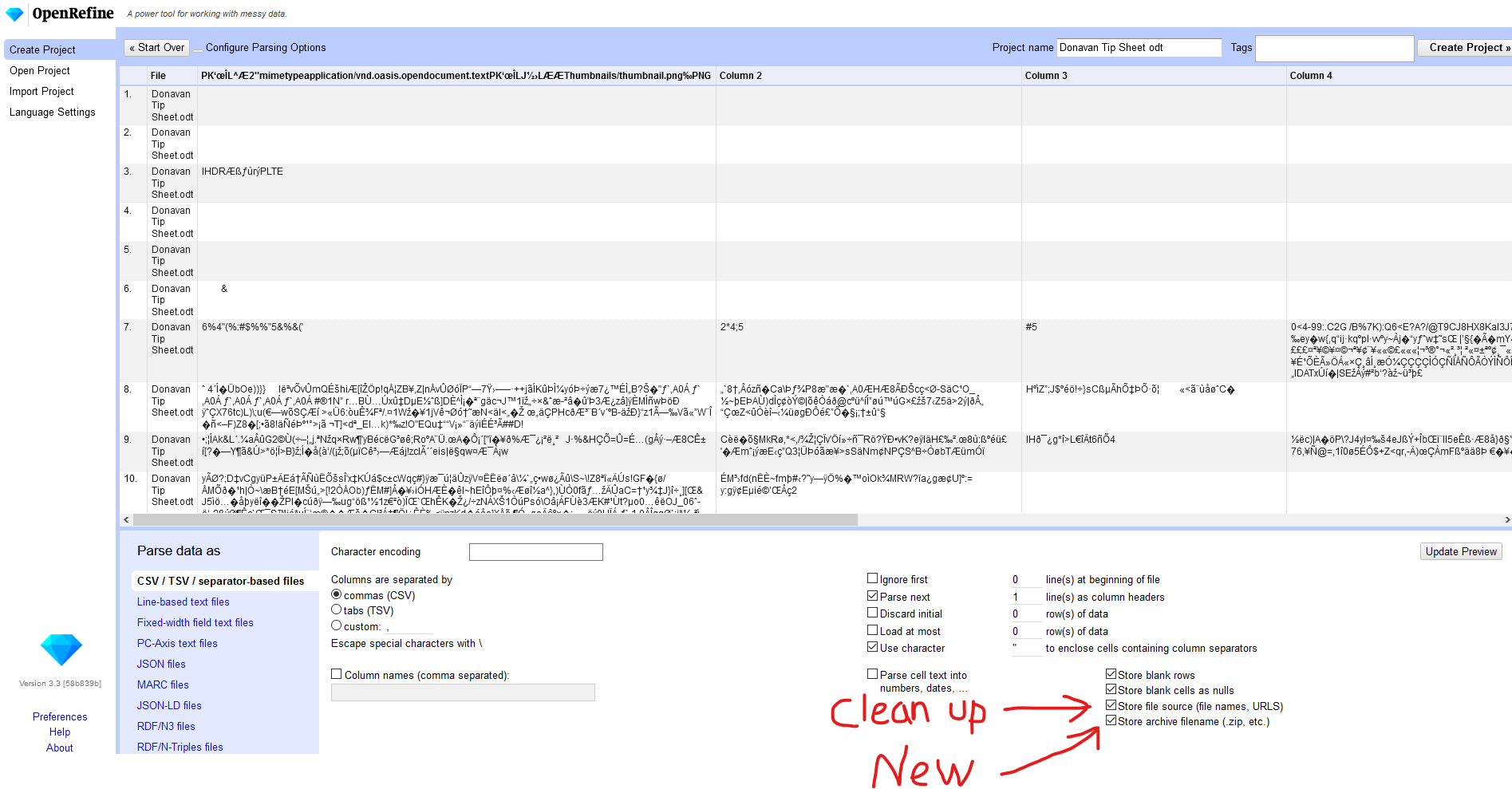
@james-cui Sorry, it probably was not clear what we are really expecting, and how it works now... let me show you my Proof of Concept screenshot to make this super clear.
Using my texas_grasses.zip which has a subfolder inside the zip to ensure the existing Store file source option continues to work as it did before.
- make small change on existing option Store file source to clean it up (it's too verbose)
- add a new option Store archive filename for storing the archive filename into a column (to all those file-based importers that this option would apply to)
thadguidry
on 11 Apr 2020
thanks @thadguidry for such detailed design and @wetneb @antoine2711 for comments!
regarding the openrefine version, @thadguidry suggested to use 2.7, any specific reason for that? I think the problem remains in the latest, right?
james-cui
on 15 Apr 2020
@james-cui Don't worry about 2.7 ... I just confirmed myself that 2.7 had same File handling (subfolders and files) when it inserted the new column, so its been the same for 6 years. Now we just need to implement the new option "Store archive filename" as shown in my design proof, and relabel original filename option as shown.
thadguidry
on 15 Apr 2020
Hey @wetneb, @thadguidry and @antoine2711,
I have the first draft implemented here, https://github.com/OpenRefine/OpenRefine/pull/2573/commits/27750816cb2419a86580aedebd5dc62972d1cb06
can you review and let me know where should I improve?
Thanks!
james-cui
on 20 Apr 2020
Related issues
wetneb
·
3Comments
antoine2711
·
3Comments
 kushthedude
·
3Comments
kushthedude
·
3Comments
 davidegiunchidiennea
·
3Comments
davidegiunchidiennea
·
3Comments
 ettorerizza
·
3Comments
ettorerizza
·
3Comments