Openrefine: SQLite database connector
The current database connector supports connections to PostgreSQL, MariaDB and MySQL.
A SQLite3 connector would be useful for several reasons:
- there is lots of tooling around SQLite, so it may be possible to use it as glue between different DBMS;
- SQLite3 provides a convenient way of distributing / sharing data in a way that also makes it amenable to querying.
- SQLIte3 is a file based system so it does not require a connection to a running server.
 psychemedia
All 8 comments
@psychemedia Care to hack on this? Just look at the existing connection code in the extensions database folder and have a look at the tests as well. Ooo, also just noticed the README.md under /database needs to be touched up a bit also since we use Maven now (don't use Ant anymore)
 thadguidry
on 8 Feb 2019
thadguidry
on 8 Feb 2019
@thadguidry I don't have any experience with Java, and don't have a Java environment to work in, so there's a startup cost there that I don't have time to invest in atm... unless maybe you have a VM somewhere I could clone and fire up in an already working state?
psychemedia
on 8 Feb 2019
Does #2323 fully resolve this, or is additional documentation required?
 tfmorris
on 10 May 2020
tfmorris
on 10 May 2020
Thanks, I forgot to link the PR to the issue.
 wetneb
on 11 May 2020
wetneb
on 11 May 2020
Sorry for posting in closed issue, but how i can connect to sqlite.db file that is locally stored. It seems that OpenRefine is waiting for some local port connection?
_3.4-beta [5597e1c]_
 snussik
on 20 May 2020
snussik
on 20 May 2020
Sorry for posting in closed issue, but how i can connect to sqlite.db file that is locally stored. It seems that OpenRefine is waiting for some local port connection?
Hi @snussik. Just enter the full path to your file in the last field, the one named « Database » (/Folder/File.sqlite3 in this picture):
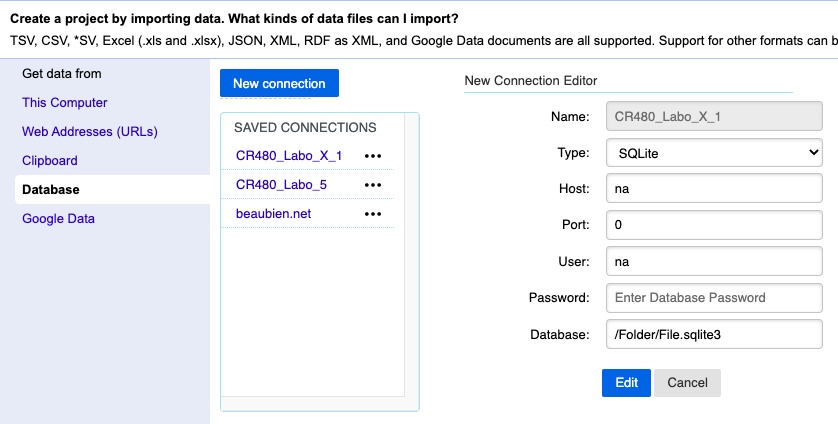
@thadguidry: maybe we should consider « Only show the database login fields when necessary #2615 » as a bug fix for question like this one.
Regards,
Antoine
 antoine2711
on 20 May 2020
antoine2711
on 20 May 2020
Hi @snussik. Just enter the full path to your file in the last field, the one named « Database » (
/Folder/File.sqlite3in this picture):
Thanks a lot! Didn’t think that it’s so simple. By the way, don’t know if it is a bug or feature but if I choose “SQLite” engine and enter any string to database textfield, “test” button shows “Ok”.
snussik
on 20 May 2020
By the way, don’t know if it is a bug or feature but if I choose “SQLite” engine and enter any string to database textfield, “test” button shows “Ok”.
Thank you @snussik for pointing that out. I would classify it as a bug, indeed… ;-)
Regards,
Antoine
antoine2711
on 20 May 2020
Related issues
 ettorerizza
·
4Comments
ettorerizza
·
4Comments
 anchardo
·
3Comments
tfmorris
·
3Comments
anchardo
·
3Comments
tfmorris
·
3Comments
 dantexier
·
4Comments
thadguidry
·
4Comments
dantexier
·
4Comments
thadguidry
·
4Comments