Openrefine: Cross() function not working if applied to a column different from the column used for matching
Describe the bug
Cross() function not working if applied to a column different from the column used for matching.
Not sure it is fully reproducible, but happended to me twice, with big OR projects (a lot of transformations, including moving columns, before applying the cross function)
I cannot join the files because they weigh 200 Mo...
To Reproduce
Current Results
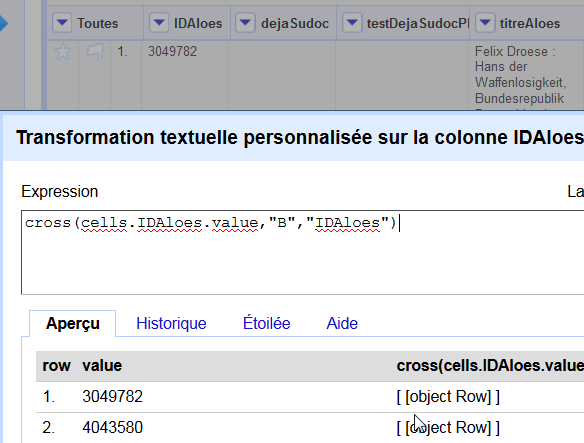
The normal behavior (matching 2 project, based on "IDAloes", the 1st column of each project, and applying the formula to the 1st column)
The error (matching the same projects on the same column, but applying the formula to the 2d column)
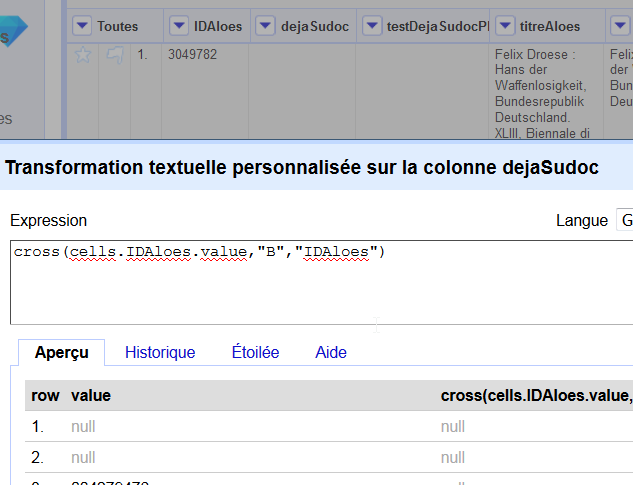
No warning in console
Expected behavior
A clear and concise description of what you expected to happen or to show.
Screenshots
If applicable, add screenshots to help explain your problem.
Desktop (please complete the following information):
- OS: Mac and PC, same behavior
- Browser Version: FF
- JRE or JDK Version:[output of "java -version" e.g. JRE 1.8.0_181]
OpenRefine (please complete the following information):
- Version : OpenRefine 3.1
Datasets
If you are allowed and are OK with making your data public, it would be awesome if you can include or attach the data causing the issue or a URL pointing to where the data is.
If you are concerned about keeping your data private, ping us on our mailing list
Additional context
Add any other context about the problem here.
 msaby
msaby
All 17 comments
I can give you access to the projects via box.com if you want
msaby
on 5 Feb 2019
I can confirm that the code was just written with the cell.cross(...) use case in mind, it is not working for values constructed on the fly.
I would say this is a pretty important bug - we should not rely on the column of the project where the cross function is applied. Moreover, the current design requires that both project names are unique in the workspace, whereas one would expect that only the target project (whose name appears in the invocation of the function) would need to be uniquely named.
Intuitively it should not be hard to redesign this: instead of creating ProjectJoins, we should just create a single index on the target project, and look up values from that.
 wetneb
on 24 Feb 2019
wetneb
on 24 Feb 2019
I also had problems with 2 project with the same name... I don't remember the result but it was not what I expected... Could it be possible to raise an error (or to fill the created column with an error) when this situation happens?
msaby
on 24 Feb 2019
Apparently the names of the two columns to be joined on must be the same, according to the following (from the mailing list):
When using “Add a column based on a column”, the expression I’m using
is: cell.cross(“Dates”,”Creation dates”)[0].cells[“Start date”].valueI thought that the column name (“Creation dates”), only had to match the
name of the column in the cross project [“Dates”]. (i.e. I thought it
should look at the “Creation dates” column in the “Dates” project and
return the value in the “Start date” columnWhat I have now discovered is that the name of the “based on column”
also has to match (i.e. also has to be headed “Creation dates”). Is that
how cross is meant to work? Or is that a bug?
wetneb
on 28 Feb 2019
@wetneb Not true regarding the columns have to be the same name. We have this documented https://github.com/OpenRefine/OpenRefine/wiki/GREL-Other-Functions#crosscell-c-string-projectname-string-columnname
 thadguidry
on 28 Feb 2019
thadguidry
on 28 Feb 2019
Just to keep this stuff together, worth reading https://github.com/OpenRefine/OpenRefine/issues/1204#issuecomment-326320954 and noting https://github.com/OpenRefine/OpenRefine/commit/ad807e525d5d9b3d1d400f5bbd1acbcce515926b which concern dealing with using cross on multi-value cells
 ostephens
on 11 Mar 2019
ostephens
on 11 Mar 2019
Also https://github.com/OpenRefine/OpenRefine/issues/1289 and https://github.com/OpenRefine/OpenRefine/projects/1#card-5380183
ostephens
on 11 Mar 2019
We had a discuss related to this bug at https://groups.google.com/forum/#!topic/openrefine/D3ZDxxX3BCU.
I'll try to get this issue fixed!
 afkbrb
on 20 Mar 2020
afkbrb
on 20 Mar 2020
FWIW, I have been experiencing similar issues with cross. For me, I have two projects with ~9800 rows. I wanted to find out which rows exist in both projects. Perhaps there are better ways to do this (I could dump as json and code up the diff, for instance), but I created a new column which concatenates the values of the columns I wanted to compare in both projects and did a simple cross to look up which values of these concatenated rows match.
length(cell.cross('senclasses','rowval'))
SOO.... The issue I saw is that there were no rows returned on the match (similar to those repoted above) even when using a text filter on the column with the same value in both projects showed there were matches.
It feels like the newly created row in the "remote project" takes some time to be recognized. I say this because after playing with a bunch of things, closing the projects and reopening them, the very same cross function DID work.
I realize this is not a lot to go on, but my real question is where to look for diagnostics? I'm a programmer (though not in java) but I'm not sure where to start with the debugging?
Thanks for your attention.
 gitonthescene
on 26 Jul 2020
gitonthescene
on 26 Jul 2020
Also, it might be nice to have some sort of "basic diagnostics" link on the project. If nothing else it might help to report which version of OpenRefine is being used.
gitonthescene
on 26 Jul 2020
If nothing else it might help to report which version of OpenRefine is being used.
Which begs the question: which version of OpenRefine are you using yourself? :)
wetneb
on 26 Jul 2020
I found it on the application Help (not in the browser). It's 3.3. I'm using it on a Mac running Catalina.
gitonthescene
on 26 Jul 2020
This is an issue with 3.3, and it got fixed in 3.4. Maybe you should try our 3.4 beta releases: https://github.com/OpenRefine/OpenRefine/releases, but do remember to backup your data first!
afkbrb
on 26 Jul 2020
I'll try, but to be clear the description of this fix doesn't seem to match my experience. I see no description in the bug of stuff magically working again after some time. Also, I'm still hoping to get some pointers on where to look for logs, etc.
gitonthescene
on 26 Jul 2020
- The version of OpenRefine is listed on the home page of the web client (bottom left corner)
- Logging level can be increased using standard Java facilities, BUT
- it doesn't make sense to spend time debugging a problem which has been fixed already, so I'd test the latest version first, and
- even at the highest logging level, we don't typically log operations at a level of granularity which would be useful for debugging something like this
 tfmorris
on 26 Jul 2020
tfmorris
on 26 Jul 2020
Thanks. As I said, I’ll give it a try. Thanks to all of you for your work maintaining OpenRefine. I’ve on started to explore the tool but have already been able to complete a project that would have taken much longer without it.
gitonthescene
on 26 Jul 2020
FWIW, I see the version in the lower left, but only when I go to the main page(?) by clicking on the OpenRefine icon and not when I'm looking at an actual project, which is probably why I missed it. I reflexively clicked on help which is a link outside of the refine app. Maybe it would be more intuitive for help to link to something like the About link from the main page and have links from there to outside resources? In any event, I thought I'd pass on one user's experience.
gitonthescene
on 27 Jul 2020
Related issues
 davidegiunchidiennea
·
3Comments
davidegiunchidiennea
·
3Comments
 ralcazar-oeg
·
3Comments
ralcazar-oeg
·
3Comments
 ettorerizza
·
4Comments
tfmorris
·
3Comments
ettorerizza
·
4Comments
tfmorris
·
3Comments
 kushthedude
·
3Comments
kushthedude
·
3Comments
Most helpful comment
FWIW, I see the version in the lower left, but only when I go to the main page(?) by clicking on the OpenRefine icon and not when I'm looking at an actual project, which is probably why I missed it. I reflexively clicked on help which is a link outside of the refine app. Maybe it would be more intuitive for help to link to something like the About link from the main page and have links from there to outside resources? In any event, I thought I'd pass on one user's experience.