Openrefine: Transform value.toString() converting (blank) values in a cell to a string with 'null' as the value
When reporting a bug please provide the following information to help reproduce the bug:
When reviewing open issues this #332 seems to be the closest I could get to, but what is being described is not the same thing I am running into.
Version of OpenRefine used (Google Refine 2.6, OpenRefine2.8, an other distribution?):
2.8 and 3.0-beta
Operating Systems and version:
Windows 10 Version 1803
Browser + version used - Please note that OpenRefine doesn't support Internet Explorer but works OK in most cases:
Chrome Version 66.0.3359.181 (Official Build) (64-bit), using the API via python 2.7 and 3.6 (only http request)
Steps followed to create the issue:
Started new project with the attached file.
louisiana-elected-officials.zip
In the Zip Code column clicking transform. I use the following code
value.toString()[0,5]
What happens is it converts the previously (blank) rows into 'null' strings
If you are allowed and are OK with making your data public, it would be awesome if you can include the data causing the issue or a URL pointing to where the data is (if your concerned about keeping your data private, ping us on our mailing list):
Current Results:
value.toString() on nulls is turning them into strings with the value 'null'
Expected Results:
null / blank rows kept as null / blank values in the row
 daniel-butler
All 13 comments
Hi ! We just released 3.0 Beta of OpenRefine. Please try it out, as we have added several new features to help you with NULL values, such as new Facets and a new Toggle mode for displaying NULL cells. You can read about the new features and download the newest version on our releases page https://github.com/OpenRefine/OpenRefine/releases
We would appreciate any feedback you can give us on how we can make things even easier for your needs !
 thadguidry
on 2 Jun 2018
thadguidry
on 2 Jun 2018
Hi Thad,
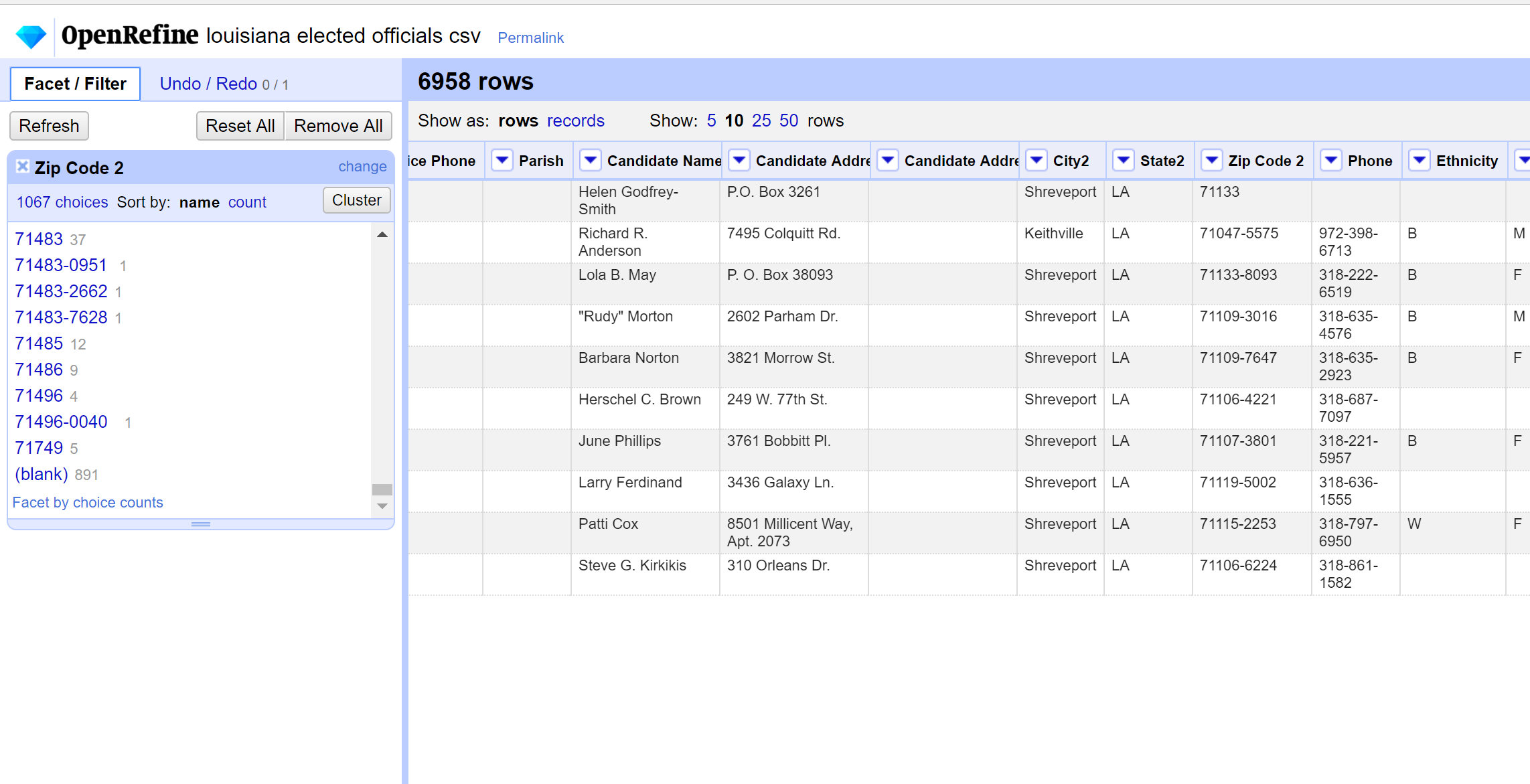
I just tested this in 3.0 and its doing the same thing. Below is before I transform the cells to a string
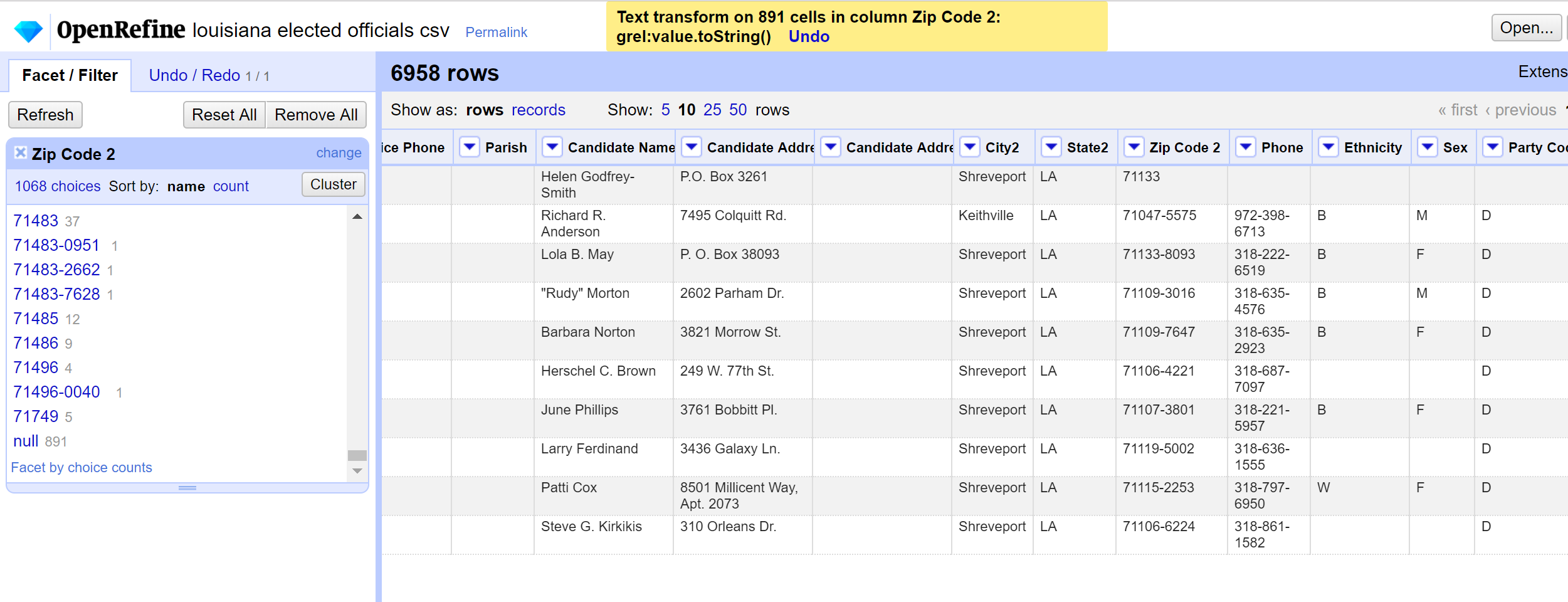
This is after. You'll notice that the (blanks) turned to null
daniel-butler
on 2 Jun 2018
Sorry, WHAT are you trying to perform ? So you have some blank Zip Codes on 891 rows... they basically look like this "" ... so what do you want to do with that empty string (also called a blank) ?
thadguidry
on 3 Jun 2018
@dbutlerdb
The short explanation is that the behaviour of 'toString' on a null cell is deliberately set to result in the string "null".
The short solution:
Use the 'Facet on blank' option on the column to remove all rows with blank and/or null values before applying the 'toString' transformation on the column
More information:
probably worth giving some background on this first - apologies if some/all of this you may know or is obvious
Each cell in an OpenRefine project contains a value of a specific 'type'. The types supported are:
- String
- Number
- Date
- Boolean
- error
- null
The first four are different types of data. The data type will determine what you can do with the value. For example, if you want to sum two values by adding them together, they must both be of Number type.
error is when the cell is storing an error generated during a transformation in OpenRefine
null is a special value which basically means 'this cell has no value' (see https://techterms.com/definition/null for a slightly fuller definition).
You can convert between types within some limits (e.g. you can't turn the string "asdfsd" into a Date or a Number, because OpenRefine has no way of knowing how to make a Date or Number from a random collection of letters).
The 'toString' option will work on any of the value types and gives a String version of the value. This works in different ways depending on what type you are converting from. The deliberate decision in OpenRefine is that using 'toString' on null results in the string "null"
When you see an empty cell in an OpenRefine project there are broadly three possibilities:
- the cell contains the
nullvalue - the cell contains a string value of zero length
- the cell contains a string value that only contains whitespace
When you are using the toString() function, any null cells will get coverted to "null"
In OpenRefine 3.0 upwards we've introduced some more options for handling the difference between null and zero length strings, although there are probably more improvements to be made, and we probably can't get it right for everyone at the same time.
These improvements include:
- ability to view where there are
nullvalues in your project by using the menu All->View->Show/Hide null values in cells - option to "facet by null" as well as "facet by blank" (the latter was previously the only option and tests for both null and empty strings) (in the "Customised Facets" drop down menu)
- option to convert cells "to null" or "to empty string" (in the "Common Transforms drop down menu)
 ostephens
on 5 Jun 2018
ostephens
on 5 Jun 2018
Owen,
Great writeup actually ! I've added this info to our Wiki under 2 pages:
https://github.com/OpenRefine/OpenRefine/wiki/Cell-Editing#what-is-a-cell-
https://github.com/OpenRefine/OpenRefine/wiki/GREL-String-Functions <--we
were missing the toString() function, and was found only on Date page
https://github.com/OpenRefine/OpenRefine/wiki/GREL-Date-Functions
Feel free to edit more and improve.
-Thad
thadguidry
on 5 Jun 2018
Hi Owen,
I'm having a hard time understanding why the default action when converting a numeric cell with no values into a string is to add 'null' into the cell. If operations like .toString[0,2] didn't lop off part of the 'null' string it would make more sense to me. I am not the expert here like you guys so I'm sure there is a reason that I am missing.
A work around it to exclude all nulls before making a transformation but that can be easily forgotten or unknown to a new user. Nulls/blanks were not handled this way in version 2.5 and lower.
@thadguidry
I was following David Huynh's tutorial and noticed the difference in "3. Cell Editing" on page 6.
daniel-butler
on 11 Jun 2018
Hi @dbutlerdb
I'm not sure I can completely explain this. I have to admit I struggle to see the advantage of converting a null into the string "null" rather than an empty string (which is the behaviour that occurs if you use '+' with a null)
This change was introduced 5 years ago as part of a fix for another issue #783. I can't really see quite why this change decided to convert null to the string "null". I think there is a strong argument for reverting to the previous behaviour of converting it to a blank string.
@thadguidry ?
As a slight aside it is important to state that it is not the case that "the default action when converting a numeric cell with no values into a string is to add 'null' into the cell." The 'cell' itself is not numeric or non-numeric - it is the value in the cell that is numeric or non-numeric. An empty cell cannot be 'numeric'.
The default behaviour is that a cell containing the null value converts to the string "null" if you use 'toString'. As I say above, I can't really explain this behaviour, and I'm not defending it but I just wanted to be clear how this works.
ostephens
on 13 Jun 2018
@ostephens We wanted toString() to be able to convert any Data Type to a string, that included null. Sorry, but how does this hurt ? Can you give me a scenario where this causes some grief ?
thadguidry
on 13 Jun 2018
@thadguidry I'm suggesting:
null.toString() -> ""
instead of
null.toString() -> "null"
This would still allow a null to convert to a string
I think it potentially hurts in that it seems like unexpected behaviour (as found by @dbutlerdb here) that using 'toString()' results in a non-zero length string appearing where there wasn't one previously - it means the user has to be very careful to exclude null from their 'toString' function if they don't want to end up with the word "null" in their output.
I also think it would be nice if:
"example"+null
and
"example"+null.toString()
gave the same result - as they both convert null to a string, but this is not currently the case:
"example"+null -> "example"
"example"+null.toString() -> "examplenull"
So my argument would be that having
null.toString() -> ""
would be more intuitive for users and be more consistent in overall OR behaviour
ostephens
on 13 Jun 2018
Oh yes, I completely agree on those points. And I'm not sure why Tom did that...other than visibility of null's. But I always had the idea of simply handling that via display...and not Data Type conversions as he did. (and this is how other programs deal with it also, as I have demonstrated in other issues)
Besides which...for those that truly want NULL in the value of a cell...they can use replace("","null") Yes ?
+1 Please revert toString to old style. Knowing that we have new ways to make null visible now.
thadguidry
on 13 Jun 2018
Fixed by #1650
ostephens
on 19 Jun 2018
Thanks to @dbutlerdb for raising this - new behaviour will be in 3.0
ostephens
on 19 Jun 2018
Thank you for changing the functionality!
daniel-butler
on 22 Jun 2018
Related issues
 stellasia
·
4Comments
stellasia
·
4Comments
 asyrul21
·
3Comments
thadguidry
·
3Comments
asyrul21
·
3Comments
thadguidry
·
3Comments
 ettorerizza
·
3Comments
thadguidry
·
4Comments
ettorerizza
·
3Comments
thadguidry
·
4Comments
Most helpful comment
Owen,
Great writeup actually ! I've added this info to our Wiki under 2 pages:
https://github.com/OpenRefine/OpenRefine/wiki/Cell-Editing#what-is-a-cell-
https://github.com/OpenRefine/OpenRefine/wiki/GREL-String-Functions <--we
were missing the toString() function, and was found only on Date page
https://github.com/OpenRefine/OpenRefine/wiki/GREL-Date-Functions
Feel free to edit more and improve.
-Thad