Openrefine: Project name with national characters
Hi all,
I use OpenRefine 2.8 on Linux with Oracle Java Version 8 Update 151.
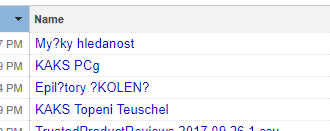
If I create a new project with a name that contains special characters, then I restart OpenRefine, so I see only "???????".
 rezabj
All 17 comments
Exact. If I create a project from the "Łukasz.csv" file, it is saved as "ukasz csv". If I then rename it "Łukasz", the change is replaced at the next start with "?ukasz".
Windows 10, OR 2.8, JDK 8
 ettorerizza
on 21 Nov 2017
ettorerizza
on 21 Nov 2017
Seems it only happens when rename it from project page. It works fine when do it from the about link. that is weird.
 jackyq2015
on 21 Nov 2017
jackyq2015
on 21 Nov 2017
No. I tried it. The same problem.
rezabj
on 22 Nov 2017
I can't replicate this error with OpenRefine 2.8 (Linux version, running on macOS High Sierra) and Java:
OpenRefine >>java -version
java version "1.8.0_72"
Java(TM) SE Runtime Environment (build 1.8.0_72-b15)
Java HotSpot(TM) 64-Bit Server VM (build 25.72-b15, mixed mode)
I do find that non-ascii characters are dropped from file names on import and export (presumably not trusting the OS to necessarily handle filenames containing non-ascii nicely), but if I name my projects with non-ascii chars, then that seems to work fine within OpenRefine
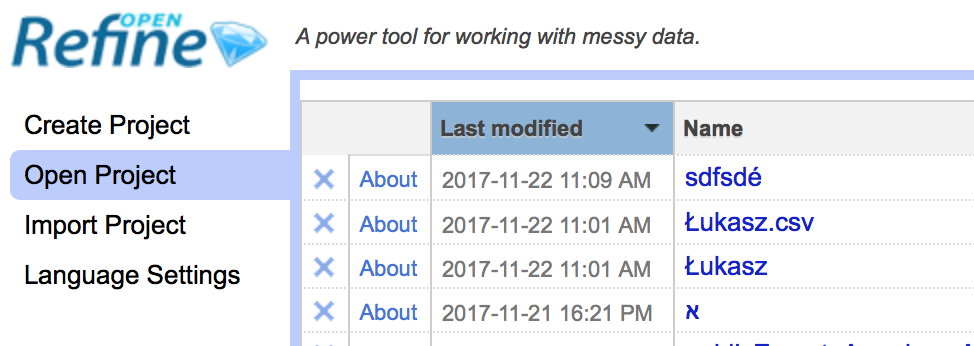
If the problem is noticed after a restart, it could be that the issue occurs when the metadata is written to disk?
 ostephens
on 22 Nov 2017
ostephens
on 22 Nov 2017
I use OpenRefine in Docker container. Dockerfile attached.
Dockerfile.txt
I think the container use UTF8.
rezabj
on 22 Nov 2017
I can reproduce under windows 10.
@rezabj can you please run a "locale" command in the environment running the OpenRefine
jackyq2015
on 22 Nov 2017
I can reproduce using that Dockerfile.
If I set the lang/locale to C.UTF-8 the issue goes away
Find locale on starting the Docker container:
root@37c04a8bf856:/opt# locale
LANG=
LANGUAGE=
LC_CTYPE="POSIX"
LC_NUMERIC="POSIX"
LC_TIME="POSIX"
LC_COLLATE="POSIX"
LC_MONETARY="POSIX"
LC_MESSAGES="POSIX"
LC_PAPER="POSIX"
LC_NAME="POSIX"
LC_ADDRESS="POSIX"
LC_TELEPHONE="POSIX"
LC_MEASUREMENT="POSIX"
LC_IDENTIFICATION="POSIX"
LC_ALL=
Set lang to C.UTF-8 and re-check:
root@37c04a8bf856:/opt# LANG="C.UTF-8"
root@37c04a8bf856:/opt# export LANG
root@37c04a8bf856:/opt# locale
LANG=C.UTF-8
LANGUAGE=
LC_CTYPE="C.UTF-8"
LC_NUMERIC="C.UTF-8"
LC_TIME="C.UTF-8"
LC_COLLATE="C.UTF-8"
LC_MONETARY="C.UTF-8"
LC_MESSAGES="C.UTF-8"
LC_PAPER="C.UTF-8"
LC_NAME="C.UTF-8"
LC_ADDRESS="C.UTF-8"
LC_TELEPHONE="C.UTF-8"
LC_MEASUREMENT="C.UTF-8"
LC_IDENTIFICATION="C.UTF-8"
LC_ALL=
Once I've done this, when I use non-ascii chars in the Project name it persists through the metadata save process
ostephens
on 22 Nov 2017
That's what I thought. But ideally it should be handled from the application level
jackyq2015
on 22 Nov 2017
It's help me. Thx.
rezabj
on 22 Nov 2017
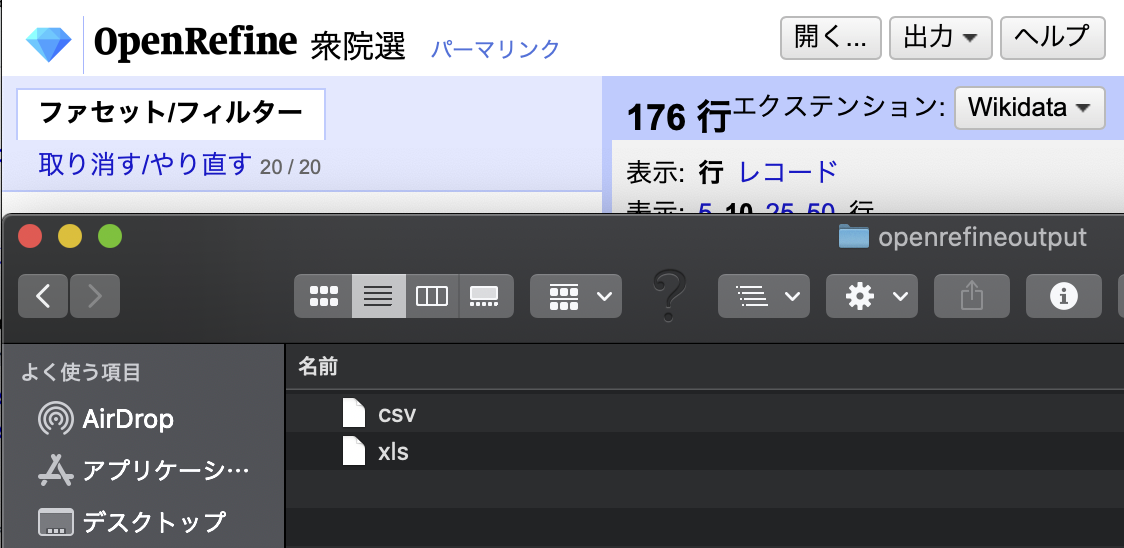
Exported file loses Japanese characters in its filename, leaving only extension. This also happens in case of project names with non-ascii characters like à, è, ù.
For now, we should avoid non-Ascii Project names.
 isaomatsunami
on 11 Jun 2020
isaomatsunami
on 11 Jun 2020
@isaomatsunami Are you also using OpenRefine 2.8 as the original poster? which version?
 thadguidry
on 12 Jun 2020
thadguidry
on 12 Jun 2020
@isaomatsunami Please create a new issue describing the problem that you are having with full details of versions of OpenRefine, operating system, Java, etc
@rezabj This is likely is another, earlier, variant of same bug that caused #2543 #2544 #2627. It is fixed by #2657 which specifies UTF-8 for the workspace.json file on all platforms and doesn't depend on the locale being set to UTF-8. The fix will be in 3.4.
 tfmorris
on 12 Jun 2020
tfmorris
on 12 Jun 2020
Sorry for my inadequate explanation and I should have reported earlier.
I tried with both OR3.4beta on current Mac OS 10.15 AND java-embedded OR3.4beta on Windows10.
1) When starting project with file with Japanese name, all Japanese characters are lost in suggested (initial) project name, usually leaving only extention such as csv. (In the test file case, "2020 xls" is left )
2) So, I input manually a new project name in Japanese, like "選挙2020" (= election2020). The project is safely saved. The project list shows the Japanese project name perfectly. Reloading the project works fine.
3) When exporting csv/xls/html/odf, Japanse characters in exported file name are lost. BUT exporting project ( 選挙2020.openrefine.tar ) works fine, with Japanese characters intact.
Presumably this has been happening for a long time (<- sorry for my poor language)
I usually use ascii project name (is it bad habit?). But when I was teaching OR, they wanted to use original names.
P.S. I added a test file with Japanese file name/ Japanese cell value for dev team.
isaomatsunami
on 12 Jun 2020
On project creation we were dropping all characters not in the set [A-Za-z0-9] (ie replacing them with spaces), collapsing multiples spaces and trimming leading and trailing whitespace. I've changed this to just replace the characters .-_ with spaces, but would be willing to listen to arguments to either add to that list or get rid of the "cleaning" altogether.
On export multinational characters and punctuation was dropped and spaces were replaced with dashes. I took out the first part, but left in the space => hyphen conversion. My thinking is that modern file system are less restrictive about filenames and users can adjust their project names to be legal filenames on their operating system if necessary.
There are similar issues in the SQL exporter and the schema alignment, but I'm not sure of the requirements for those, so I'm not going to mess with them right now.
tfmorris
on 12 Jun 2020
👍 drop the "cleaning" for the Project name. Folks should be able to use what is available for their OS, with Unicode support now for the 3 major ones.
thadguidry
on 12 Jun 2020
@tfmorris Thank you for quick response. I understand now its historical reason.
I feel sorry for my lack of ability to dig into code directly. Thank you again.
isaomatsunami
on 12 Jun 2020
Sorry, I just discovered that this got yanked from the 3.4 release at the last minute, so it won't be available until 3.5.
tfmorris
on 4 Jul 2020
Related issues
 kushthedude
·
3Comments
ettorerizza
·
3Comments
kushthedude
·
3Comments
ettorerizza
·
3Comments
 katrinleinweber
·
3Comments
katrinleinweber
·
3Comments
 asyrul21
·
3Comments
kushthedude
·
3Comments
asyrul21
·
3Comments
kushthedude
·
3Comments