Openrefine: The duplicate facet does not take into account other facets
Original user question : https://groups.google.com/forum/#!topic/openrefine/JDpix4g2Jc4
Here is an example dataset :
A,B
1,2
3,2
3,2
1,6
3,7
1,7
If I make a "text facet" on column A and I select the value 3...

... a "duplicate facet" on column B should send me only 2 duplicates, not 3. Bug or feature?

 ettorerizza
All 7 comments
It's a feature and works on single column. I think we already have an issue somewhere to provide a unique rows facet that would do what your asking. If not, please create one.
 thadguidry
on 4 Nov 2017
thadguidry
on 4 Nov 2017
I'm confused. If a facet is set to show a subset, the "duplicate facet" or facetCount should act on the selection set. The question above is not trying to work on more than one column. @thadguidry
I've pulled my hair out on this in 2.8 and now see the same behaviour in 3.0.
Is this the best workaround? Create a column of the facet selection you want first, so that you can remove any facets you have on before using facetCount or the custom "facet duplicates"
 eswright
on 20 Sep 2018
eswright
on 20 Sep 2018
@eswright
Let's look at the GREL expression in the B facet picture above. It is asking for this in layman's terms:
(Show me a count of rows in Column B where the value ) is greater than 1
facetCount(value, 'value', 'B') > 1
Now let's look at the data rows that are shown with the A facet selected on 3 (clicked and shows orange color)
OpenRefine's data structure grid looks like this in that picture:
column B
row value 2
row value 2
row value 7
Now run the layman terms sentence in your head... what is the count or number of rows in Column B that has a value greater than 1 ?
If you arrived at a result of 3, then the Facet on B column showing a true 3 seems to be correct and accurate. 3 rows are matching that expression.
But I love pictures to explain better of what facetCount() really does and how it works. facetCount() by the way is what we use for the Duplicates Facet counting and it simply takes 'value' in the normal case as shown in the above picture in this issue, but you could override this to say "Only show me duplicate rows that have a value of 7" like I have done so in this picture (notice how many rows are true that have a value of 7? then what do you think the facetCount() result would be for "true" when I clicked OK button ? If you guessed 2, you are correct !!! , there are 2 rows that equally have a value of 7 :
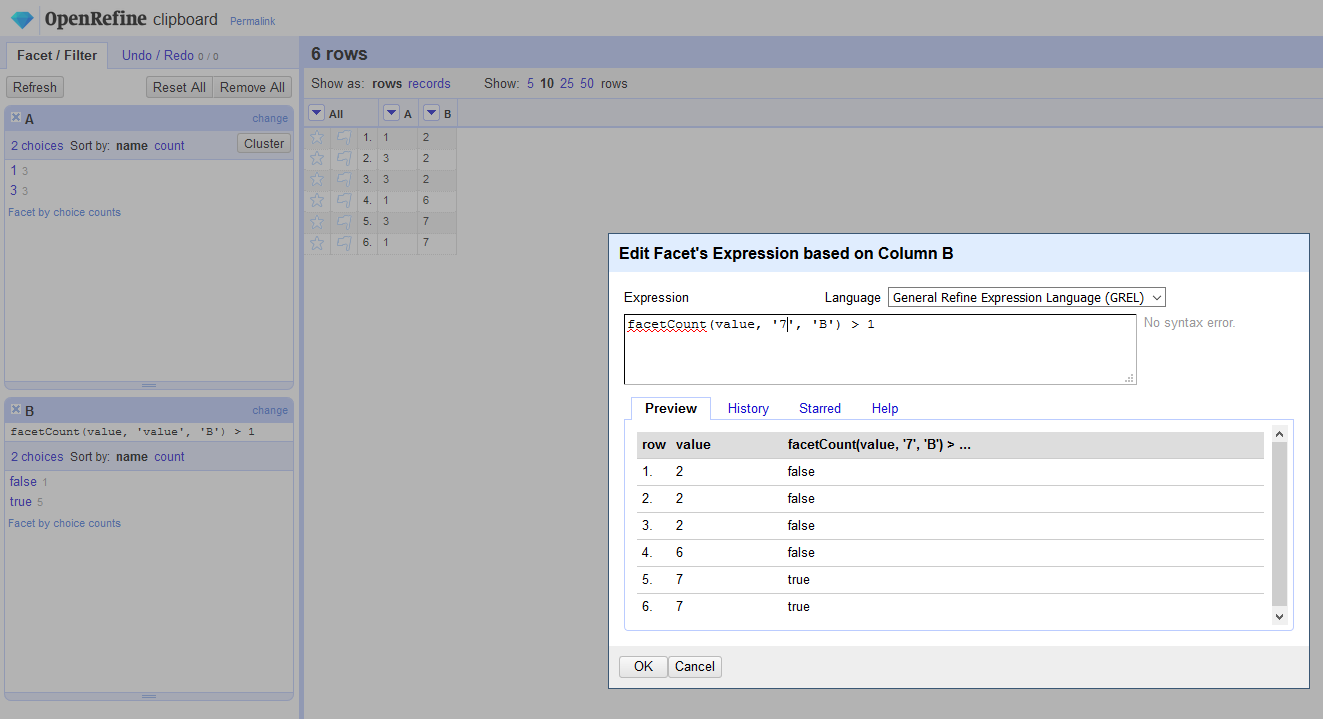
Now let's really see what happens when I change back to just 'value' :
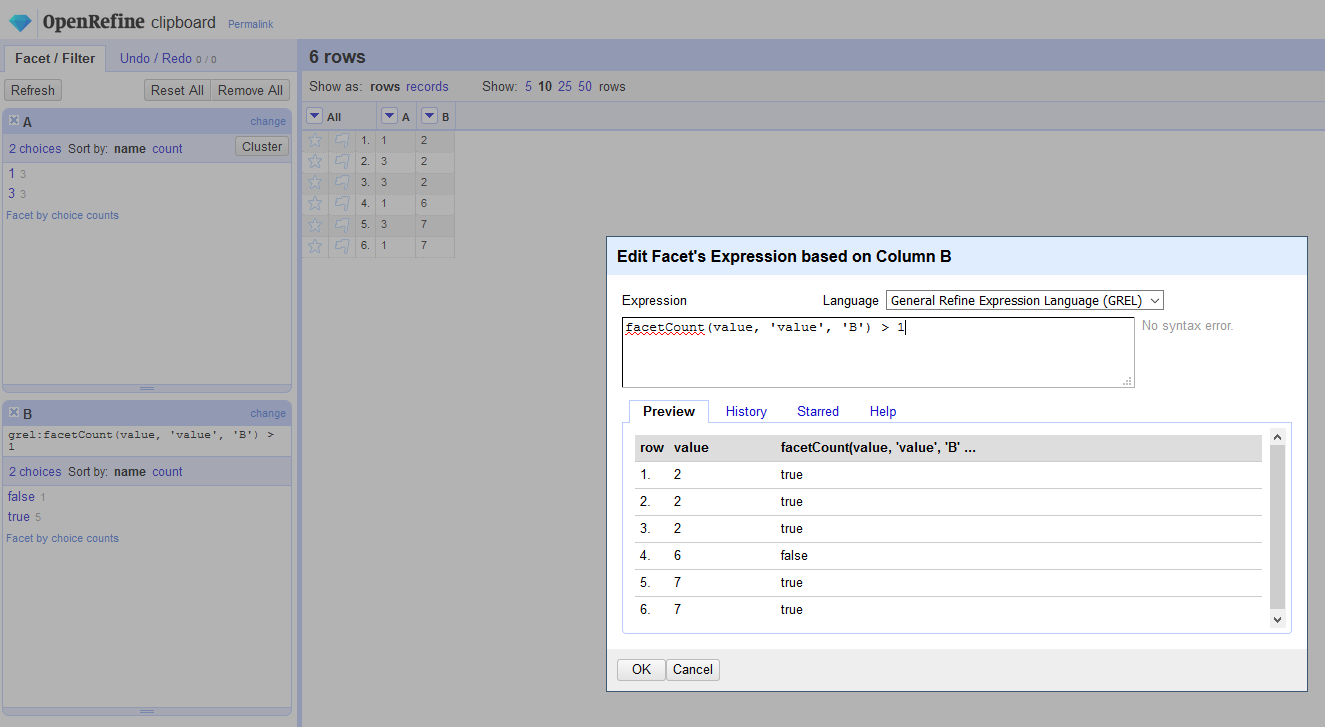
There we see that 5 total rows have duplicated values (5 true rows in the preview dialog). Its not 3, because I have not selected on my A Facet on the 3.
But when I then select on 3 in my A Facet...
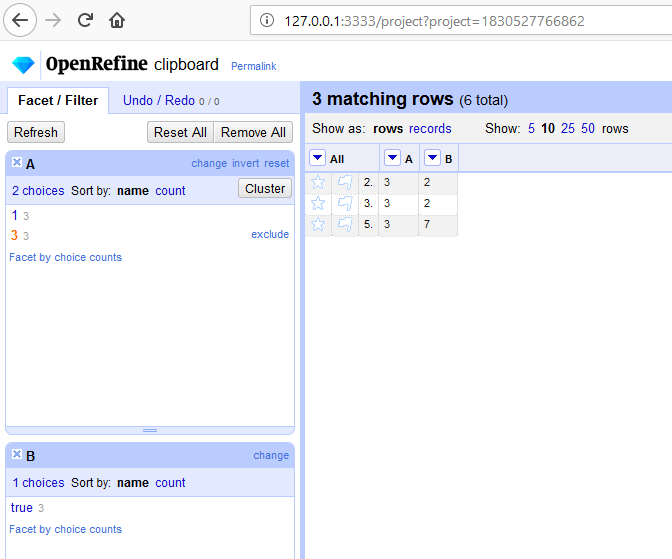
I then expose an anomaly...
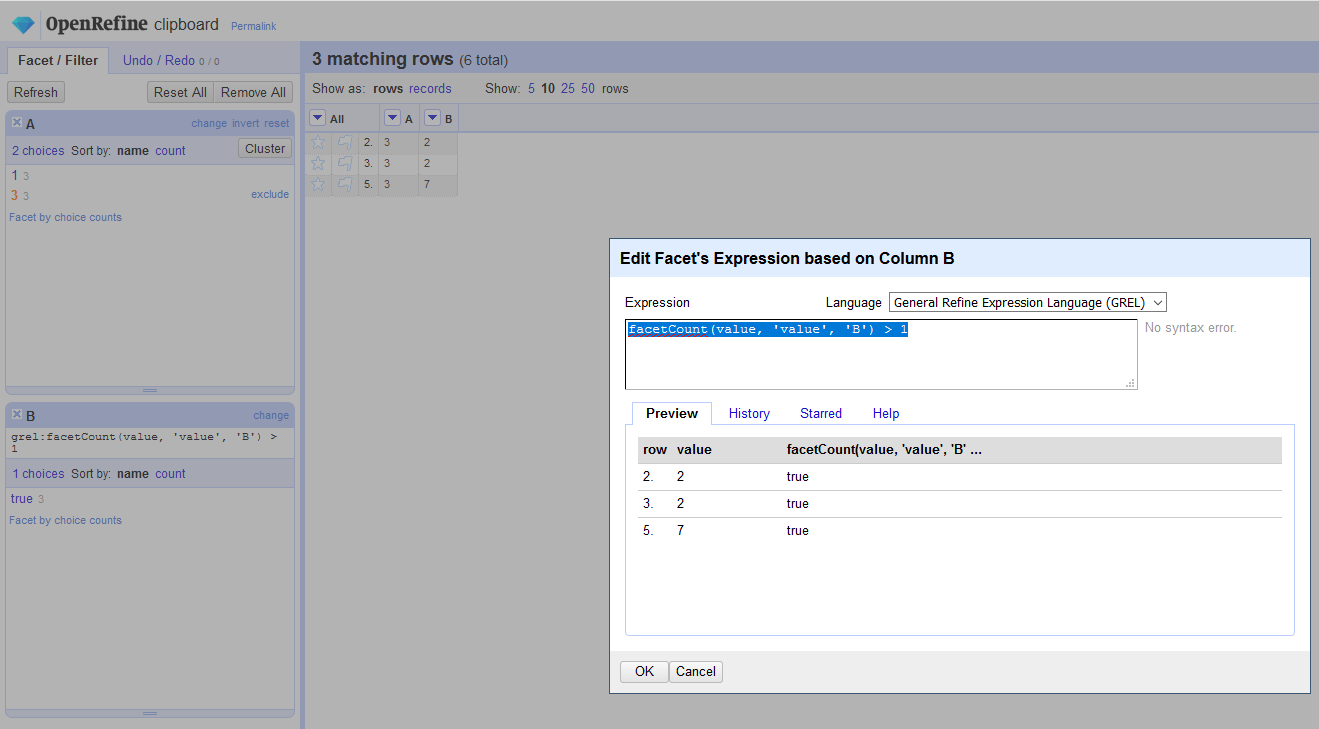
or did I ? Which row of value 7 is being presented here, you wonder ? (its row 5.) Wait, didn't we have 2 rows that had a value of 7 in B column , and not just one ? Yes we did, and still do (rows 5. and 6.) ...but then why isn't the other 7 row shown (row 6.)? Because we filtered on A Facet for only the rows that match a value of 3 and not value of 1 !
In Summary:
We designed the Duplicates Facet to work "alone", and not really in tangent with other Facets at the same time. In other words, the Duplicates Facet always looks at ALL ROWS in a column, until you change 'value' to something other than 'value'. But out of the box, the Duplicates Facet has the GREL expression of : facetCount(value, 'value', 'B') > 1 where 'value' means all the values in a column, and its special in that way within the expression. (Technically its an iterator variable, if you will, in our Java code for the Duplicates Facet functionality)
In other other words... a Duplicate value row...is always a Duplicate value row...no matter the other Facets that expose to show it, or hide it.
thadguidry
on 21 Sep 2018
@eswright If you have a need for a new Duplicates Facet that is , a Filtered Duplicates Facet, then we could certainly provide that new Filtered Duplicates Facet that takes into account all the other facets. But the Duplicates Facet will always work on ALL ROWS as designed and tested. Feel free to create a new enhancement request if you need that additional Filtered Duplicates Facet.
(by the way, the reason we would not want to change the logic of the existing Duplicates Facet, is because many thousands of folks already know how it works generally and are aware of the logic of it and have already built workflows with that existing logic, so we wouldn't want to change it...but doing a new or different Facet for some other logic is doable)
thadguidry
on 21 Sep 2018
Adding a "filtered duplicates facet" also brings in more issues - it would mean that the order of facets would need to matter (otherwise, with two filtered duplicates facets, you get a circular definition). So this is prone to introduce bugs and unexpected behaviours.
 wetneb
on 21 Sep 2018
wetneb
on 21 Sep 2018
@wetneb yes, but we could probably put some controls around that... for instance, always making filtered duplicates facet a LAST OUT facet. In a hypothetical new UI, the "filtered duplicates facet" may not even be part of the regular facets views, where we might want to highlight to users that this is always a FINAL LAYER that is applied (David H. and I talked about final layers in the past, just like Photoshop does layer ordering with a last layer). How we present these always final layers...could be a UI experiment or Proof of Concept for a budding UI intern or Google Summer Project.
thadguidry
on 21 Sep 2018
Wow... I spend hours working around this, and just discover it is a feature ;-)
I really need use a filtered duplicate facet for a project, and don't know how to do that :/
 msaby
on 11 Mar 2019
msaby
on 11 Mar 2019
Related issues
thadguidry
·
3Comments
 dantexier
·
4Comments
dantexier
·
4Comments
 tfmorris
·
3Comments
tfmorris
·
3Comments
 kushthedude
·
3Comments
kushthedude
·
3Comments
 asyrul21
·
3Comments
asyrul21
·
3Comments