Openrefine: add find() function similar to match() but can do re.findall() in python
I do not like match() and I'm sure I'm not the only one. As much as replace() is a pleasure to use, so much match() gives me a headache. In 90% of the cases, someone who uses this function wants to find some substrings in a string using a regular expression. But why is it absolutely necessary that this function imposes to match first the whole cell? In any regular expression tester, like regex101.com, you just have to match the pattern that interests you. Same thing in Python/Jython.
Let's take an example with this dataset:
Jean De Dinant
Jeanne de Paris
If I want to extract all the words that begin with the capital letter D, the Python regex will be very simple:

But with value.match(), you have to spend five minutes wondering why this formula does not produce the expected result.

Nor this one :
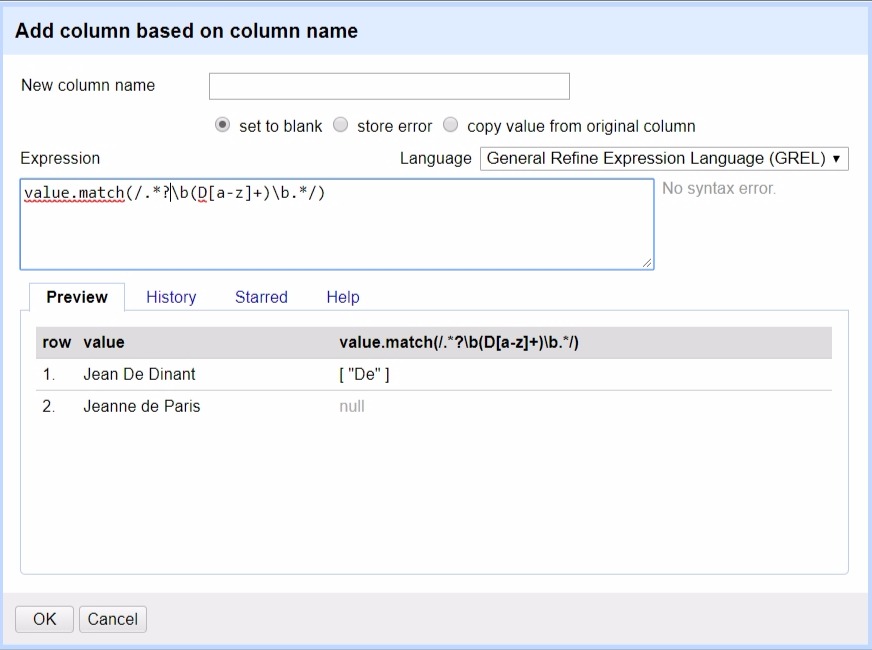
@thadguidry wrote somewhere that GREL must be a _walk in the park_. This is certainly the case for value.replace(), but value.match() looks more like a walk in the mud on a rainy day. Would not it be a good idea to rewrite this function to make it an equivalent of value.replace(), a kind of value.find() that would include contains() by accepting both a string and a regex?
On the string "HELLO World!", it will send back:
value.find("World")

["world"]

value.find(/[A-Z]{2,}/)

["HELLO"]

value.find(/\w+/)

["HELLO", "World"]

value.find(/(hello|world/i)[0]

["HELLO"]
 ettorerizza
All 9 comments
but what's the fundamental difference do you expect from the future find() and current match()?
 jackyq2015
on 1 Nov 2017
jackyq2015
on 1 Nov 2017
@jackyq2015 Simply that it works in a more natural/classic/straightforward way. On the string "Hello World", how would you, with match(), extract all words that start with a capital letter? In any regex engine, the answer will be something like [A-Z]\w+, and it would be nice if value.find(/[A-Z]\w+/) gives as result ["Hello", "World"].
Or maybe I don't understand this function correctly. The problem may be that I'd like to see it do things for which it was not designed.
ettorerizza
on 1 Nov 2017
It feels like what is needed here is just a ‘regex’ function that takes a regex and returns an array of any capture groups
I would say the two things that frustrate me about ‘match’ are:
1) the need to match the entire string
2) the inability to do a /g flag to do a global reg ex
 ostephens
on 1 Nov 2017
ostephens
on 1 Nov 2017
@ettorerizza you should have be able to do group and get the result. something like this:
value.match(/((A-Z)) /)
But seems it doesn't work. I would say it's a bug.
jackyq2015
on 1 Nov 2017
@jackyq2015 It's not a bug, it's unfortunately a feature. The documentation is clear on this.
On the string "hello 123456 goodbye", you can't simply extract the number with value.match(/(\d{6})/). You must match the whole string and indicate between parentheses the part you want to extract, that is to say: value.match(/.*(\d{6}).*/).
It's a little boring when it comes to extracting a single element, but when there are several in the string, it becomes a puzzle.

That's why I prefer to use Jython when I have to find something with regex.

ettorerizza
on 1 Nov 2017
GREL match just wrapped the java java.util.regex.Matcher. But java.util.regex.Matcher is able to do the same thing your python script does. If we stick with the document, current behaviour follow the spec well.
Maybe we can add another function findall to do the same thing. thought?
jackyq2015
on 2 Nov 2017
@jackyq2015 Exactly. Looks like the find() method already exists and it would be easy to create a match() variant named find().
matches()
The matches() method in the Matcher class matches the regular expression against the whole text passed to the Pattern.matcher() method, when the Matcher was created. Here is a Matcher.matches() example:String patternString = ".http://.";
Pattern pattern = Pattern.compile(patternString);boolean matches = matcher.matches();
If the regular expression matches the whole text, then the matches() method returns true. If not, the matches() method returns false.You cannot use the matches() method to search for multiple occurrences of a regular expression in a text. For that, you need to use the find(), start() and end() methods.
I've never programmed in Java, but I would be interested to immerse myself one of these days in this @ostephens tutorial.
ettorerizza
on 2 Nov 2017
@ettorerizza Matcher has much more that folks are probably not aware of, I myself have used Matcher.lookingAt() back in the day. Better to link to the Official Java docs https://docs.oracle.com/javase/8/docs/api/java/util/regex/Matcher.html
@jackyq2015 @ostephens Google Guava had nice helpers back in the day, but no longer in it, since Java has advanced. But this might help (they have interesting notes) https://github.com/google/guava/search?p=2&q=matcher+find%28%29&type=&utf8=%E2%9C%93 and in particular what their CommonMatcher provides https://github.com/google/guava/blob/master/guava/src/com/google/common/base/CommonMatcher.java
@jackyq2015 @ostephens I also don't think we need to worry about NFA... but who knows what kind of gigantic strings that users might try to put into OpenRefine https://github.com/google/re2j Let's skip worrying about that particular corner case.
 thadguidry
on 3 Nov 2017
ettorerizza
on 26 Nov 2017
thadguidry
on 3 Nov 2017
ettorerizza
on 26 Nov 2017
Related issues
 wetneb
·
3Comments
thadguidry
·
4Comments
wetneb
·
3Comments
thadguidry
·
4Comments
 davidegiunchidiennea
·
3Comments
davidegiunchidiennea
·
3Comments
 kushthedude
·
3Comments
kushthedude
·
3Comments
 lapoisse
·
3Comments
lapoisse
·
3Comments