Openrefine: Cross function not working - Reproducible scenario
From our mailing list
https://groups.google.com/forum/#!topic/openrefine/72b5r3QQQcQ
"I noticed a scenario related to cell.cross not working for me on occasion:
If I export a refine project (or both) from one computer to another (in this case, always Mac to Mac, but sometimes different OS X versions), cross does not work numeric values.
This has happened to me three times:
- Exported Google Refine project from iMac running Yosemite to an old 17" MacBook Pro running either Yosemite or earlier (possibly Snow Leopard).
- Exported Google Refine project from the same iMac to a new 15" MacBook Pro running El Capitan and OpenRefine 2.6 beta 1
- Exported OpenRefine 2.6 beta 1 project from new Mac Mini running El Capitan to the same 15" MBP (e.g., both with the same configuration)
(I did not test these situations with my Linux and Windows 10 installations of Open Refine.) What I was doing was trying to cross-join on a standardized college ID (from http://nces.ed.gov/collegenavigator). I first tried with the string versions, first making sure to trim() and strip() spaces in both projects, and sorted the target project. No luck. I changed the ID toNumber() in both projects. No luck. I tried with the college names and it worked just fine. I had this exact same problem in the other scenarios listed, always on the ID, if either or both of the projects were imported from another Mac. If I create two projects on the same Mac, I can join them.
Now here's how I solved it, just this very minute. I created a duplicate column of the college id values in both projects and converted them toString(). Then I tried to join on these two new columns created on the same computer, and it lo and behold, it worked perfectly.
To further test my premise (numeric values don't join from projects created on other computers, whether in text or numeric mode), I then converted both new columns to numbers, did the join again, and verified that both sets of restults are identical.
Not sure if this helps you. If I knew more Java (and had more than 10 free minutes per week), I'd try to hunt down the problem in the code. Unfortunately, I can't help there."
 thadguidry
All 15 comments
Any idea if this is still current after the new cross function?
 wetneb
on 2 Aug 2017
wetneb
on 2 Aug 2017
@wetneb see referenced issue #1228 , This might be slightly related ? The hidden 1234.0 value not matching the shown value 1234 ? dunno, but ...
Need to dive in and verify this with a test and perhaps somehow make a test case for this also if we can.
thadguidry
on 19 Oct 2017
Hi @thadguidry. According to my own tests, two columns of numeric IDs do not match with cell.cross() if one of the columns consists of "normal" numbers and the other of numbers from Excel (with an invisible trailing zero)
 ettorerizza
on 19 Oct 2017
ettorerizza
on 19 Oct 2017
@ettorerizza yeah, ok... I think we really should not hide the fact that there is precision with an amount of scale to you as a user. A number of 123.45 has a precision of 5 and a scale of 2 (two digits to the right of the decimal) But 123.0 also has precision and scale...just because a 0 is there, you could say its a whole number, but technically, to scientists, its not a whole number yet until its been converted to 123. And I don't think we should ever auto convert things during import, but let the users make the choice afterwards.
@wetneb @jackyq2015 Now I am convinced we ALWAYS need to display precision/scale to users that have imported numbers with any amount of scale. Even if the scale is only 1 digit and holds a 0 as in @ettorerizza case. Other tools always default to display precision and scale, and I think we should make that change as well. We can call it the "Truthful data feature" :)
thadguidry
on 19 Oct 2017
I've made a different issue for that as it would have implications beyond the cross function.
wetneb
on 19 Oct 2017
@wetneb yeap, absolutely, its non-trivial and requires a full review at multiple points and our tests would have to be much more rugged as well :)
thadguidry
on 19 Oct 2017
If I am not mistaken, the cross is designed for match based on string , not number. If you need cross a number, a added column with converted number should required.
 jackyq2015
on 19 Oct 2017
jackyq2015
on 19 Oct 2017
@jackyq2015 @wetneb Right, cross() is based on string, but thats where it becomes a usability issue for folks unaware like @ettorerizza who would expect then an ERROR or hint that crossing a Number column against a Text column is not going to work out well :) OK, so....
- Improve the test cases for this. Ensuring that 2 Numbers can cross and 2 Strings can cross, but that trying to cross a Number and a String properly throws an error to the user.
All agreed ?
thadguidry
on 19 Oct 2017
@thadguidry @jackyq2015 I can assure you that cell.cross() works with numbers stored as "numeric" just as well as with strings (screencast). I have not tried it yet with dates.
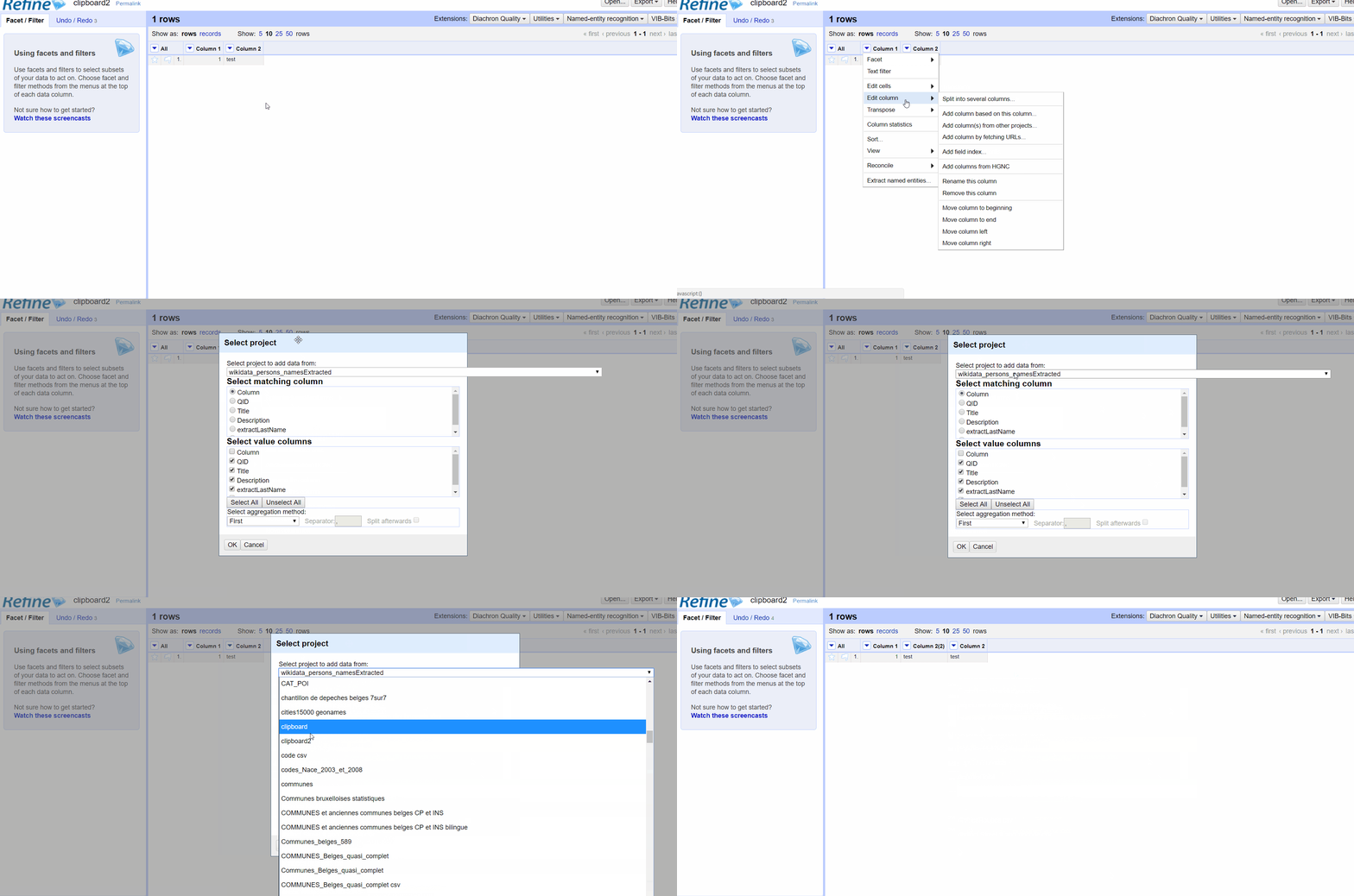
I used the VIB-BITS extension here, but the hidden GREL formula does not perform any number -> string conversion.
forEach(cross(cell,"clipboard","Column 1"),v,v.cells["Column 2"].value)[0]
I'm not a computer scientist, but I know Open Refine a bit and I'm not totally unaware of this kind of triviality ;)
ettorerizza
on 19 Oct 2017
@ettorerizza According to code from ImporterUtilities.java:
static public Serializable parseCellValue(String text) {
        if (text.length() > 0) {
            String text2 = text.trim();
            if (text2.length() > 0) {
                try {
                    return Long.parseLong(text2);
                } catch (NumberFormatException e) {
                }

                try {
                    double d = Double.parseDouble(text2);
                    if (!Double.isInfinite(d) && !Double.isNaN(d)) {
                        return d;
                    }
                } catch (NumberFormatException e) {
                }
            }
        }
        return text;
    }
The cellType could be Long and Double if it's numeric. In that case, the cross cann't behave properly unless you can make sure the types are the same. Also for Double if you have the same type, the scale still an issue. You may get it right under some situation but the result is not deterministic.
For the GREL forEach issue, you can refer to #1204
jackyq2015
on 20 Oct 2017
The cross() function sometimes has erratic behavior, with or whitout the VIB-BITS extension. Just now, a matching returned me, I do not know why, a "NullPointerException". I restarted Open Refine and it worked correctly. (OR 2.7, Windows 10, Chrome).
Precision: I have a LOT of projects in my workspace directory. I do not know if it matters.
ettorerizza
on 27 Oct 2017
@jackyq2015 I did some tests to answer this question on SO, and it looks like it is no longer possible (with OR 3 RC1) to perform a cell.cross() with two numeric columns.
Error: java.lang.ClassCastException: java.lang.Long cannot be cast to java.lang.String
Yet nothing seems to have changed in importerUtilities.java. How to explain that?
ettorerizza
on 11 Aug 2018
@ettorerizza Will take a look. could you please paste the full exception stack?
jackyq2015
on 12 Aug 2018
@jackyq2015 No other error message in the console.
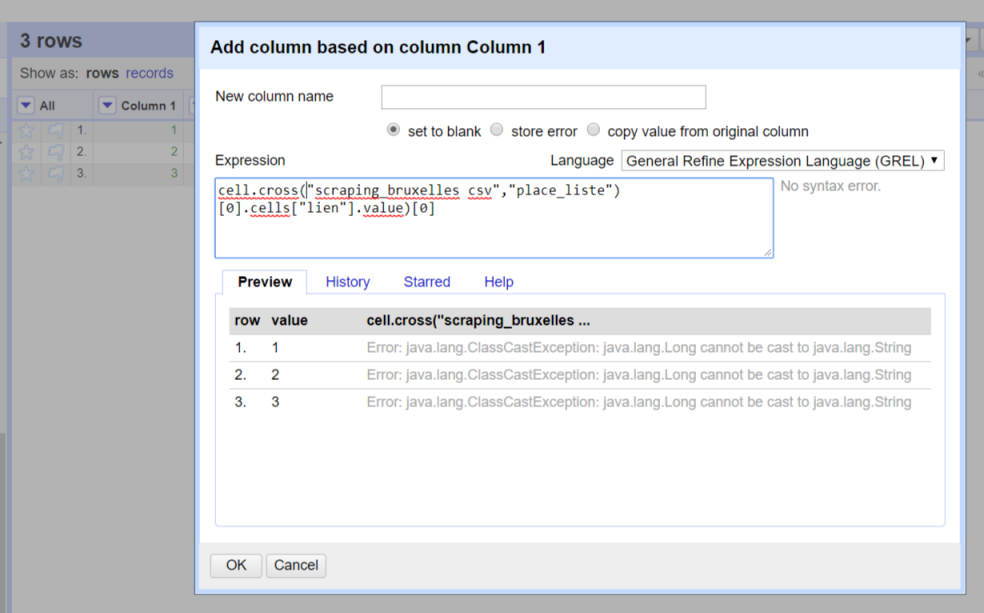
ettorerizza
on 12 Aug 2018
Fixed by #1852.
wetneb
on 24 Nov 2018
Related issues
 stellasia
·
4Comments
stellasia
·
4Comments
 antoine2711
·
3Comments
ettorerizza
·
3Comments
antoine2711
·
3Comments
ettorerizza
·
3Comments
 ralcazar-oeg
·
3Comments
thadguidry
·
4Comments
ralcazar-oeg
·
3Comments
thadguidry
·
4Comments
Most helpful comment
Hi @thadguidry. According to my own tests, two columns of numeric IDs do not match with cell.cross() if one of the columns consists of "normal" numbers and the other of numbers from Excel (with an invisible trailing zero)