Openrct2: Increased lag makes large parks borderline unplayable
Over the past few years I have noticed the amount of lag in OpenRCT2 kept increasing and now it's come to a point where large parks have become borderline unplayable because of the lag. Yesterday I had to revert to version 0.2.5 (9 months old) to be able to livestream a large park without severe lag.
I have made this video to compare the amount of lag in four different OpenRCT2 builds: https://www.youtube.com/watch?v=tfpkhR_kfzg
If this trend continues, even medium sized parks of 3000 or 4000 guests will become very laggy and larger parks will become entirely unplayable. If we get an increased sprite limit after the custom save format is done, it won't be of much use since the lag will make it unplayable in 0.3.2 already.
This is a huge issue that has to be addressed.
 LordMarcel
All 26 comments
There is a huge jump in lag from 0.2.5 to 0.3.2, but there are also several release versions in between (0.2.6, 0.3.0, and 0.3.1). Do you know the exact commit or release that causes OpenRCT2 to reduce in framerates severalfold, or is it just accumulated lag increases from many commits in between?
 James103
on 22 Dec 2020
James103
on 22 Dec 2020
Why didn't you leave the fps on so that we could have some more empirical results. What graphics rendering are you using are you comparing that as well?
 duncanspumpkin
on 22 Dec 2020
duncanspumpkin
on 22 Dec 2020
I could not test 0.2.6 since none of my big parks would load on that build, but all the others worked fine. The largest jump by far was between 0.3.0 and 0.3.1. There have of course been many small development builds between those two and I don't know on which of those the lag increased the most.
There is also quite a large jump between 0.2.0 and 0.2.5, which is especially noticable with the small park at x128 speed. The largest jumps here seem to be between 0.2.1 and 0.2.2, and between 0.2.4 and 0.2.5.
LordMarcel
on 22 Dec 2020
I have used 'software (hardware display)' for 0.1.0 (because OpenGL gave glitches) and OpenGL on all the others. I have tried switching between the two several times and never notice any difference in the amount of lag. I suspect that this is because this lag is not caused by the rendering but rather by the number of calculations that the game has to do for all the guests.
I forgot that having the fps on was a thing, apologies.
LordMarcel
on 22 Dec 2020
From my tests its the path finding that is the most expensive function when at faster speeds
duncanspumpkin
on 22 Dec 2020
Hey marcel, just saw the video. A similar test that would be really useful with regard to duncan's findings would be:
1) load a really big park with no guests and the FPS counter on (i.e. load a save and remove all guests with cheats)
2) gradually spawn in some guests and let the game run for a bit, monitor the FPS for slowdown
3) at each milestone of 1000 or so guests, record what your FPS is
this test or something similar would be useful to determine the rate at which more guests = more pathfinding = more lag
 csunday95
on 22 Dec 2020
csunday95
on 22 Dec 2020
Another thing that I'm not sure if we should change is invalidate functions on open gl can be replaced with a nop. We invalidate the whole screen every tick so they are not required. Some of the invalidate functions can be a bit expensive due to looping through every viewport to check coordinates. It's always been the plan to make opengl understand dirty areas so it has never been optimised
duncanspumpkin
on 22 Dec 2020
@duncanspumpkin OpenGL already does nothing for invalidate calls
 IntelOrca
on 22 Dec 2020
IntelOrca
on 22 Dec 2020
It does nothing but quite far down the callstack. I found one function that ultimately did nothing was using up 10% CPU due to performing checks that ultimately did nothing.
duncanspumpkin
on 22 Dec 2020
I did @csunday95's test and found the following results. Up to 3000 guests I get the max fps of 75 for my monitor. When going to 4000 guests I get the first framerate drop. Every step starting at 5000 to 6000 guests increases the lag by a lot, down to about 11 fps with 8600 guests (maxed out sprite limit).
https://www.youtube.com/watch?v=Z4tpYB0F0iY
At the end I zoom out which drops to fps down to 7. Even when the park is empty I only get about 24 fps when I'm zoomed out with OpenGL and about 16 fps with software rendering. This is not a new thing though, as in 0.1.0 I get the same framerate. It's also much less important as you're rarely zoomed out that far.
LordMarcel
on 22 Dec 2020
@LordMarcel this may have just been my system, but when profiling the CPU usage, I noticed that the plugin integration handler code was using an enormous amount of CPU when many guests were present. This was especially true when I was looking at the edge of the map (to make it so drawing utilization was minimized), and plugin handling code was using as much as 80% of the program's CPU time. If you had any plugins enabled during the test, could you try running the same test again with no plugins in your plugin directory? I specifically had the Stream Integration plugin. With no plugins enabled I got vastly better performance, and the primary CPU utilizing functions, according to my profiling, are all drawing related under those conditions.
csunday95
on 23 Dec 2020
Wow, that makes an incredible difference. I changed the name of my plugin folder and got about 45 fps in the big park with 8600 guests. When I changed the name back and reloaded the park I went all the way down to 9 fps. In my case it's also the stream integration plugin as if I only remove that one the lag disappears as well.
Edit: If you tick the 'disable plugin' box in the stream integration plugin and reload the park the lag disappears as well. Somehow that plugin trying to make a connection to Twitch is causing the massive lag. There still is the question why 0.3.0 doesn't give lag while it does have the plugin as the lag only starts in 0.3.1.
LordMarcel
on 23 Dec 2020
Outdated, See my next message
The stream integration plugin continously tries to connect to the stream integration relay, but only when enabled.
This is why the plugin has a disable plugin checkbox, which you should absolutely use if you're experiencing issues. I haven't seen this be an issue before, I'll test it with the latest version.
The plugin uses the most amount of resources when connected though. If you're somoene who barely ever shuts down their PC you'll want to check if the plugin is actually connected to a (hidden) instance of the stream integration relay.
Hm, the TCP API was introduced in 1.3.1. So yeah, disable the plugin through the in game widget if you're not streaming, and having performance issues. This is not something that I'd hold OpenRCT2 accountable for.
Note that of my other plugins, the active ones may have a performance impact, this currently includes:
- Stream Integration
- Advanced Track (Though mostly when you have sensors set up, otherwise it shouldn't have much impact)
 oli414
on 23 Dec 2020
oli414
on 23 Dec 2020
The stream integration plugin had an oversight (pulling all the entities every tick for no reason). Here's an updated version that solves the lag issues:
https://github.com/oli414/StreamIntegrationPlugin/releases/tag/1.3
oli414
on 23 Dec 2020
This lines up with what I was seeing in profiling; the json sterilization code for transmitting entity information was being thrashed. Beyond removing plugins as a factor, the drawing code would be the next optimization target, but that's a big project with a lot of planning required.
csunday95
on 23 Dec 2020
OpenGL generally improves the framerate when a lot needs to be drawn, which I noted in one of my earlier comments on this thread. However, today I found a situation where OpenGL destroys your framerate.
Here I get 72 fps with software rendering and only 3 fps with OpenGL:
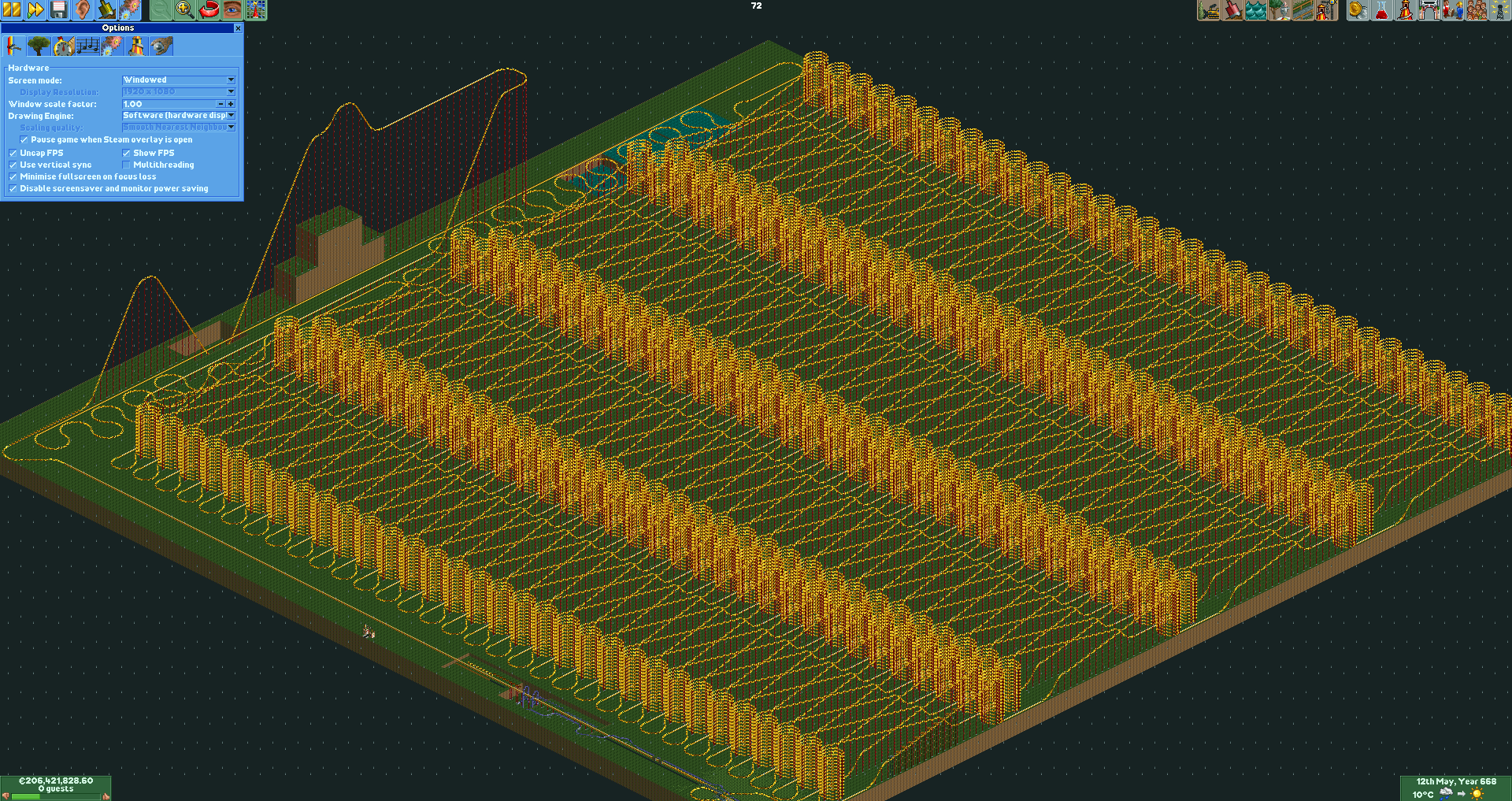

It seems that whenever there's a pattern that's repeated many times OpenGL does absolutely terribly. I've tested three other parks with huge repeated rides like above and they all had similar results of software rendering having zero lag and OpenGL doing terrible.
This happens in both 0.2.0 and 0.3.2 so I think it's safe to assume it's also a thing on all versions in between.
LordMarcel
on 25 Dec 2020
@LordMarcel this is to do with static vs moving. If most of your screen is static then software will likely outperform OpenGL. If you have lots of moving sprites, pattern or no pattern, OpenGL should perform better.
IntelOrca
on 25 Dec 2020
@LordMarcel I'm very unhappy you made a video before consulting us. Yes, there is lag that we need to address, but it was not our fault it was borderline unplayable - that was on you for using a buggy plug-in. You have left that video up with nothing in the way of rectifying - only a small mention in a comment. This is a pretty poor way of handling things.
 Gymnasiast
on 28 Dec 2020
Gymnasiast
on 28 Dec 2020
I did not have the intentions to cause any public outrage or something. I was going to make the video anyway to make it clearer for you guys but usually I make these videos unlisted because no one else is interested in them. However, I had been talking about this on my stream and thought that people might find the comparison interesting so I decided to make it public instead. The text in the video wasn't meant as a 'they can't do their job' or something as I made the entire video before deciding to make it public. It was meant to make it clearer for other people to understand what exactly I did in the video.
I admit that this could paint the developer team in a bad light and I apologize for that, but it wasn't my intention.
LordMarcel
on 28 Dec 2020
And yet people are tearing us to shreds in the comments on that video, since you did not post a follow-up video. Lots of people will now think our game is borderline unplayable, since you have reach a big audience with your videos and people take you seriously. Nobody is going to go back to that video and check the comments to see there is more to it than that.
I wouldn't be so upset if you were just a random streamer, but you are held in high regard - and deservedly so - for your OpenRCT2 knowledge. This is also why I really want you to rectify it with a follow-up video, since this could really hurt us.
Gymnasiast
on 28 Dec 2020
You know, that's a fair point. I can't really make one right now as it's very late but I'll definitely get one out in the next few days.
LordMarcel
on 29 Dec 2020
I'll definitely get one out in the next few days.
It has been a week, and you uploaded several videos, but no rectification. And neither did you unlist the old video or even change its title to warn people it is incorrect.
This is unacceptable. You had no problem broadcasting something that was both incorrect and very damaging to us to the world. Now take your responsibility and rectify it to the same audience.
Gymnasiast
on 4 Jan 2021
You are right. I have now finally made a video: https://www.youtube.com/watch?v=H80NETwX3C8.
I realize that this was unacceptable and I should have not let it come this far. What else (other than the update video) can I do to help out OpenRCT2? You deserve better than this and I'd like to help.
LordMarcel
on 20 Jan 2021
Thank you. I'm happy you made a video after all and unlisted the old one. _Zand erover_.
As for helping out OpenRCT2: @janisozaur suggested that we could do a “dev round table” (a video in which the dev show off new features, talk about development and answer questions) at some point with you as host. The last one was years ago. Would you be up for that?
Finally, getting back to the lag that _is_ part of our code: perhaps we should summon @ZehMatt in. I already asked him about it, but he had trouble reproducing it exactly, so perhaps it's better if you two talk to each other directly.
Gymnasiast
on 22 Jan 2021
The round table is not a bad idea (wasn't the last one hosted by BlindIrl? I think I remember that). I could ask my viewers to send in questions and we could livestream it.
About the lag, I didn't do anything special to cause it. All I did in the lag comparison video was open the park and speed up the game on all the different versions. If you're not able to reproduce it I'm very confused. It can't be park-specific because I've been noticing the increase in lag in a lot of parks over the years.
LordMarcel
on 23 Jan 2021
There might be some slight decrease in performance for the next few weeks whilst i tinker on the entity lists. Will be most noticeable when there are lots of entities (peeps, vehicles, explosions, ...). At the end of these tinkering activities it should end up with better performance and be ready for new save format.
duncanspumpkin
on 23 Jan 2021
Related issues
 J0anJosep
·
3Comments
J0anJosep
·
3Comments
 Superjustinbros
·
3Comments
Superjustinbros
·
3Comments
 nuclearslurpee
·
3Comments
nuclearslurpee
·
3Comments
 Nubbie
·
3Comments
Nubbie
·
3Comments
 qwertychouskie
·
3Comments
qwertychouskie
·
3Comments
Most helpful comment
From my tests its the path finding that is the most expensive function when at faster speeds