Openrct2: [Feature] OpenTTD-like transparency options
Currently transparency and see-throughness of different kinds of objects are handled by separate options available in the menu. You can also bind shortcut keys to them individually.
My suggestion is a new transparency options tool that handles the options for all of the different objects in one window.
Here's a screenshot of the OpenTTD transparency options window:
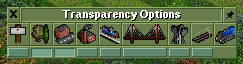
The top row controls whether the object type is transparent or not (when pressed down, transparency is enabled)
The bottom row controls whether the objects are transparent or see-through when in the "transparent" mode. (Implementing this would be a bonus, not a hard requirement.)
Additionally, a shortcut key (X) is bound to toggle the transparency state for all objects contrary to OpenRCT2, where you currenyly have to hit the shortcut keys for each object group separately.
 knomepasi
All 2 comments
The window can arguably just be a plugin, but we will need to implement the ability to enable / disable translucent and fully transparent for each visibility option.
 IntelOrca
on 23 Sep 2020
IntelOrca
on 23 Sep 2020
Here's a Gist with a plugin that adds a simple transparency options window into the game.
https://gist.github.com/knomepasi/cb9f47f24bfd2eae58ef3801239a3c67
knomepasi
on 24 Sep 2020
Related issues
 telk5093
·
3Comments
telk5093
·
3Comments
 J0anJosep
·
3Comments
J0anJosep
·
3Comments
 Nubbie
·
3Comments
Nubbie
·
3Comments
 mrtnptrs
·
3Comments
mrtnptrs
·
3Comments
mrtnptrs
·
3Comments
mrtnptrs
·
3Comments
Most helpful comment
The window can arguably just be a plugin, but we will need to implement the ability to enable / disable translucent and fully transparent for each visibility option.