Openrct2: Preset list of the Spiral coaster works incorrectly (if I have Korean-named custom track)
OS: Windows 10
Version: 0.2.4
Commit/Build: 8893d99
I'm not sure if it is the certain problem with the spiral coaster, anyway, I think its preset list works incorrectly if I have custom track which of its name contains non-english, such as korean.
Steps to reproduce:
- Name any custom track file(*.TD6) containing non-english characters, such as
테스트.TD6 - Store it in _(Doc)/OpenRCT2/track_ directory
- Run the game, try to build a spiral coaster
- See the preset coaster list
Screenshots / Video:
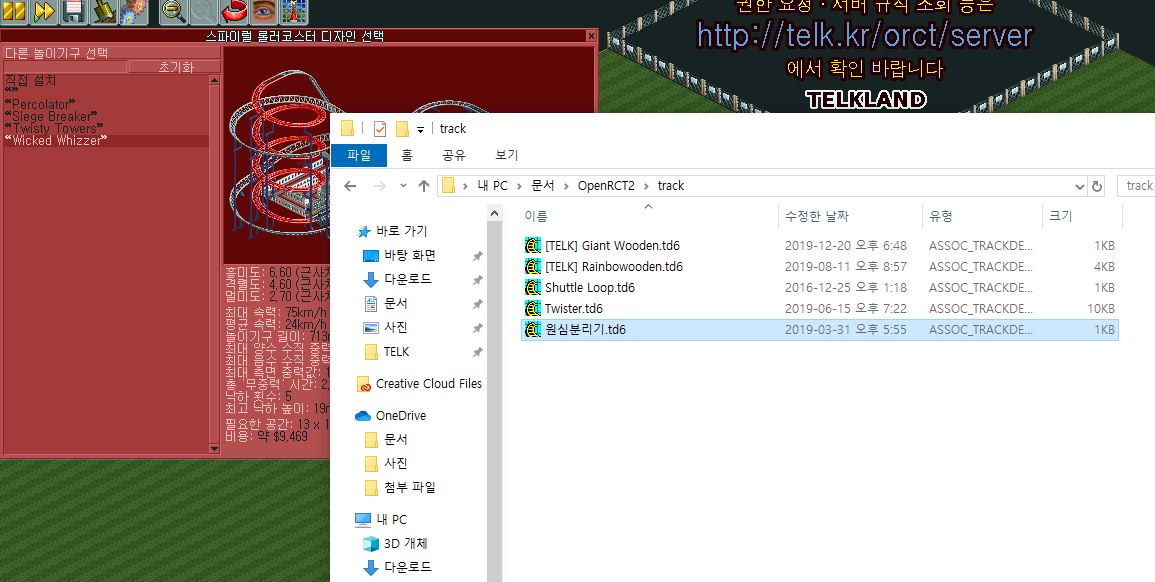
(Note that 원심분리기.TD6 is not a custom design of Spiral coaster, but it looks it is shown as an empty entry)
If I try to click the "" entry:
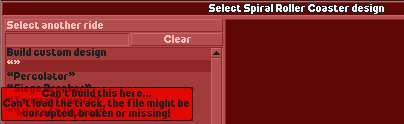
In English, if I try to click _Build custom design_ first without any clicking other entries, it works.
If I try to click the corrupted entry, it shows error message. Then if I click _Build custom design_ again, it shows the same error.
In Korean, whatever I try to click first, it shows the error.
 telk5093
All 5 comments
Note that 원심분리기.TD6 is not a custom design of Spiral coaster, but it looks it is shown as an empty entry.
The reason it does this is because the Spiral Roller Coaster has ride type index 0.
This works for me on Linux, so it appears to be Windows-specific.
 Gymnasiast
on 11 Jan 2020
Gymnasiast
on 11 Jan 2020
Is this also resolved by #10540?
 AaronVanGeffen
on 11 Jan 2020
AaronVanGeffen
on 11 Jan 2020
10540 has been merged in the meantime. @telk5093 , could you try the develop version 09ac8a0c59b4bc35c8758aae6ee00e5e4ecbc4f2 or newer?
Gymnasiast
on 12 Jan 2020
@Gymnasiast Thanks for notice, unfortunately it doesn't solve this issue.
telk5093
on 12 Jan 2020
@Gymnasiast I've checked recent develop(2340206), and it seems that there is no problem anymore :)
telk5093
on 7 Feb 2020
Related issues
 Nubbie
·
3Comments
Nubbie
·
3Comments
 Superjustinbros
·
3Comments
Superjustinbros
·
3Comments
 Ryder17z
·
3Comments
Nubbie
·
3Comments
Ryder17z
·
3Comments
Nubbie
·
3Comments
 wildgoosespeeder
·
3Comments
wildgoosespeeder
·
3Comments