Openrct2: Scenario(including korean texts in scripts) load fails
OS: Windows 10
Version: 0.1.3
Commit/Build: d0ad94b
There are hundreds of OpenRCT2 custom-made scenarios in korean community, and also they have korean texts in their scripts such as scenario description.
But it is impossible to load such scenarios, nor hovering mouse on the scenario list. Game just crashes.
When I run them by using openrct2.com, its console returns like this:
WARNING[c:\projects\openrct2-ject9\src\openrct2\localisation\localisation.cpp:1155 (format_string)]: Truncating formatted string "혦챘?셋㉲ヂ볛뼯 챠혬혙챘혷혵챙휋혞챘혫짚챙혶??챙휋혨챗?댿뎵 챙혞혱 챙혷혞챘혡혬 챘혛?챙혶?쑦ぢ년궗챙혴혨챙혶혙 챘흟혣챘혫혵챘혡혬챗?ㅒ걘?뺚뼱!, 챗째?챘째짤 챘혙혞챘혡혬 챘?볛쑦?쀂눬?앪쑦ヂ볛뼯 챙혷혱 챠혮??챙혞혱 챙혷혞챙혵?늘ヂ떷댠も겭혣" to 256 bytes.
Note that 0.1.2 stable works fine, and default scenarios work fine, too.
Steps to reproduce:
- Download and apply a scenario that contains korean text in their scenario description.
(for example: https://rctsc.telk.kr/download?no=625)
2-1. Double click the sc6 file
2-2. Or, open the scenario list, and hover the mouse on it. - Game crashes.
Dump file
Screenshots / Video:
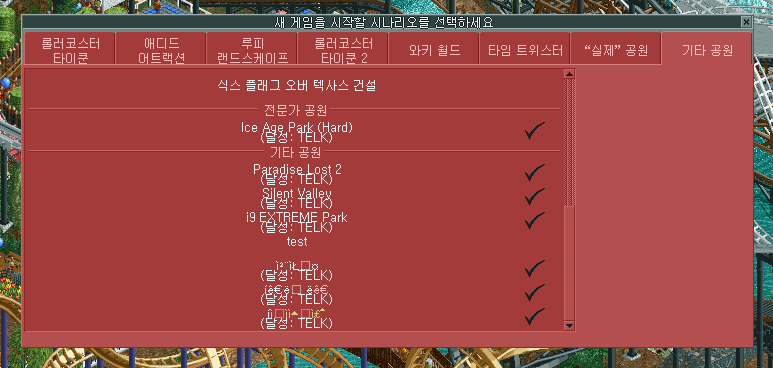
And, the three scenarios in the very bottom in the list are custom scenarios made by users.
Their name were "숨겨진 진실", "폐교된 대학교", "환상의섬 제주", which is korean text.
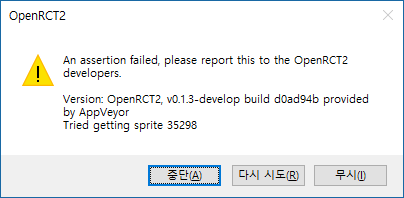
And, an error message when I double-clicked sc6 file directly:
Save game:
 telk5093
All 32 comments
Until recently, OpenRCT2 would save newly created scenarios in the wrong encoding. But since it also loaded scenario names in the wrong encoding, this was never obvious.
In any case, it should not crash because of encoding going wrong.
 Gymnasiast
on 15 Apr 2018
Gymnasiast
on 15 Apr 2018
adding utf-8 string check to GetScenarioInfo solves this problem.(not convert to utf-8 if string is already utf-8)
but it will be better if encoding is checked by library like libicu.
 Lastorder-DC
on 15 Apr 2018
Lastorder-DC
on 15 Apr 2018
http://rctsc.telk.kr
There are about 600 custom scenarios literally and most of them are unplayable because of this bug.(having korean in names)
 fromthere
on 22 Apr 2018
fromthere
on 22 Apr 2018
#7414 fixes the scenario list, but no fixes at scenario description. (=> My misunderstand)
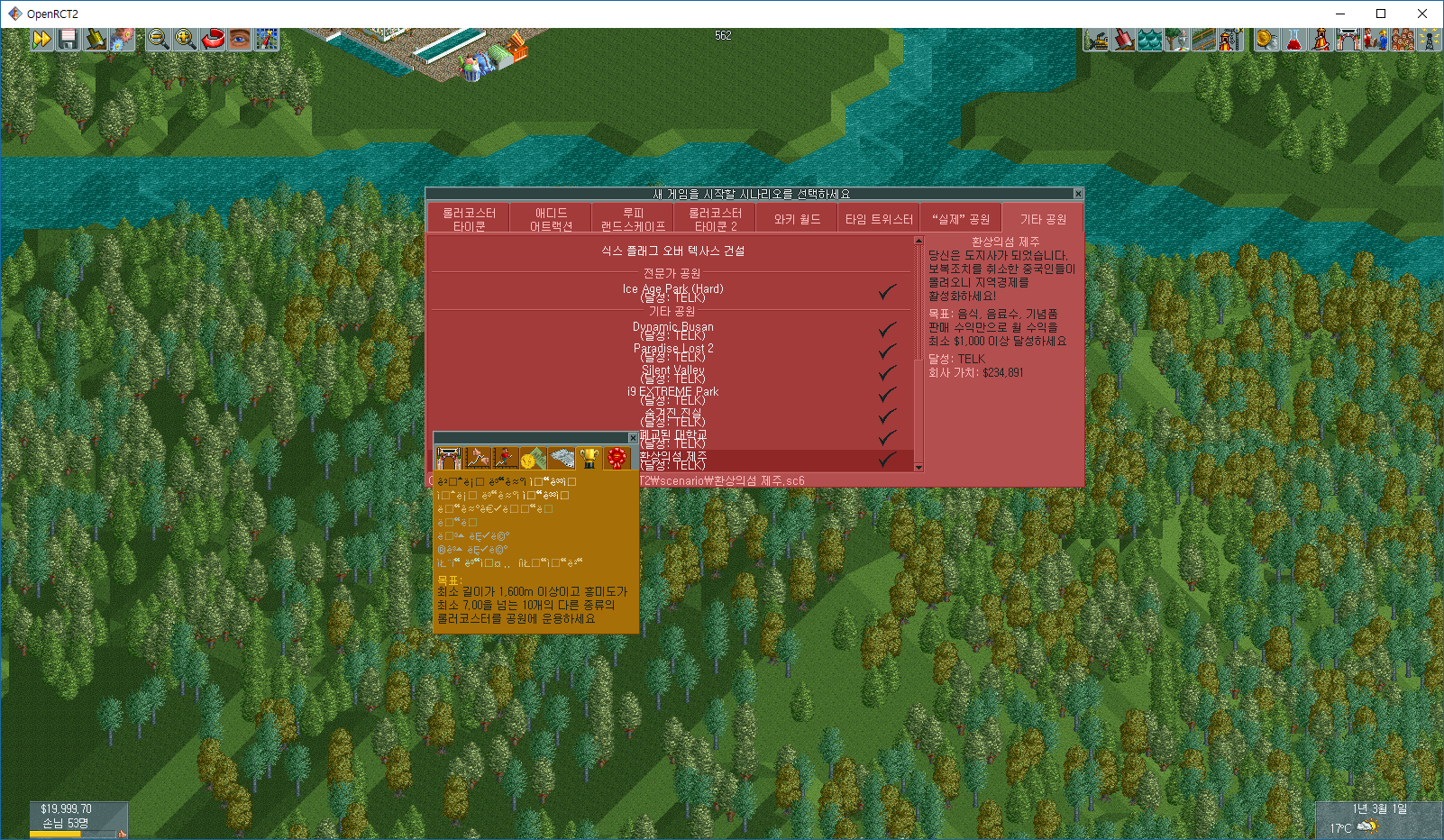
And even the rendering bug is occured as you can see below (No pause button in main menu, sometimes window rendering is made incorrectly):
telk5093
on 25 Apr 2018
I can reproduce the rendering issue using English, too. For me, the pause button does appear, but chunks of the menus themselves are missing, including the background. This notably happens on the save menu, for me. I'm guessing this is unrelated to the character set changes, but I have not had time to bisect the issue.
 AaronVanGeffen
on 26 Apr 2018
AaronVanGeffen
on 26 Apr 2018
@telk5093 names are not fixed. try delete scenarios.idx file. scenario names will break again
Lastorder-DC
on 4 May 2018
@telk5093 In the original Korean version of RCT2, is it possible to save scenario descriptions in Korean?
Gymnasiast
on 12 May 2018
@Gymnasiast Yes, it is stored in modified CP-1252.
telk5093
on 12 May 2018
Can you provide me with a scenario with Korean descriptions, created in the original Korean version of RCT2?
Gymnasiast
on 12 May 2018
@Gymnasiast Please wait a couple of hours.
telk5093
on 12 May 2018
Korean scenario.zip
Scenario name: 한국어 이름
Park name: 한국어 이름
Scenario description: 한국어 설명
Generated from vanilla RCT2 (not a steam edition. Steam edition does not support korean)
telk5093
on 12 May 2018
So, it is not solved until today.
Is it hard to solve it or nobody is interested in?
@Gymnasiast @AaronVanGeffen
telk5093
on 20 Jul 2018
@telk5093 making converter and convert all wrong encoding scenario files might better than converting in openrct2.
there's already solution for this(2e7d6e58d0daef41c2216081314ad9551049446d) but that commit is not complete(that did not check name, needs rebase). also, some short korean string might parsed as utf-8 anyway(since it only depends having colour code in string and short korean strings might not have that)
Lastorder-DC
on 21 Jul 2018
@Lastorder-DC That, plus I would also want to add support for the encoding that RCT2 used, if possible.
By the way, could someone provide me with the Korean exe of RCT2, so I can test a few more things?
Gymnasiast
on 22 Jul 2018
@Gymnasiast Here you are: rct2.zip
telk5093
on 22 Jul 2018
hang.zip
And maybe you would need this hang.dat file which is similar to kanji.dat, stored in Data folder
telk5093
on 22 Jul 2018
@Gymnasiast
I have tried to avoid this issue like below:
- delete scenarios.idx file
- Rollback 0.1.2
- Run, and revert to latest develop.
But It seems that all korean scenario name/desc are kept in broken after Danish translation is added.
I think LANGUAGE_KOREAN is shifted one in src/openrct2/localisation/Language.h so that my palliative does not work, do you think am I right?
telk5093
on 23 Jul 2018
Yes, I think so.
Gymnasiast
on 23 Jul 2018
Is it right to put danish in the middle of enum, instead of being added at the last position?
telk5093
on 29 Jul 2018
Yes, because it's needed to keep another list sorted alphabetically.
Gymnasiast
on 29 Jul 2018
I think recently saved scenario in OpenRCT2 mangles korean encoding.
I just made a scenario in OpenRCT2(3ccad7c) with name 시나리오이름, but when I decode SC6 file and look its hex data, it stores name as 20 C2 9C 20 20 20 20 20 20 20 C6 A4 20 C7 B4 20 20 20
I know that 20 means a blank, but there are no blanks in the name I made.
(There is a posibility that I decoded my sc6 files incorrectly, but I read 64 bytes integers from 0x48, in decoded chunk 1 as this code says.)
Originally, 시나리오이름 = BD C3 B3 AA B8 AE BF C0 C0 CC B8 A7 in EUC-KR encoding. (BD C3 = 시 / B3 AA = 나 / ...)
And the vanilla would stores 시나리오이름 as FF BD C3 FF B3 AA FF B8 AE FF BF C0 FF C0 CC FF B8 A7. Note that there are FFs in front of each two bytes.
telk5093
on 4 Aug 2018
I finally got around to testing it.
This is what the scenario you provided looks like in vanilla RCT2:
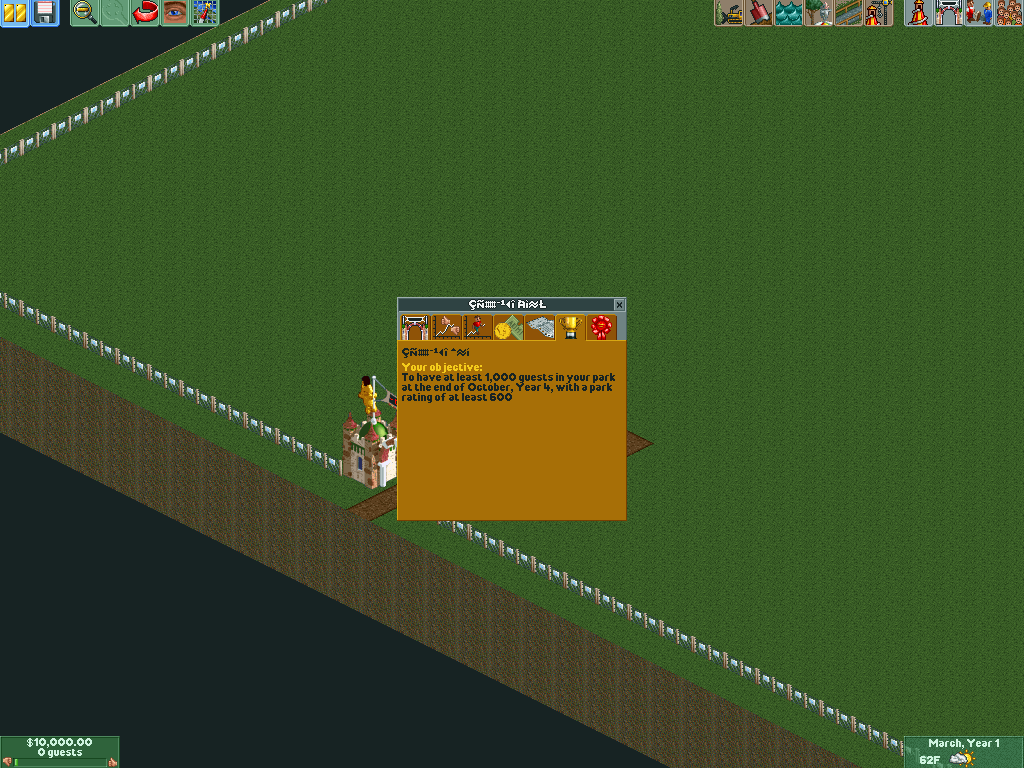
And there lies the problem: RCT2 simply assumed that the scenario was in the same encoding as the language the EXE was in. It basically means that we cannot import scenarios with Korean descriptions properly without breaking support for scenarios with English/German/Dutch/etc. descriptions.
It basically means that we have to stick with one of the encodings RCT2 used, and we picked the modified Windows-1252 used for languages in the Latin alphabet. That also means we won't be able to save Korean text properly until we switch to our own save format.
Gymnasiast
on 12 Aug 2018
I can't understand that it requires new save format.
Former OpenRCT2 had supported korean scenario names/descriptions very well(Eg. before 0.2.0), and it has been ruined at some time.
Is it impossible to revert back to check what code is ruined korean scenario names/desc?
telk5093
on 12 Aug 2018
No, because that breaks importing scenarios from vanilla with non-ASCII characters. The code wrongly assumed that RCT2 saves used UTF-8 encoding.
I know it's not nice that you cannot save Korean descriptions now, but I cannot fix that without breaking compatibility with the vanilla encoding.
This issue can only be _properly_ solved with a new save format. All other options break _something_.
Gymnasiast
on 12 Aug 2018
As I understand it, vanilla RCT2 used different encoding in the scenario files depending on its language. Unfortunately, it does not save which language a scenario is describing, so we have to pick the most compatible one…
Like @Gymnasiast says, if we assume it's described UTF-8, it breaks custom English/Dutch/German/etc. scenarios created with vanilla RCT2 (particularly ordinal values >= 128; e.g. characters with diacritics/accents).
So we have to make a choice. I'd like to switch to UTF-8 and be done with it, but then you're breaking compatibility with vanilla RCT2 for _all_ languages. Unfortunately, that's not a trade-off everyone wants to make. Regrettably, that would mean scenario descriptions for CJK languages will be broken for a little while longer…
AaronVanGeffen
on 12 Aug 2018
Then it will be very serious since Korean users can't use most of custom scenarios until new save format is applied(and we have no idea when it will be applied). I think it is not proper to wait until we apply new save format. Any alternatives?
telk5093
on 12 Aug 2018
@Gymnasiast Are there no padding bytes in the SV6 format left that we could use to flag that strings are UTF-8 encoded? I'm looking at e.g. uint8_t pad_013573D6[2]; right after the park name.
Of course, scenarios whose strings are encoded in UTF-8 would still have their text mangled when opened in vanilla, but at least OpenRCT2 could then be compatible with both vanilla scenarios, and ones exported through itself.
AaronVanGeffen
on 12 Aug 2018
Would you be able to detect the encoding based on the strings in the scenario file?
 IntelOrca
on 12 Aug 2018
IntelOrca
on 12 Aug 2018
I don't think so. I can detect the 0xFF character, which means it's multibyte (and since I think most CJK users will be Korean, we could assume Korean if the SV6 file has them). I can also detect if the converted CP1252 contains colour codes or other stuff not expected in descriptions - meaning I can detect the broken scenarios with UTF-8 encoding. Saving is far more complicated, though.
Gymnasiast
on 12 Aug 2018
I can detect the 0xFF character, which means it's multibyte
Sorry, I don't follow. 0xFF is forbidden by the UTF-8 specification…?
AaronVanGeffen
on 12 Aug 2018
Chris Sawyer used the 0xFF character to separate characters in multibyte encodings. So if it contains them pre-conversion, it means that the text is using a multibyte encoding.
Gymnasiast
on 12 Aug 2018
@telk5093 I can load the park just fine, with no crash and no pause button glitch, so I'm closing this issue. Please let us know if you can still reproduce it.
 tupaschoal
on 1 Oct 2020
tupaschoal
on 1 Oct 2020
Related issues
 Wirlie
·
3Comments
Wirlie
·
3Comments
 Xaroth
·
3Comments
Xaroth
·
3Comments
 Nubbie
·
3Comments
Nubbie
·
3Comments
 Ionaru
·
3Comments
Ionaru
·
3Comments
 J0anJosep
·
3Comments
J0anJosep
·
3Comments
Most helpful comment
Korean scenario.zip
Scenario name:
한국어 이름Park name:
한국어 이름Scenario description:
한국어 설명Generated from vanilla RCT2 (not a steam edition. Steam edition does not support korean)