Openrct2: Doors in land textures for ghost train rides do not appear when loading SV4
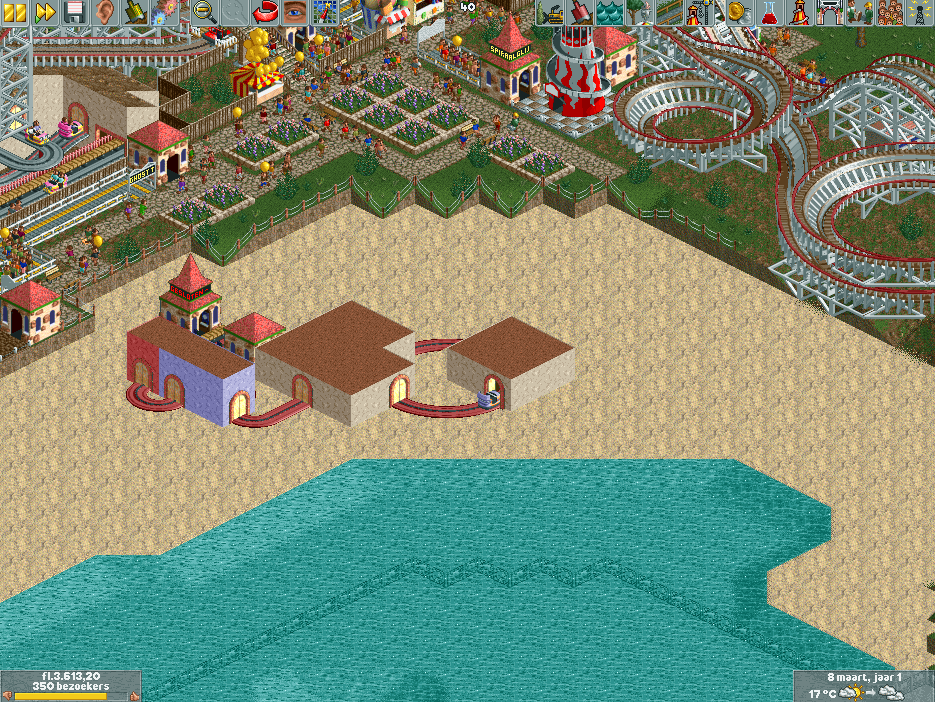
In vanilla RCTLL, doors appear in the land textures when a ghost train ride passes through. In OpenRCT2, it appears that this behavior is not carried over, as the areas that are supposed to be doors are holes. See the comparison image below. I'm not sure if this can be fixed given the limitations of the SV6 file format, but I thought I would report it nonetheless.
RCTLL:
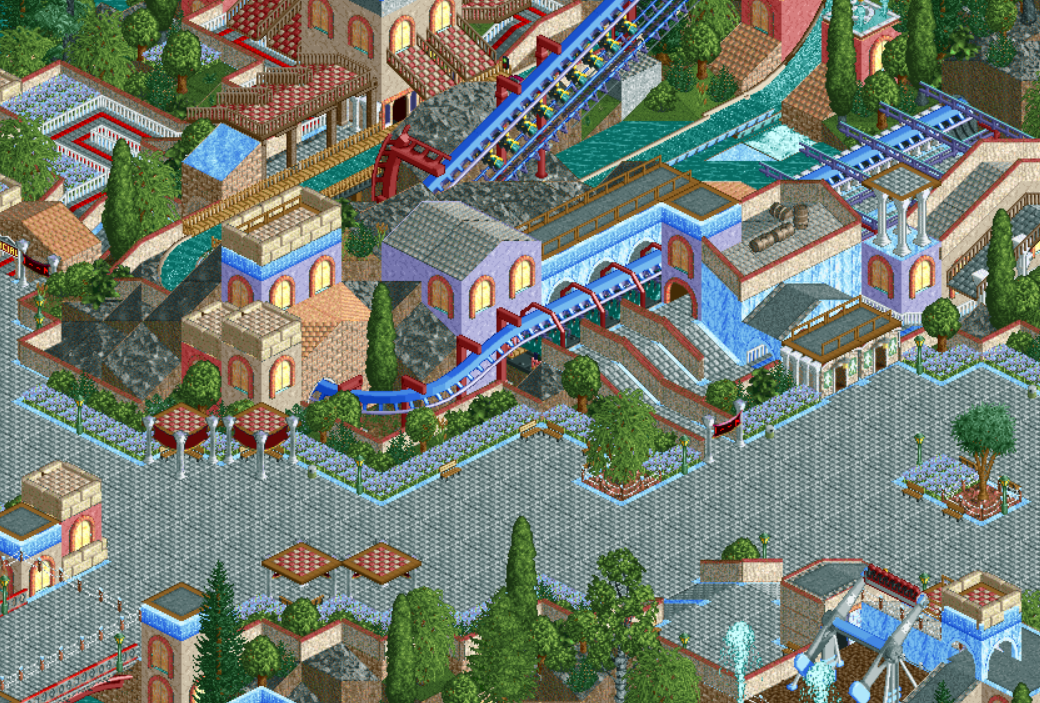
OpenRCT2:

 saxman1089
All 10 comments
I don't think it's a limitation of the SV6 format. It's just that it needs implementing too.
 Gymnasiast
on 21 Jan 2018
Gymnasiast
on 21 Jan 2018
@Gymnasiast It appears that you have been assigned to implement it xD
 IntelOrca
on 21 Jan 2018
IntelOrca
on 21 Jan 2018
@IntelOrca Yes, and not completely undeserved ;-)
Gymnasiast
on 21 Jan 2018
Good to hear that its not a limitation. I also had to copy some files over from the LL cd to my local folder to get this to work, should I file a separate issue for that?
saxman1089
on 21 Jan 2018
@saxman1089 this is basically why you can specify an RCT1 installation folder in the options menu.
 Ryder17z
on 21 Jan 2018
Ryder17z
on 21 Jan 2018
@Patrik356b this was after I had specified the RCT1 installation folder. I think these files are only contained on the CD, and not copied over automatically.
saxman1089
on 21 Jan 2018
That sounds strange. Unless you didn't do a full RCT1 installation or you are running RCT1 provided by steam
Ryder17z
on 22 Jan 2018
@saxman1089 No, it is entirely expected. The CD version does not copy csg1i.dat, ever.
Gymnasiast
on 21 Mar 2018
I have been able to determine where RCT1 saves the door state. For reference, this is the track element struct:
struct rct_tile_element_track_properties {
    uint8 type; //4
    union {
        struct {
            uint8 sequence; //5.
            uint8 colour; //6
        };
        uint16 maze_entry; // 5
    };
    uint8 ride_index; //7
};
It uses an 8-bit integer for colour, but only needs two 2 of those for that. The door states are saved in the other six bits, with the first door in bits 2, 3 and 4 and the second door in bits 5, 6 and 7 (counting from 0).
The door states are as follows:
0b000: door is closed
0b010: door is half open
0b011: door is fully open
The door direction is not saved, it will always open in the direction of the track. In other words, always outwards if seen from the car.
Gymnasiast
on 1 May 2018
This is how Chione looks now (with fixed walls, added terrain surfaces and landscape doors):

Gymnasiast
on 23 Dec 2020
Related issues
 mrtnptrs
·
3Comments
mrtnptrs
·
3Comments
 Wirlie
·
3Comments
Wirlie
·
3Comments
 Nubbie
·
3Comments
Nubbie
·
3Comments
 J0anJosep
·
3Comments
J0anJosep
·
3Comments
 wildgoosespeeder
·
3Comments
wildgoosespeeder
·
3Comments
Most helpful comment
@Gymnasiast It appears that you have been assigned to implement it xD