Openrct2: [Android suggestions] Greying out some options at the options menu
I have a few suggestions regarding the options menu on an Android device. At the moment a lot of these options are not usefull or simply completely ignored. I want to point all these setting out in here. Would it then be a good idea to grey these options out for only Android builds instead of having to make a complete new options menu in the future? What do you think about this?
Here some images of the different tabs of the options window with why I think that option is not needed/ignored on Android devices (these images are taken on a PC, but of course the options menu there is exactly the same):

-Screen mode: it doesn't matter of course on android, whatever you choose, the result stays the same.
-Resolution: you have no choice there: OpenRCT2 adapts to the resolution of your phone.
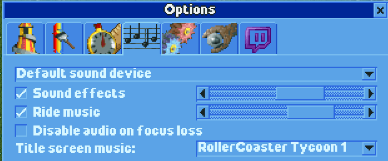
-Choosing the sound device ("default sound device"): there are no more options if you connect an audio device to your phone. So, there is not choice to make in this case.
-Disable audio on focus loss: this is standard Android behavior for apps and doesn't change of course whether you checked the box or not. So, there is no choice again in this case.
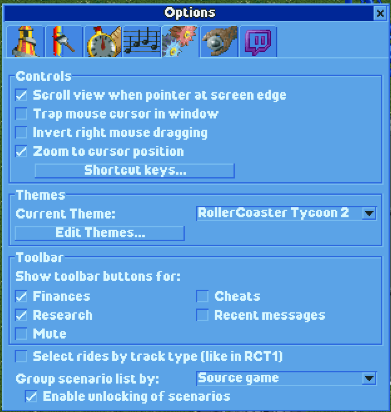
-Scroll view when pointer at screen edge: It's the only way to scroll over the map and is enabled by default. So, users shouldn't get the option to disable this at the moment.
-Trap mouse cursor in window: standard Android behavior does this.
-Invert right mouse dragging: there is no right mouse button of course and no proper touch screen support. It is not useful at the moment, but when proper touch screen support gets added, it becomes useful again as an option to invert the map scrolling when touching the touchscreen to scroll over the map.
 mrtnptrs
All 7 comments
Regarding the resolution: some of us might find it useful to have OpenRCT2 to switch to landscape/portrait mode automatically
 Ryder17z
on 5 Dec 2017
Ryder17z
on 5 Dec 2017
Regarding the resolution: some of us might find it useful to have OpenRCT2 to switch to landscape/portrait mode automatically
That's not what the resolution box is for.
Invert right mouse dragging: there is no right mouse button of course...
There is if you connect a mouse, which coincidentally is currently more or less the least frustrating way to play OpenRCT2 on Android.
In general, I agree many options you list are not very useful on Android.
 Gymnasiast
on 5 Dec 2017
Gymnasiast
on 5 Dec 2017
Oh yes, didn't think of the possibility to connect a mouse. Will try that today and see if it works.
Edit: it works great, but it seems that right mouse dragging doesn't work.
mrtnptrs
on 5 Dec 2017
it works great, but it seems that right mouse dragging doesn't work.
We'd welcome a PR to fix that.
 janisozaur
on 5 Dec 2017
janisozaur
on 5 Dec 2017
@Gymnasiast
It does however affect the resolution so it's related. Also: how would you deal with the split screen feature in newer versions of android?
Ryder17z
on 5 Dec 2017
@Patrik356b the split screen feature works as intended on my S8+; the resolution seems to get automatically adjusted. BUT if you set it to split screen it seems to completely restart OpenRCT2 and brings you back to the main menu. The same happens when you change the size of the split screened OpenRCT2 window too much.
So, the resolution option does not affect the game resolution and so can be disabled.
mrtnptrs
on 5 Dec 2017
Aha, I see
Ryder17z
on 5 Dec 2017
Related issues
mrtnptrs
·
3Comments
Gymnasiast
·
3Comments
 Xaroth
·
3Comments
Xaroth
·
3Comments
 Wirlie
·
3Comments
Ryder17z
·
3Comments
Wirlie
·
3Comments
Ryder17z
·
3Comments