Openrct2: Add warning to title screen if game is running on elevated permission/administrator account(not message)
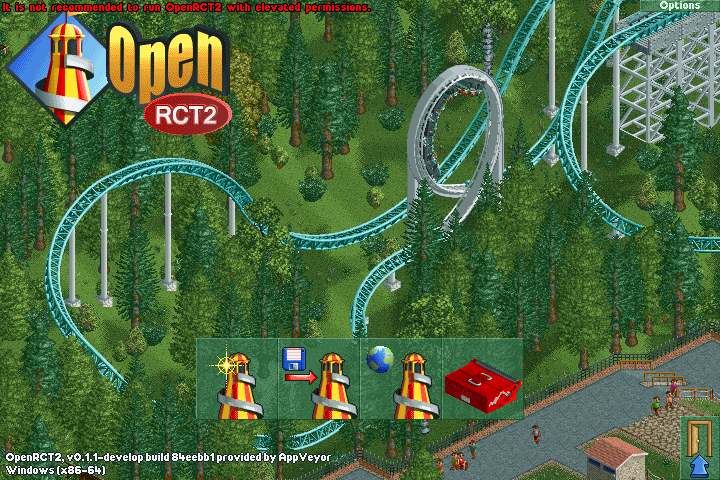
<My suggestion>
Warning message is really annoying because I'm using administrator account so game detects I'm running with elevated permission. This way message will not annoying, and users will notice warning more easily.
 fromthere
All 5 comments
The whole point of the message and it being annoying is that you shouldn't be using an administrator account to do stuff that doesn't require it. That includes OpenRCT2. Your attack surface is high enough without running everything as administrator.
 Gymnasiast
on 31 Jul 2017
Gymnasiast
on 31 Jul 2017
The whole point of this is to not run with elevated permissions, so in a way, it is _meant to be annoying_. Run OpenRCT2 with lowered permissions and it will be OK.
I vote for closing with wontfix.
 janisozaur
on 31 Jul 2017
janisozaur
on 31 Jul 2017
As you're on Windows, you should really have UAC on, which runs processes non-elevated unless you (or the process) specifically requests elevation. OpenRCT2 does not need administrative permissions.
EDIT: To elaborate, the reason why we added the message is because (1) OpenRCT2 connects to remote servers for MP, and there is a small but non-zero chance that a remote code execution exploit may be discovered, and (2) an upcoming change will add a scripting system, which increases the risk of (1) happening. Running the process as admin dramatically increases the damage a RCE exploit could do.
 rwjuk
on 31 Jul 2017
rwjuk
on 31 Jul 2017
I'm having this problem too however in my case i have a message box come up before i can start the game.

Elevated permission usually means you are opening something as the administrator which is what most people are... the administrator, so this would be annoying for most people trying to play openrct2. Why would you guys have "added" this to openrct2?
 jamtraks
on 13 Jul 2018
jamtraks
on 13 Jul 2018
@jamtraks Please read the messages in this thread. It's been explained several times.
 AaronVanGeffen
on 13 Jul 2018
AaronVanGeffen
on 13 Jul 2018
Related issues
 deurklink
·
3Comments
deurklink
·
3Comments
 nuclearslurpee
·
3Comments
nuclearslurpee
·
3Comments
 qwertychouskie
·
3Comments
qwertychouskie
·
3Comments
 Superjustinbros
·
3Comments
Superjustinbros
·
3Comments
 mrtnptrs
·
3Comments
mrtnptrs
·
3Comments