Openrct2: Game crashes when switching to OpenGL
OS: Windows 7
Version: 0.0.5-1e3504c
[Explanation of the issue...]
- [ ] Reproducible in RCT2 (vanilla) - no
- [ ] Multiplayer? - not tested
Steps to reproduce:
Set renderer to software with hardware display. Then switch to OpenGL
Error message:
Probleemhandtekening:
Gebeurtenisnaam van probleem: APPCRASH
Naam van de toepassing: openrct2.exe
Versie van toepassing: 0.0.0.0
Tijdstempel van toepassing: 504d6947
Naam van foutmodule: openrct2.dll
Versie van foutmodule: 0.0.0.0
Tijdstempel van foutmodule: 5782c991
Uitzonderingscode: c0000005
Uitzonderingsmarge: 00022e99
Versie van besturingssysteem: 6.1.7601.2.1.0.768.3
Landinstelling-id: 1043
Aanvullende informatie 1: 0a9e
Aanvullende informatie 2: 0a9e372d3b4ad19135b953a78882e789
Aanvullende informatie 3: 0a9e
Aanvullende informatie 4: 0a9e372d3b4ad19135b953a78882e789
Screenshots / Video:
http://i.imgur.com/KFnbGIe.png
 Invictaz
All 66 comments
Can you provide me with details of your graphics card?
 mrtnptrs
on 11 Jul 2016
mrtnptrs
on 11 Jul 2016
Can you upload the dump file?
 IntelOrca
on 11 Jul 2016
IntelOrca
on 11 Jul 2016
Hardware: Nvidia GT555M / Intel HD3000
I cannot send the dmp file yet since: C:WindowsMinidump and C:Windows do not have .dmp files in them... So tell me where to get the dmp file and I will generate it and send it.
Invictaz
on 11 Jul 2016
Providing you did not build OpenRCT2 yourself, the dump files should be in DocumentsOpenRCT2. It usually displays a message about this when it crashes.
IntelOrca
on 11 Jul 2016
We expected openrct2 generated a dump for you and told you its path. It's a bit weird this did not happen, as we have set up the project in such a way this should happen.
 janisozaur
on 11 Jul 2016
janisozaur
on 11 Jul 2016
Here are the files
Invictaz
on 11 Jul 2016
@Invictaz can you just zip them and upload to github?
janisozaur
on 11 Jul 2016
In the new version 8851e43 the bug is still present. I have found what causes it. If you run the game on Intel HD3000 (Optimus) it crashes. If you run the game via the Nvidia GT555M you can select the OpenGL without crashing. The Intel HD3000 should be more than capable of running this game so might be a quirk there to solve.
Invictaz
on 11 Jul 2016
What OpenGL version does your HD3000 gpu advertise?
janisozaur
on 11 Jul 2016

Invictaz
on 11 Jul 2016
We request OpenGL 3.2, which is the source of your crash.
We'll try fixing it so it does not crash, but rather falls back to previous (or software) mode.
janisozaur
on 11 Jul 2016
I thought we already had fixed this... any ideas @LRFLEW ?
IntelOrca
on 11 Jul 2016
What does it crash on exactly?
janisozaur
on 11 Jul 2016
Maybe you can also tell what the benefits of OpenGL are for the general public, since I know from other open source game conversions that graphics are now rendered in better scaling (i.e. CorsixTH) but for OpenRCT2 it isn't quite clear yet.
Invictaz
on 11 Jul 2016
@Invictaz same as for anything using OpenGL: rendering will be done on GPU instead of CPU.
janisozaur
on 11 Jul 2016
Yeah, but in software more it 90 prc looks the same, and fps is much lower on GPU instead of software (if running on a laptop that throttles).
Invictaz
on 11 Jul 2016
@Invictaz Because the drawing was designed for software rendering, it doesn't transfer well to hardware rendering. Its very new and experimental and we haven't yet worked out how to optimise it better.
We need OpenGL rendering for more complicated effects like night time / lights etc.
IntelOrca
on 11 Jul 2016
Interesting. What I might suggest is (more) transparency levels. If elements in game are visualized in layers we can have multiple transparency layers, as some of the buildings of rollercoasters collide with upper levels. Since you cannot easily turn the camera (like in Parkitect) some more levels of transparency or hiding would come in handy.
Other option would be to allow for free camera rotation but that's really not in the engine so it should be written from scratch.
Invictaz
on 11 Jul 2016
Intel HD3000 with OpenGL 3.2 only is supported in OSX and Linux (maybe Mesa drivers needed). On Windows Intel didn't upgrade past 3.1. I did install the latest Intel driver but no luck.
Invictaz
on 11 Jul 2016
To chime in real quick, I think our code is currently 3.0-compatible for the most part. SDL (I think) uses the version hints as just that, a hint, and will create a context even if it can't get the version. Since we aren't using any functions added in 3.1 or 3.2 (as far as I know), getting the function pointers would work just fine. This leaves the only location for an unrecoverable crash to be in the shader compilation. When we add the #version attribute to the shaders, we set a hard ceiling to the max version supported, and is our current limiting factor. I think I can get the version requirement down to 3.0 (if people are willing), but it will require some weird code to get macOS working correctly. As to this crash, I'd bet it's the shader compiling code not checking for errors enough. I can take a look at it at some point.
 LRFLEW
on 11 Jul 2016
LRFLEW
on 11 Jul 2016
@LRFLEW If you would be willing to set 3.0 or 3.1 as maximum that would be great as a lot of users have an HD3000. HD4000 and newer only came until very recently in Intel 3xxx laptop chipsets.
Like I said before 3.2 is only implemented partially in an unofficial driver for Linux and official driver on OSX, but Windows users do not benefit. If I have to test more please let me know.
Invictaz
on 11 Jul 2016
@Invictaz Could you do me a favor? I want to test a few different way of detecting the OpenGL version. I wrote a short command-line program I would like you to run and send me the output for. I have a Windows build you can use here:
GLTester.zip
If someone else wants to look at the source (or wants to test it on Linux), here's the source file (It depends on SDL2 and OpenGL):
main.cpp
LRFLEW
on 12 Jul 2016
While so far there's nothing really limiting us from simply lowering the requested GPU, HD3000 was not particularly good GPU and my gut tells me Intel does not advertise support for 3.2+ for a reason. We already had someone give us report on this, saying it does not work well.
I'd like to also remind, that we chose 3.2 based on it being the lowest version supporting core profile.
janisozaur
on 12 Jul 2016
Lets just focus on the fact that its crashing and that it should not do that.
IntelOrca
on 12 Jul 2016
@IntelOrca That's a clear concern, and is a major part of what I'm working on. The code to test the GL version reporting should give me enough information to setup an "early fail" system that will prevent the renderer from loading once a bad context is created. Once that issue is resolved, I will look into the GL 3.0 stuff (which isn't hard, just unusual).
LRFLEW
on 12 Jul 2016
Will test later tonight. HD3000 is already followed up by HD4000 and so on. It is delivered to Apple as well who did OpenGL 3.3 even, so it just the fact that Intel doesn't want to spend resources on an aging chipset. Even the HD6000 is already out so some of us might be out of luck.
Invictaz
on 12 Jul 2016
Invictaz
on 13 Jul 2016
@Invictaz wake me up when intel plays Crysis :+1:
 Ryder17z
on 13 Jul 2016
Ryder17z
on 13 Jul 2016
Added to the list here: https://github.com/OpenRCT2/OpenRCT2/wiki/OpenGL-renderengine-issues
So, this issue can be closed or does @janisozaur want more information from @Invictaz ?
Also, are you sure you downloaded the latest driver from here?: https://downloadcenter.intel.com/product/81500/Intel-HD-Graphics-3000-for-2nd-Generation-Intel-Core-Processors
mrtnptrs
on 15 Jul 2016
@mrtnptrs I did download the latest drivers but no effect.
I thought @LRFLEW came up with some new info if OpenGL 3.0 was going to be supported after all.
For now, OpenGL is usuable but on dedicated graphics chips only. to ensure stable enough framerates.
Invictaz
on 15 Jul 2016
@Invictaz I _know_ how to get 3.0 working, but it won't be a pretty solution, and I have a feeling that IntelOrca might turn down my solution.
As to the issue, leave it open. I want to find the source of the crash, and see if I can resolve it at its root (or at least fail in a less destructive way).
LRFLEW
on 16 Jul 2016
(For the record, I also have an Optimus System, Intel HD 4600/nVidia 950M.)
 Krutonium
on 16 Jul 2016
Krutonium
on 16 Jul 2016
I'm against 3.0. We already had this discussion and we have to draw the line somewhere. It's not like we will retire the software renderer anyway.
 duncanspumpkin
on 16 Jul 2016
duncanspumpkin
on 16 Jul 2016
@PFCKrutonium 950m is a luxury. Intel HD5500/940m over here.
IMHO the software render should suffice for most if OpenGL or other will not work.
Ryder17z
on 16 Jul 2016
I'm not able to discuss what the internal roadmap of OpenGL is for this project so I refrain from further questioning :) It's upto you guys. At least I hope that it doesn't crash. If I would like to run it under OpenGL I use the Nvidia card.
Invictaz
on 16 Jul 2016
This is a duplicate of #3867 and can both be closed as it is already added to the OpenGL wiki-page.
mrtnptrs
on 17 Jul 2016
Weird that in that post @janisozaur provided a fix...
Invictaz
on 18 Jul 2016
Yes that's the reason why this is open. There is some sort of bug in the version detection code
duncanspumpkin
on 18 Jul 2016
@duncanspumpkin It's not in the "version detection code", as (last I checked) there is none. Right now, the strategy is to create a context and try to get everything needed to make it work (functions and shaders). Those fetches are supposed to self-validate, and switch to the software renderer if it can't get everything it needs. My guess is that the code that's supposed to compile the shaders doesn't fail gracefully. I could be very much wrong, but that's my guess if it's crashing.
LRFLEW
on 18 Jul 2016
@LRFLEW
How does it create a context when its asking for OpenGL 3.2?
Would it be worth grabbing the GL and GLSL versions the same way you did with that mini app you made and using those to check version?
IntelOrca
on 18 Jul 2016
How does it create a context when its asking for OpenGL 3.2?
¯_(ツ)_/¯ That has to do with WGL (which is what SDL is using in the background), which I don't really know.
As to grabbing the GL version, it would avoid the issue. I wouldn't check the GLSL version, as it didn't seem consistent in how it was reported, but the glGetIntegerv(GL_MAJOR_VERSION, &major); and glGetIntegerv(GL_MINOR_VERSION, &minor); checks for OpenGL 3.2 should work. (Just a heads up, those lines only work on OpenGL 3.0 and higher, and should produce a GL_INVALID_ENUM error on lower versions, which should be checked for).
I'd rather find the source of the crash and resolve that than just write a guard that checks the received version, but the guard should probably be implemented at some point anyways.
LRFLEW
on 18 Jul 2016
@LRFLEW its difficult to find the source of the crash without a dump.
IntelOrca
on 18 Jul 2016
what about https://github.com/OpenRCT2/OpenRCT2/issues/4047#issuecomment-231728890 ?
janisozaur
on 18 Jul 2016
@janisozaur oh, didn't see that. I'll see where its crashing this evening.
IntelOrca
on 18 Jul 2016
I provided a dump.
Invictaz
on 18 Jul 2016
Okay I found the issue: if OpenGL fails then it will try to delete the OpenGLEngine, which will then delete the TextureCache which then tries to call glFreeTextures which has not been initialised.
IntelOrca
on 18 Jul 2016
@Invictaz could you now try seeing if it still crashes in 664c460 or later?
IntelOrca
on 18 Jul 2016
@IntelOrca I tried in f6c8993 and it does not let me select OpenGL in HD3000, so yeah the crash is fixed but a new thing emerged. It goes back to software instead of going back to software (hardware display) if you have selected that before. And it switches from fullscreen to window mode.
Invictaz
on 18 Jul 2016
It will go to software mode yeah, that's the lowest common denominator. Not sure why it changes display mode.
IntelOrca
on 18 Jul 2016
@IntelOrca IMO it should go to Software (Hardware display) if that was selected before AND display a message OpenGL is not available please run OpenRCT2 with a GPU capable or something, friendly for the end user.
Invictaz
on 18 Jul 2016
OpenGL 3.3 might be supported if you implement this backported dll file which supports opengl 3.3. Going to test that later on my HD3000.
Invictaz
on 23 Oct 2017
Rather than using such ancient version, try this one with OpenSWR: https://github.com/pal1000/mesa-dist-win
janisozaur
on 23 Oct 2017
@janisozaur It seems that it works sometimes with 7 fps. Weirdly though it still gives still some crashes. So this issue is not fixed. I attached some dumps.
Invictaz
on 7 Mar 2020
@Invictaz I also get severe graphical glitches when I run the game with the Intel HD-chip in my laptop. Intel Laptop graphics drivers are just often severely lacking especially when the laptop-producer won't let you update the graphics drivers from Intel. Does running OpenRCT2 with your GT555M in your laptop fix your issues with OpenGL?
Edit: that hardware got released like 9-10 years ago. Both Intel and NVidia stopped supporting that hardware. The latest Intel HD3000 driver is for example from 5 years ago.... If you keep Windows up-to-date it is very likely you will run into issues like this eventually. Are you still running Windows 7 on that laptop or did you update to Windows 10? As it seems that Intel didn't release a Windows 10-compatible graphics driver for your Intel HD3000.... Maybe it is time to get a new laptop? :)
Edit2: It would indeed be nice if OpenRCT2 then would correctly go back to software mode if it failed to go to OpenGL...... but that would only be useful for a tiny fraction of the PCs running nowadays. Don't really know if it is useful for the devs here to put time in that...
mrtnptrs
on 7 Mar 2020
@mrtnptrs
The "problem" you talk about old hardware is absolute nonsense when the game we are talking about is much much older (2002!!) A new laptop is absolutely unnessecary. Besides, in other topics the devs talk about OpenRCT working on ReactOS (close to XP) or Vista. Much older.
The answer isn't simple a yes or no.
With the standard opengl32.dll - 1 mb from 2009 OpenRCT2 does not select OpenGL and reverts back to software. I guess that was supplied by Microsoft or Nvidia. Has OpenGL 3.1
With the specially constructed Grim Fandango .dll I get OpenGL 3.3 - Mesa 10.5.5 in some software but it crashes OpenRCT2?
With the ones supplied by @janisozaur I get OpenGL 3.1 but OpenRCT2 works. Really weird. However, with the OpenGL32.dll replaced in system32 directory, the NVIDIA control panel selection of GT555M vs HD3000 does not do a thing. The selection does not work anymore. You need the smaller file opengl32.dll to have Optimus working.
Invictaz
on 7 Mar 2020
@Invictaz Yes, the game is 18 years old, but this engine in OpenRCT2 is more modern and tries to use more modern techniques than were available in 2002 to get the game to work much better than in 2002. I'm not saying you need a new laptop, but I'm just saying that you can expect problems like this with a laptop of 10 years old.
"With the standard opengl32.dll - 1 mb from 2009" >> What are you talking about? It is better to not mess with System32 filess as it makes Windows and drivers unstable and can cause many problems. Many solution involving replacing system32 files or copying them over are from people who don't really know what they are talking about.... I would advice to just install the latest graphics driver and revert to changes made to system32 files. That should make the switching to OpenGL fail correctly and revert back to the software renderer.
From the NVidia control panel you should be able to select the NVidia graphics card to run OpenRCT2.exe with instead of the Intel HD chip.
mrtnptrs
on 7 Mar 2020
@mrtnptrs You didn't listen to the other guys that suggested replacing the openGL32 to achieve OpenGL 3.3. That is what this issue is about. Running it on that hardware. Nothing else.
There is no such fun in running it on the Nvidia chip. It's about fixing the issue. Like you are suggesting you have a flat tire go buy a new car. Could you please refrain from doing such "fixes"?
The Nvidia Control panel setting does not work anymore when the OpenGL32.dll file is replaced.
When the OpenGL32.dll in windowssystem32 is replaced by the LLVM Mesa 20 file:
If OpenRCT2 is set to "software hardware display" --> it runs via the NVIDIA card - 40fps
If OpenRCT2 is set to "openGL renderer" --> it runs via the HD3000 card - 18 fps
With the standard OpenGL32.dll
If OpenRCT2 is set to "software hardware display" --> it runs via the NVIDIA card - 40fps
If OpenRCT2 is set to "openGL renderer" --> it runs via the NVIDIA card - 40 fps
I have NVDisplay.Container running in the task tray to check if the Nvidia card is used.
Invictaz
on 8 Mar 2020
@Invictaz No, it is more like riding a bike: would you choose the one with no bell, no lights, no brakes and no tires that is impossible to ride and almost impossible to fix on or would you choose the bike which doesn't have these problems? Just to name a Dutch example we can both relate to ;)
I might have missed something, but I didn't read anyone here saying to replace a driver-file in system 32. I still wouldn't advice to do it as your Intel Driver just doesn't support it. And it gives problems, like you not being able to select the NVidia card for OpenRCT2. It seems you technically added OpenGL 3.3 support to the Intel driver somewhat, but it is not surprising that it doesn't fully work correctly or crashes sometimes as the rest of the driver is likely not fully compatible with the replaced OpenGL32.
I know it is fun to try to fix things, but trying to fix OpenGL-detection on a kind of hacked-in OpenGL-support?.... is that really worth the time? What you have done is not fixing a problem, but it is just a workaround that maybe works quite good, but not fully optimal.
mrtnptrs
on 8 Mar 2020
@mrtnptrs Clearly you are not the type of "winners never quit" but more the type of "quitters never win" as I apparently solved it :) As we call it in Dutch: "Voor de aanhouder is geen weg onbegaanbaar".
@janisozaur suggested https://github.com/OpenRCT2/OpenRCT2/issues/4047#issuecomment-338688384 to try another version of the dll.
The problem is that the card DOES support OpenGL 3.3 required by OpenRCT2 is 3.2. So this is no hacked-in support. You better start reading the specs boy! You did not even look at the crash dumps.
"Your Intel driver just does not support it" -> Incorrect: mesa3d-20.0.1-release-msvc does work fine.
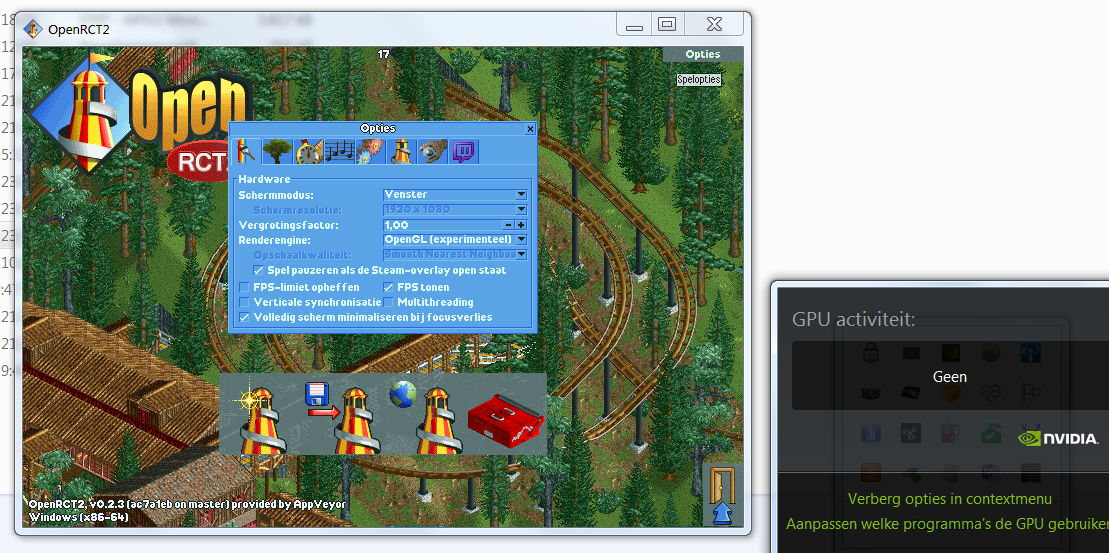

Although it has somewhat lower FPS. Mesa10 does not work and gives a crash dump saying it cannot open opengl32.dll.
There is a new bug but I will open up a new issue for that. Hopefully Maarten hides away behind his new 2020 Macbook Pro to play a game from 2002 :)
The strange thing is that
OpenRCT2 0.2.3 - 20 fps (OpenGL)
OpenRCT2 0.2.4 - 10 fps (OpenGL)
Not sure what has been changed?
Invictaz
on 8 Mar 2020
You more mean "de aanhouder wint". The HD3000 chip does officially only support up to OpenGL 3.1. See the release notes for the latest officially released HD3000 driver: https://downloadmirror.intel.com/24970/eng/ReleaseNotes_GFX_15.28.24.4229.pdf And yes UNOFFICIAL (non-Intel support) drivers might support OpenGL 3.3 for your Intel HD chip, but it wouldn't surprise me if you could run into issues with this. And please try to stay friendly; I'm just trying to say that you shouldn't be surprised that a game runs not optimal with unofficial OpenGL 3.3 support.... nothing personal....
mrtnptrs
on 8 Mar 2020
Well, the phase of being friendly is somewhat over if you come up with a stupidious suggestion of buying a new laptop "as it is 9-10 years old". The thing is like new, runs newer games like GTA5 fine.
AFAIK Mesa isn't unofficial. Intel, AMD and Tungsten Graphics are both cooperating in writing it. https://en.wikipedia.org/wiki/Mesa_(computer_graphics)
Also, OpenRCT2 is "unofficial" software. So only supporting official GPU drivers for unofficial software is rather weird.
Invictaz
on 8 Mar 2020
Even if you're right, it does not excuse a violation of form. Very old hardware can likely run newer software, but the performance will probably be very low. But that doesn't matter of course if you don't care about that :) And with official I just meant the latest official Intel-driver specific for HD3000, but you obviously have a other definition of "official" haha. That isn't bad of course, but we will see what the devs have to say when you open that new issue report :) Unofficial software btw can't support all new, old, official and unofficial hardware and drivers of course (dan zou het einde zoek zijn haha)
mrtnptrs
on 8 Mar 2020
@mrtnptrs Well I guess you are incorrect again, as they even have toasters running Doom. I do have even laptops from 2007 running OpenRCT2 fine in software renderer. But let's get back ontopic:
The strange thing is that this topic mentions that it uses the older 10.5 Mesa for Citra (in 2018). https://community.citra-emu.org/t/force-opengl3-3-on-intel-hd-graphics-3000-windows/14122
Invictaz
on 8 Mar 2020
@Invictaz @mrtnptrs this is an issue tracker, not place to call each other names.
janisozaur
on 8 Mar 2020
@janisozaur suggested #4047 (comment) to try another version of the dll.
@Invictaz I have never suggested replacing your system opengl library with openswr, that was your own choice and could lead to instabilities, but then again so could any other opengl library. Make sure you read and understood the installation guide in the linked project.
janisozaur
on 8 Mar 2020
@janisozaur That is incorrect.
There is no such option as to symlink the opengl32.dll to openrct2.exe as it still retrieves the file from system32 directory AFAIK. If if relied on a file placed into the same directory I could try it. So the installation cmd would not help as it only created the symlinks and a .local file to force openrct2.exe to use the altered opengl32.dll from the Mesa directory. However, since that did not work optimally I opted to replace the file in system32 all together.
There is also a GPU selection box missing in OpenRCT2 to select which GPU to render on. Selecting that in Nvidia Optimus settings only partially helps, as it requires the standard 1 mb opengl32.dll to be present. I guess it was installed by Nvidia.
Invictaz
on 10 Mar 2020
Related issues
 Margen67
·
3Comments
Margen67
·
3Comments
 Superjustinbros
·
3Comments
Superjustinbros
·
3Comments
 deurklink
·
3Comments
mrtnptrs
·
3Comments
deurklink
·
3Comments
mrtnptrs
·
3Comments
 qwertychouskie
·
3Comments
qwertychouskie
·
3Comments
Most helpful comment
@Invictaz wake me up when intel plays Crysis :+1: