Openra: Linux build error at the "Updating GeoIP country database" stage
Issue Summary
Since a commit c55c65f6d763cfe212fb35d699aa1af1ec39e434 I've been getting the build error:
  Restore completed in 3.98 ms for /data/GitHub/mine/packaging/openra-git/src/OpenRA/OpenRA.Platforms.Default/OpenRA.Platforms.Default.csproj.
  Restore completed in 3.43 ms for /data/GitHub/mine/packaging/openra-git/src/OpenRA/OpenRA.PostProcess/OpenRA.PostProcess.csproj.
  Restore completed in 1.85 ms for /data/GitHub/mine/packaging/openra-git/src/OpenRA/OpenRA.Server/OpenRA.Server.csproj.
  Restore completed in 4.01 ms for /data/GitHub/mine/packaging/openra-git/src/OpenRA/OpenRA.Test/OpenRA.Test.csproj.
  Restore completed in 1.82 ms for /data/GitHub/mine/packaging/openra-git/src/OpenRA/OpenRA.Utility/OpenRA.Utility.csproj.
Updating GeoIP country database from MaxMind.
make: *** [Makefile:194: geoip-dependencies] Error 6
when building using this PKGBUILD on Arch Linux.
System Information
- Operating System: Arch Linux
- .NET / Mono Version: 6.4.0.
- OpenRA Version: c55c65f6d763cfe212fb35d699aa1af1ec39e434, 7a57f0e6ef3be227e04b005816847f6af1570fd8, and 9d7ecdbc2c453b903c40feae327d78770b5b22d8.
- Mod: N/A.
Additional Information:
- Steps to reproduce:
- On Arch Linux with
gitandmsbuildinstalled run:
git clone https://github.com/fusion809/openra-git
cd openra-git
makepkg -s
and lo and behold the error. Oddly my Travis build of my minimalist fork (only changes are to .travis.yml, with the changes designed to get Travis to build and upload the packages/installers of all commits) is erroring with these latest commits (but not with earlier commits) too but due to a completely unrelated issue that involves the Windows x86 installer: https://api.travis-ci.org/v3/job/631183124/log.txt.
 fusion809
All 11 comments
 Unrud
on 31 Dec 2019
Unrud
on 31 Dec 2019
@Unrud: interesting, although how does one fix this issue w.r.t. local builds? Like, I get how to download the file manually based on the instructions here, https://dev.maxmind.com/geoip/geoipupdate/#Direct_Downloads, but I'm not sure how that fits in with OpenRA's build system (i.e. how one builds the game with make).
fusion809
on 31 Dec 2019
but I'm not sure how that fits in with OpenRA's build system
Save the file as thirdparty/download/GeoLite2-Country.mmdb.gz.
You might also have to run touch thirdparty/download/GeoLite2-Country.mmdb.gz, because OpenRA tries to download the file anyway based on the modification time of the file.
Unrud
on 31 Dec 2019
With your suggested changes running make goes fine, but running ./buildpackage.sh fails due to the GeoLite2 download issue.
fusion809
on 31 Dec 2019
This is a major issue, we will need to fix this ASAP on bleed and cherry-pick to prep.
We can't expect everybody to create their own MaxMind account, and including a license key in a public repo is a bad idea. This leaves us with two options:
- Add
GeoLite2-Country.mmdb.gzto the repo, and make sure we remember to update it every now and then. - Remove the GeoIP feature completely.
 pchote
on 31 Dec 2019
pchote
on 31 Dec 2019
Add
GeoLite2-Country.mmdb.gzto the repo, and make sure we remember to update it every now and then.
I'm not sure that their new licence agreement allows this. I've uploaded the version from 2019-12-24 to https://github.com/flathub/net.openra.OpenRA/. I think it is the latest version without the new license.
Unrud
on 31 Dec 2019
I have filed #17530 as an initial quick fix to get the project compiling again.
My gut feeling is that we should add the last license-compatible database file to the repo for the prep branch only.
For bleed, I think we should change the client-side code to not require the database - the master server response already includes a server-derived country, and the discussion from #17343 had already established that we really should be resolving IP -> country in the game server and removing the last octet of the player IP in the lobby data.
IMO it is reasonable enough to ask people who are hosting dedicated servers to set up a MaxMind account and follow https://dev.maxmind.com/geoip/geoipupdate/. We can then add a Server.GeoIP=/path/to/database option to point to it.
pchote
on 31 Dec 2019
Remove the GeoIP feature completely.
This would be wise considering this feature is already controversial (#17343) and the rationale given by MaxMind for this change hints that not providing an opt-out might even be illegal.
 tovl
on 31 Dec 2019
tovl
on 31 Dec 2019
Prep has been sufficiently fixed, so moving to Next + 1 to track my plan above for moving GeoIP serverside.
pchote
on 31 Dec 2019
Guessing it's an expected characteristic of this post-GeoIP OpenRA that now the Players tab isn't shown in the single player interface? i.e. this is what I see now:
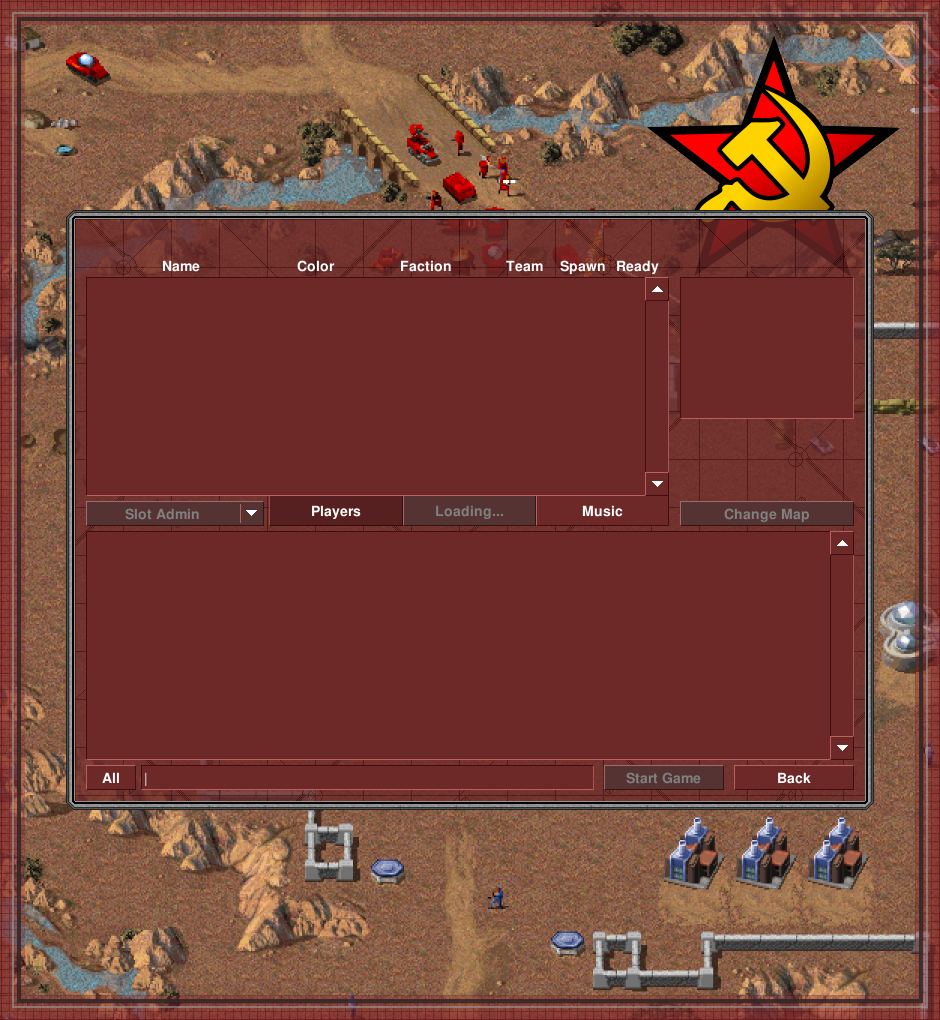
Oops, after waiting for 1 minute, things did load properly. Every other app is loading perfectly fine (i.e. at a normal rate), so is Red Alert with regards to everything else. I'm using less than half my total RAM at the moment, and my CPU usage is at ~4%, so it makes no sense for Red Alert's Players tab to be loading particularly slowly, unless this is related to GeoIP.
fusion809
on 31 Dec 2019
@fusion809 that is probably another aspect of #17028 / #17536, caused by the unrelated but coincidentally timed server failure.
pchote
on 31 Dec 2019
Related issues
 drunsinn
·
4Comments
drunsinn
·
4Comments
 Claudedeus
·
3Comments
Claudedeus
·
3Comments
 ghost
·
4Comments
ghost
·
4Comments
 dnqbob
·
3Comments
dnqbob
·
3Comments
 JustSomeDev1
·
4Comments
JustSomeDev1
·
4Comments
Most helpful comment
This is a major issue, we will need to fix this ASAP on bleed and cherry-pick to prep.
We can't expect everybody to create their own MaxMind account, and including a license key in a public repo is a bad idea. This leaves us with two options:
GeoLite2-Country.mmdb.gzto the repo, and make sure we remember to update it every now and then.