Openra: Arbitrary zoom / custom resolution support
This outlines my plan for fixing our issues relating to zoom, custom resolutions, and HiDPI support in one fell swoop. I've referred to it several times in the past, so I figure it is time to document this properly. From my perspective this supersedes all the previous tickets, but of course others are free to argue against this.
User interface
Two new dropdowns are included in the display settings: UI resolution and World resolution (like UT3 and i'm sure other games have done). They contain values for "Native", a selection of popular defaults with a fixed width and a height calculated from the aspect ratio, and a "custom" option that exposes text fields for entering a manual width. These set the (fixed) size of the UI, and the default size/zoom of the world.
Players can use ctrl + scroll to arbitrarily zoom the world (but not the UI) between the minimum and maximum limits (explained below). The . key (currently used for pixel doubling) is used to reset the world to the default zoom configured in the settings.
Implementation
The world rendering (everything that scales with the world, so this excludes selection decorations, target lines, etc) is rendered into a framebuffer that is configured a viewport size calculated from the zoom and default resolution, and the result is rendered using a quad covering the window viewport. The UI rendering (everything else from the world, and then the widgets) is similarly rendered first into a framebuffer (maybe the same as the first, depending on the cost of reconfiguring a buffer vs switching to a new one), and then scaled to fill the screen.
The default "Native" value is calculated by the window / display size divided by the native pixel scale (queried from SDL). The pixel scale will be 2 for retina displays under OSX, or between 0.75 and 2 (I think?) for the different DPI options under Windows. We can calculate the pixel scale by comparing the resolution that we asked for with the output from SDL_GetRendererOutputSize. The minimum supported resolution is defined in mod.yaml (with defaults for our mods of 1024 x 700), and the maximum values are queried from the GPU (the smaller of GL_MAX_RENDERBUFFER_SIZE / GL_MAX_TEXTURE_SIZE).
To enable HiDPI rendering we need to set SDL_WINDOW_ALLOW_HIGHDPI when creating the window, and under OSX we also need to set NSHighResolutionCapable in Info.plist. I have no idea how DPI scaling works across the various linux WMs or whether they are supported by SDL.
The world is always rendered with a "zoom" of 1 into the framebuffer, so all of the fiddly code using Viewport.Zoom can be removed (yay!). The shader-level hack for rendering the depth buffer can also be removed in favour of rendering the depth texture from the framebuffer.
Want to back this issue? Post a bounty on it! We accept bounties via Bountysource.
 pchote
All 14 comments
I'm be willing to spend a chunk of time on this if I could get mentored, but if that is going to cause more trouble than someone else doing it outright there is no point to guide me through it.
 Phrohdoh
on 14 Jan 2016
Phrohdoh
on 14 Jan 2016
SDL 2.0.4 added https://wiki.libsdl.org/SDL_GetDisplayDPI which gives us a much cleaner way for determining the default scaling factor.
pchote
on 7 Aug 2016
I'm considering playing this in WINE because it isn't natively playable in 4k resolution (3840x2160). WINE has a DPI setting which I can double (from 96dpi to 192dpi) and use WINE apps normally.
The biggest issue for me is I can't see the text and graphics without having my nose an inch off the screen.
- OS: Ubuntu 16.04.1 LTS GNU/Linux
 samrocketman
on 14 Dec 2016
samrocketman
on 14 Dec 2016
@samrocketman: #12501 adds an OPENRA_DISPLAY_SCALE environment variable that you can use to bump up the size.
pchote
on 24 Dec 2016
This is not yet implemented, is it?
I always use my Mac's Zoom feature which is an annoyance when your mouse accidently hits the screen's borders.
 Skeeve
on 21 Jun 2017
Skeeve
on 21 Jun 2017
This is not yet implemented,are you ok?
 hadow
on 13 Mar 2018
hadow
on 13 Mar 2018
I've tried OPENRA_DISPLAY_SCALE and it looks good. However, after I use it, it also scale the map and the units, just like double pixeling. When I don't scale, I can see a whole small map without scrolling in a 4k display, so what I want is not scaling the map, and just scale the menu and minimap on the right.
 mytbk
on 3 Apr 2019
mytbk
on 3 Apr 2019
New user impression using release-20190314: Oof. My native resolution is 1080p. By default some of the text is almost too small to read, while the movies take up only 25% of the screen.
Using the hidden fullscreen resolution option is broken - the game does ugly nearest neighbor scaling of the UI, and thinks you're clicking in a different place than where the mouse cursor is at.
Using hidden fullscreen resolution with legacy fullscreen seems to be the best option. At 720p I can actually read the mission detail text, and the videos aren't ridiculously tiny.
I would actually prefer the game run at 1080p, but scale (preferably bilinear) the text and videos to something reasonable.
 HunterZ
on 15 Apr 2019
HunterZ
on 15 Apr 2019
If all goes to plan we will finally have this fixed for the next release.
https://www.youtube.com/watch?v=jTGPxGuh7yY shows an earlier version of what is now the Battlefield Camera option in #17424.
https://www.youtube.com/watch?v=IlVxnXB0r9g shows an early WIP of the UI scaling option - ignore the rendering artifacts for now, these will be fixed before the feature is merged.
pchote
on 13 Dec 2019
I have now prototyped all of the important features for the UI scaling, and i'm quite pleased with the results.
Its going to take a lot of work to rework the prototypes into mergable features: first will be a PR that replaces chrome.yaml with a new yaml format, then we'll need PRs that rearrange the UI artwork for each mod (I will do RA and TD, but I will need somebody who has a compatible version of photoshop to make the same changes for D2k and TS), then one or more PRs to implement the UI scaling logic itself.
A nice sideeffect of this work is that it will bring a noticeable graphical improvement to our (surprisingly large number of) Windows players who run their system with non-integer (125%, etc) display scaling.
Before: https://i.imgur.com/DIUUvdP.png (relying on Windows' legacy upscaling behavior)
After: https://i.imgur.com/WTymsXi.png
pchote
on 20 Dec 2019
first will be a PR that replaces
chrome.yamlwith a new yaml format
I suppose this conflicts with #16774. Maybe we should get that PR in first, as by the looks of it it greatly reduces the size of the chrome yaml and only then refactor the smaller file?
 abcdefg30
on 20 Dec 2019
abcdefg30
on 20 Dec 2019
Its going to take a lot of work to rework the prototypes into mergable features
I crunched through most of this work over the last few days. We now have #17489 followed by #17494, #17495, #17504, #17506 implementing all of the messy asset/yaml changes. Once these preparations are all merged, another PR will enable the HiDPI UI and remove the DisableWindowsDPIScaling bodge. A final PR will then add the UI Scale dropdown and close this issue.
The end result of these changes looks really good, and I already find it difficult to go back to bleed without it.
pchote
on 24 Dec 2019
A test build that adds the new features on top of release-20191117 can be downloaded from https://github.com/pchote/OpenRA/releases/tag/release-20191117-rendertest3
pchote
on 12 Jan 2020
A test build that adds the new features on top of release-20191117 can be downloaded from https://github.com/pchote/OpenRA/releases/tag/release-20191117-rendertest3
Gave it a quick test and noticed that there seems to be an issue with the Camera/UI Scale dropdowns in windowed mode.
After changing from 125% to 100%, the 125% option disappears.
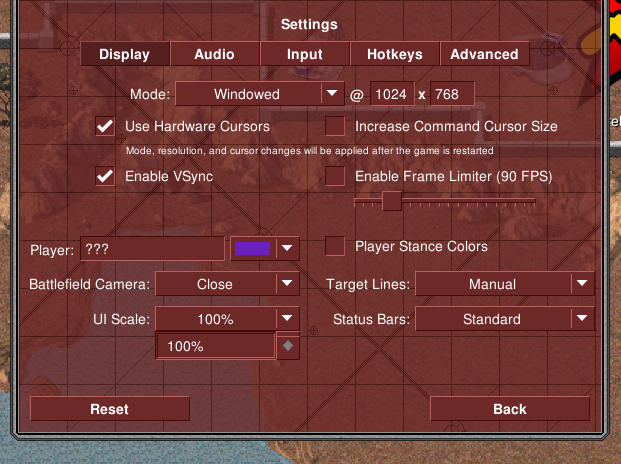
"Far" option is not available

Options not available.
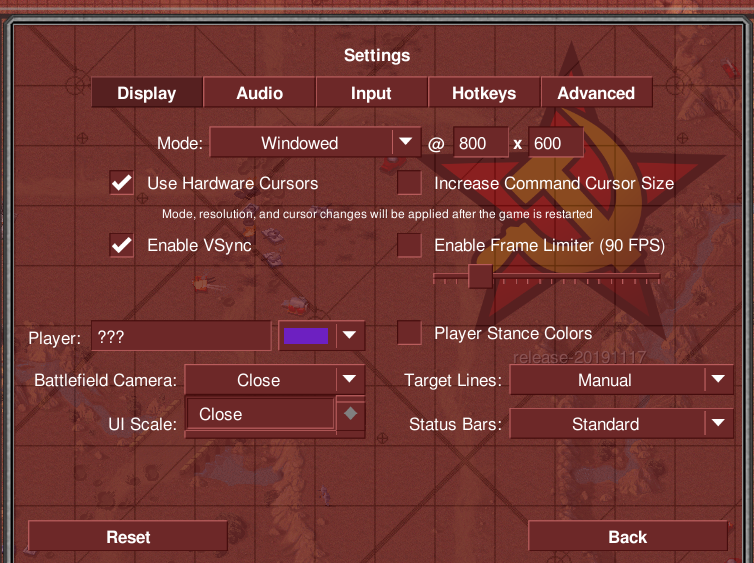
No options at all.
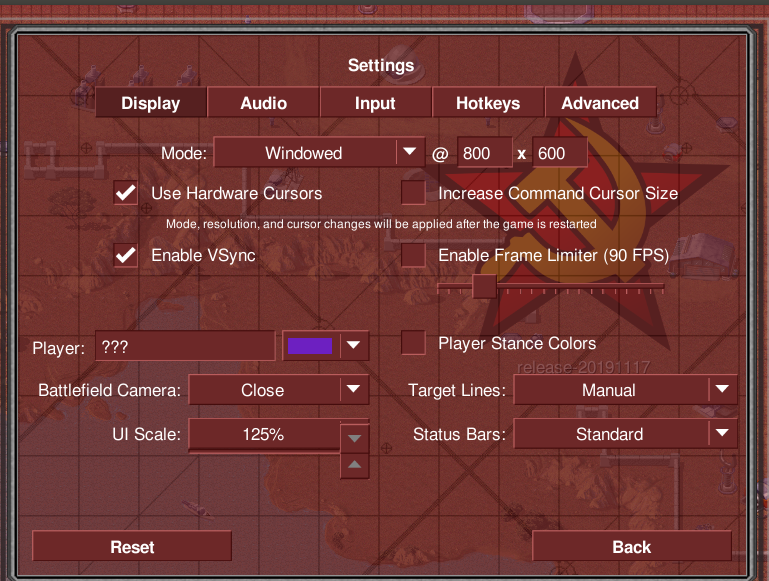
Didn't notice issues in fullscreen mode and the ingame zooming looks really cool.
 ghost
on 13 Jan 2020
ghost
on 13 Jan 2020
Related issues
 Mailaender
·
5Comments
Mailaender
·
5Comments
 Hammerfest
·
4Comments
Hammerfest
·
4Comments
 MlemandPurrs
·
4Comments
MlemandPurrs
·
4Comments
MlemandPurrs
·
4Comments
MlemandPurrs
·
4Comments
 AliT1993
·
3Comments
AliT1993
·
3Comments
Most helpful comment
@samrocketman: #12501 adds an
OPENRA_DISPLAY_SCALEenvironment variable that you can use to bump up the size.