Openmptcprouter: OMR bypass issues
Expected Behavior
OMR correctly sends traffic along specified interface.
Current Behavior
Ever since I switched from 55 to 55.3 three things (that I think are related) happened.
- Whenever I make any changes to OMR-bypass page, the log shows "OMR-ByPass is running" only 2-4 seconds after I hit apply. It used to take 15+ seconds to happen.
- Random things in OMR-bypass are working, but other things are not. IRC seems to just randomly pick interfaces no matter what I set in OMR-bypass. And I have a strong feeling this is the same for other rules I am trying set on this page.
- My multiplayer games using OMR-bypass no longer seem to ignore the SQM bandwidth limit for that interface. This is needed because if I can throttle my DSL to 3200 kbps upload for the stream, I have 800-1000 left over for my game with OMR-bypass.
Possible Solution
Maybe rollback changes made to OMR-bypass after version 55?
Steps to Reproduce the Problem
- Load up game
- Restart an interface that is NOT in the OMR-bypass rules
- Game kicks me out to login screen.
or - Open up mIRC and connect to Twitch server
- Restart interface that is NOT in the OMR-bypass rules
- Watch mIRC disconnect and reconnect.
Specifications
OpenMPTCProuter version: 55.3
OpenMPTCProuter VPS version: Version 0.1017 5.4.52-mptcp
OpenMPTCProuter platform: RPI4 Model B Rev 1.1
 darthclide
All 55 comments
Please, be more precise about "steps to reproduce the problem", you use protocol ? domain ? asn ? ip ? mac address ?
 Ysurac
on 8 Sep 2020
Ysurac
on 8 Sep 2020
I am using domains, ports, and protocols/services. If I tell OMR-bypass to send all IRC to eth1, then restarting eth2, usb0, usb1 or usb2 should have 0 effect on any of my irc connections.
Can you confirm btw that OMR-bypass still ignores bandwidth limiting on the SQM page?
darthclide
on 8 Sep 2020
And nothing is working ? Or it's only when you restart an interface in Network->interface ?
Ysurac
on 8 Sep 2020
Both. IRC seems to just randomly connect to what it wants to, but I just don't have faith OMR-bypass is being used. Are there any terminal commands I can use to ensure the ports and domains are being forwarded correctly?
darthclide
on 8 Sep 2020
Test by adding "ifconfig.co" to domains list, and if your DNS is set to OpenMPTCProuter DNS then you should see IP of selected interface.
Ysurac
on 8 Sep 2020
hmmm, I used curl and it seems to be working just fine. I really don't know why it sometimes just "gives up" on using the OMR-bypass rules?
Can you confirm that SQM throttling is ignored by OMR-bypass domains/ports?
darthclide
on 8 Sep 2020
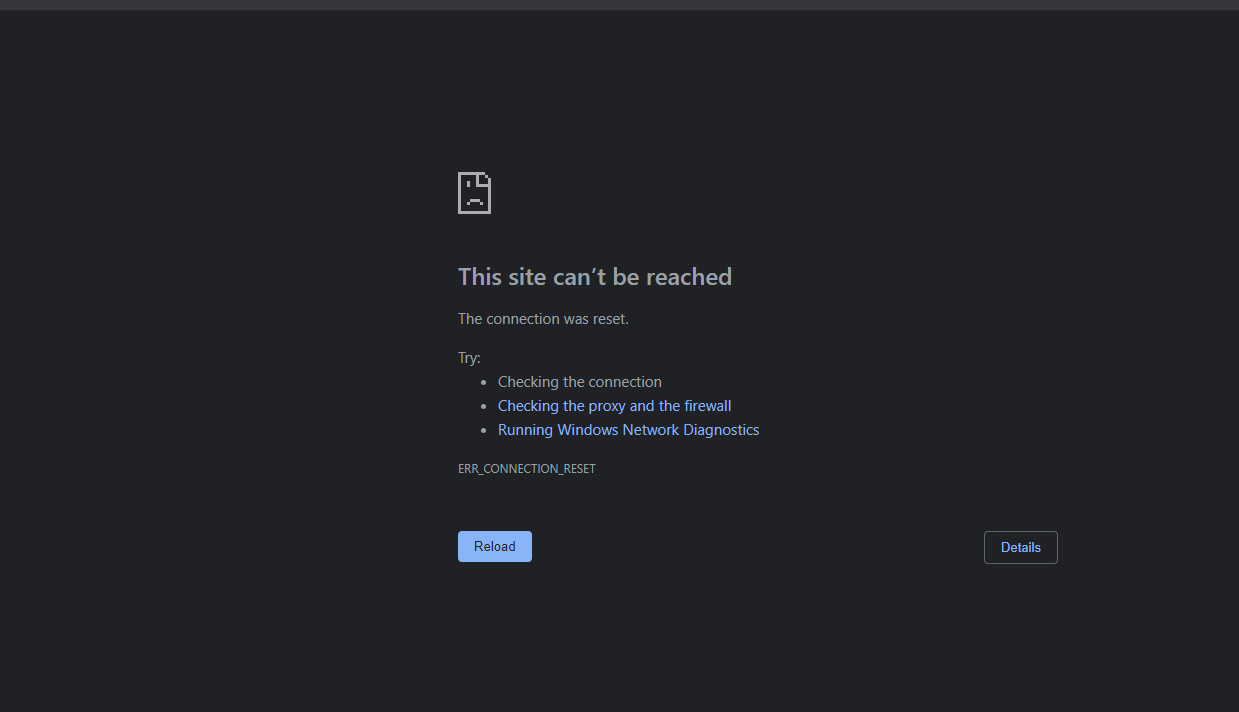
Oh this is interesting. Now that url ifconfig.co does not work in the browser?
darthclide
on 8 Sep 2020
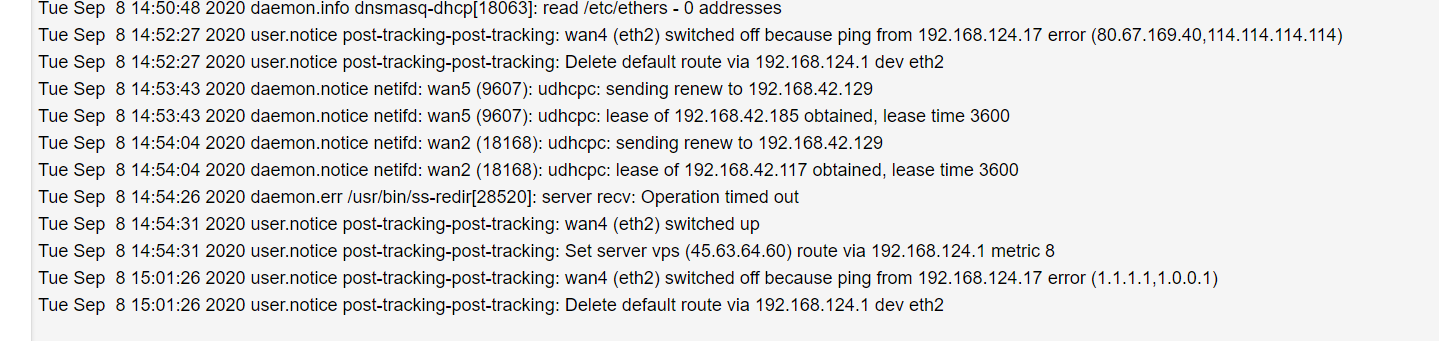
Can you check in state->system log what errors you can have ?
For SQM it should not be ignored.
Ysurac
on 8 Sep 2020
Refreshing the page doesn't change anything in the log:
So you are saying there is no way for me to give some headroom for DSL in my multiplayer games? :/
darthclide
on 8 Sep 2020
Wan4 is down, it's not your exit interface ?
SQM is here to control bufferbloat, so this should be better even for multiplayer games.
Also sometimes route is shorter using a VPS than direct ISP for games so this can give a lower latency.
Ysurac
on 8 Sep 2020
I am unsure what you mean by "exit interface". I currently have ifconfig.co set to my T-mobile interface which curl reports as true. But for some reason the browser will not load that page. My master is set to my DSL (eth1)
For me there are too many tree leaves between me and the tower. It means I have no choice but to rely on DSL for gaming. So you are saying that as long as I have the the SQM activated, it will make the game run better? Are there any ways to tweak it so that it prioritizes traffic on a certain port? (such as what the game uses) Or do I have to rely upon DSCP for that?
darthclide
on 8 Sep 2020
I mean the interface used for ifconfig.co.
To prioritizes some port, you have to use DSCP.
Your install is an update or a fresh install ?
Ysurac
on 9 Sep 2020
It is an update. After dealing with weird issues wiping the sd card and reinstalling, I am trying to avoid fresh installs as much as possible.
ifconfig.co is on usb2 (which is my T-mobile)
darthclide
on 9 Sep 2020
i have slight suspicion(!) there might be an issue during first install if you decide to "skip" a LAN adaptor as WAN-IF.
e.g. LAN ond eth0, eth1 unused (during setup), eth2 first Provider, becoming WAN2, eth3 -> WAN3 etc.
 Adorfer
on 9 Sep 2020
Adorfer
on 9 Sep 2020
I am unsure what you mean? If the interfaces page shows eth1 as wan3 with an ip address from my DSL modem, then what difference does it make if I used eth1 at the beginning?
darthclide
on 10 Sep 2020
i am not sure. i just see that things get messy when adding/removing interfaces later, e.g. when eth1 becomes WAN5, while still no WAN1 exsting, while OMR-bypass seems not to work.
Adorfer
on 10 Sep 2020
Ah... Well unless Ysurac asks me to, I really want to avoid wiping. I have always had struggles when doing a fresh install.
darthclide
on 10 Sep 2020
And perhaps it is related, but recently sometimes all pages stop loading and say "err refused to connect". This includes OMR pages at 192.168.100.1
I can load up command prompt at this same time and ping my OMR router just fine. What could ever cause me to lose connection even to OMR router? (I do have an Asus router as a go between from the Pi to the household, but if I can ping the gateway, then I don't see how that could be the problem)
darthclide
on 10 Sep 2020
I'm curious about this as well. I created all my vlans after an original setup. While everything seems to work, OMR bypass doesn't. I'm on 55 as well.
 Rwestrem
on 11 Sep 2020
Rwestrem
on 11 Sep 2020
Extra info: I still haven't figured out why sometimes I lose connection to the router admin page at random, but here is what happened today:
- Without changing anything, I opened up my Amazon Prime video and the page would not even load.
- I tried to bypass "Amazon" and "AmazonVideo" service to my T-mobile, but the Amazon page said "You are behind a VPN or proxy, please disable it".
- I then switched the bypass back to my DSL, and all of a sudden the page loaded correctly like it always did.
I see in my log now a bunch of errors while watching the Amazon Prime video though.
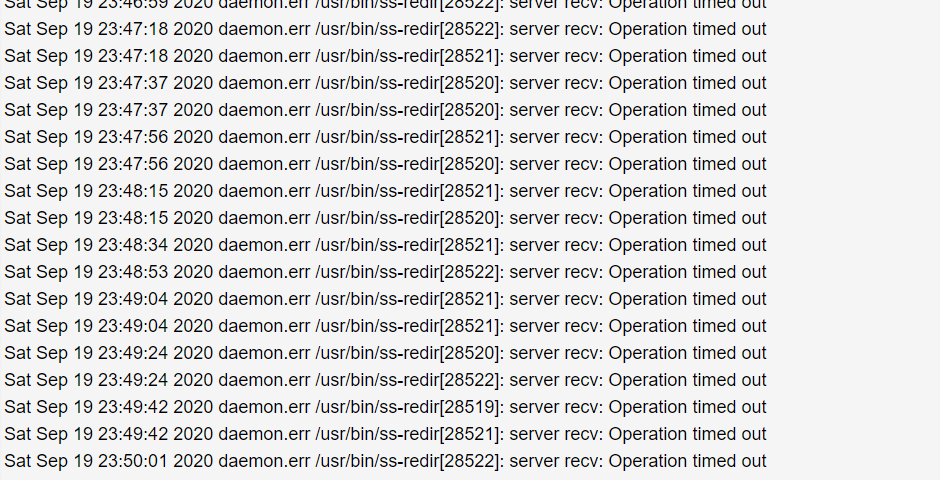
It is almost like there is some part of the website that is still trying to connect through the VPS? Why else would these errors be happening?
darthclide
on 20 Sep 2020
I did attempt restarting my eth1 (DSL) during this problem, so I believe this kernel log is related:
https://pastebin.com/p99BFzBR
darthclide
on 20 Sep 2020
Extra info: And now after I did a restart on my usb1 (T-mobile) interface while watching an Amazon Prime video, it automatically started downloading that video through T-mobile, even though OMR bypass is still set to eth1 for Amazon.
This issue really seems way more complicated than simply wiping the sd card.
darthclide
on 20 Sep 2020
I found the issue when an interface is removed, this will be fixed in next release.
Ysurac
on 20 Sep 2020
Hmmm, the only time I removed an interface was during a fresh install back on version .54 This is because your default WANs couldn't be edited no matter how much I tried (restarts, unplugging the device, etc). So can you confirm that the default WANs can now be edited in 55.3 and that I don't have to delete them to create WANS for my hotspots?
darthclide
on 20 Sep 2020
No know issue on editing any interfaces was reported, even in any previous release.
Ysurac
on 20 Sep 2020
Hmmm, then why have I always struggled to edit the default WANs on a fresh install? If this OMR-bypass problem is due to deleting interfaces, I need to figure out how to avoid deleting WANs on a fresh install?
darthclide
on 20 Sep 2020
This will be fixed in next release. There is some issue with omr-bypass for now.
Ysurac
on 20 Sep 2020
Ah, well I guess I will try a fresh install and see if I can avoid deleting the default WAN interfaces. I really need some stability at home right now since I have a server here.
darthclide
on 20 Sep 2020
i did a fresh install _"straight forward, getting everything in the right order at first shot"_.
(in other words: No adding/removing of interfaces later)
and it did not help.
(see https://github.com/Ysurac/openmptcprouter/issues/1203#issuecomment-691342791)
Adorfer
on 21 Sep 2020
I have yet to try adding anything to OMR-bypass after a fresh install. I was dealing with weird Youtube throttling issues last night. I would have thought that Youtube would straight up block an IP address if they were suspicious? Not throttle it? I was stuck at 3-4 Mbps down and had to use my expressvpn to unlock my full download speeds. It seems to be better this morning though.
I will report back here once I get around to adding some OMR-bypass rules.
darthclide
on 21 Sep 2020
Can you try to block UDP traffic from LAN on port 80 and 443, this should block QUIC traffic and this may be why Youtube is slow (or not, but at least this will test it) ?
Ysurac
on 21 Sep 2020
If I encounter this heavy throttling again, I will try it. But for now all 1080p videos are loading correctly.
darthclide
on 21 Sep 2020
Seeing a repeated message in the log after a fresh install, may I ask what it is and if I can ignore it? (replaced vps IP with x). It appears to change depending on if an interface can't be pinged which sounds correct, but I just wanted to make sure with you since I never saw anything with the phrase "nexthop" before I did this wipe.
Set server vps (x.x.x.x) default route x.x.x.x nexthop via 192.168.1.1 dev eth1 weight 1 nexthop via 192.168.42.129 dev usb1 weight 10 nexthop via 192.168.25.1 dev usb0 weight 1 nexthop via 192.168.124.1 dev eth2 weight 1 nexthop via 192.168.42.129 dev usb2 weight 1
darthclide
on 21 Sep 2020
Also, I just tried adding only Amazon and AmazonVideo to OMR-bypass. There is a constant stream of errors:
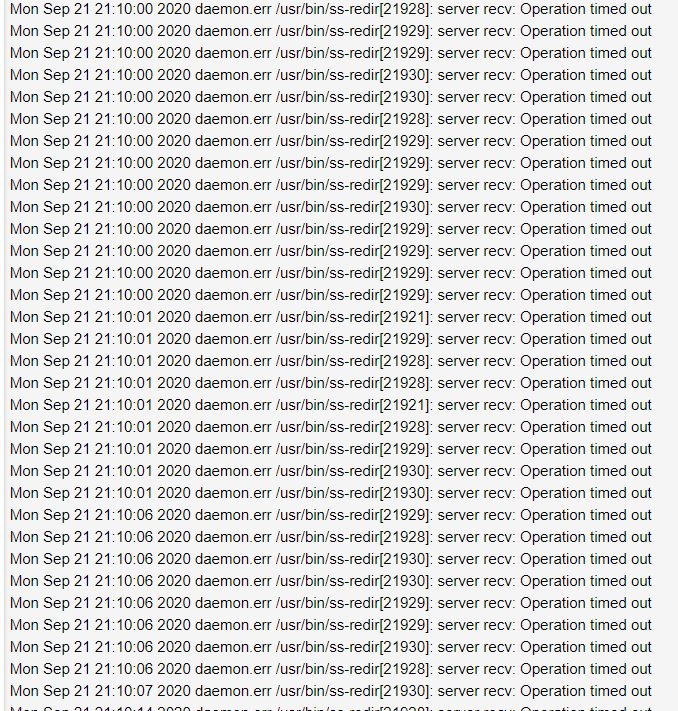
Yes, the Amazon video page finally loaded, but these errors are still happening even when the video is paused? Is it possible that these services in OMR are not updated and this is why the errors occur?
darthclide
on 22 Sep 2020
I have issues too with omr-bypass, bypassing services from "Protocols and services" is not working, at least with primevideo ( the one i have issue for now ), maybe other streaming platform have issue.
The only way i found to bypass primevideo for now warning is whitelisting via MAC Address, this is actually working, but that device is now bypassing the tunnel for everything, that is not good...
I'm using router IP as DNS as suggested.
EDIT: disneyplus have issues too.
 Malaga82
on 27 Sep 2020
Malaga82
on 27 Sep 2020
True protocol and services is not working, this will be fixed in next release (already fixed in develop branch).
Ysurac
on 27 Sep 2020
Thanks @Ysurac , hope you can create a wiki for this service too, for non experts or who is approaching omr for the first time. 😄
Malaga82
on 27 Sep 2020
Hmmm, I remember seeing other OMR issue threads in the past that required an update. Is it possible that these issues will keep coming back when services change domains/IP addresses? And perhaps there should be a disclaimer in parenthesis letting people know that services may change and no longer work? Or perhaps there could be a little "+" button that allows you to view the details of that service? (Netflix, Amazon, etc)
darthclide
on 27 Sep 2020
I think the best way is to have a thread about omr-bypass issue ( country, service, logs ) and something like an online list where an omr fetch the list, like adblock lists.
So at scheduled time, or reboot or whatever, omr fetch the list and if it will find an update it will apply it.
If omr-bypass is build against "lists".
Malaga82
on 28 Sep 2020
True protocol and services is not working, this will be fixed in next release (already fixed in develop branch).
I updated to v56beta1( v0.56beta1-3b17a96c r0+14615-624298dc27 ) for router and test script for the VPS( 5.4.65-mptcp 0.1018-test ), but omr-bypass is not working for protocols and services, is that normal?
p.s. can i report somewhere bugs about the beta version? Thanks
Malaga82
on 4 Oct 2020
No. Should be working.
What do you have in uci show dhcp on the router via SSH ? And what is the protocol used ?
Ysurac
on 4 Oct 2020
> root@OpenMPTCProuter:~# uci show dhcp
dhcp.@dnsmasq[0]=dnsmasq
dhcp.@dnsmasq[0].domainneeded='1'
dhcp.@dnsmasq[0].localise_queries='1'
dhcp.@dnsmasq[0].rebind_protection='1'
dhcp.@dnsmasq[0].rebind_localhost='1'
dhcp.@dnsmasq[0].expandhosts='1'
dhcp.@dnsmasq[0].authoritative='1'
dhcp.@dnsmasq[0].readethers='1'
dhcp.@dnsmasq[0].leasefile='/tmp/dhcp.leases'
dhcp.@dnsmasq[0].localservice='1'
dhcp.@dnsmasq[0].noresolv='1'
dhcp.@dnsmasq[0].nonegcache='1'
dhcp.@dnsmasq[0].rebind_domain='plex.direct'
dhcp.@dnsmasq[0].local='/fritz.box/'
dhcp.@dnsmasq[0].domain='fritz.box'
dhcp.@dnsmasq[0].strictorder='1'
dhcp.@dnsmasq[0].server='/fritz.box/' '/use-application-dns.net/' '192.168.1.20' '94.140.15.15'
dhcp.@dnsmasq[0].ipset='/googlevideo.com/omr_dscp-cs4,omr_dscp6-cs4' '/nflxvideo.net/omr_dscp-cs4,omr_dscp6-cs4' '/s3.ll.dash.row.aiv-cdn.net/omr_dscp-cs4,omr_dscp6-cs4' '/d25xi40x97liuc.cloudfront.net/omr_dscp-cs4,omr_dscp6-cs4' '/aiv-delivery.net/omr_dscp-cs4,omr_dscp6-cs4' '/vevo.com/omr_dscp-cs4,omr_dscp6-cs4' '/audio-fa.scdn.com/omr_dscp-cs4,omr_dscp6-cs4' '/deezer.com/omr_dscp-cs4,omr_dscp6-cs4' '/sndcdn.com/omr_dscp-cs4,omr_dscp6-cs4' '/last.fm/omr_dscp-cs4,omr_dscp6-cs4' '/v.redd.it/omr_dscp-cs4,omr_dscp6-cs4' '/ttvnw.net/omr_dscp-cs4,omr_dscp6-cs4,omr_dscp-cs4,omr_dscp6-cs4' '/googletagmanager.com/omr_dscp-cs2,omr_dscp6-cs2' '/googleusercontent.com/omr_dscp-cs2,omr_dscp6-cs2' '/google.com/omr_dscp-cs2,omr_dscp6-cs2' '/fbcdn.net/omr_dscp-cs4,omr_dscp6-cs4,omr_dscp-cs2,omr_dscp6-cs2' '/akamaihd.net/omr_dscp-cs2,omr_dscp6-cs2' '/whatsapp.net/omr_dscp-cs2,omr_dscp6-cs2' '/whatsapp.com/omr_dscp-cs2,omr_dscp6-cs2' '/googleapis.com/omr_dscp-cs2,omr_dscp6-cs2' '/1e100.net/omr_dscp-cs2,omr_dscp6-cs2' '/hwcdn.net/omr_dscp-cs2,omr_dscp6-cs2' '/download.qq.com/omr_dscp-cs1,omr_dscp6-cs1' '/steamcontent.com/omr_dscp-cs1,omr_dscp6-cs1' '/gs2.ww.prod.dl.playstation.net/omr_dscp-cs1,omr_dscp6-cs1' '/dropbox.com/omr_dscp-cs1,omr_dscp6-cs1' '/dropboxstatic.com/omr_dscp-cs1,omr_dscp6-cs1' '/dropbox-dns.com/omr_dscp-cs1,omr_dscp6-cs1' '/log.getdropbox.com/omr_dscp-cs1,omr_dscp6-cs1' '/drive.google.com/omr_dscp-cs1,omr_dscp6-cs1' '/drive-thirdparty.googleusercontent.com/omr_dscp-cs1,omr_dscp6-cs1' '/docs.google.com/omr_dscp-cs1,omr_dscp6-cs1' '/docs.googleusercontent.com/omr_dscp-cs1,omr_dscp6-cs1' '/gvt1.com/omr_dscp-cs1,omr_dscp6-cs1' '/mmg-fna.whatsapp.net/omr_dscp-cs1,omr_dscp6-cs1' '/upload.youtube.com/omr_dscp-cs1,omr_dscp6-cs1' '/upload.video.google.com/omr_dscp-cs1,omr_dscp6-cs1' '/windowsupdate.com/omr_dscp-cs1,omr_dscp6-cs1' '/update.microsoft.com/omr_dscp-cs1,omr_dscp6-cs1'
dhcp.lan=dhcp
dhcp.lan.interface='lan'
dhcp.lan.ra_slaac='1'
dhcp.lan.ra_flags='managed-config' 'other-config'
dhcp.lan.start='20'
dhcp.lan.limit='249'
dhcp.lan.leasetime='72h'
dhcp.lan.dhcp_option='15,fritz.box'
dhcp.wan=dhcp
dhcp.wan.interface='wan'
dhcp.wan.ignore='1'
dhcp.odhcpd=odhcpd
dhcp.odhcpd.maindhcp='0'
dhcp.odhcpd.leasefile='/tmp/hosts/odhcpd'
dhcp.odhcpd.leasetrigger='/usr/sbin/odhcpd-update'
dhcp.odhcpd.loglevel='4'
dhcp.@host[0]=host
dhcp.@host[0].name='dockersrv'
dhcp.@host[0].dns='1'
dhcp.@host[0].mac='00:15:5d:XX:XX:XX'
dhcp.@host[0].ip='192.168.1.X'
dhcp.@host[0].gw='192.168.1.254'
what do you mean by protocol used?
I use glorytun udp and openvpn udp for the second wan since mptcp is blocked on that otherwise.
but using glorytun tcp is the same.
Malaga82
on 4 Oct 2020
Protocol in omr-bypass or what you wan to bypass.
Ysurac
on 4 Oct 2020
tried with amazonvideo ( is primevideo right? ) and disneyplus
Malaga82
on 4 Oct 2020
Yes, should be primevideo.
In your config, both protocols doesn't seems to be enabled.
When I add it on the beta, I can see that some domains are bypassed (even if I can't see if it's working, I don't need to bypass primevideo and I don't have disneyplus).
Check that you use OpenMPTCProuter IP as DNS.
Ysurac
on 4 Oct 2020
it's not enabled beacause it's not working and i just removed it😄
in fact i just use mac address on beta too, but i miss it on other devices, other than my tv.
omr is default dns for clients.
Malaga82
on 5 Oct 2020
Updated to beta5 but it doesn’t seems to work 🤔😅
Malaga82
on 8 Oct 2020
Add a domain like ifconfig.co in domain list and go to this domain and check the IP.
Ysurac
on 8 Oct 2020
Hello, it shows the correct WAN IP, not the VPS one. Tested both WAN's
But, with protocols and services enabled for primevideo, i have this:
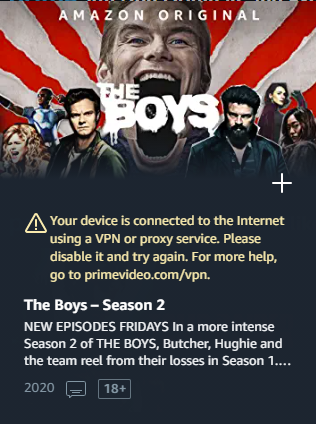
these are the rules:
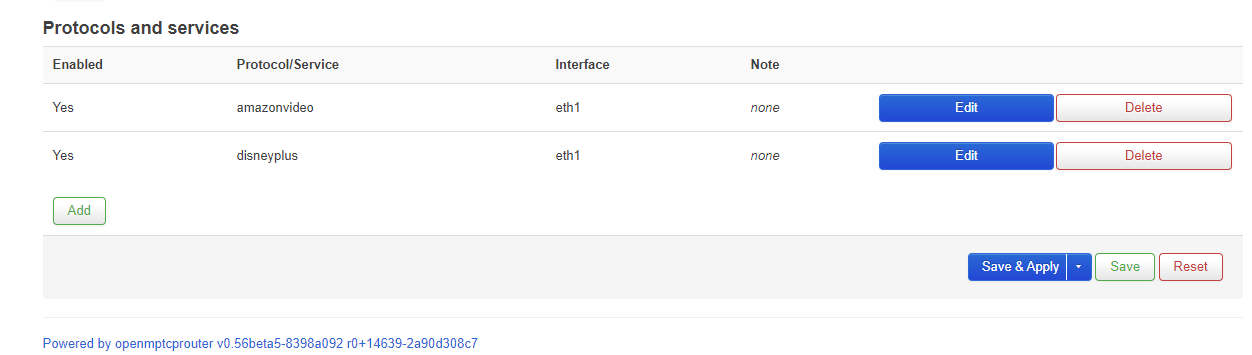
I'm available for any kind of tests.
Malaga82
on 8 Oct 2020
root@OpenMPTCProuter:~# uci show dhcp
dhcp.@dnsmasq[0]=dnsmasq
dhcp.@dnsmasq[0].domainneeded='1'
dhcp.@dnsmasq[0].localise_queries='1'
dhcp.@dnsmasq[0].rebind_protection='1'
dhcp.@dnsmasq[0].rebind_localhost='1'
dhcp.@dnsmasq[0].expandhosts='1'
dhcp.@dnsmasq[0].authoritative='1'
dhcp.@dnsmasq[0].readethers='1'
dhcp.@dnsmasq[0].leasefile='/tmp/dhcp.leases'
dhcp.@dnsmasq[0].localservice='1'
dhcp.@dnsmasq[0].noresolv='1'
dhcp.@dnsmasq[0].nonegcache='1'
dhcp.@dnsmasq[0].rebind_domain='plex.direct'
dhcp.@dnsmasq[0].local='/fritz.box/'
dhcp.@dnsmasq[0].domain='fritz.box'
dhcp.@dnsmasq[0].strictorder='1'
dhcp.@dnsmasq[0].server='/fritz.box/' '/use-application-dns.net/' '192.168.1.20' '94.140.15.15'
dhcp.@dnsmasq[0].ipset='/googlevideo.com/omr_dscp-cs4,omr_dscp6-cs4' '/nflxvideo.net/omr_dscp-cs4,omr_dscp6 -cs4' '/vevo.com/omr_dscp-cs4,omr_dscp6-cs4' '/audio-fa.scdn.com/omr_dscp-cs4,omr_dscp6-cs4' '/deezer.com/o mr_dscp-cs4,omr_dscp6-cs4' '/sndcdn.com/omr_dscp-cs4,omr_dscp6-cs4' '/last.fm/omr_dscp-cs4,omr_dscp6-cs4' ' /v.redd.it/omr_dscp-cs4,omr_dscp6-cs4' '/ttvnw.net/omr_dscp-cs4,omr_dscp6-cs4,omr_dscp-cs4,omr_dscp6-cs4' ' /googletagmanager.com/omr_dscp-cs2,omr_dscp6-cs2' '/googleusercontent.com/omr_dscp-cs2,omr_dscp6-cs2' '/goo gle.com/omr_dscp-cs2,omr_dscp6-cs2' '/fbcdn.net/omr_dscp-cs4,omr_dscp6-cs4,omr_dscp-cs2,omr_dscp6-cs2' '/ak amaihd.net/omr_dscp-cs2,omr_dscp6-cs2' '/whatsapp.net/omr_dscp-cs2,omr_dscp6-cs2' '/whatsapp.com/omr_dscp-c s2,omr_dscp6-cs2' '/googleapis.com/omr_dscp-cs2,omr_dscp6-cs2' '/1e100.net/omr_dscp-cs2,omr_dscp6-cs2' '/hw cdn.net/omr_dscp-cs2,omr_dscp6-cs2' '/download.qq.com/omr_dscp-cs1,omr_dscp6-cs1' '/steamcontent.com/omr_ds cp-cs1,omr_dscp6-cs1' '/gs2.ww.prod.dl.playstation.net/omr_dscp-cs1,omr_dscp6-cs1' '/dropbox.com/omr_dscp-c s1,omr_dscp6-cs1' '/dropboxstatic.com/omr_dscp-cs1,omr_dscp6-cs1' '/dropbox-dns.com/omr_dscp-cs1,omr_dscp6- cs1' '/log.getdropbox.com/omr_dscp-cs1,omr_dscp6-cs1' '/drive.google.com/omr_dscp-cs1,omr_dscp6-cs1' '/driv e-thirdparty.googleusercontent.com/omr_dscp-cs1,omr_dscp6-cs1' '/docs.google.com/omr_dscp-cs1,omr_dscp6-cs1 ' '/docs.googleusercontent.com/omr_dscp-cs1,omr_dscp6-cs1' '/gvt1.com/omr_dscp-cs1,omr_dscp6-cs1' '/mmg-fna .whatsapp.net/omr_dscp-cs1,omr_dscp6-cs1' '/upload.youtube.com/omr_dscp-cs1,omr_dscp6-cs1' '/upload.video.g oogle.com/omr_dscp-cs1,omr_dscp6-cs1' '/windowsupdate.com/omr_dscp-cs1,omr_dscp6-cs1' '/update.microsoft.co m/omr_dscp-cs1,omr_dscp6-cs1' '/ifconfig.co/omr_dst_bypass_eth2,omr6_dst_bypass_eth2' '/s3.ll.dash.row.aiv- cdn.net/omr_dst_bypass_eth1,omr6_dst_bypass_eth1' '/s3-dub.cf.dash.row.aiv-cdn.net/omr_dst_bypass_eth1,omr6 _dst_bypass_eth1' '/dmqdd6hw24ucf.cloudfront.net/omr_dst_bypass_eth1,omr6_dst_bypass_eth1' '/d25xi40x97liuc .cloudfront.net/omr_dst_bypass_eth1,omr6_dst_bypass_eth1' '/aiv-delivery.net/omr_dst_bypass_eth1,omr6_dst_b ypass_eth1' '/aiv-cdn.net/omr_dst_bypass_eth1,omr6_dst_bypass_eth1' '/1s3.lvlt.dash.us.aiv-cdn.net.c.footpr int.net/omr_dst_bypass_eth1,omr6_dst_bypass_eth1' '/s.loris.llnwd.net/omr_dst_bypass_eth1,omr6_dst_bypass_e th1' '/atv-ext.amazon.com/omr_dst_bypass_eth1,omr6_dst_bypass_eth1' '/c.media-amazon.com/omr_dst_bypass_eth 1,omr6_dst_bypass_eth1' '/bamgrid.com/omr_dst_bypass_eth1,omr6_dst_bypass_eth1' '/disney-plus.net/omr_dst_b ypass_eth1,omr6_dst_bypass_eth1'
dhcp.lan=dhcp
dhcp.lan.interface='lan'
dhcp.lan.ra_slaac='1'
dhcp.lan.ra_flags='managed-config' 'other-config'
dhcp.lan.start='20'
dhcp.lan.limit='249'
dhcp.lan.leasetime='72h'
dhcp.lan.dhcp_option='15,fritz.box'
dhcp.wan=dhcp
dhcp.wan.interface='wan'
dhcp.wan.ignore='1'
dhcp.odhcpd=odhcpd
dhcp.odhcpd.maindhcp='0'
dhcp.odhcpd.leasefile='/tmp/hosts/odhcpd'
dhcp.odhcpd.leasetrigger='/usr/sbin/odhcpd-update'
dhcp.odhcpd.loglevel='4'
Malaga82
on 8 Oct 2020
It's possible that new domain added by Amazon is missing. You can check with your browser, using developer tools and network tab if there is a domain that answer 503 or that is not in the previous list.
Ysurac
on 9 Oct 2020
It's what i did sunday, in beta env, but i didn't seems to work, but i'm in another environment( stable ) and gonna test with these:
www.primevideo.com
cloudfront.xp-asset.aiv-cdn.net
d35uxhjf90umnp.cloudfront.net
js-assets.aiv-cdn.net
m.media-amazon.com
fls-eu.amazon.fr
ters.eu-west-1.aiv-delivery.net
api.eu-west-1.aiv-delivery.net
fls-na.amazon.com
ipv6.unagi-na.amazon.com
unagi-eu.amazon.com
with domains posted before finally primevideo is working on desktops.
i have an issue with "app" version( android and ios ): it keeps saying "vpn blablabla", so maybe the apps are using different domains to validate the vpn state.
has omr on router something like a traffic scanner or monitor built-in?
or maybe vps side?
I'm on beta5 x86_64 but sadly there are no software repo available. expected btw
Malaga82
on 10 Oct 2020
There is iftop on the router.
I didn't make the links available for the beta, too many beta, too many links, too many CDN refresh needed.
Ysurac
on 10 Oct 2020
will check with that, thanks
Malaga82
on 10 Oct 2020
Related issues
 dnwk
·
8Comments
Adorfer
·
11Comments
dnwk
·
8Comments
Adorfer
·
11Comments
 Scaff31
·
5Comments
Malaga82
·
9Comments
Scaff31
·
5Comments
Malaga82
·
9Comments
 Mutanter
·
3Comments
Mutanter
·
3Comments