Openmptcprouter: Keeping line aggregation with OMR BYPASS
Hello
I used OMR BYPASS in order to avoid to be blacklisted by Netflix and forced my tv to use my WAN2. By doing that I’m loosing benefit of the aggregation. Is there a way to show to Netflix the IP of my WAN2 ( and not the ip if the VPS which is blacklisted ) while keeping aggregation ?
Thank you in advance
 numerobis08
All 17 comments
It's not possible.
The only way to keep aggregation with Netflix is to have a VPS provider that is not blacklisted.
 Ysurac
on 9 May 2020
Ysurac
on 9 May 2020
Not sure but... dispite latency problems, technically this can be possible by connecting the VPS to an external proxy, no ? Like NordVPN or something like that but anyway, this may be quite difficult to have a compatible setup with OMR.
And there will be another problem : Found a VPN provider not blacklisted by Netflix.
 kevin39
on 9 May 2020
kevin39
on 9 May 2020
Yes, an external VPN can also be used. But it's better for speed to have a VPS not blacklisted by Netflix than an external VPN.
Ysurac
on 9 May 2020
Hi both
Thanks for the feedback. my VPS is currently hosted by Firstheberg , do you know a provider which is not blacklisted ?
numerobis08
on 9 May 2020
FirstHeberg was not blacklisted when I used it few weeks ago.
kevin39
on 9 May 2020
Also can we force to go through NordVPN only for Netflix ? ( I do have a Nordvpn subscription with dedicated IP)
Thanks
numerobis08
on 9 May 2020
FirstHeberg was not blacklisted when I used it few weeks ago.
Yes this is why I choose it but the IP that they gave me doesn’t work with Netflix. I’ll looking for milkywan after reading positive comments
numerobis08
on 9 May 2020
Milkywan is not blacklisted.
For NordVPN, by configuring it in OpenVPN section of OpenMPTCProuter and using omr-bypass to redirect netflix to NordVPN OpenVPN interface this should be possible.
Ysurac
on 9 May 2020
Milkywan is not blacklisted.
For NordVPN, by configuring it in OpenVPN section of OpenMPTCProuter and using omr-bypass to redirect netflix to NordVPN OpenVPN interface this should be possible.
Thank you both for the quick feedback
numerobis08
on 9 May 2020
One last question.
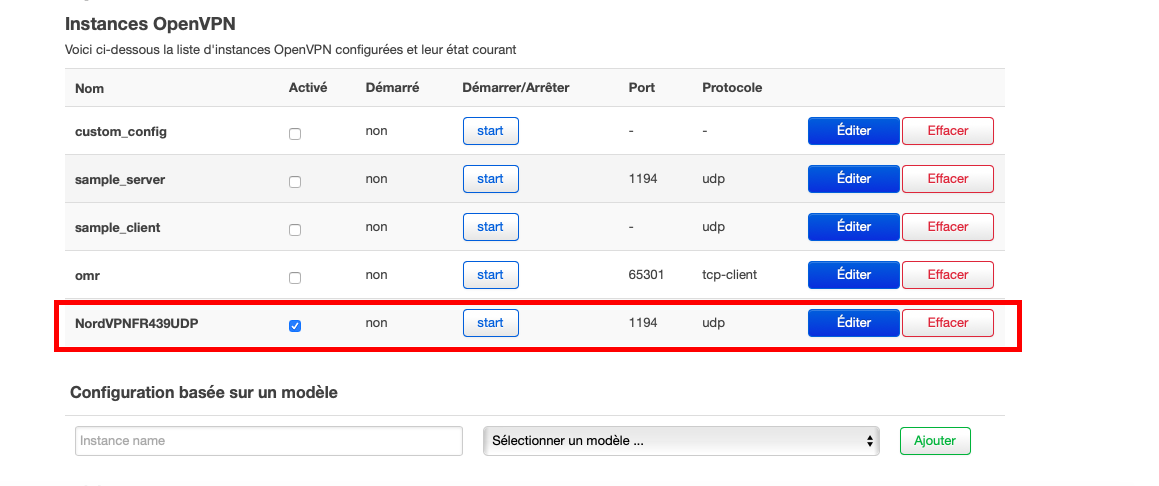
I tried to upload the .ovpn file from NordVPN and tried desperately but the VPN doesn't start.
did i missed something ?
numerobis08
on 10 May 2020
Check that it doesn't use "tun0" as interface and check State->System log.
Ysurac
on 10 May 2020
In which section I can check that tun0 is not used ? ( sorry just started 1 week ago with openmptcp)
numerobis08
on 10 May 2020
In VPN->OpenVPN, edit the instance, "Switch to advanced configuration", "Networking" and "dev".
Ysurac
on 10 May 2020
Hello
I cannot find the “switch to advanced configuration” in VPN / OPENVPN is there something to activate ?
numerobis08
on 26 May 2020
By the way many thanks for the support
numerobis08
on 26 May 2020
This seems difficult to give more info. When you edit an instance of OpenVPN it's the first link after the title.
Ysurac
on 26 May 2020
This issue is stale because it has been open 120 days with no activity. Remove stale label or comment or this will be closed in 5 days
![github-actions[bot] picture](https://avatars2.githubusercontent.com/in/15368?v=4&s=40) github-actions[bot]
on 23 Sep 2020
github-actions[bot]
on 23 Sep 2020
Related issues
 PCRyan
·
4Comments
Ysurac
·
8Comments
PCRyan
·
4Comments
Ysurac
·
8Comments
 uryupinsk
·
6Comments
uryupinsk
·
6Comments
 Mutanter
·
3Comments
Mutanter
·
3Comments
 joshuaeb09
·
4Comments
joshuaeb09
·
4Comments
Most helpful comment
Yes, an external VPN can also be used. But it's better for speed to have a VPS not blacklisted by Netflix than an external VPN.