Openmptcprouter: OpenMPTCProuter v0.53
Status of v0.53rc7 before release of final release.
Router tests:
- [X] x86_64
- [ ] x86
- [x] RPI4 64Bits
- [ ] RPI3 64Bits
- [ ] RPI2/3/4 32Bits
- [x] BPI-R2 (wifi not supported)
- [x] WRT32X/WRT3200ACM
- [x] Update from previous release
Server script tests:
- [X] Debian 9
- [X] Debian 10
- [X] Ubuntu 18.04
- [x] Ubuntu 19.04
- [x] Update from previous release
Server script update Debian 9 to Debian 10 if it's not an upgrade of the script because Python 3.7 is needed. If it's an upgrade Python 3.7 is installed from source.
How to test: https://github.com/Ysurac/openmptcprouter/wiki/Snapshots
If you want to know what's new look at commit logs or wait for final release.
 Ysurac
All 16 comments
Hi,
I just updated my OMR and OMV.
after the update, I restarted my OMR and OMV.
Since the update, I have my downflow rate which has been halved.
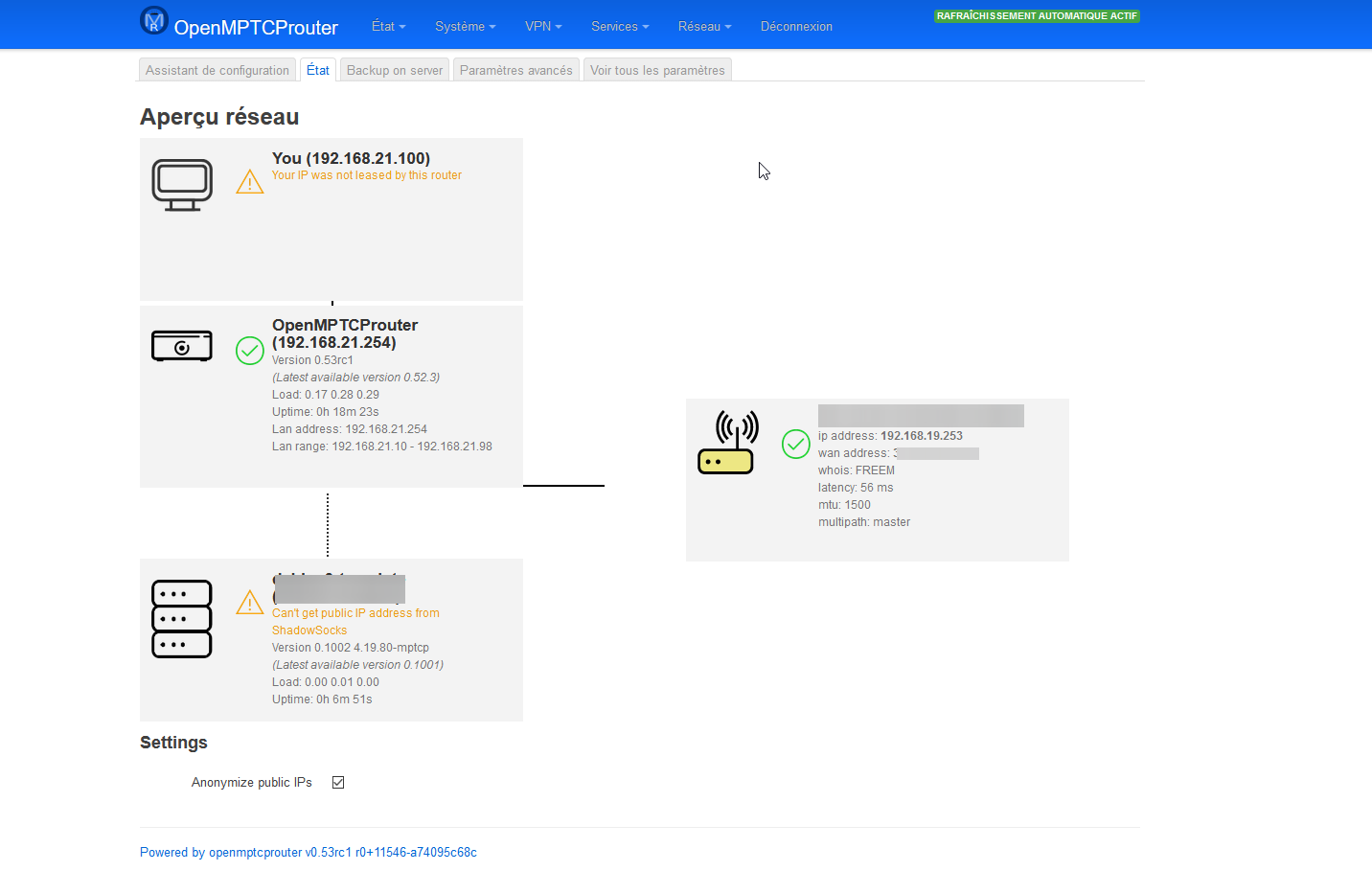
On OMR, I have the following message: "Can't get public IP address from ShashowSocks"
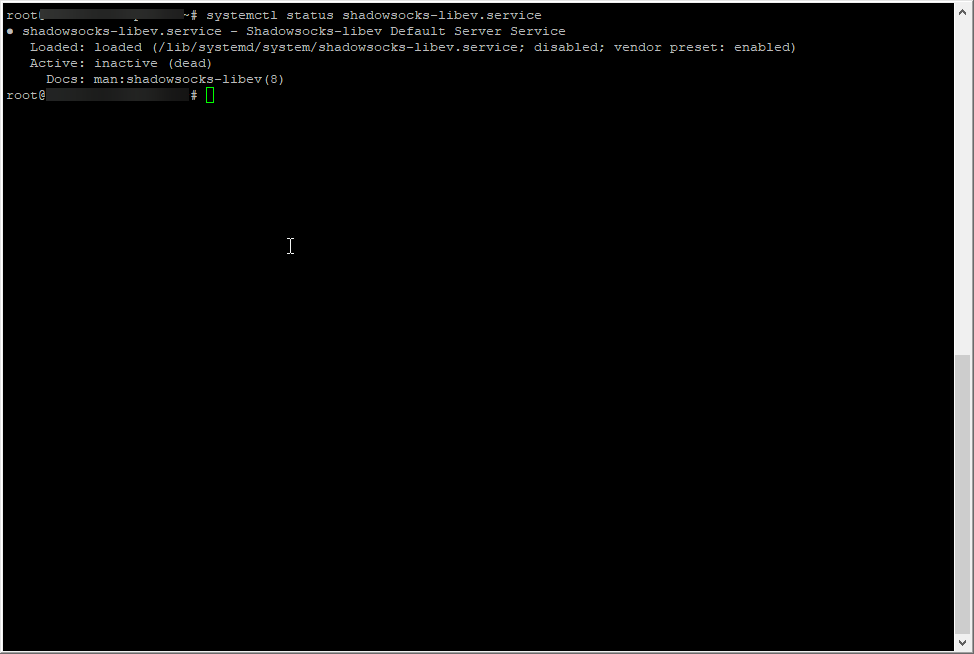
On the VPS, when I do "systemctl status shadowsocks-libev.service" it tells me that it is disabled.
is that normal?
 cayenne17
on 3 Dec 2019
cayenne17
on 3 Dec 2019
You can try to restart VPS install script again.
And validate the wizard in OMR (the shadowsocks key is modified).
Ysurac
on 3 Dec 2019
congrats on v0.53rc1 milestone!
RPI4 64Bits
-also noticed down/up throughput to be halved when using wget -O - http://www.openmptcprouter.com/server-test/debian9-x86_64.sh | sh to set up a test VPS.
Changed to a 2nd Debian 9 VPS I had running (set up using a modified version of debian9-x86_64.sh) and my throughput values were back to normal (up throughput seems to be a tad bit lower. i verified my wan modem values are the same as before) . omr-admin is not enabled on the 2nd VPS.
Edit- i forgot to force MTU on my WANs when testing (mtu='1446' is the sweet spot for me), so the throughput issue might be related to local config.
-shadowsocks encrypted method defaulted to aes when vps-admin kicked in. unfortunately, they didn't license AES-NI for bcm2711 so it's not available.
low priority edge case stuff:
- after rebuilding config from vanilla, still seeing ss-redir flooding 10.255.254:65101 when omr-pihole is enabled, using gt-udp-tun0 on vps. conntrack goes up quite high and freezes rpcd.
this rule stops the tcp flooding
DROP       tcp  --  anywhere             10.255.254.1         tcp dpt:65101 /* !fw3: ss-redir */
DROP       udp  --  anywhere             10.255.254.1         udp dpt:65101 /* !fw3: ss-redir */
- glorytun-udp only (shadowsocks disabled) can only use one wan when using a omr-bypass domain example: setup netflix domains in omr-bypass. start watching netflix. now, start a download and see if you can use any other wan throughput.
 user747
on 3 Dec 2019
user747
on 3 Dec 2019
MTU auto detect will be resolved for next RC.
AES will be fixed too (error in default VPS config).
I'm not able to reproduce pihole issue and glorytun with omr-bypass issue.
Ysurac
on 3 Dec 2019
very nice.
ill investigate the edge cases further, but its looking like a local config issue on my end.
auto mtu configures virtual macvlan
uci -q set openmptcprouter.$OMR_TRACKER_INTERFACE.mtu=$mtu
curious to know if other uci mtu values should mirror openmptcprouter.wan.mtu
network.wan.mtu
network.wan_dev.mtu
noticed something in log about omr-tracker-ss and an xtables lock.
it could be "delays caused by slow DNS lookups"
if dns lookups are needed can ignore this. adding -n skips resolving.
user747
on 3 Dec 2019
For MTU, I allow users to set it also manually. It's why I don't force it in network.wan.mtu but it's set manually via ip link, else I would have to add a checkbox or something like that to enable/disable auto-mtu...
Fix with -n will be added in next release everywhere it's needed (not only in ss-tracker)
Ysurac
on 3 Dec 2019
For MTU, I allow users to set it also manually.
Given 1 WAN, with a properly configured MTU, the performance gains can be somewhat small, depending on the underlying protocols (maybe 0.50% reduction in overhead in some cases) However, my guess is that when you start adding more WANs, the impact of a bad MTU value could have some sort of cascading packet fragmentation affect, which increases the overhead to a point where there is a noticeable performance drop. No data or tests to back this up though.
user747
on 5 Dec 2019
True. It's why there is MTU detection.
Ysurac
on 5 Dec 2019
Hey, can you update your Port forwarding (How To Page)? I can't find the SNAT Configuration
 rubaz100
on 21 Dec 2019
rubaz100
on 21 Dec 2019
@Ysurac hello you can check validate on ESXI ;)
 Scaff31
on 22 Dec 2019
Scaff31
on 22 Dec 2019
@Ysurac Just a few questions:
- Where is the configuration for MLVPN? I can't seem to find it on my router (x86_64 efi ext4) on the luci UI.
- I'm not sure if this is related, but the router can't get the Server Admin script from my VPS?
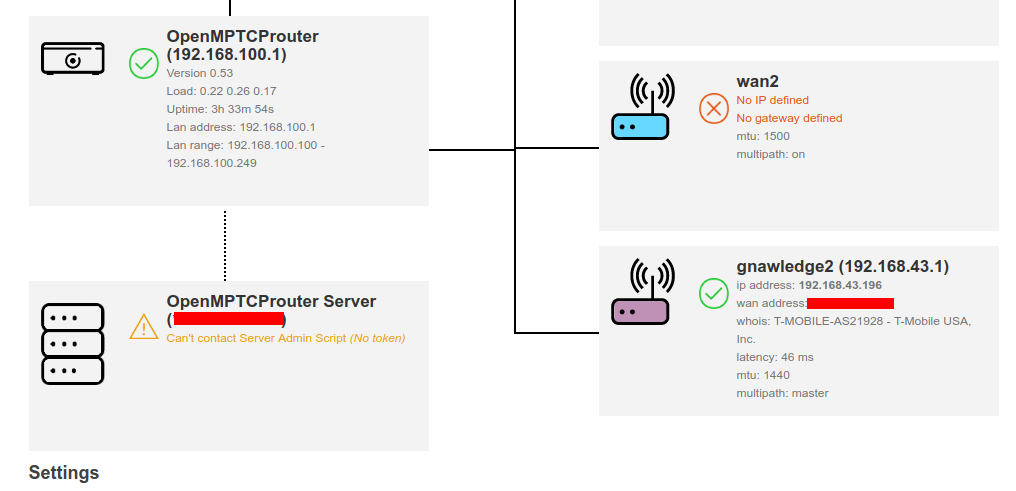
- Also not sure if this is related, but the system logs is full of OMR-VPS errors?
> Wed Dec 25 01:55:45 2019 user.notice OMR-VPS: Can't get token, try later
> Wed Dec 25 01:56:01 2019 user.notice OMR-VPS: Can't get token, try later
Someday I'm going to have to really crawl through your setup so I don't bother you with tiny things like this! :)
 PhatHub
on 25 Dec 2019
PhatHub
on 25 Dec 2019
MLVPN is removed, not able to make it working again without crash.
It's not related but Server was updated and rebooted ? If yes you can check in /var/log/daemon.log on the VPS if there is errors.
Ysurac
on 25 Dec 2019
Hey Merry Christmas @Ysurac !
I restarted the VPS and it works somehow? :confused: :disappointed_relieved: :laughing:
Currently the router's MPTCPRouter (luci) status has the following errors:
Can't get public IP address from ShadowSocks
Can't contact Server Admin Script (No token)
...but I'm getting network connectivity...?
PhatHub
on 26 Dec 2019
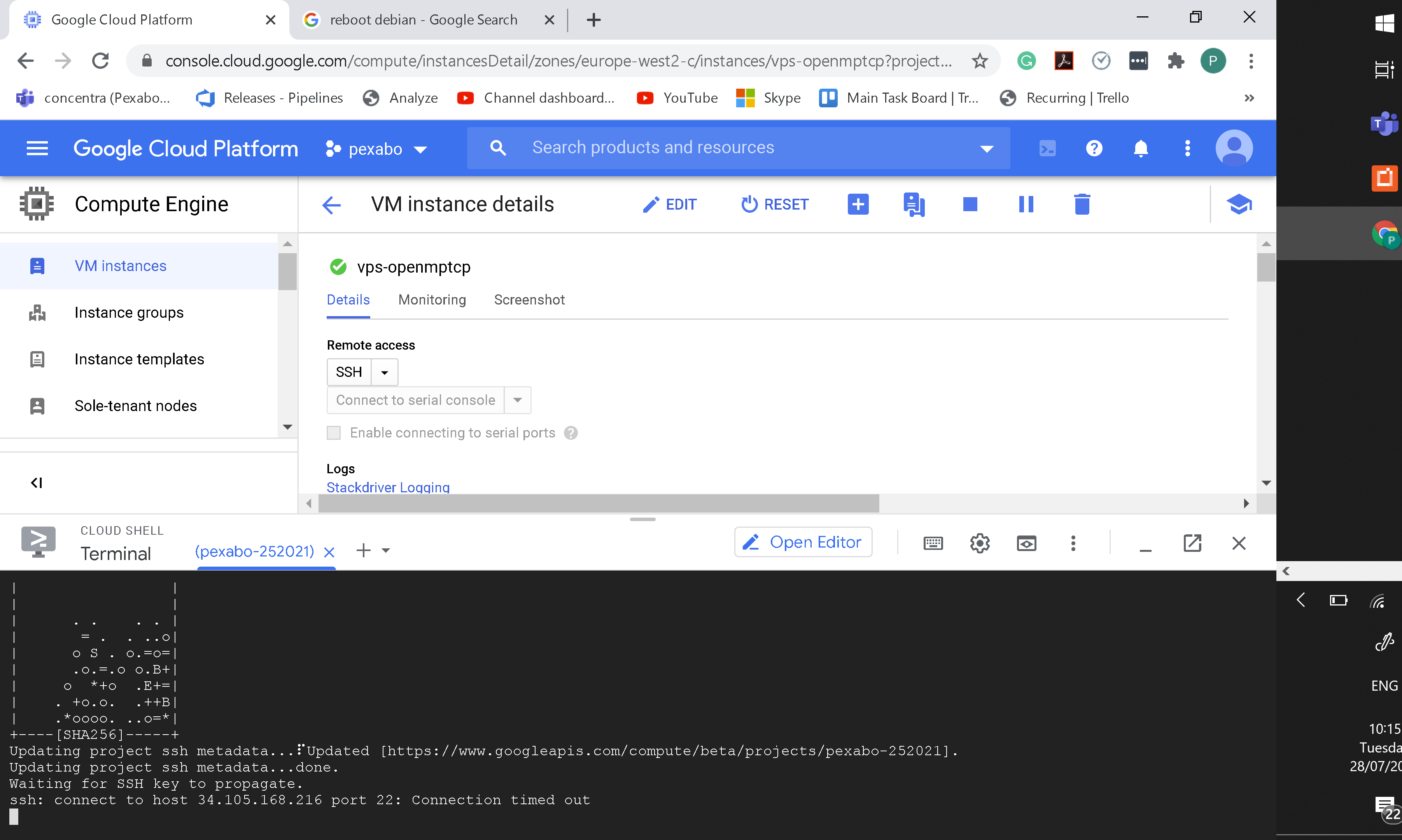
from time to time the debian vps in gcp gets stuck

 rifaterdemsahin
on 28 Jul 2020
rifaterdemsahin
on 28 Jul 2020
Old closed issue and your issue is not related to this issue subject.
This doesn't seems to be related to OpenMPTCProuter at all.
Ysurac
on 28 Jul 2020
well said i realized it was the problem with the port change from 22 to 65222
rifaterdemsahin
on 28 Jul 2020
Related issues
Ysurac
·
8Comments
 Mutanter
·
3Comments
Mutanter
·
3Comments
 Rwestrem
·
6Comments
Rwestrem
·
6Comments
 uryupinsk
·
6Comments
uryupinsk
·
6Comments
 adamb
·
9Comments
adamb
·
9Comments