Openmaptiles: Generating planet takes too long
This is my hardware:
16 CPU cores
32 GB RAM
512 GB SSD
docker-compose-config.yml
version: "2"
services:
generate-vectortiles:
environment:
BBOX: " -180.0000000, -85.05112877980659, 180, 85.05112877980659"
OSM_MAX_TIMESTAMP : "2017-06-19T01:59:55Z"
OSM_AREA_NAME: "planet"
MIN_ZOOM: "0"
MAX_ZOOM: "14"
I want to try extracting the planet data, but I found it's very slow.
after run about 1 day, it still show generate vec tiles need about 34 days, is there anything that I can adjust?
[12h 58m 31.540000000000873s] 1.5152% 5.37m/354.65m @ 116/s | ✓ 5.37m □ 3.26m | 34d 22h 58m 9s left
[12h 58m 31.629000000000815s] 1.5152% 5.37m/354.65m @ 116/s | ✓ 5.37m □ 3.26m | 34d 22h 57m 54s left
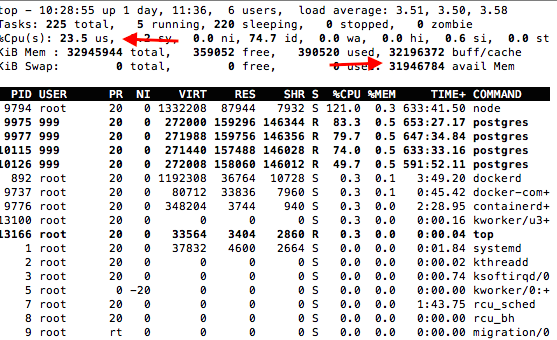
The system usage looks low.
The Quickstart log is not complete, I just upload the analyze log.
analyze_planet
BTW, the postgis container also have this kinds of warning in the step 'mport-osm'.
LOG: checkpoints are occurring too frequently (12 seconds apart)
HINT: Consider increasing the configuration parameter "max_wal_size".
 taoweibang
All 4 comments
This is expected (optimistic) generating time duration for the whole planet.
We offer the generating of tiles for the whole planet on our cluster as a service (with our hardware setup it is done in one day): https://openmaptiles.com/cluster-rendering/
The complete latest planet is also avaialble at as part of the Production package: https://openmaptiles.com/production-package/ - delivered with weekly updates! (every week you can download a new MBTiles with latest OpenStreetMap data).
This ticket is a duplicate to #242. Closing.
 klokan
on 1 Jul 2017
klokan
on 1 Jul 2017
@taoweibang
Also see https://github.com/openmaptiles/openmaptiles/blob/master/quickstart.sh#L248 , it brings up postserve, which skips the caching to mbtiles as its all done on the fly from Postgres (using fancy new PostGIS functions). You should be seeing tiles at localhost:8090/tiles/{z}/{x}/{y}.pbf
Given you're on an SSD, serving on the fly from Postgres will be moderately fast, especially with caching.
 stirringhalo
on 1 Jul 2017
stirringhalo
on 1 Jul 2017
@klokan @stirringhalo Thanks for you answer.
taoweibang
on 2 Jul 2017
I was able to get generate-vectortiles to use all cores.
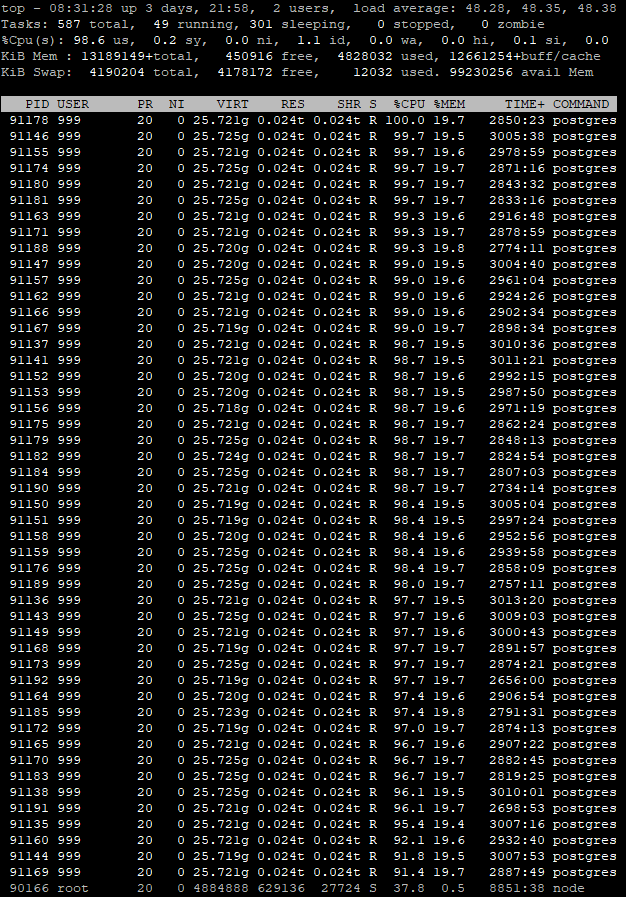
Here is the solution: https://github.com/mapbox/tilelive/issues/181
Just add UV_THREADPOOL_SIZE with the thread count to the environment section in docker-compose.yml
generate-vectortiles:
image: "openmaptiles/generate-vectortiles:0.1.1"
volumes:
- ./data:/export
- ./build/openmaptiles.tm2source:/tm2source
networks:
- postgres_conn
env_file: .env
environment:
BBOX: ${BBOX}
MIN_ZOOM: ${MIN_ZOOM}
MAX_ZOOM: ${MAX_ZOOM}
UV_THREADPOOL_SIZE: ${UV_THREADPOOL_SIZE} (from .env in my case)
Additionally I am playing with the postgres settings: https://gist.github.com/smellman/559f74158447c60ebc88c8bc12ebb505
Generating the mbtiles for the whole planet still is quite slow. After 2 days and 6 hours a i9 9900K with NVME is at 4,3%. A processor with a higher core count doesn't improve things necessarily a lot. I'm running this simultaneously on an Epyc 7401P which is at 3,7% after roughly the same time.
 GoingElectric
on 11 Mar 2019
GoingElectric
on 11 Mar 2019
Related issues
 rpieciorak
·
5Comments
rpieciorak
·
5Comments
 otherjason
·
6Comments
otherjason
·
6Comments
 lukasmartinelli
·
4Comments
lukasmartinelli
·
4Comments
 nyurik
·
7Comments
klokan
·
5Comments
nyurik
·
7Comments
klokan
·
5Comments
Most helpful comment
I was able to get generate-vectortiles to use all cores.
Here is the solution: https://github.com/mapbox/tilelive/issues/181
Just add UV_THREADPOOL_SIZE with the thread count to the environment section in docker-compose.yml
generate-vectortiles:
image: "openmaptiles/generate-vectortiles:0.1.1"
volumes:
- ./data:/export
- ./build/openmaptiles.tm2source:/tm2source
networks:
- postgres_conn
env_file: .env
environment:
BBOX: ${BBOX}
MIN_ZOOM: ${MIN_ZOOM}
MAX_ZOOM: ${MAX_ZOOM}
UV_THREADPOOL_SIZE: ${UV_THREADPOOL_SIZE} (from .env in my case)
Additionally I am playing with the postgres settings: https://gist.github.com/smellman/559f74158447c60ebc88c8bc12ebb505
Generating the mbtiles for the whole planet still is quite slow. After 2 days and 6 hours a i9 9900K with NVME is at 4,3%. A processor with a higher core count doesn't improve things necessarily a lot. I'm running this simultaneously on an Epyc 7401P which is at 3,7% after roughly the same time.