Openlibrary: Excerpts UI confusing for users
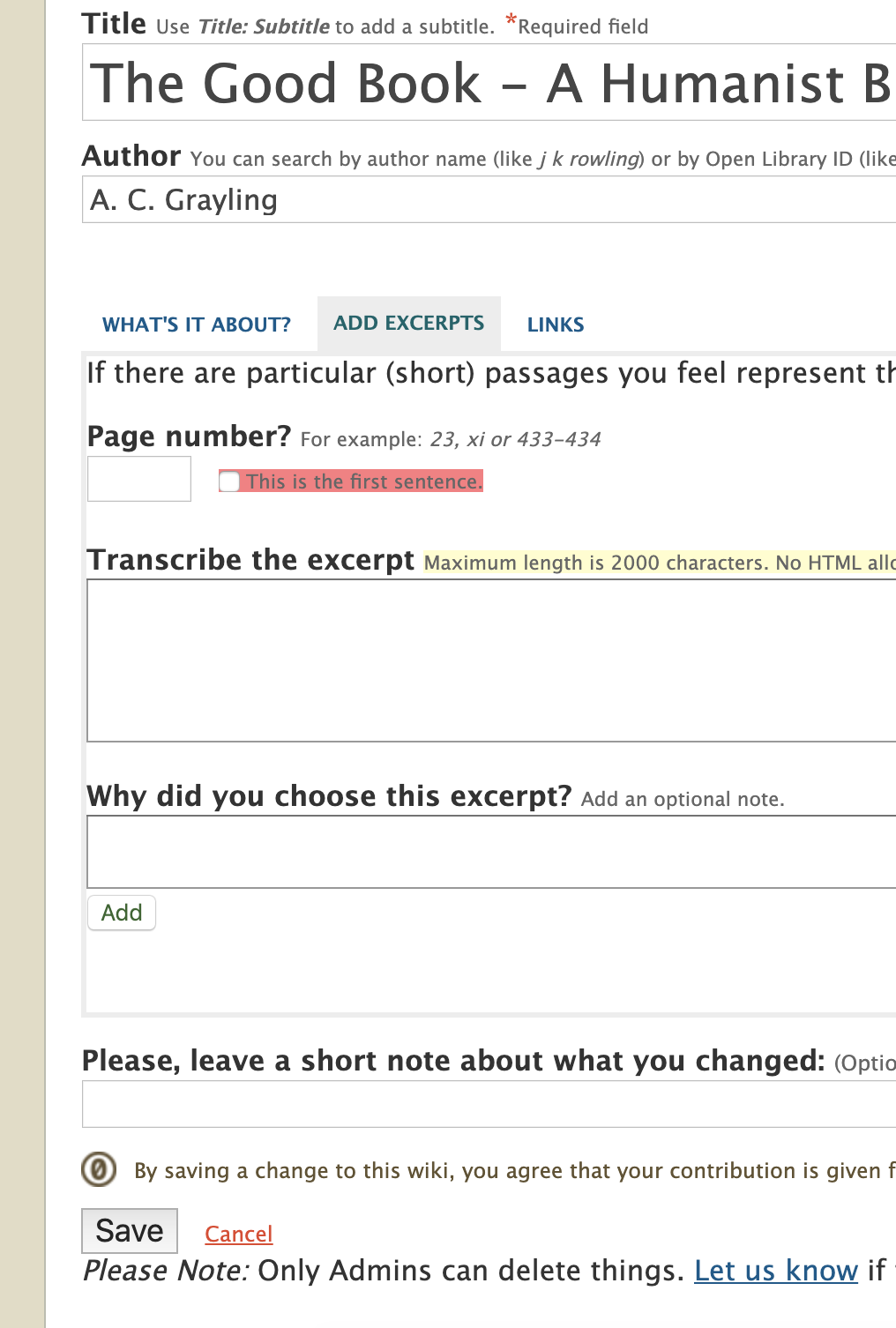
The UI for adding an excerpts is not intuitive for users. The process for adding an excerpt requires the user to save 2x; 1) the user must populate the fields than click ADD, 2) the user must click SAVE. I think a lot of users miss the ADD button and just click SAVE which results in the loss of the excerpt. (I personally do this on a regular basis.)
Evidence / Screenshot (if possible)
Relevant url?
Steps to Reproduce
- Go to Work edit form, Excerpts tab.
- Add excerpt text and click save.
- Actual: Excerpt is not saved because user did not first click ADD.
- Expected: User expects excerpt to be saved.
Details
prod
Proposal & Constraints
Save the populated data without requiring ADD.
Make an ADD ANOTHER button for users wanting to add multiple excerpts.
Related files
Stakeholders
@jdlrobson
 seabelis
All 6 comments
I am a new user of Open Library and tried to enter an excerpt three times. Each time I would enter the information and at the bottom of the page, I would click the Save button. So I finally contacted the support desk to ask what I was doing wrong and the support person suggested that I might have neglected to click the Add button. Since there were no instructions, the Add button did not seem like the proper one to click. Per the advice from the support person, I tried using the Add button and it worked.
This was an inconvenient experience. I am a persistent person, so reported the issue. I suspect most people would just give up and not try to resolve the issue. I urge you to fix this interface problem.
 tipkilby
on 17 Nov 2019
tipkilby
on 17 Nov 2019
@guyjeangilles Sorry, I thought this was on the Librarian project board when I changed to high-priority. Adjust as you see fit.
seabelis
on 19 Nov 2019
@tabshaikh I think the recent changes to the edit form resolve this as the excerpts are now part of the larger work edit form and the save button is not immediately below the excerpts section.
@tipkilby If you go to dev.openlibrary.org you can take a look at the changes.
seabelis
on 30 Jul 2020
Thank you @seabelis for helping identify the relevant issues :)
 tabshaikh
on 30 Jul 2020
tabshaikh
on 30 Jul 2020
I am thinking of adding a small note next to the Add button, something like *You must add excerpts before saving
tabshaikh
on 3 Aug 2020
I don't even think that would be necessary now. I think the confusion is that this section is in its own tab or "page" for some in terms of how it is displayed. That makes the SAVE button appear to belong to the excerpts, not to the whole record. The incorporation of this form section eliminates that presentation and I think will eliminate the problem.
seabelis
on 3 Aug 2020
Related issues
 bitnapper
·
4Comments
bitnapper
·
4Comments
 jdlrobson
·
5Comments
jdlrobson
·
5Comments
 BrittanyBunk
·
4Comments
BrittanyBunk
·
4Comments
 nemobis
·
5Comments
jdlrobson
·
5Comments
nemobis
·
5Comments
jdlrobson
·
5Comments
Most helpful comment
I am a new user of Open Library and tried to enter an excerpt three times. Each time I would enter the information and at the bottom of the page, I would click the Save button. So I finally contacted the support desk to ask what I was doing wrong and the support person suggested that I might have neglected to click the Add button. Since there were no instructions, the Add button did not seem like the proper one to click. Per the advice from the support person, I tried using the Add button and it worked.
This was an inconvenient experience. I am a persistent person, so reported the issue. I suspect most people would just give up and not try to resolve the issue. I urge you to fix this interface problem.