Openlibrary: There is a mismatch of availability of a book in a thumbnail to its true status
Example:
https://openlibrary.org/books/OL26571490M/Flush
https://openlibrary.org/books/OL26571491M/A_haunted_house_and_other_short_stories
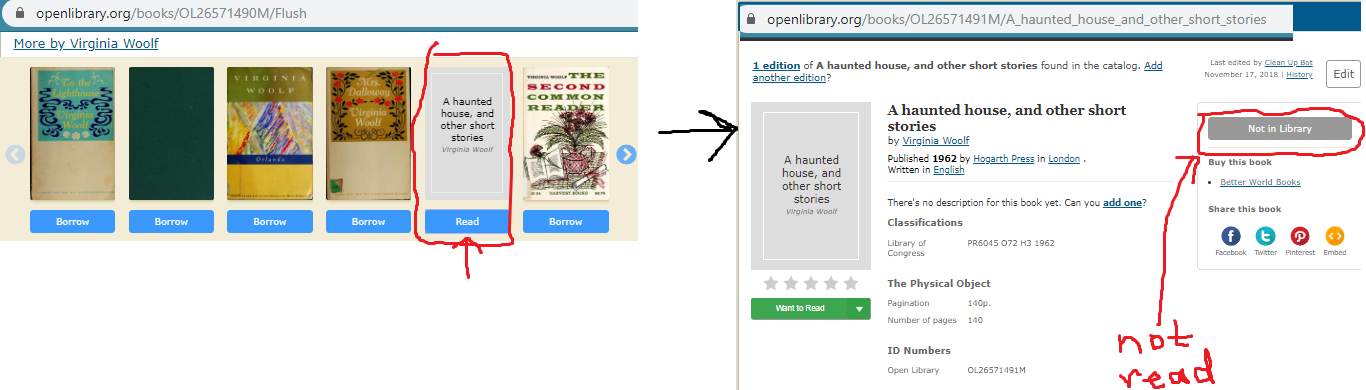
Problem:
Works in carousel say 'read', but when clicked on says 'no ebook available'. The expected result should be a read button there.
Solution:
Change the carousel to match the availability of the edition (as what shows on the editions page is the true status)
Stakeholders
Users - this issue creates confusion and frustration for someone hoping to see a book only to find out it's not available.
 BrittanyBunk
All 9 comments
@BrittanyBunk "Read" is now taking me to the Works pages. Is the same happening for you? If so can we close this issue?
 xayhewalo
on 25 Nov 2019
xayhewalo
on 25 Nov 2019
@guyjeangilles still happening. Like https://openlibrary.org/works/OL39416W/Virginia_Woolf to click on https://openlibrary.org/books/OL1557874M/Women_fiction. In the carousel, it says 'read'. When clicking on it, it goes to the edition page, but says 'no ebook available'
BrittanyBunk
on 26 Nov 2019
@BrittanyBunk I'm trying to understand the issue here, what is the expected result of clicking 'read'? Should we change the wording to something other than 'read' or does the button need to redirect to another page?
 Loquen
on 30 Mar 2020
Loquen
on 30 Mar 2020
@Loquen I apologize. I reworded it. Check out what I wrote :)
BrittanyBunk
on 30 Mar 2020
@BrittanyBunk Much clearer! Thanks for clarifying. So the solution seems to be if a book has a borrowable edition display it instead of the editions not in the library. If a book has only issues that are not in the library we can change the wording of the button to 'Not In Library' or something while still directing users to the books detail page.
Loquen
on 2 Apr 2020
I think you're referring more to another issue I created: #3248. You're specifying though - as what are in carousels are mostly works, so it should redirect to the most available edition - that is a good thought! What I'm referring to here is if a book is in a carousel, then its availability would need to match, no matter what it is. No ebook -> no ebook, read -> read, borrow -> borrow, etc.
BrittanyBunk
on 3 Apr 2020
I found the reason why!
The button (read, borrow, etc.) link to a book in the IA, while the book covers connect to the Work page of the OL edition webpage of the button.
BrittanyBunk
on 16 Apr 2020
Should be resolved now
 mekarpeles
on 30 Aug 2020
mekarpeles
on 30 Aug 2020
@mekarpeles this is still an issue as it's been brought up again in #4379. Please reopen, so there's no duplicates.
BrittanyBunk
on 8 Jan 2021
Related issues
 dcapillae
·
4Comments
dcapillae
·
4Comments
 LeadSongDog
·
5Comments
LeadSongDog
·
5Comments
 cclauss
·
3Comments
cclauss
·
3Comments
 jdlrobson
·
5Comments
jdlrobson
·
5Comments
 Pratyush1197
·
3Comments
Pratyush1197
·
3Comments