Openlibrary: Removing the last book from a list on list page throws an exception
Visit a list you own which just has one item.
e.g.
https://openlibrary.org/people/jdlrobson/lists/OL131254L/new_list
- Click "remove this item"
- A dialog shows. The close icon is off-centered
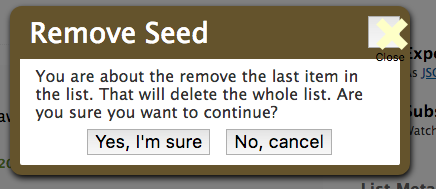
- Click "Yes i'm sure"
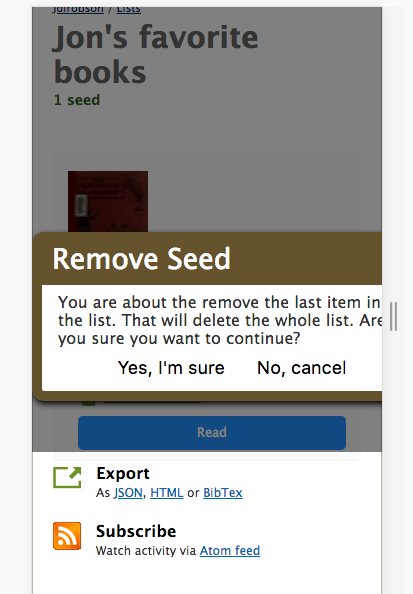
Expected: the book is removed from the list and the page is reloaded e.g. history.reload();
Actual: The book is removed successfully but a JS exception is thrown instead of some nice user feedback!
vendor-v2.js?v=9aed0c5aac43e3e7d9941b1c8d05ace9:2 Uncaught Error: cannot call methods on dialog prior to initialization; attempted to call method 'close'
    at Function.error (vendor-v2.js?v=9aed0c5aac43e3e7d9941b1c8d05ace9:2)
    at Object.<anonymous> (vendor-v2.js?v=9aed0c5aac43e3e7d9941b1c8d05ace9:34)
    at Function.each (vendor-v2.js?v=9aed0c5aac43e3e7d9941b1c8d05ace9:2)
    at e.fn.init.each (vendor-v2.js?v=9aed0c5aac43e3e7d9941b1c8d05ace9:2)
    at e.fn.init.t.fn.(anonymous function) [as dialog] (https://openlibrary.org/static/build/vendor-v2.js?v=9aed0c5aac43e3e7d9941b1c8d05ace9:34:5357)
    at Object.success (Jon's_favorite_books:687)
    at j (vendor-v2.js?v=9aed0c5aac43e3e7d9941b1c8d05ace9:2)
    at Object.fireWith [as resolveWith] (vendor-v2.js?v=9aed0c5aac43e3e7d9941b1c8d05ace9:2)
    at x (vendor-v2.js?v=9aed0c5aac43e3e7d9941b1c8d05ace9:4)
    at XMLHttpRequest.b (vendor-v2.js?v=9aed0c5aac43e3e7d9941b1c8d05ace9:4)
error @ vendor-v2.js?v=9aed0c5aac43e3e7d9941b1c8d05ace9:2
(anonymous) @ vendor-v2.js?v=9aed0c5aac43e3e7d9941b1c8d05ace9:34
each @ vendor-v2.js?v=9aed0c5aac43e3e7d9941b1c8d05ace9:2
each @ vendor-v2.js?v=9aed0c5aac43e3e7d9941b1c8d05ace9:2
t.fn.(anonymous function) @ vendor-v2.js?v=9aed0c5aac43e3e7d9941b1c8d05ace9:34
(anonymous) @ Jon's_favorite_books:687
j @ vendor-v2.js?v=9aed0c5aac43e3e7d9941b1c8d05ace9:2
fireWith @ vendor-v2.js?v=9aed0c5aac43e3e7d9941b1c8d05ace9:2
x @ vendor-v2.js?v=9aed0c5aac43e3e7d9941b1c8d05ace9:4
b @ vendor-v2.js?v=9aed0c5aac43e3e7d9941b1c8d05ace9:4
XMLHttpRequest.send (async)
send @ vendor-v2.js?v=9aed0c5aac43e3e7d9941b1c8d05ace9:4
ajax @ vendor-v2.js?v=9aed0c5aac43e3e7d9941b1c8d05ace9:4
$.ajax @ vendor-v2.js?v=9aed0c5aac43e3e7d9941b1c8d05ace9:224
n.(anonymous function) @ vendor-v2.js?v=9aed0c5aac43e3e7d9941b1c8d05ace9:4
Yes, I'm sure @ Jon's_favorite_books:686
(anonymous) @ vendor-v2.js?v=9aed0c5aac43e3e7d9941b1c8d05ace9:39
dispatch @ vendor-v2.js?v=9aed0c5aac43e3e7d9941b1c8d05ace9:3
r.handle @ vendor-v2.js?v=9aed0c5aac43e3e7d9941b1c8d05ace9:3
 jdlrobson
All 15 comments
I'd like to take a shot at this over the next couple of weeks if that's okay!
 anthonyattipoe
on 20 Nov 2018
anthonyattipoe
on 20 Nov 2018
@anthonyattipoe I've taken another look at this and the bug as originally reported is now fixed, but there's another problem with it. Please see updated description if you are interested in working out what's going wrong here!
jdlrobson
on 28 Nov 2018
@jdlrobson ok, thanks for the heads up. I'm pivoting to that now. I noticed some js code within the loaded html page for a book list:
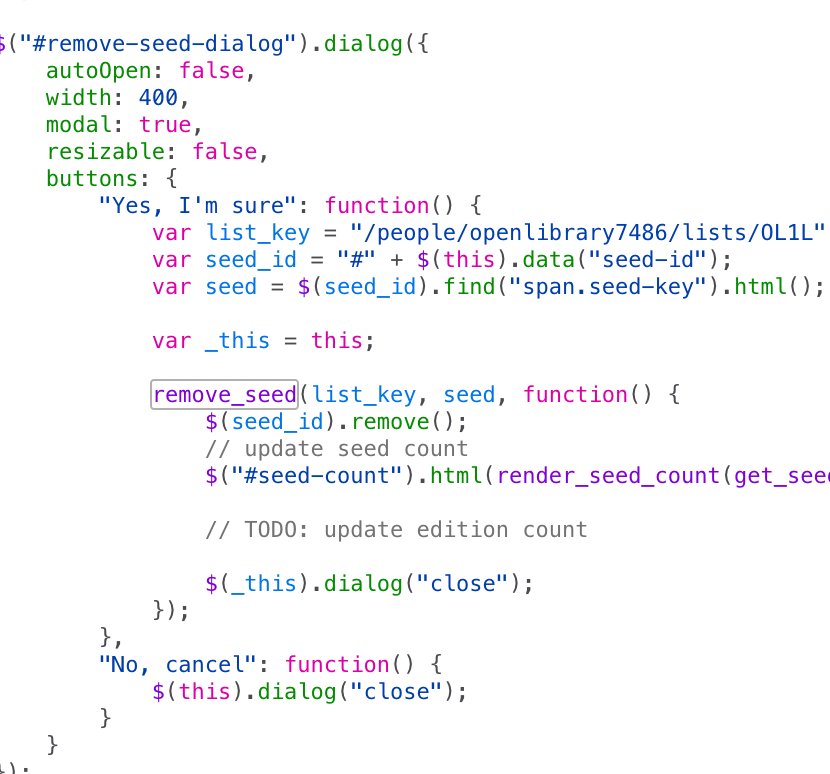
I tried to trace where that code was generated & added to the html file and found the following in "utils.js":
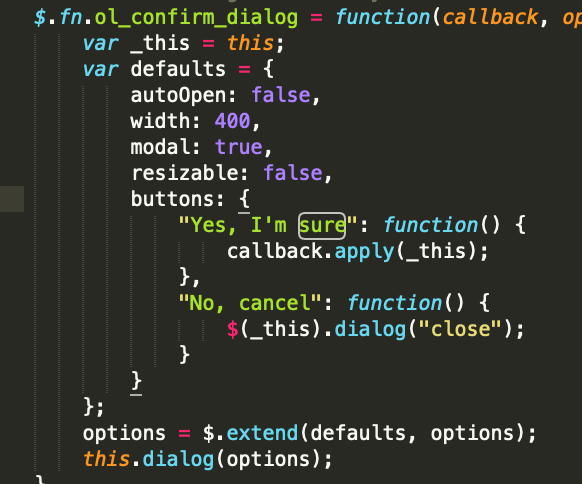
I've tried editing it but seems to have no effect. Any ideas please?
anthonyattipoe
on 4 Dec 2018
Sorry for the late reply @anthonyattipoe I've been on vacation.
I'm back now and keen to help you with this!
First things first, right now, any changes to JS need to be followed by:
docker-compose exec web bash
make js
does that make your changes show up?
jdlrobson
on 13 Dec 2018
Is the issue still to be worked out ?
 utkarsh-raj
on 16 Jan 2019
utkarsh-raj
on 16 Jan 2019
@jdlrobson I would like to work on this issue.
 ayushshivani
on 23 Jan 2019
ayushshivani
on 23 Jan 2019
Yes regression is still there. utkarsh-raj or ayushshivani either of you can work on this.
Don't worry too much if we end up with multiple patches. That feels like a good problem to have and we have plenty of issues to go round. :)
If you get stuck or learn something while attempting to fix it please report back- it's extremely useful to share problems!
jdlrobson
on 23 Jan 2019
Is this issue still open? Can I work on it?
 Mr-Magnificent
on 10 Feb 2019
Mr-Magnificent
on 10 Feb 2019
@Mr-Magnificent yes please!
jdlrobson
on 10 Feb 2019
@jdlrobson sorry I am having trouble running the command docker-compose up. Can you tell a workaround or if I can do without docker as a whole?
:~/Documents/opens/openlibrary$ sudo docker-compose up
Pulling solr (olsolr:)...
ERROR: The image for the service you're trying to recreate has been removed. If you continue, volume data could be lost. Consider backing up your data before continuing.

Continue with the new image? [yN]y
Pulling solr (olsolr:)...
ERROR: pull access denied for olsolr, repository does not exist or may require 'docker login'
@Mr-Magnificent looks like you need to run docker build -t olsolr:latest -f docker/Dockerfile.olsolr . to create the ol-solr image
 hornc
on 11 Feb 2019
hornc
on 11 Feb 2019
@jdlrobson kindly check whether this solves the issue. My best guess was that this was not in context in the code and since reload is anyway required then we can just simply reload than to close the dialog and then reload. If you can please do confirm if my assumptions are correct about this and whether this solves the purpose. Thanks!
Mr-Magnificent
on 12 Feb 2019
Sorry @Mr-Magnificent for the delay I've been sick. I've not tested to check, but it looks like this will fix the JS error but not close the dialog. Will pull the code down and take a look as soon as I'm feeling better if nobody else beats me to it.
jdlrobson
on 14 Feb 2019
Just tested what @jdlrobson had suggested and it seems that it should work. Created a pull request to therefore solve this issue. internetarchive#2474
 qawbecrdteyf
on 6 Oct 2019
qawbecrdteyf
on 6 Oct 2019
Thank you @qawbecrdteyf for the patch
jdlrobson
on 6 Oct 2019
Related issues
 bitnapper
·
4Comments
jdlrobson
·
5Comments
bitnapper
·
4Comments
jdlrobson
·
5Comments
 nemobis
·
5Comments
nemobis
·
5Comments
 Yashs911
·
5Comments
Yashs911
·
5Comments
 Pratyush1197
·
3Comments
Pratyush1197
·
3Comments