Openkore: xconf or pickupitems not working as it should
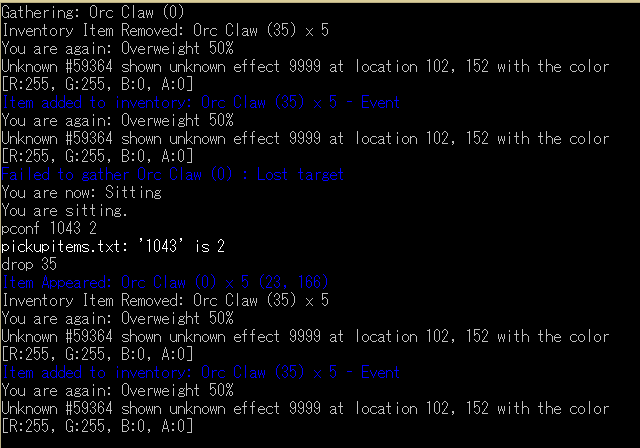
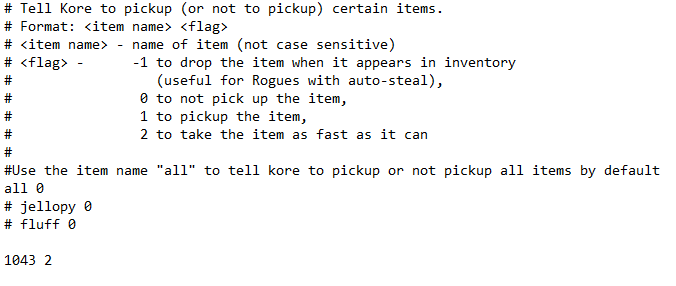
xconf (pconf) is adding Item ID in pickupitems.txt, but Kore is not picking up items unless I put the name, like Orc Claw instead of 1043 (Orc Claw ID).
When I use pconf Orc Claw 2, it goes to pickupitems as 1043 2 # Orc Claw, but it wont pick it, unless i put the name.
100% reproduction.
I dont know if the problem is with xconf inserting item as ID, or is at pickupitem doesnt picking ID numbers.
 nizdi
nizdi
All 24 comments
Latest version have no problem.
Working fine as it should.
Check your setting again.
 Fadreus
on 10 Dec 2018
Fadreus
on 10 Dec 2018
@Fadreus I'm so sorry, i thought mine was sync automatic, i'm doing it by hand now and gonna check. I'll come back.
EDIT: 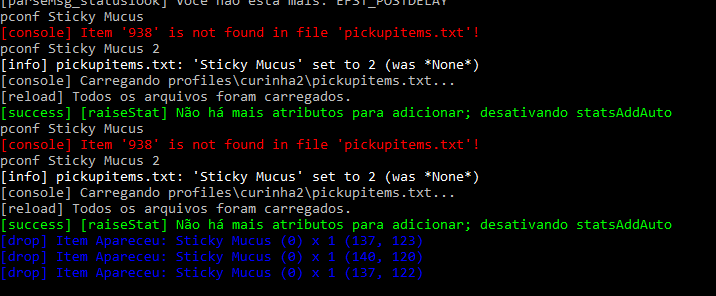
Yeah, i've got some problem with mine. Even after using 2 times pconf command it says it was none from the begining. I'm reinstalling it to try again.
EDIT2:
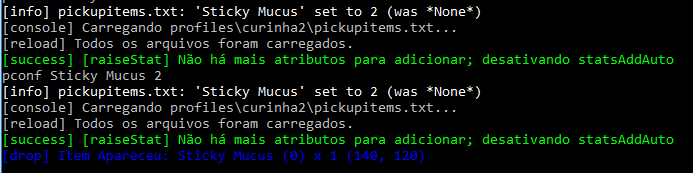
Still not working, I think it might be something with permissions from windows to edit files? It always shows as none even after I putting it there...
EDIT 3: Third time resintalling still not picking up, but it always shows as none, I think that might be the problem. When you use pconf ITEM it shows last status of picking up this item, or shows as none for you too? I tried running as admin, nothing changes. I'm installing strawberry perl to try to run start.pl instead of .exe.
nizdi
on 10 Dec 2018
I'm more intrigue on curinha2 while default must be control.
Do you use some thing like openkore manager; which not from openkore?
When you use pconf ITEM it shows last status of picking up this item, or shows as none for you too?
To answer your question, if the item didn't exist, it will be added.
Fadreus
on 10 Dec 2018
I use plugin profiles, but I thought it was default. Might be the problem? I did not tried in usual control folder, but I'll try and come back (1 hour from ago I think)
If the item already exist, it show his state (0, 1, 2) or show as none?
EDIT: Sorry about being late I could not answer on time.
EDIT 2: I just tried in default folder, not working. I'll try to find out if it's some problem with acess to folders from start.exe.
I'm pretty much sure the problem is with: [info] pickupitems.txt: 'Sticky Mucus' set to 2 (was *None*) which should change to at least something, but it always return none.
EDIT 3: line 295 from xConf.pl message "$file: '$name' set to @value (was ". ($oldval || "*None*") .")\n", 'info'; for some reason is always returning none, even if I add ITEMname or ITEMid. I really cant imagine why it's not working as it should. I just dont understand why did not work after a fresh installation.
nizdi
on 10 Dec 2018
If I were you, I ditch profile.pl and use this.
Fadreus
on 10 Dec 2018
I think the problem was the comments that keep in front of item ID
when you use the pconf command, it automatically insert this comment, which confuses the regexes
For us to be sure, use this command on your openkore (after using pconf with ID)
eval use Data::Dumper; warning (Dumper(\%pickupitems)) ;
This will show some yellow lines, send us the print of this please
 Nipodemos
on 10 Dec 2018
Nipodemos
on 10 Dec 2018
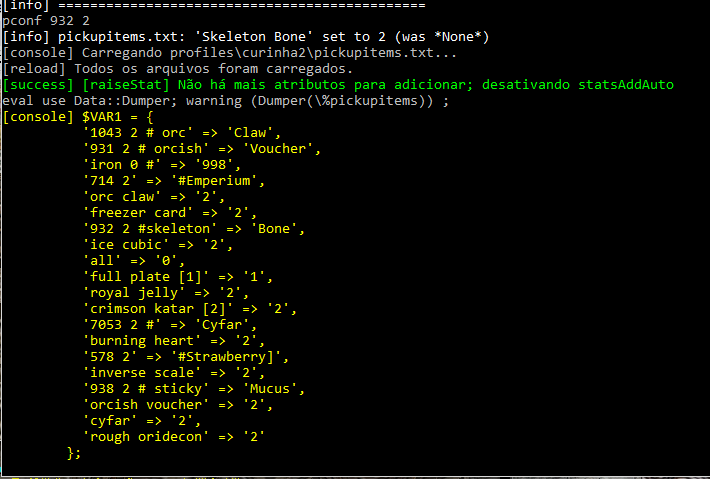
Item is Skeleton Bone (ID = 932) now.
@Fadreus but the problem persist even without profiles. I'll reconsidering using it, but I just wanted xconf.pl to work, it's so damn useful. And if i'm not wrong, it worked with before, it's only showing problems now.
@Nipodemos but for comparison why it confuses mine regexp but not from Fadreus? He tried the same item as me (orc claw).
EDIT: Now I gotta what's happening, it's only getting part of the item. Why is that? I tried with " but says item doesn't exist.
nizdi
on 10 Dec 2018
1 thing is weird; why raiseStat always appear?
It should be just this:
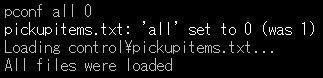
Note: I don't Portuguese.
Fadreus
on 10 Dec 2018
I don't know, it always appear when I reload something from control folder. I'll check again at home, but maybe a plugin problem? I'll try disable some plugins to take a look, but I was just used to it appearing. The condition to add stats is off in config.txt tho.
nizdi
on 10 Dec 2018
@nizdi if you pay attention to fadreus print, you'll notice the there isn't a comment in front of item, that's why it works on his openkore
Fortunaly, the problem was already solved today by @lututui, just update your openkore again and it will probably work
Nipodemos
on 10 Dec 2018
I'll try again at home but it's weird since I downloaded the new openkore already with the pull from lututui, but I'll see it again.
I just did not understood why fadreus had the same version as me and the results were different.
nizdi
on 10 Dec 2018
Still not working.

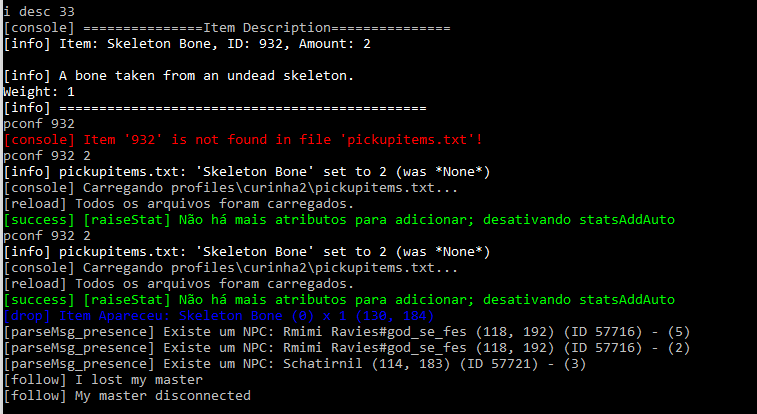
It's a slave bot but itemsgatherauto and pickupitems are 2 in config.
My pickupitems still using this structure:
932 2 # Skeleton Bone
Which might be the problem as you said.
Also, @Fadreus raiseStat is from the plugin in the default openkore (raiseStat.pl)
`Hooks used to activate the plugin during initialization and on config change events.
my $base_hooks = Plugins::addHooks(
['start3', \&checkConfig],
['postloadfiles', \&checkConfig],
['configModify', \&on_configModify]
);`
Which, if I understand it right, it's gonna trigg whenever I make a modification in config files.
EDIT: Making changes in default plugin is an option, or it's just mine kore?
nizdi
on 10 Dec 2018
@nizdi how are you updating your openkore? I just tested and seems to work fine for me, even with comments
Nipodemos
on 10 Dec 2018
@Nipodemos through git sync. I'll download a fresh one right now again to try, my old folder could be broken idk.
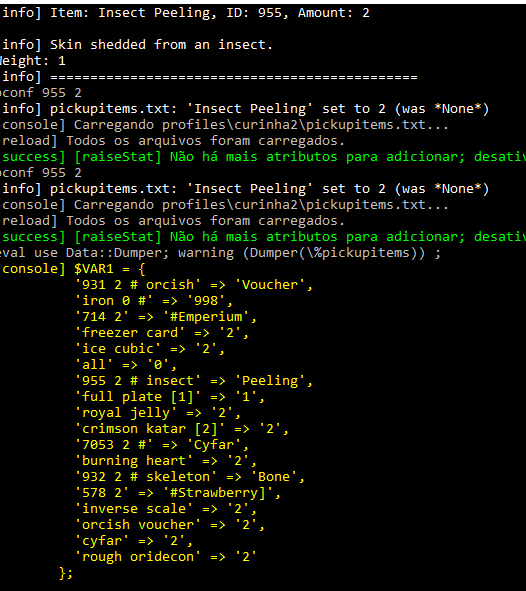
EDIT: Even downloading a new one is not working for me. If I just let ID in pickupitems.txt (by hand, not via command) it works great. But with command it becames messy. I think it's about that command you told me to use (eval use Data::Dumper; warning (Dumper(\%pickupitems)) ;) like it's in the image:
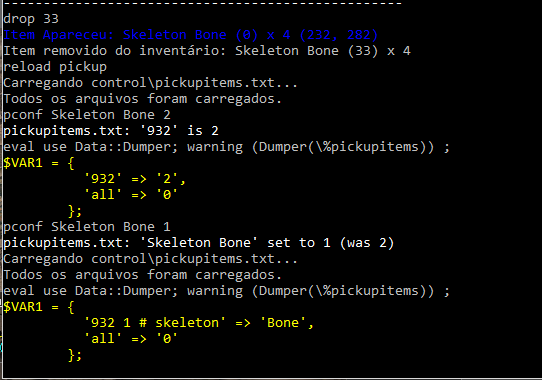
Disclaimer: I set Skeleton Bone as 2 in pickupitems.txt, that's why it changed to 1, but after that added the # comment.
And what I talked about, whenever I do a command in pconf says last value was none:
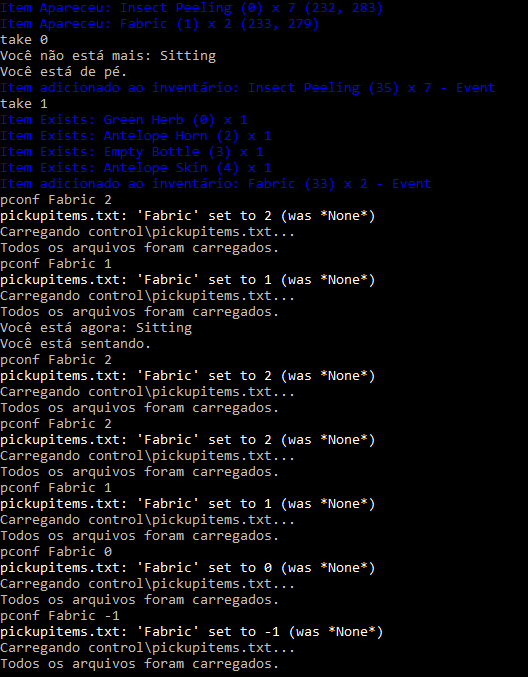
I mean, I can do it by hand, it's just a pain since xConf was always great and working with me. Maybe some incompatibility (or only in iRO). Thanks for the help.
EDIT 2: another weird thing --> raiseStat is not appearing when I do pconf in the fresh download.
Other thing is that mConf is working flawless (showing old value instead of none):
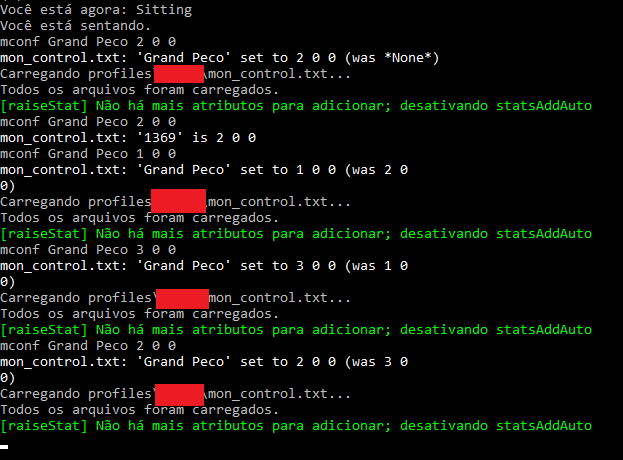
I really don't get it.
nizdi
on 11 Dec 2018
You might wanna tell us what changes have you done with openkore and your PC since it last working that you claimed to be.
At this point, xConf is working fine.
Openkore also working fine.
Even if you could provide the reproduce step, I doubt the value would remain none
Put a comment before or after, if the value didn't exist, it will be written a new.
If the value exist, even if it incorrect, it would show old value.
Either way, I tried possible common mistakes and I can't reproduce as what happened to yours.
Try run on different platform or in VM.
Fadreus
on 11 Dec 2018
put the comment under your item's line, not on the same line, how's that ?
 c4c1n6kr3m1
on 11 Dec 2018
c4c1n6kr3m1
on 11 Dec 2018
put the comment under your item's line, not on the same line, how's that ?
It's automatic put by the plugin after the ID + (-1,0,1,2) or I would. I dont know what to change in xConf.pl to change it.
You might wanna tell us what changes have you done with openkore and your PC since it last working that you claimed to be.
At this point, xConf is working fine.
Openkore also working fine.Even if you could provide the reproduce step, I doubt the value would remain
none
Put a comment before or after, if the value didn't exist, it will be written a new.
If the value exist, even if it incorrect, it would show old value.Either way, I tried possible common mistakes and I can't reproduce as what happened to yours.
Try run on different platform or in VM.
I know it's my computers problem. I'll try to run a VM since I can't try in another computer, but thanks for all the help.
nizdi
on 11 Dec 2018
I just had the exact same problem, I I've noticed that it's not the plugin thing it's openkore
openkore is not removing comments, I'll try to make a pull request today to fix that
Nipodemos
on 11 Dec 2018
@fadreus if you use pconf command to insert a new item on pickupitems (and use ID of item) you'll notice that you'll have the same problem
Nipodemos
on 11 Dec 2018
I am almost sure that the problem occurs when you are not using default control folder
Nipodemos
on 11 Dec 2018
Okay. Now that you mention it, everything he said is making sense now.
Fadreus
on 11 Dec 2018
@nizdi , for now, what if remove the additional comment from xconf.pl
, "#", $key
, "#", $name
c4c1n6kr3m1
on 11 Dec 2018
@c4c1n6kr3m1 it's working great now!!!
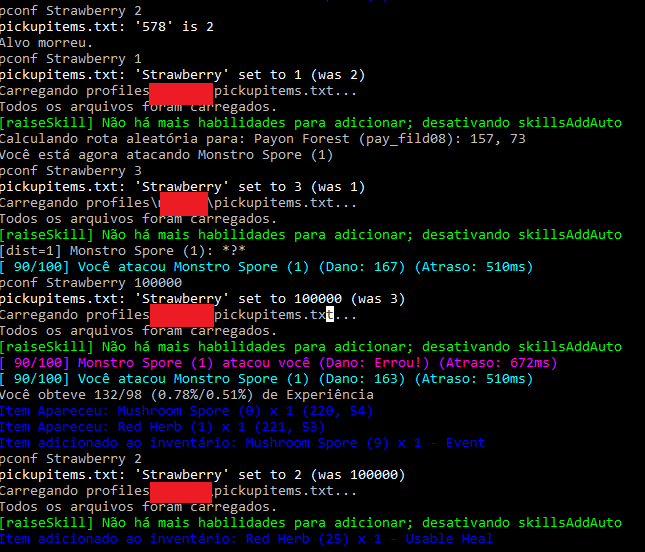
As a quickfix changin lines 273 and 275 (comments) from xConf.pl is working.
nizdi
on 11 Dec 2018
lets wait someone make a proper fix for this rather than a trick , well i don't use this plugin nor profile plugin
may be @Nipodemos has found the culprit ?
c4c1n6kr3m1
on 12 Dec 2018
Related issues
 farrainbow
·
4Comments
farrainbow
·
4Comments
 ncplay91
·
4Comments
ncplay91
·
4Comments
 joecabezas
·
5Comments
joecabezas
·
5Comments
 kumulo123
·
5Comments
kumulo123
·
5Comments
 lututui
·
5Comments
lututui
·
5Comments