Openkore: xKore 1 and xKore 3 not have suport to encryptMessageID
Summary:
openkore xkore 1 and xkore 3 not have suport to encryptMessageID
Affected configuration(s)/ file(s):
network\xkore
network\xkoreProxy
Impact:
no one can connect to a server that need encryptMessageID
Expected Behavior:
connect to servers using encryptMessageID
Actual Behavior:
kore not work with encryptMessageID when we connect to a server that need.
Steps to Reproduce:
Just try to use xKore 1 or 3 in a server that have crypt keys
References:
1174
1160
1133
977
540
innitial support:
https://github.com/alisonrag/openkore/commit/3034f398f7aed74835c24ec24b171d2ee8a0ba88
bug in map with players when login, kore lost itself in keys or maybe in packet '-'
 alisonrag
All 52 comments
what help do you guys need, never used xkore before
 joecabezas
on 3 Oct 2017
joecabezas
on 3 Oct 2017
This is the logs that I got, it is in xkore 1, however after the update of Philippine Ragnarok Online it seems that xkore 1 won't connect anymore as seen down below the italicized text.
 bebox123
on 3 Oct 2017
bebox123
on 3 Oct 2017
@joecabezas
i have started just, you can start trying to connect with the following files
https://github.com/alisonrag/openkore/commit/3034f398f7aed74835c24ec24b171d2ee8a0ba88
alisonrag
on 3 Oct 2017
If I am able to use xKore 1 on Restart after this gets fixed then I will try to help as well, just tell me what I need to do as I do not know, I don't mind dedicating some time to this.
 Raguto
on 3 Oct 2017
Raguto
on 3 Oct 2017
1227
 sctnightcore
on 3 Oct 2017
sctnightcore
on 3 Oct 2017
@bebox123 kindly upload your openkore folder(don't forget to remove user account) and lemme check your settings. I'll see what I can do
 corexkore
on 3 Oct 2017
corexkore
on 3 Oct 2017
@corexkore the whole folder? Really bruh? Haha and you joined 2 hours ago.
bebox123
on 3 Oct 2017
Would really be nice to have this resolved eventually. xkore seems to be a pretty niche thing. As alisonrag say this started happening when Re-Start started using cryptkeys a bit back. My guess is that xkore was just overlooked when the encrypted packets were found.
 Mustardfreedom
on 3 Oct 2017
Mustardfreedom
on 3 Oct 2017
for everyone:
start from here
https://github.com/alisonrag/openkore/commit/3034f398f7aed74835c24ec24b171d2ee8a0ba88
alisonrag
on 3 Oct 2017
@alisonrag – xKore 3 is hit and miss: I was able to run xKore 3 long enough to kill a single monster and on reloading the client and OK, I was able to again run xKore 3 long enough to gather an item. Other times, I simply receive a timeout disconnect.
 elitecasaj00
on 4 Oct 2017
elitecasaj00
on 4 Oct 2017
1236
sctnightcore
on 5 Oct 2017
Working with bRO:
https://github.com/alisonrag/openkore/tree/xkore-proxy-cryptkeys
Need test in iRO, maybe some packets are different
alisonrag
on 6 Oct 2017
You're a god; I will test this later tonight.
elitecasaj00
on 6 Oct 2017
Using Xcore3 gets up to char select then after selecting it disconnects
Disconnecting (128.241.92.130:4500)...disconnected
Closing connection to Character Server
Connecting (128.241.92.131:4503)... connected
Proxying to [International - iRO: Ymir/Yggdrasil/Valkyrie]
[reconnect] Login retry number 2, setting reconnect timeout to 69 seconds.
Connecting (128.241.92.162:6800)... connected
With XKore1 you can login with the char but after that you cant move or do anything
 mseifer
on 6 Oct 2017
mseifer
on 6 Oct 2017
xKore 3 is timing out after character select; see attached
console.txt
elitecasaj00
on 7 Oct 2017
Are the xkore 0 working?
I only supose that the mda keys are wrong
alisonrag
on 7 Oct 2017
xKore 0 is not working - timing out on map server
elitecasaj00
on 7 Oct 2017
I tried xkore 1 on restart and it's not working there either, I move once and then it does the timeout.
Raguto
on 7 Oct 2017
Xkore 1,2,3 are sensitive only work if xkore 0 are working perfect
alisonrag
on 7 Oct 2017
@allanon can you help us with the update of iro ymir?
alisonrag
on 7 Oct 2017
I can connect with xkore 0 in Iro - Renewal - Chaos! -- Using the files from iro-update branch
With xkore 2, I got "disconnected from server" in character selection screen
With xkore 1, the kore recognizes the opened client, but can't connect with it!
 Fvegini
on 7 Oct 2017
Fvegini
on 7 Oct 2017
@Fvegini the one in your xkore 1 procedure is also my problem in phRO. If that hooks up then I can run the bot smoothly as I already connected it previously before the new server went up.
bebox123
on 7 Oct 2017
xkore 2 works like a charm in iRO:Restart if the character is female. on my male character, it swaps the gender when i open ragexe and then i get a disconnected from server when trying to connect to map server
 Pachu1985
on 11 Oct 2017
Pachu1985
on 11 Oct 2017
Can confirm, xKore 2 works flawlessly with female characters.
elitecasaj00
on 12 Oct 2017
xkore 0 works for re:start. xkore 1 - dc after connecting to map server. xkore 2 cant hook the client. Dont know how you managed to work it even with female acc.
nvm. Xkore 2 works fine with client, my bad, forgot to configure :D
 Youtouchmytralala
on 13 Oct 2017
Youtouchmytralala
on 13 Oct 2017
Hello, any update on this or can already lose hope?
thank you!
mseifer
on 17 Oct 2017
@mseifer
i'm working on this.
current i'm here:
xkore 1:
no changes:
xkore 2:
bRO: working and fixed the unknow map error in character select screen
iRO: working male and female character
private servers: working
xkore 3:
bRO: working perfectly
iRO: working with dc after some seconds (trying to figure out what is doing this)
private servers: not tested yet
alisonrag
on 17 Oct 2017
Thanks for male characters with xKore 2 - much appreciated
elitecasaj00
on 18 Oct 2017
@alisonrag
Thanks man... but I must be doing somthing wrong then. (Or the version you`re working on isn't commited yet)
When I try to use xkore 2 on iro-chaos, the ragnarok client shows a female character with wrong hair style and color in an "Unknown" map... if I try to connect it anyway, the client show a "Disconected from server" and return to login screen.
My openkore.xml looks this:
In the original clientinfo.xml the "version" is 18 and has extra information like
I tried to add and remove a few combinations of them, but nothing changed.
Fvegini
on 18 Oct 2017
@elitecasaj00 @Fvegini
try this branch:
https://github.com/alisonrag/openkore/commits/iro-xkore2-fix-male-character
use the original xml, just change the ip and port to xkore
alisonrag
on 18 Oct 2017
xKore 2 confirmed working with male character; thanks for update
elitecasaj00
on 19 Oct 2017
@alisonrag
Worked 100% with the new files thanks for them and thanks for the tip of the original xml!
Fvegini
on 19 Oct 2017
Ragexe is not responding after the new update – anyone else seeing the same thing?
elitecasaj00
on 20 Oct 2017
Here, after the last update, openkore is still connecting with xkore2, but the ragnarok client seems weird!
Sometimes it syncs with the kore actions, sometimes it remains idle, and at some moment it just "teleport" to the actual character location and keep stopped!
Really weird
Fvegini
on 21 Oct 2017
For me xCore 1 is still not working. It shows nothing. Means no inventory, skills, etc.. Can't move.
xCore 0 has no problem. I downloaded a fresh copy of openkore to check if there are any problems with mine, but no, doesn't work neither.
 MasterOfBytes
on 25 Oct 2017
MasterOfBytes
on 25 Oct 2017
@MasterOfBytes
the fix for xkore 3 is here:
1290
for xkore 1 in future i will work around
alisonrag
on 25 Oct 2017
1322
sctnightcore
on 27 Oct 2017
Any news on xkore 1? I cant get xkore 2 nor 3 to work and not being able to actually see the game UI is really bad
 KnightSickle
on 29 Oct 2017
KnightSickle
on 29 Oct 2017
@KnightSickle
is the xkore 0 working?
xkore 1,2,3 will only work if xkore 0 is working
alisonrag
on 29 Oct 2017
@alisonrag Yes it is, using it right now, its just that i have no idea how to setup 2 nor 3 so im expecting a fix to 1 since that is the most simple apparently. There arent really any user-friendly guides and i dont want to bother people about it, but every time i try to start xkore 2 nothing happens the bot just starts as if it was xkore 0 and when i try to use xkore 3 the bot asks me to start ragnarok on the localhost but it doesnt seem to recognize it when i do so after i start it nothing else happens on the console.
KnightSickle
on 29 Oct 2017
I'm using xkore 2 on iRO:RE and it works like a charm, even with multiple clients. Did you configure the shortcut to Ragexe.exe with the correct parameters? Did you edit the clientinfo.xml? I can try help you configure xkore 2
Pachu1985
on 30 Oct 2017
1339
sctnightcore
on 30 Oct 2017
@Pachu1985
Can you please tell us a step by step what you did? When you say did you configure the shortcut what do you mean by that? or the clientinfo?
I'm sorry im bit new to this. oKore 0 works fine for me but with the number of GM's about I would like to see what is going on when im boting and using my slave.
Regards
 ShadowCold
on 30 Oct 2017
ShadowCold
on 30 Oct 2017
When setting XKore 3 and connecting with the client, it disconnects after selecting server:
Waiting Ragnarok Client to connect on (localhost:6901)
Proxying to [International - iRO: Ymir/Yggdrasil/Valkyrie]
[reconnect] Login retry number 2, setting reconnect timeout to 67 seconds.
Connecting (128.241.92.162:6800)... connected
---------- Account Info ----------
----------------------------------
---------------------- Servers ----------------------
#   Name                  Users  IP              Port
0   Thor                  513    128.241.92.155  4500
1   Chaos                 2367   128.241.92.130  4500
-----------------------------------------------------
Closing connection to Account Server
Disconnecting (128.241.92.162:6800)...disconnected
@ShadowCold
I don't think this is the place for that. Leave me your forum username and i will PM there since i can't find a way to send PM here
Pachu1985
on 30 Oct 2017
@Pachu1985 u can help me? for me dont work... i use the guide of https://wiki.wetfish.net/xkore but not work in xkore2 my nik in forum its SusanooWoSPR
 MysticFurur0RE
on 1 Nov 2017
MysticFurur0RE
on 1 Nov 2017
fix in #1347
alisonrag
on 2 Nov 2017
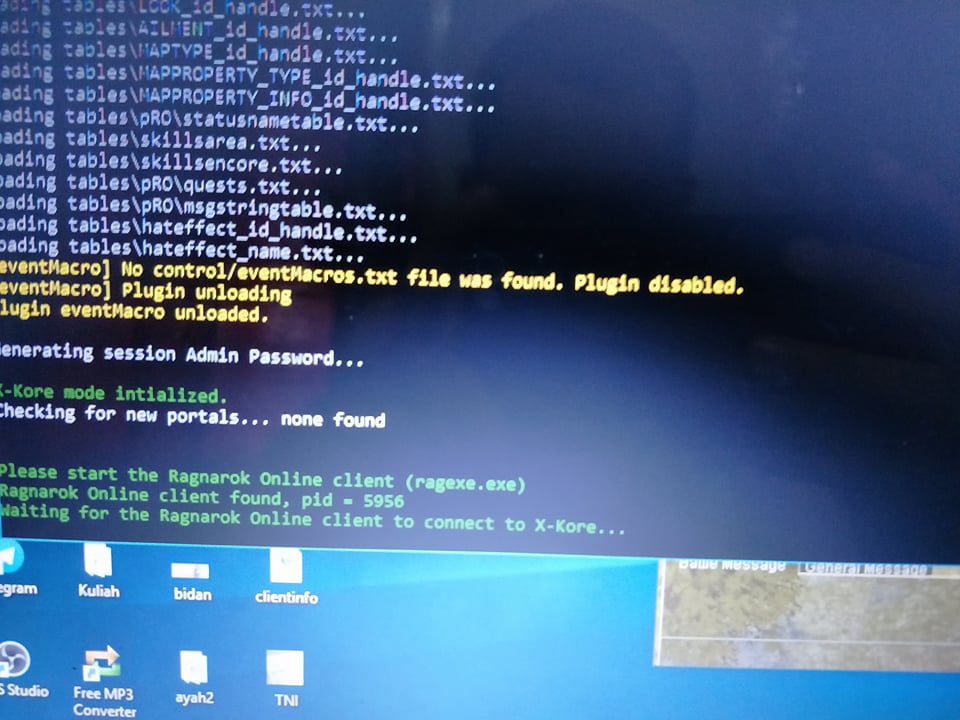
Im seeking for help.
Playing Official server Ragnarok MYSG .
ive some issue that i cannot go through in.
Im really need help about this Connection ragnarok client to xkore.
 cowan26
on 17 Feb 2018
cowan26
on 17 Feb 2018
@cowan26 dont work in mRO :p
sctnightcore
on 17 Feb 2018
come on bro. i saw too many people botting around. please help :(
cowan26
on 17 Feb 2018
@cowan26 That working bot is from personal individual who make it work, not from official openkore release. If you want, go find them.
And please remember this.
Github for fix bug, not for help.
Need help, go forum.
 Fadreus
on 17 Feb 2018
Fadreus
on 17 Feb 2018
@fadreus bro aku betul2 perlukan pertolongan ni. Aku dah comment dkt forum tapi xde yg jawab 😣😣
cowan26
on 17 Feb 2018
Related issues
 Queroz
·
4Comments
Queroz
·
4Comments
 CaioVictor21
·
4Comments
CaioVictor21
·
4Comments
 ramojskie
·
5Comments
ramojskie
·
5Comments
 kumulo123
·
5Comments
kumulo123
·
5Comments
 comdevx
·
3Comments
comdevx
·
3Comments
Most helpful comment
fix in #1347