Openjdk-tests: make compile on Mauve tests requires java in path
Describe the bug Building the mauve suites requires a java explicitly in the PATH
To Reproduce
Steps to reproduce the behavior (or Grinder rerun link): BUILD_LIST=system make compile
get-source:

BUILD FAILED
/home/sxa/openjdk-tests/TKG/scripts/build_test.xml:76: The following error occurred while executing this line:
/home/sxa/openjdk-tests/system/common.xml:255: The following error occurred while executing this line:
/home/sxa/openjdk-tests/system/common.xml:246: The following error occurred while executing this line:
/home/sxa/openjdk-tests/system/openjdk-systemtest/openjdk.build/build.xml:58: The following error occurred while executing this line:
/home/sxa/openjdk-tests/system/openjdk-systemtest/openjdk.test.mauve/build.xml:363: Execute failed: java.io.IOException: Cannot run program "java" (in directory "/tmp/mauve"): error=2, No such file or directory
    at java.lang.ProcessBuilder.start(ProcessBuilder.java:1048)
Expected behavior Test suite would be able to use the java from TEST_JDK_HOME but it doesn't.
Screenshots n/a
Additional context n/a
I suspect this would be fairly simple to change, and I can't see a reason why it would be beneficial to use the system one instead of the one under test for building, so I would suggest that this be changed to invoke TEST_JDK_HOME/bin/java (or jre/bin/java) instead of relying on the PATH for simplicity.
 sxa
sxa
All 17 comments
(Potential good first issue?)
sxa
on 16 Mar 2021
Hi @smlambert! Can this issue be assigned to me as an Outreachy applicant?
 SAY-droid427
on 13 Apr 2021
SAY-droid427
on 13 Apr 2021
For sure @SAY-droid427 !
 smlambert
on 13 Apr 2021
smlambert
on 13 Apr 2021
Hi @smlambert! Thanks for assigning the issue to me. Could you please explain the steps I should follow to solve this issue? Thank you!
SAY-droid427
on 14 Apr 2021
Hi @SAY-droid427 - a few things you can do to start with:
- try to reproduce this failure locally (by checking you have no java in your PATH environment variable and then loosely following these general steps with setting BUILD_LIST=system and TEST_JDK_HOME to something you have installed from adoptopenjdk.net, and test target you attempt to run is _MauveSingleThrdLoad_HS_5m. See if you get the same problem as reported in this issue (presumably so).
- look at the file and line number identified in the description, to understand more about the failure
get-source:

BUILD FAILED
/home/sxa/openjdk-tests/TKG/scripts/build_test.xml:76: The following error occurred while executing this line:
/home/sxa/openjdk-tests/system/common.xml:255: The following error occurred while executing this line:
/home/sxa/openjdk-tests/system/common.xml:246: The following error occurred while executing this line:
/home/sxa/openjdk-tests/system/openjdk-systemtest/openjdk.build/build.xml:58: The following error occurred while executing this line:
/home/sxa/openjdk-tests/system/openjdk-systemtest/openjdk.test.mauve/build.xml:363: Execute failed: java.io.IOException: Cannot run program "java" (in directory "/tmp/mauve"): error=2, No such file or directory
    at java.lang.ProcessBuilder.start(ProcessBuilder.java:1048)
Some notes:
These xml files are ant scripts (see more about ant in this ant tutorial), looking at each:
- system/openjdk-systemtest/openjdk.test.mauve/build.xml:363 - instruction that says use an executable named java (and does not define 'which' java to use, so ant will attempt to use the one on the PATH...
so it may be at this line that can be changed so that if Java is not on the PATH, try to use the Java defined at TEST_JDK_HOME which should be set if people are using the preferred method for running systemtest material (via TKG/openjdk-tests)
smlambert
on 14 Apr 2021
@smlambert Thank you so much for the detailed explanation! I will try to reproduce the bug locally and reach out to you for help if I get stuck. Would you suggest that I take a short video tutorial on Apache ant for better understanding of the project or is the tutorial you have mentioned enough?
SAY-droid427
on 15 Apr 2021
Ant is used to compile java test material in our project. Make/gmake used for compiling native test material. Having basic understanding of how things are built is useful, but running things directly and trying to make changes is like more useful for understanding.
smlambert
on 15 Apr 2021
@smlambert I am a bit stuck while installing the pre-reqs on my new laptop(using Ubuntu 18.04). I have checked that I have no java in my PATH environment variable. I have installed Apache-ant 1.10.5 version using apt and also downloaded the ant-contrib1.05b. The ant has been downloaded to the usr/bin/ant. But how do I link the ant-contrib? I had been following these steps :http://ant-contrib.sourceforge.net/.I got a bit confused reading this. I have installed all other pre-reqs for the issue. And also, for this issue, should I set my PATH environment variable for JAVA, because I have installed OpenJDK11? A little guidance would put me in the right track. Thanks!
SAY-droid427
on 18 Apr 2021
For installing ant-contrib, I believe its just a matter of putting the ant-contrib-1.05b.jar file in the lib directory of your ant installation.
Alternatively, if you are on Ubuntu 18.04, perhaps you can try to use the same steps used to set up a ubuntu based test container? https://github.com/AdoptOpenJDK/openjdk-tests/blob/master/buildenv/docker/Dockerfile#L36-L39
For this issue, to recreate the problem that is reported, you would not set any installed Java or OpenJDK binaries on your PATH. The problem we are trying to address is to have the mauve ant scripts use the java executable at TEST_JDK_HOME (as sometimes there will not be one defined on the path).
smlambert
on 18 Apr 2021
For installing ant-contrib, I believe its just a matter of putting the ant-contrib-1.05b.jar file in the lib directory of your ant installation.
Alternatively, if you are on Ubuntu 18.04, perhaps you can try to use the same steps used to set up a ubuntu based test container? https://github.com/AdoptOpenJDK/openjdk-tests/blob/master/buildenv/docker/Dockerfile#L36-L39
For this issue, to recreate the problem that is reported, you would not set any installed Java or OpenJDK binaries on your PATH. The problem we are trying to address is to have the mauve ant scripts use the java executable at TEST_JDK_HOME (as sometimes there will not be one defined on the path).
Yes, I had understood that but the problem is I am unable to find the ant directory. I have run the command which ant and found that it is in /usr/bin/ant. But when I moved to the location I did not find any folder containing lib directory. While running the external tests in my previous laptop, I had installed ant manually and it was present in usr/local/apache-ant-10.5.1, but now when I am installing it again, I am facing this problem.
SAY-droid427
on 18 Apr 2021
Perhaps then try the alternate approach of using apt-get update && install for ant and ant-contrib
https://github.com/AdoptOpenJDK/openjdk-tests/blob/master/buildenv/docker/Dockerfile#L39 ?
smlambert
on 18 Apr 2021
Perhaps then try the alternate approach of using apt-get update && install for ant and ant-contrib
https://github.com/AdoptOpenJDK/openjdk-tests/blob/master/buildenv/docker/Dockerfile#L39 ?
Yes I will get this to work! Thank you for the help!
SAY-droid427
on 19 Apr 2021
@smlambert I am a bit stuck while installing the pre-reqs on my new laptop(using Ubuntu 18.04). I have checked that I have no java in my PATH environment variable. I have installed Apache-ant 1.10.5 version using apt and also downloaded the ant-contrib1.05b. The ant has been downloaded to the usr/bin/ant. But how do I link the ant-contrib? I had been following these steps :http://ant-contrib.sourceforge.net/.I got a bit confused reading this. I have installed all other pre-reqs for the issue. And also, for this issue, should I set my PATH environment variable for JAVA, because I have installed OpenJDK11? A little guidance would put me in the right track. Thanks!
I have solved this issue, by re-installing ant manually. I will run the tests locally now and continue the work on this issue! Thank you
SAY-droid427
on 19 Apr 2021
Great to hear @SAY-droid427, thanks for persevering !
smlambert
on 19 Apr 2021
Hi @smlambert
On executing the make_compile and make _MauveSingleThrdLoad_HS_5m command in my terminal, I faced this issue.
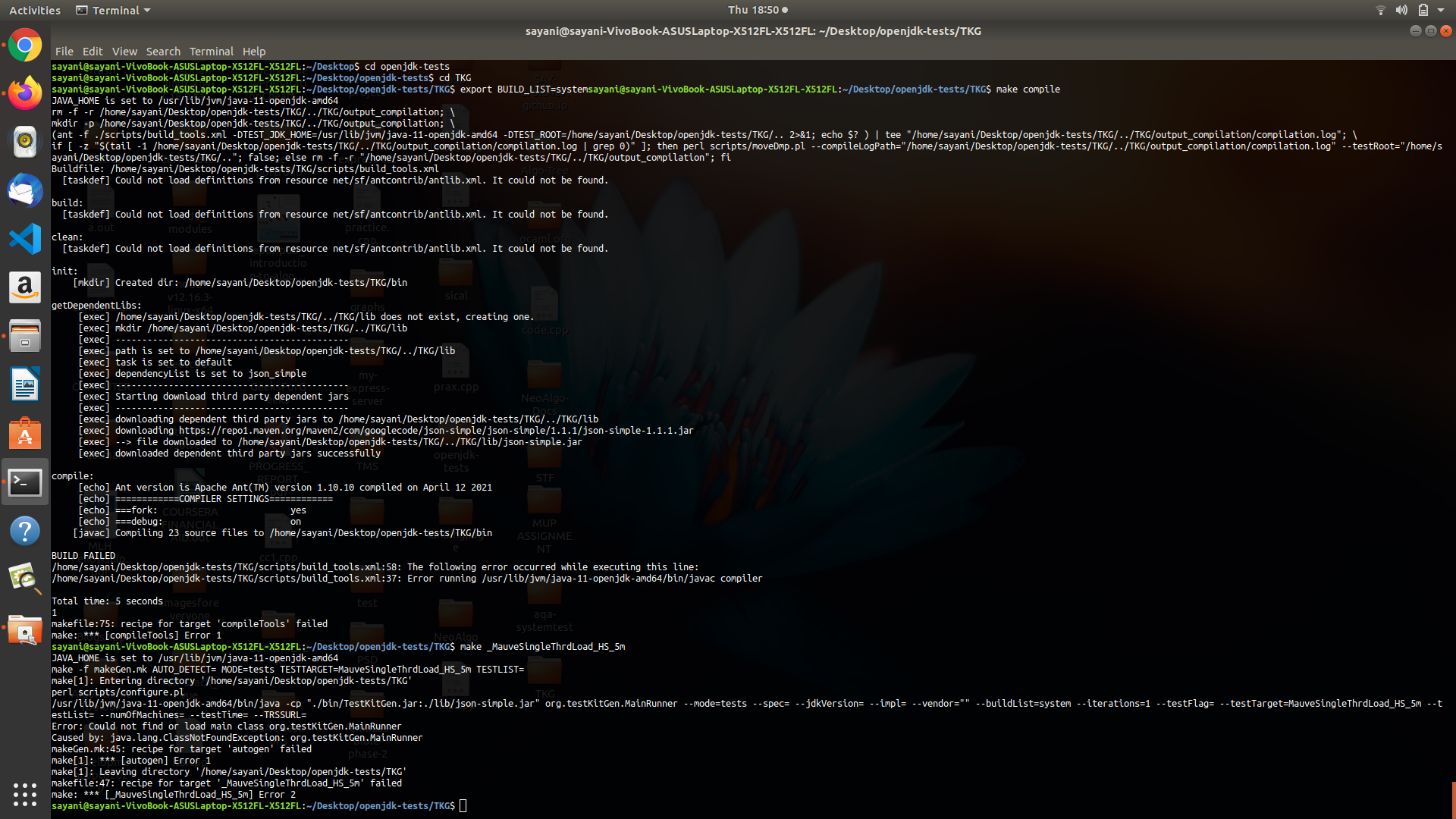
On executing java -version, I received the following output:
openjdk version "11.0.7" 2020-04-14
OpenJDK Runtime Environment (build 11.0.7+10-post-Ubuntu-2ubuntu218.04)
OpenJDK 64-Bit Server VM (build 11.0.7+10-post-Ubuntu-2ubuntu218.04, mixed mode, sharing)
As mentioned in this issue, I had removed JAVA from my PATH environment variable.
Is this the error we sought to remove?
SAY-droid427
on 22 Apr 2021
no, not quite the same error.
As @sxa reports in the issue description, he sees Cannot run program "java" (in directory "/tmp/mauve"): error=2, No such file or directory
Presumably in his environment, there is no java on the PATH. In your environment, there must be, or you would not be able to type java -version and get version output. (and since your error says there is no javac, guessing its a version of java that does not contain the javac compiler ...).
If you run 'which java' what is the output, and then when you run 'printenv' do you see that output in the PATH variable?
smlambert
on 22 Apr 2021
Output of printenv:
CLUTTER_IM_MODULE=xim
LS_COLORS=rs=0:di=01;34:ln=01;36:mh=00:pi=40;33:so=01;35:do=01;35:bd=40;33;01:cd=40;33;01:or=40;31;01:mi=00:su=37;41:sg=30;43:ca=30;41:tw=30;42:ow=34;42:st=37;44:ex=01;32:*.tar=01;31:*.tgz=01;31:*.arc=01;31:*.arj=01;31:*.taz=01;31:*.lha=01;31:*.lz4=01;31:*.lzh=01;31:*.lzma=01;31:*.tlz=01;31:*.txz=01;31:*.tzo=01;31:*.t7z=01;31:*.zip=01;31:*.z=01;31:*.Z=01;31:*.dz=01;31:*.gz=01;31:*.lrz=01;31:*.lz=01;31:*.lzo=01;31:*.xz=01;31:*.zst=01;31:*.tzst=01;31:*.bz2=01;31:*.bz=01;31:*.tbz=01;31:*.tbz2=01;31:*.tz=01;31:*.deb=01;31:*.rpm=01;31:*.jar=01;31:*.war=01;31:*.ear=01;31:*.sar=01;31:*.rar=01;31:*.alz=01;31:*.ace=01;31:*.zoo=01;31:*.cpio=01;31:*.7z=01;31:*.rz=01;31:*.cab=01;31:*.wim=01;31:*.swm=01;31:*.dwm=01;31:*.esd=01;31:*.jpg=01;35:*.jpeg=01;35:*.mjpg=01;35:*.mjpeg=01;35:*.gif=01;35:*.bmp=01;35:*.pbm=01;35:*.pgm=01;35:*.ppm=01;35:*.tga=01;35:*.xbm=01;35:*.xpm=01;35:*.tif=01;35:*.tiff=01;35:*.png=01;35:*.svg=01;35:*.svgz=01;35:*.mng=01;35:*.pcx=01;35:*.mov=01;35:*.mpg=01;35:*.mpeg=01;35:*.m2v=01;35:*.mkv=01;35:*.webm=01;35:*.ogm=01;35:*.mp4=01;35:*.m4v=01;35:*.mp4v=01;35:*.vob=01;35:*.qt=01;35:*.nuv=01;35:*.wmv=01;35:*.asf=01;35:*.rm=01;35:*.rmvb=01;35:*.flc=01;35:*.avi=01;35:*.fli=01;35:*.flv=01;35:*.gl=01;35:*.dl=01;35:*.xcf=01;35:*.xwd=01;35:*.yuv=01;35:*.cgm=01;35:*.emf=01;35:*.ogv=01;35:*.ogx=01;35:*.aac=00;36:*.au=00;36:*.flac=00;36:*.m4a=00;36:*.mid=00;36:*.midi=00;36:*.mka=00;36:*.mp3=00;36:*.mpc=00;36:*.ogg=00;36:*.ra=00;36:*.wav=00;36:*.oga=00;36:*.opus=00;36:*.spx=00;36:*.xspf=00;36:
LESSCLOSE=/usr/bin/lesspipe %s %s
XDG_MENU_PREFIX=gnome-
LANG=en_IN
DISPLAY=:0
GNOME_SHELL_SESSION_MODE=ubuntu
COLORTERM=truecolor
USERNAME=sayani
XDG_VTNR=2
SSH_AUTH_SOCK=/run/user/1000/keyring/ssh
XDG_SESSION_ID=2
USER=sayani
DESKTOP_SESSION=ubuntu
QT4_IM_MODULE=xim
TEXTDOMAINDIR=/usr/share/locale/
GNOME_TERMINAL_SCREEN=/org/gnome/Terminal/screen/c2d44dc2_68ed_489b_abe7_c86982354bbd
PWD=/home/sayani
HOME=/home/sayani
TEXTDOMAIN=im-config
SSH_AGENT_PID=2068
QT_ACCESSIBILITY=1
XDG_SESSION_TYPE=x11
XDG_DATA_DIRS=/usr/share/ubuntu:/usr/local/share:/usr/share:/var/lib/snapd/desktop
XDG_SESSION_DESKTOP=ubuntu
GJS_DEBUG_OUTPUT=stderr
GTK_MODULES=gail:atk-bridge
WINDOWPATH=2
TERM=xterm-256color
SHELL=/bin/bash
VTE_VERSION=5202
QT_IM_MODULE=ibus
XMODIFIERS=@im=ibus
IM_CONFIG_PHASE=2
XDG_CURRENT_DESKTOP=ubuntu:GNOME
GPG_AGENT_INFO=/run/user/1000/gnupg/S.gpg-agent:0:1
GNOME_TERMINAL_SERVICE=:1.70
XDG_SEAT=seat0
SHLVL=1
LANGUAGE=en_IN:en
GDMSESSION=ubuntu
GNOME_DESKTOP_SESSION_ID=this-is-deprecated
LOGNAME=sayani
DBUS_SESSION_BUS_ADDRESS=unix:path=/run/user/1000/bus
XDG_RUNTIME_DIR=/run/user/1000
XAUTHORITY=/run/user/1000/gdm/Xauthority
ANT_HOME=/usr/local/ant
XDG_CONFIG_DIRS=/etc/xdg/xdg-ubuntu:/etc/xdg
PATH=/usr/local/ant/bin:/usr/local/sbin:/usr/local/bin:/usr/sbin:/usr/bin:/sbin:/bin:/usr/games:/usr/local/games:/snap/bin:/usr/local/ant/bin
GJS_DEBUG_TOPICS=JS ERROR;JS LOG
SESSION_MANAGER=local/sayani-VivoBook-ASUSLaptop-X512FL-X512FL:@/tmp/.ICE-unix/1967,unix/sayani-VivoBook-ASUSLaptop-X512FL-X512FL:/tmp/.ICE-unix/1967
LESSOPEN=| /usr/bin/lesspipe %s
GTK_IM_MODULE=ibus
_=/usr/bin/printenv
Output of which java:
/usr/bin/java
Executing echo $JAVA_HOME gives a blank line.
Executing echo $PATH gives:
/usr/local/ant/bin:/usr/local/sbin:/usr/local/bin:/usr/sbin:/usr/bin:/sbin:/bin:/usr/games:/usr/local/games:/snap/bin:/usr/local/ant/bin
I did not explicitly install OpenJDK11 because Ubuntu18.04 has pre-installed OpenJDK11.
SAY-droid427
on 23 Apr 2021
Related issues
 psoujany
·
6Comments
psoujany
·
6Comments
 piyush286
·
5Comments
smlambert
·
4Comments
piyush286
·
5Comments
smlambert
·
4Comments
 sophia-guo
·
4Comments
smlambert
·
3Comments
sophia-guo
·
4Comments
smlambert
·
3Comments